Title here
Summary here
Lesson 2 ran one unmanaged pod — delete it, and nothing brings it back. This lesson introduces the object that changes that: a Deployment, backed by a ReplicaSet, whose entire job is making sure a declared number of pods actually exist, continuously, no matter what happens to any individual one.
By the end of this lesson, you will be able to:
restart: policy.kubectl create deployment nginx-deploy --image=nginx:alpine -n defaultdeployment.apps/nginx-deploy createdkubectl get deployments -n default
kubectl get rs -n default
kubectl get pods -n default -o wideNAME READY UP-TO-DATE AVAILABLE AGE
nginx-deploy 1/1 1 1 2sNAME DESIRED CURRENT READY AGE
nginx-deploy-7f557c4594 1 1 1 2sNAME READY STATUS RESTARTS AGE IP NODE NOMINATED NODE READINESS GATES
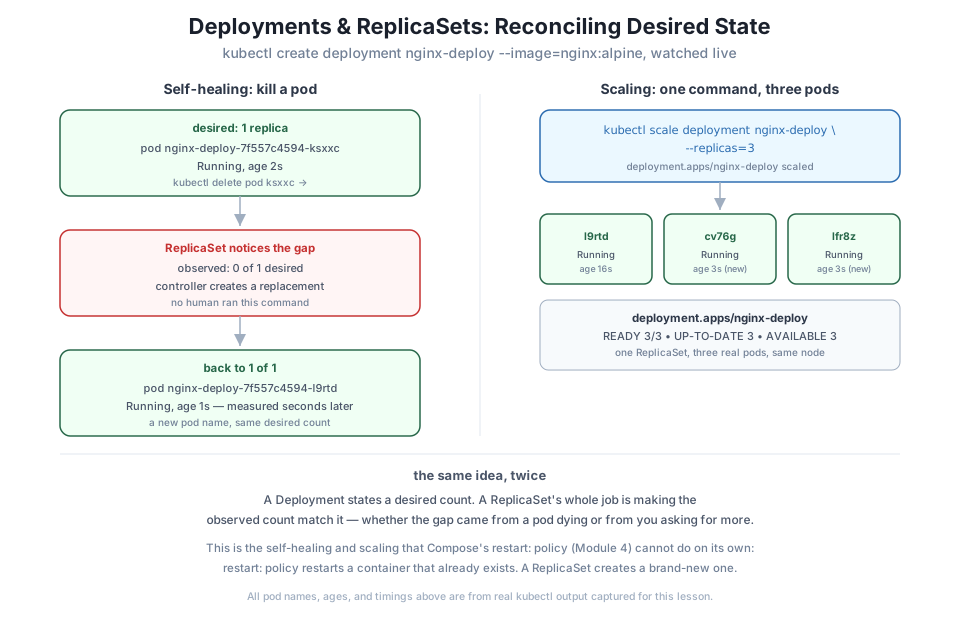
nginx-deploy-7f557c4594-ksxxc 1/1 Running 0 2s 10.244.0.10 datatweets-docker-k8s-control-plane <none> <none>One kubectl create deployment command produced three real objects: the Deployment nginx-deploy itself (which only states “I want 1 replica of this pod template”), a ReplicaSet nginx-deploy-7f557c4594 (whose entire job is making the actual pod count match that number), and the pod the ReplicaSet created to satisfy it. The hash 7f557c4594 in the ReplicaSet’s name is derived from the pod template — it changes if you ever update the image or spec, which is exactly how a Deployment manages rolling updates, a topic later modules build on.
This is the moment Lesson 1 promised. Delete the running pod directly — not through the Deployment, just the pod itself — and watch what happens:
kubectl delete pod nginx-deploy-7f557c4594-ksxxc -n defaultpod "nginx-deploy-7f557c4594-ksxxc" deletedkubectl get pods -n default -o wideNAME READY STATUS RESTARTS AGE IP NODE NOMINATED NODE READINESS GATES
nginx-deploy-7f557c4594-l9rtd 1/1 Running 0 1s 10.244.0.11 datatweets-docker-k8s-control-plane <none> <none>A brand-new pod, nginx-deploy-7f557c4594-l9rtd, already Running at age 1 second — by the time this command was even typed, the ReplicaSet controller had already noticed the observed count drop to 0, decided that didn’t match the desired count of 1, and created a replacement. No docker-compose up was run. No human intervened at all. This is the reconciliation loop Lesson 1 described in the abstract, now something you watched happen to a pod you killed yourself.
Note
Notice this is a genuinely different pod — a new name, a new IP (10.244.0.11 instead of 10.244.0.10). The ReplicaSet doesn’t resurrect the pod you deleted; it creates a fresh one from the same template. Nothing about the old pod’s identity survives, which is exactly why pods should never hold state a workload actually depends on — a lesson Module 4’s named volumes already drove home for containers in general.
kubectl scale deployment nginx-deploy --replicas=3 -n defaultdeployment.apps/nginx-deploy scaledkubectl get deployments -n default
kubectl get pods -n default -o wide
kubectl get rs -n defaultNAME READY UP-TO-DATE AVAILABLE AGE
nginx-deploy 3/3 3 3 30sNAME READY STATUS RESTARTS AGE IP NODE NOMINATED NODE READINESS GATES
nginx-deploy-7f557c4594-cv76g 1/1 Running 0 3s 10.244.0.12 datatweets-docker-k8s-control-plane <none> <none>
nginx-deploy-7f557c4594-l9rtd 1/1 Running 0 16s 10.244.0.11 datatweets-docker-k8s-control-plane <none> <none>
nginx-deploy-7f557c4594-lfr8z 1/1 Running 0 3s 10.244.0.13 datatweets-docker-k8s-control-plane <none> <none>NAME DESIRED CURRENT READY AGE
nginx-deploy-7f557c4594 3 3 3 30sThe exact same ReplicaSet — same hash, 7f557c4594, because the pod template didn’t change — now manages three real pods: the one already running (l9rtd, age 16s) plus two brand-new ones (cv76g and lfr8z, both age 3s). One command changed a single number in the Deployment’s spec, and the ReplicaSet did the rest.
kubectl delete deployment nginx-deploy -n defaultdeployment.apps "nginx-deploy" deletedkubectl get all -n defaultNAME TYPE CLUSTER-IP EXTERNAL-IP PORT(S) AGE
service/kubernetes ClusterIP 10.96.0.1 <none> 443/TCP 18hDeleting the Deployment removes the ReplicaSet and every pod it managed, in one command. The only thing left in default is service/kubernetes, the cluster’s own built-in API service — present in every namespace by default, not something this lesson created.
Create your own Deployment (kubectl create deployment my-deploy --image=nginx:alpine -n default), note its pod’s name, delete that exact pod, and confirm a new one with a different name and IP appears within a few seconds.
Hint
If you check kubectl get pods too quickly, you might catch the brief window where the new pod is still ContainerCreating rather than Running — that’s expected and matches the real Pending → ContainerCreating → Running sequence from Lesson 2, just compressed because the image is already cached.
Scale your Deployment from Exercise 1 down to 1 replica with kubectl scale deployment my-deploy --replicas=1 -n default, and check which two of your three pods get terminated.
Hint
Kubernetes doesn’t guarantee which pods survive a scale-down — check kubectl get pods -n default immediately after and reason about which ones vanished, rather than assuming it’s always the newest or oldest.
Scale your Deployment back up to 3, then delete two of the three pods in the same command (kubectl delete pod <name1> <name2> -n default). Confirm the ReplicaSet replaces both, not just one.
Hint
The ReplicaSet’s reconciliation loop doesn’t care how large the gap is — losing 1 pod or 2 pods out of 3 triggers the exact same “observed doesn’t match desired” logic, just with more pods to create.
A Deployment declares a desired pod count; a ReplicaSet’s whole job, continuously, is making the observed count match it. This lesson watched that mechanism twice: killing a running pod directly triggered an immediate, unprompted replacement — a new pod, nginx-deploy-7f557c4594-l9rtd, already Running at age 1 second, with no command typed to create it — and scaling to 3 replicas with one kubectl scale command produced two brand-new pods alongside the existing one, all managed by the same ReplicaSet. Deleting the Deployment removed everything it managed in one step, leaving only the cluster’s own built-in kubernetes service behind.
kubectl delete, or by node failure) triggers automatic replacement with no human action, unlike a restart: policy which can only restart a container that still exists.kubectl scale — changes the desired replica count directly; the same reconciliation loop that heals a deleted pod also satisfies a scale request.This is the mechanism every later module in this course, and every production Kubernetes workload, actually rests on. A restart: policy in Compose is a single machine’s promise about a single container; a ReplicaSet is a continuously-running decision process that works the same way whether the gap came from one pod dying, a node disappearing entirely, or a human asking for more capacity. You’ve now watched it close that gap twice, on your own real cluster, with real pod names and IPs — not a description of the idea, but the idea actually happening.
Pods now heal and scale themselves. Lesson 4 gives a fleet of them something they still lack: a single, stable address other pods can actually reach them by — a Service, organized inside its own Namespace, with the first real Kubernetes Dashboard screenshot of this course confirming what kubectl reports.
Keep DATATWEETS free. Help fund practical data, AI, and engineering lessons for learners worldwide.
