Title here
Summary here
Lesson 3 proved pods heal and scale. But every pod you created got its own IP, and that IP changes every time the ReplicaSet replaces one — 10.244.0.10, then 10.244.0.11, then a fresh set again after scaling. Nothing that depends on reaching those pods can hardcode an address that keeps changing. This lesson fixes that with a Service, and organizes the whole example inside its own Namespace — then confirms both visually in the real Kubernetes Dashboard, running on this cluster since before this module started.
By the end of this lesson, you will be able to:
Endpoints really are.A Namespace is a scope: resource names only have to be unique within one. Create one for this lesson’s example so it stays cleanly separated from anything else on this cluster:
kubectl create namespace cityflow-demonamespace/cityflow-demo createdkubectl create deployment web --image=nginx:alpine --replicas=2 -n cityflow-demodeployment.apps/web createdkubectl get deployments,pods -n cityflow-demo -o wideNAME READY UP-TO-DATE AVAILABLE AGE CONTAINERS IMAGES SELECTOR
deployment.apps/web 2/2 2 2 3s nginx nginx:alpine app=web
NAME READY STATUS RESTARTS AGE IP NODE NOMINATED NODE READINESS GATES
pod/web-5bd64f6ccb-q28wj 1/1 Running 0 3s 10.244.0.15 datatweets-docker-k8s-control-plane <none> <none>
pod/web-5bd64f6ccb-ssx2m 1/1 Running 0 3s 10.244.0.14 datatweets-docker-k8s-control-plane <none> <none>Two real pods, two real IPs (10.244.0.14 and 10.244.0.15), both entirely inside cityflow-demo — a second team’s web Deployment in a different namespace could use the exact same name with no conflict at all.
kubectl expose deployment web --port=80 --target-port=80 --name=web-svc -n cityflow-demoservice/web-svc exposedkubectl get svc -n cityflow-demoNAME TYPE CLUSTER-IP EXTERNAL-IP PORT(S) AGE
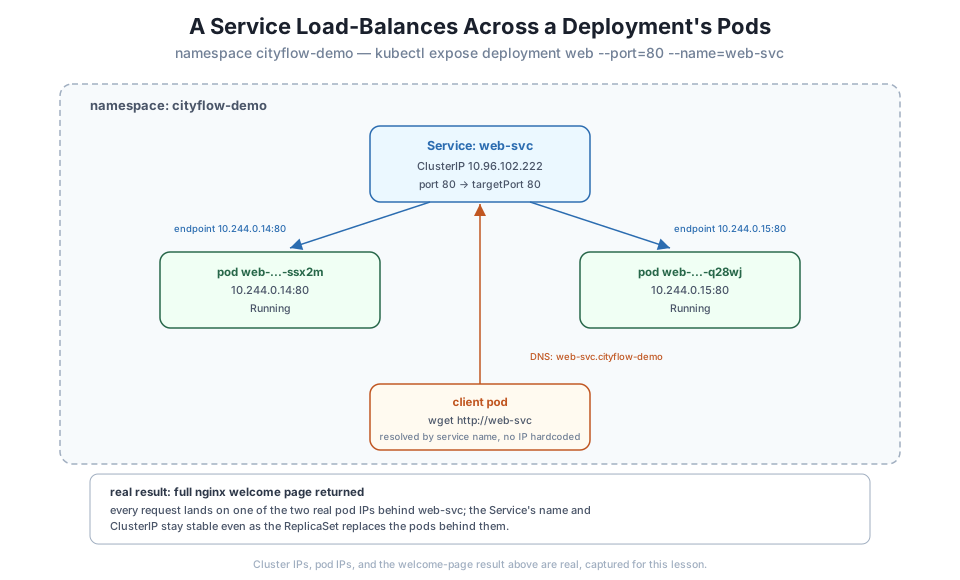
web-svc ClusterIP 10.96.102.222 <none> 80/TCP 1sweb-svc now has its own stable ClusterIP, 10.96.102.222 — an address that has nothing to do with either pod’s own IP, and that won’t change even after the ReplicaSet replaces both pods. Kubernetes tracks which real pod IPs currently back that Service as Endpoints:
kubectl get endpoints web-svc -n cityflow-demoNAME ENDPOINTS AGE
web-svc 10.244.0.14:80,10.244.0.15:80 38sExactly the two real pod IPs from the Deployment above. This list updates automatically every time a pod behind the Service changes — a Service is really just a stable name in front of a live, continuously-updated list of real pod addresses.
kubectl run curl-client --image=nginx:alpine --restart=Never -n cityflow-demo --command -- sleep 3600
kubectl wait --for=condition=Ready pod/curl-client -n cityflow-demo --timeout=60s
kubectl exec -n cityflow-demo curl-client -- wget -qO- http://web-svc
pod/curl-client created
pod/curl-client condition met
<!DOCTYPE html>
<html>
<head>
<title>Welcome to nginx!</title>
<style>
html { color-scheme: light dark; }
body { width: 35em; margin: 0 auto;
font-family: Tahoma, Verdana, Arial, sans-serif; }
</style>
</head>
<body>
<h1>Welcome to nginx!</h1>
<p>If you see this page, nginx is successfully installed and working.
Further configuration is required for the web server, reverse proxy,
API gateway, load balancer, content cache, or other features.</p>curl-client never learned either pod’s real IP. It resolved http://web-svc by name — Kubernetes’ internal DNS resolves any Service name to its ClusterIP automatically, inside the same namespace — and got back nginx’s real welcome page, served by whichever of the two real pods happened to handle that one request.
Note
This is the exact same problem Module 4’s depends_on and service-name networking solved for Compose — a client reaching a dependency by a stable name instead of an IP it would have to track down. A Kubernetes Service is that same idea, but backed by a live, continuously-reconciled list of pod IPs instead of one Compose network entry.
Clean up the temporary client before moving on:
kubectl delete pod curl-client -n cityflow-demopod "curl-client" deletedThe Kubernetes Dashboard has been running on this cluster since before this module started — Lesson 1 saw its pods directly in kubectl get pods -A. This is the first lesson to actually look at it:
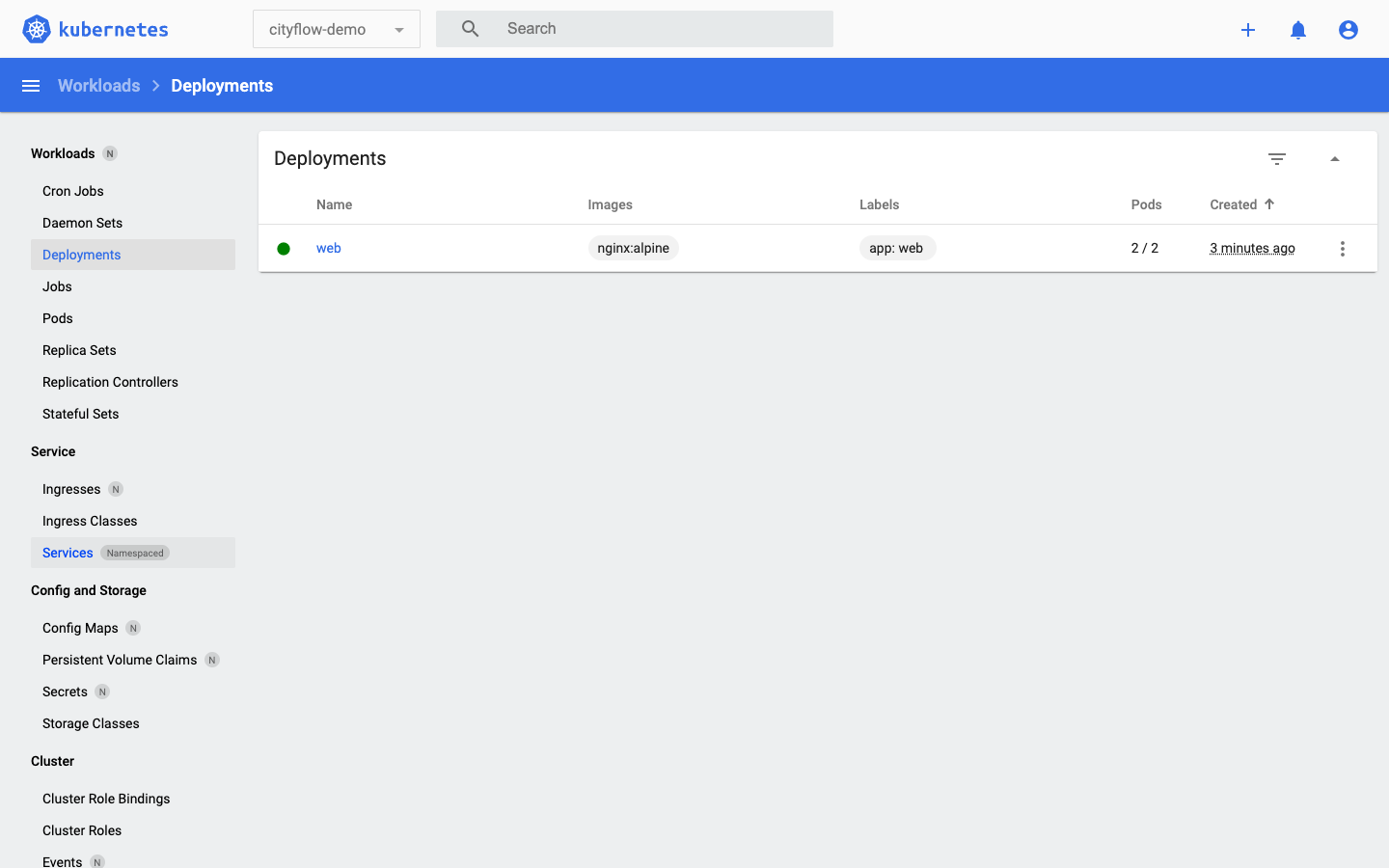
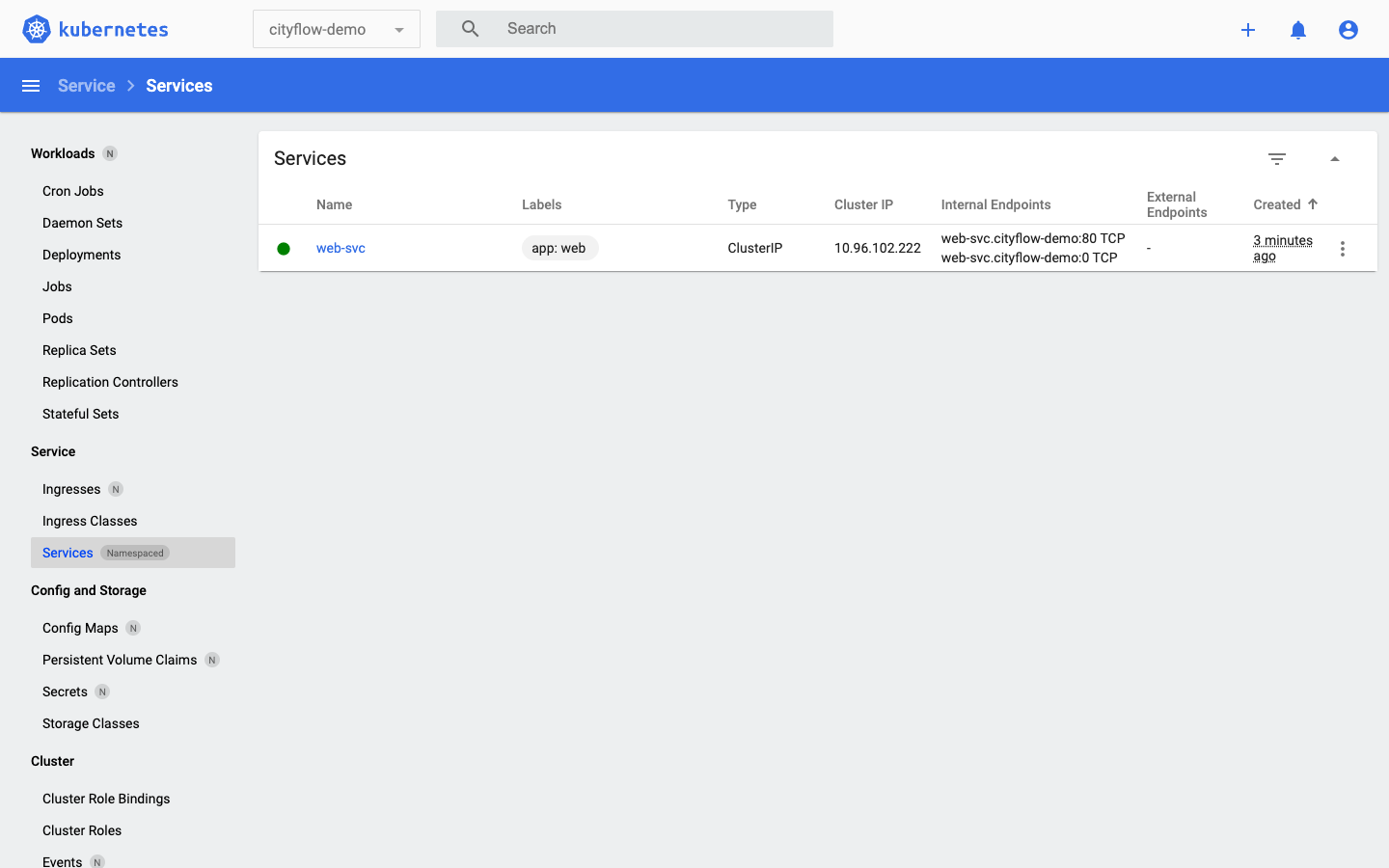
Same cluster, same real state, two different tools reporting it identically — the Dashboard isn’t a separate source of truth, it’s a web client for exactly the same API server kubectl talks to.
kubectl delete namespace cityflow-demonamespace "cityflow-demo" deletedkubectl get all -n cityflow-demoNo resources found in cityflow-demo namespace.Deleting a Namespace deletes every resource inside it — the Deployment, its pods, and the Service, all in one command. This is the other reason Namespaces matter beyond avoiding name collisions: they give you a clean unit to tear an entire example down by.
Recreate this lesson’s namespace, Deployment, and Service. Delete one of the two web pods directly (the way Lesson 3 did), then immediately re-run kubectl get endpoints web-svc -n cityflow-demo a few times. Confirm the endpoint list temporarily drops to one address, then grows back to two once the ReplicaSet’s replacement pod is ready.
Hint
The Service’s Endpoints only include pods that are actually Ready — a replacement pod that’s still ContainerCreating won’t appear in kubectl get endpoints yet, even though kubectl get pods already shows it.
Repeat this lesson’s curl-client test, but use the Service’s full internal DNS name instead of the short one: wget -qO- http://web-svc.cityflow-demo.svc.cluster.local. Confirm it returns the same result as http://web-svc.
Hint
The short name only resolves within the same namespace as the caller — that’s exactly why it worked in this lesson without qualification. The full name works from any namespace on the cluster, which matters the moment two different namespaces need to talk to each other.
Run kubectl exec -n cityflow-demo curl-client -- wget -qO- http://web-svc several times in a row, and each time also check kubectl logs on both web pods to see which one actually handled the request.
Hint
kubectl logs <pod-name> -n cityflow-demo on an nginx pod shows one access-log line per request it served — over enough repeated calls, you should see both pods show up, though Kubernetes doesn’t promise a strict round-robin split.
A Service gives a Deployment’s pods one stable ClusterIP and DNS name that survives every pod being replaced — web-svc kept its address, 10.96.102.222, even though the pods behind it (tracked as its Endpoints) can change at any time. curl-client, running in the same cityflow-demo namespace, reached it by name alone and got back a real response, with no pod IP hardcoded anywhere. The Kubernetes Dashboard confirmed both the Deployment’s 2/2 ready pods and the Service’s ClusterIP visually, reading from the exact same API server kubectl already reported from. Deleting the namespace removed the Deployment, its pods, and the Service together, in one command.
http://<service-name> (or the fully-qualified <service>.<namespace>.svc.cluster.local) without ever knowing a pod’s real IP.kubectl talks to, useful for visually confirming exactly what the CLI already reports.Every real Kubernetes workload composed of more than one pod needs exactly this: an address other things can depend on that doesn’t change every time a pod is replaced, scaled, or rescheduled to a different node. You’ve now proven that address works end to end — created by one command, backed by real pod IPs, reachable from another pod by name, and confirmed independently in a second real tool. Lesson 5’s guided project puts every mechanism from this module together at once: an original service, its own Deployment, its own Service, its own Namespace, verified the same two ways — kubectl and the Dashboard — then torn down cleanly.
Pods self-heal, scale, and now have a stable address. Lesson 5’s guided project brings all of it together: an original CityFlow service, deployed to this same cluster, verified end to end, and cleaned up — closing this module the way Module 4’s guided project closed Compose.
Keep DATATWEETS free. Help fund practical data, AI, and engineering lessons for learners worldwide.
