Title here
Summary here
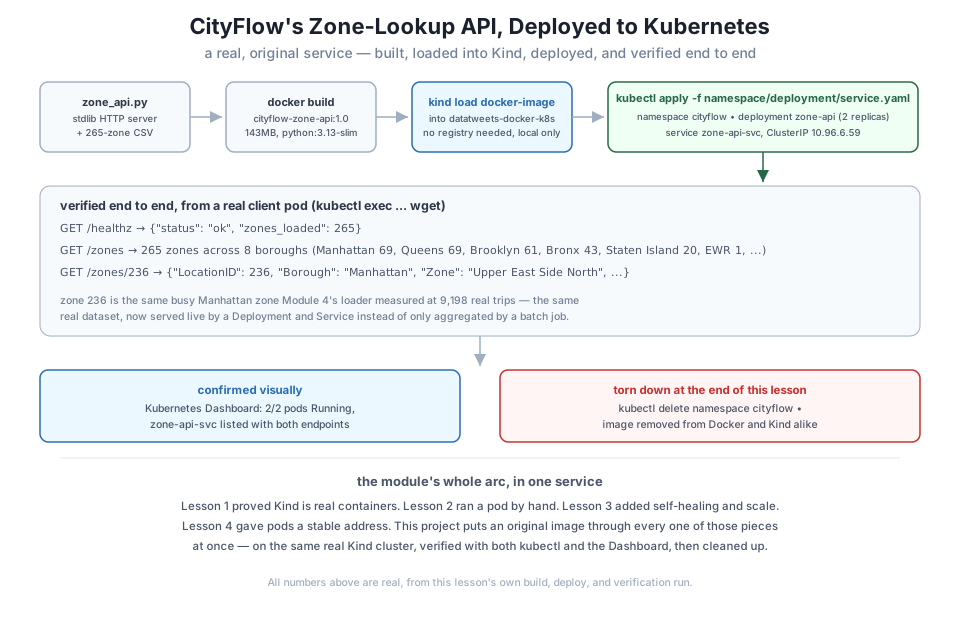
Every mechanism this module taught comes together here. You’ll build a small, original service — a lookup API over the real, public NYC taxi zone table CityFlow has used since Course 1 — package it as an image, load it directly into the Kind cluster (no registry involved), and deploy it as a real Deployment and Service inside its own Namespace. Then you’ll verify it two independent ways, the same two ways Lesson 4 did: kubectl exec from another pod, and a real Kubernetes Dashboard screenshot. Finally, you’ll tear the whole thing down, leaving the cluster exactly as healthy as this module found it.
By the end of this project, you will be able to:
kind load docker-image.This project uses the same real NYC TLC zone-lookup dimension every course in this path has used — 265 real taxi zones, each with a borough and a human-readable name:
curl -s -o taxi_zone_lookup.csv -w "%{http_code}\n" https://datatweets.com/datasets/nyc-taxi/taxi_zone_lookup.csv
wc -l taxi_zone_lookup.csv
head -5 taxi_zone_lookup.csv
200
266 taxi_zone_lookup.csv
LocationID,Borough,Zone,service_zone
1,EWR,Newark Airport,EWR
2,Queens,Jamaica Bay,Boro Zone
3,Bronx,Allerton/Pelham Gardens,Boro Zone
4,Manhattan,Alphabet City,Yellow Zone266 lines: a header plus 265 real zones. Nothing here is generated — it’s the exact file downloaded from datatweets.com/datasets/nyc-taxi/, matching every earlier course in this path.
# gate: skip
"""CityFlow's zone-lookup API - a small, original HTTP service over the real
NYC TLC taxi zone lookup table (265 zones). Stdlib only, no third-party
dependencies, so the image needs no pip install at all.

Endpoints:
  GET /healthz     -> "ok" (used as the container's readiness signal)
  GET /zones        -> summary: total zone count + per-borough counts
  GET /zones/<id>    -> the single zone matching that LocationID, or 404
"""
import csv
import json
import os
from http.server import BaseHTTPRequestHandler, ThreadingHTTPServer

DATA_PATH = os.environ.get("ZONE_DATA", "taxi_zone_lookup.csv")


def load_zones(path):
    zones = {}
    with open(path, newline="", encoding="utf-8") as f:
        for row in csv.DictReader(f):
            zones[int(row["LocationID"])] = {
                "LocationID": int(row["LocationID"]),
                "Borough": row["Borough"],
                "Zone": row["Zone"],
                "service_zone": row["service_zone"],
            }
    return zones


ZONES = load_zones(DATA_PATH)


class Handler(BaseHTTPRequestHandler):
    def _json(self, code, payload):
        body = json.dumps(payload).encode("utf-8")
        self.send_response(code)
        self.send_header("Content-Type", "application/json")
        self.send_header("Content-Length", str(len(body)))
        self.end_headers()
        self.wfile.write(body)

    def do_GET(self):
        if self.path == "/healthz":
            self._json(200, {"status": "ok", "zones_loaded": len(ZONES)})
        elif self.path == "/zones":
            boroughs = {}
            for z in ZONES.values():
                boroughs[z["Borough"]] = boroughs.get(z["Borough"], 0) + 1
            self._json(200, {"total_zones": len(ZONES), "boroughs": boroughs})
        elif self.path.startswith("/zones/"):
            try:
                zone_id = int(self.path.rsplit("/", 1)[-1])
            except ValueError:
                self._json(400, {"error": "zone id must be an integer"})
                return
            zone = ZONES.get(zone_id)
            if zone is None:
                self._json(404, {"error": f"no zone with LocationID {zone_id}"})
            else:
                self._json(200, zone)
        else:
            self._json(404, {"error": "not found"})

    def log_message(self, fmt, *args):
        print(f"{self.address_string()} - {fmt % args}", flush=True)


def main():
    port = int(os.environ.get("PORT", "8000"))
    print(f"CityFlow zone-lookup API starting - {len(ZONES)} zones loaded from {DATA_PATH}", flush=True)
    server = ThreadingHTTPServer(("0.0.0.0", port), Handler)
    server.serve_forever()


if __name__ == "__main__":
    main()
Save this as zone_api.py. Stdlib only — csv, json, http.server — so there’s nothing to pip install at all, keeping the image both small and fast to build. Tested directly, before any container is involved:
python zone_api.py &
curl -s http://localhost:8000/healthz
curl -s http://localhost:8000/zones
curl -s http://localhost:8000/zones/1
curl -s -w "\nHTTP %{http_code}\n" http://localhost:8000/zones/999999
CityFlow zone-lookup API starting - 265 zones loaded from taxi_zone_lookup.csv
{"status": "ok", "zones_loaded": 265}
{"total_zones": 265, "boroughs": {"EWR": 1, "Queens": 69, "Bronx": 43, "Manhattan": 69, "Staten Island": 20, "Brooklyn": 61, "Unknown": 1, "": 1}}
{"LocationID": 1, "Borough": "EWR", "Zone": "Newark Airport", "service_zone": "EWR"}
{"error": "no zone with LocationID 999999"}
HTTP 404Real output straight from the real file: 265 zones across 8 borough labels (including the TLC data’s own two genuine oddities — an "Unknown" borough and one row with a blank borough entirely, both left exactly as the source data has them, not cleaned away), zone 1 is Newark Airport, and a nonexistent zone correctly returns a 404.
FROM python:3.13-slim

WORKDIR /app

COPY zone_api.py taxi_zone_lookup.csv ./

EXPOSE 8000
CMD ["python", "zone_api.py"]
Save this as Dockerfile, alongside zone_api.py and taxi_zone_lookup.csv. There’s no requirements.txt at all this time — the whole point of a stdlib-only service is a build with nothing to fetch.
docker build -t cityflow-zone-api:1.0 .#4 [1/3] FROM docker.io/library/python:3.13-slim
#4 DONE 0.0s
#5 [2/3] WORKDIR /app
#5 CACHED
#6 [internal] load build context
#6 transferring context: 13.22kB done
#6 DONE 0.0s
#7 [3/3] COPY zone_api.py taxi_zone_lookup.csv ./
#7 DONE 0.0s
#8 exporting to image
#8 exporting layers done
#8 writing image sha256:3b365c7d14fca2b00cbb85347bc75980fc13269311a0155ba38a1c8e12a3729e done
#8 naming to docker.io/library/cityflow-zone-api:1.0 donedocker images cityflow-zone-api:1.0IMAGE ID DISK USAGE CONTENT SIZE EXTRA
cityflow-zone-api:1.0 3b365c7d14fc 143MB 0B143MB — essentially just the python:3.13-slim base plus two small files, since there’s no dependency layer at all.
A cluster’s containerd store is separate from your host’s Docker image store — even though both run on the same machine, the Kind node can’t see an image docker build produced until it’s loaded in. kind load docker-image does exactly that, with no registry push or pull involved at all:
kind load docker-image cityflow-zone-api:1.0 --name datatweets-docker-k8sImage: "cityflow-zone-api:1.0" with ID "sha256:3b365c7d14fca2b00cbb85347bc75980fc13269311a0155ba38a1c8e12a3729e" not yet present on node "datatweets-docker-k8s-control-plane", loading...That single command is the local-development alternative to Module 2’s Docker Hub push/pull flow — for a Kind cluster running entirely on this machine, there’s no need to publish anywhere at all.
apiVersion: v1
kind: Namespace
metadata:
  name: cityflow
Save as namespace.yaml.
apiVersion: apps/v1
kind: Deployment
metadata:
  name: zone-api
  namespace: cityflow
spec:
  replicas: 2
  selector:
    matchLabels:
      app: zone-api
  template:
    metadata:
      labels:
        app: zone-api
    spec:
      containers:
        - name: zone-api
          image: cityflow-zone-api:1.0
          imagePullPolicy: IfNotPresent
          ports:
            - containerPort: 8000
          readinessProbe:
            httpGet:
              path: /healthz
              port: 8000
            initialDelaySeconds: 1
            periodSeconds: 2
Save as deployment.yaml. imagePullPolicy: IfNotPresent is what makes the kind load step meaningful — it tells the kubelet to use the image already loaded into the node rather than trying (and failing) to pull cityflow-zone-api:1.0 from a registry that doesn’t have it. The readinessProbe reuses this service’s own /healthz endpoint, the same real-check instinct Module 4 applied to Postgres with pg_isready.
apiVersion: v1
kind: Service
metadata:
  name: zone-api-svc
  namespace: cityflow
spec:
  selector:
    app: zone-api
  ports:
    - port: 80
      targetPort: 8000
  type: ClusterIP
Save as service.yaml. Apply all three:
kubectl apply -f namespace.yaml
kubectl apply -f deployment.yaml
kubectl apply -f service.yaml
namespace/cityflow created
deployment.apps/zone-api created
service/zone-api-svc createdkubectl get all -n cityflow -o wideNAME READY STATUS RESTARTS AGE IP NODE NOMINATED NODE READINESS GATES
pod/zone-api-7bd4f85774-h5hsl 1/1 Running 0 3s 10.244.0.17 datatweets-docker-k8s-control-plane <none> <none>
pod/zone-api-7bd4f85774-t8zm6 1/1 Running 0 3s 10.244.0.18 datatweets-docker-k8s-control-plane <none> <none>
NAME TYPE CLUSTER-IP EXTERNAL-IP PORT(S) AGE SELECTOR
service/zone-api-svc ClusterIP 10.96.6.59 <none> 80/TCP 3s app=zone-api
NAME READY UP-TO-DATE AVAILABLE AGE CONTAINERS IMAGES SELECTOR
deployment.apps/zone-api 2/2 2 2 3s zone-api cityflow-zone-api:1.0 app=zone-api
NAME DESIRED CURRENT READY AGE CONTAINERS IMAGES SELECTOR
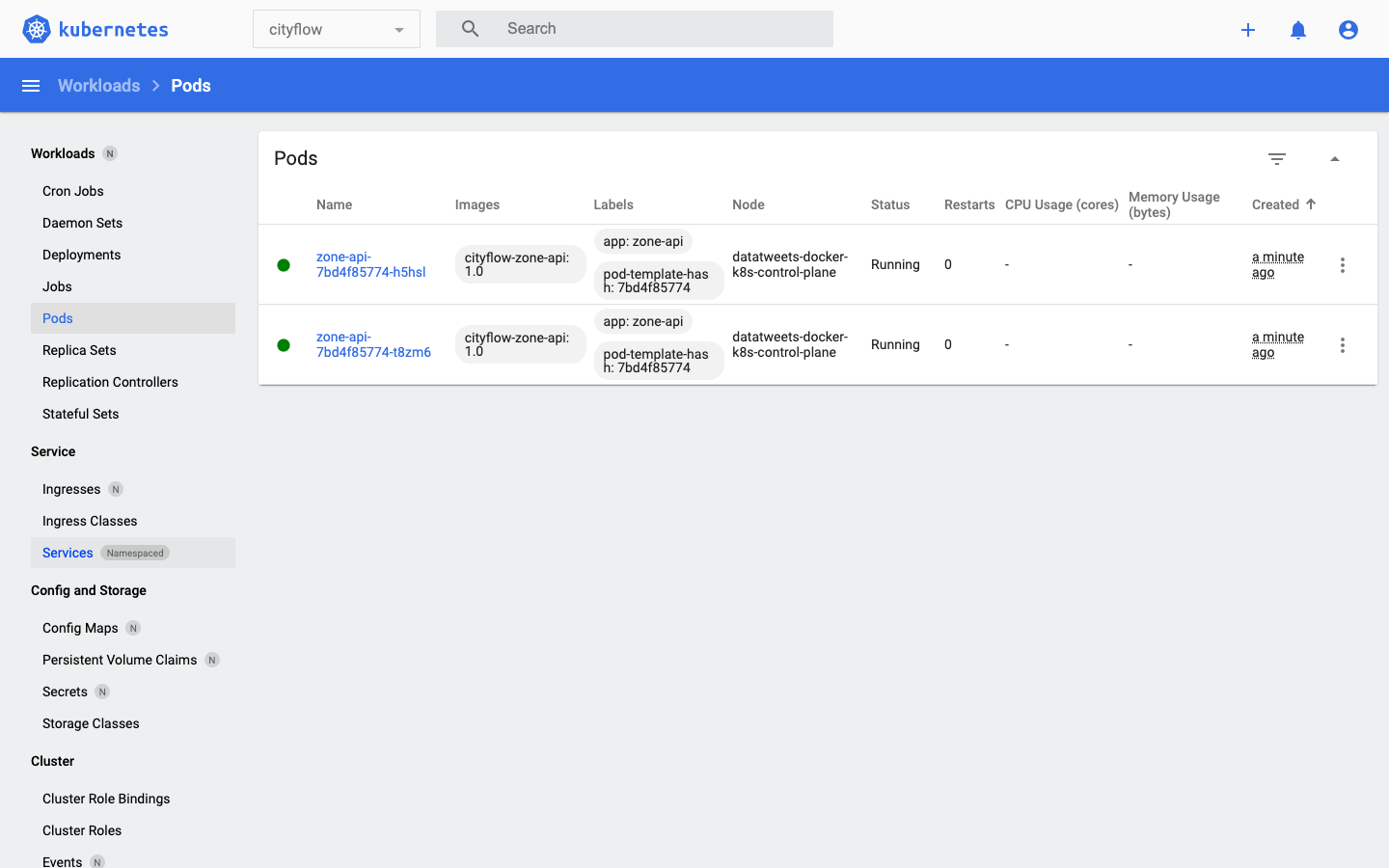
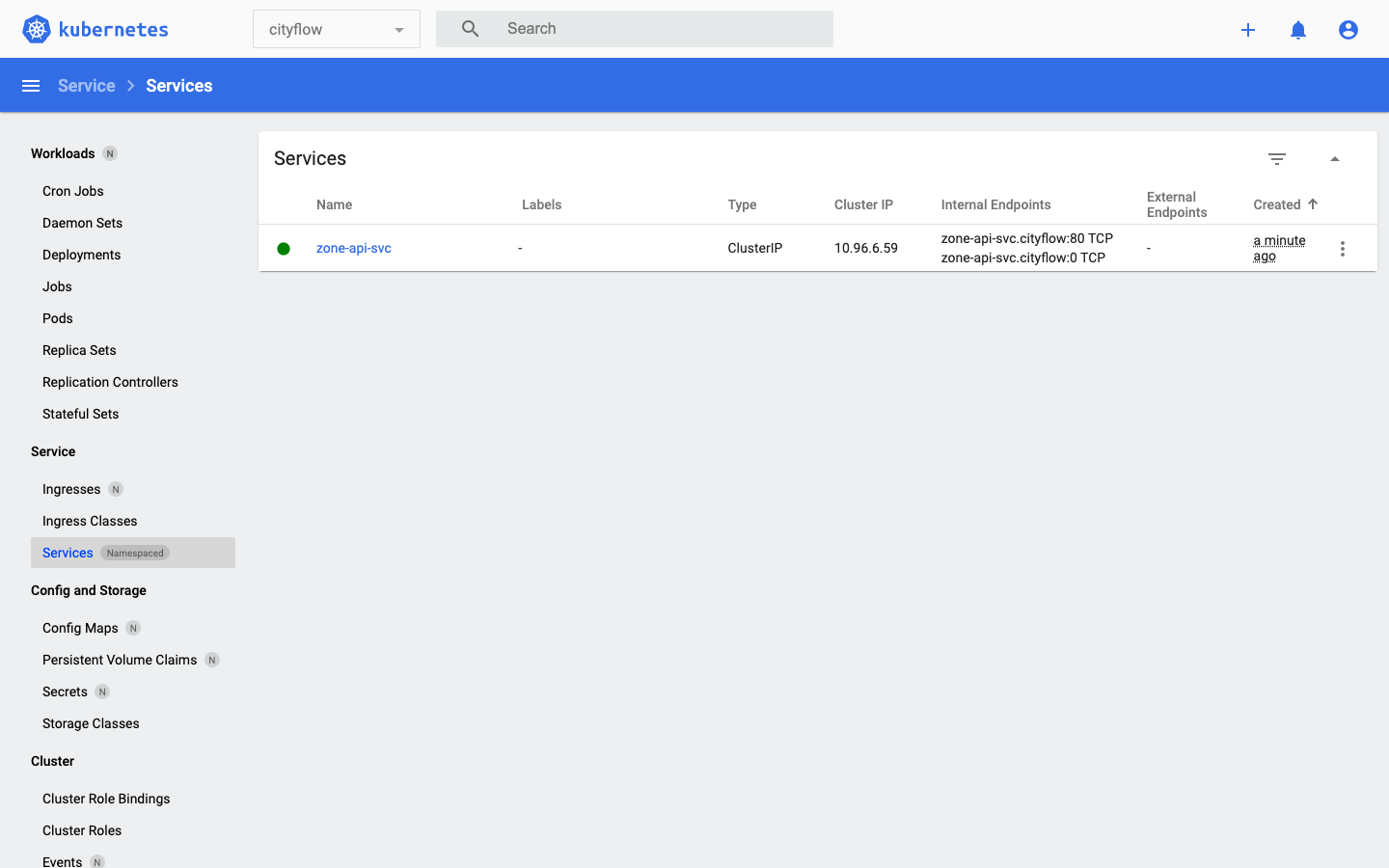
replicaset.apps/zone-api-7bd4f85774 2 2 2 3s zone-api cityflow-zone-api:1.0 app=zone-api,pod-template-hash=7bd4f85774Two real pods, running the real image loaded a moment ago, both 2/2 ready — every piece from Lessons 2 through 4 (a pod, a ReplicaSet-managed Deployment, a Service) working together for a service this project actually wrote.
kubectl run zone-client --image=nginx:alpine --restart=Never -n cityflow --command -- sleep 3600
kubectl wait --for=condition=Ready pod/zone-client -n cityflow --timeout=60s
kubectl exec -n cityflow zone-client -- wget -qO- http://zone-api-svc/zones
kubectl exec -n cityflow zone-client -- wget -qO- http://zone-api-svc/zones/236
kubectl exec -n cityflow zone-client -- wget -qO- http://zone-api-svc/healthz
pod/zone-client created
pod/zone-client condition met
{"total_zones": 265, "boroughs": {"EWR": 1, "Queens": 69, "Bronx": 43, "Manhattan": 69, "Staten Island": 20, "Brooklyn": 61, "Unknown": 1, "": 1}}
{"LocationID": 236, "Borough": "Manhattan", "Zone": "Upper East Side North", "service_zone": "Yellow Zone"}
{"status": "ok", "zones_loaded": 265}The exact same 265 zones, 8 boroughs this lesson’s local test already confirmed — now served by a real Deployment behind a real Service, reached the same way Lesson 4’s curl-client reached web-svc. Zone 236, Upper East Side North, is the same busy Manhattan zone Module 4’s loader measured at 9,198 real trips — the same real dataset, now served live rather than only aggregated by a batch job.
kubectl delete pod zone-client -n cityflow
kubectl describe deployment zone-api -n cityflow
pod "zone-client" deleted
Name: zone-api
Namespace: cityflow
Selector: app=zone-api
Replicas: 2 desired | 2 updated | 2 total | 2 available | 0 unavailable
Pod Template:
Containers:
zone-api:
Image: cityflow-zone-api:1.0
Port: 8000/TCP
Readiness: http-get http://:8000/healthz delay=1s timeout=1s period=2s #success=1 #failure=3
Conditions:
Type Status Reason
---- ------ ------
Available True MinimumReplicasAvailable
Progressing True NewReplicaSetAvailable
NewReplicaSet: zone-api-7bd4f85774 (2/2 replicas created)
Events:
Type Reason Age From Message
---- ------ ---- ---- -------
Normal ScalingReplicaSet 51s deployment-controller Scaled up replica set zone-api-7bd4f85774 from 0 to 2Available: True, 2 desired | 2 updated | 2 total | 2 available — the Deployment reports exactly the healthy state kubectl get all already showed.
kubectl delete namespace cityflownamespace "cityflow" deletedkubectl get all -ANAMESPACE NAME READY STATUS RESTARTS AGE
kube-system pod/coredns-668d6bf9bc-5mttd 1/1 Running 1 (17h ago) 18h
kube-system pod/coredns-668d6bf9bc-qxslr 1/1 Running 1 (17h ago) 18h
kube-system pod/etcd-datatweets-docker-k8s-control-plane 1/1 Running 1 (17h ago) 18h
kube-system pod/kindnet-x6x59 1/1 Running 1 (17h ago) 18h
kube-system pod/kube-apiserver-datatweets-docker-k8s-control-plane 1/1 Running 1 (17h ago) 18h
kube-system pod/kube-controller-manager-datatweets-docker-k8s-control-plane 1/1 Running 1 (17h ago) 18h
kube-system pod/kube-proxy-p7xz8 1/1 Running 1 (17h ago) 18h
kube-system pod/kube-scheduler-datatweets-docker-k8s-control-plane 1/1 Running 1 (17h ago) 18h
kubernetes-dashboard pod/dashboard-metrics-scraper-5bd45c9dd6-7vzqf 1/1 Running 1 (17h ago) 18h
kubernetes-dashboard pod/kubernetes-dashboard-79cbcf9fb6-bbs5n 1/1 Running 1 (17h ago) 18h
local-path-storage pod/local-path-provisioner-7dc846544d-p97r7 1/1 Running 2 (17h ago) 18hOnly the same eleven pre-existing pods Lesson 1 first showed — the control plane, coredns, kindnet, local-path-provisioner, and the Dashboard itself. Nothing this project created is left running anywhere on the cluster.
Remove the built image too, from both the host and the node it was loaded into, since it’s no longer needed:
docker rmi cityflow-zone-api:1.0
docker exec datatweets-docker-k8s-control-plane crictl rmi docker.io/library/cityflow-zone-api:1.0
Untagged: cityflow-zone-api:1.0
Deleted: sha256:3b365c7d14fca2b00cbb85347bc75980fc13269311a0155ba38a1c8e12a3729e
Deleted: docker.io/library/cityflow-zone-api:1.0Build, load, and deploy this service yourself, end to end. Confirm your own /zones response shows the same 265 zones and 8 boroughs, and that /zones/236 returns the same Upper East Side North result.
Hint
If kind load docker-image seems to hang or do nothing, double-check the image name and tag you built with match exactly what you pass to kind load and what’s referenced in deployment.yaml — a typo there is the most common reason a pod gets stuck in ErrImageNeverPull instead of Running.
Change deployment.yaml’s replicas from 2 to 3, re-apply it, and confirm a third pod joins the Service’s endpoints without you touching the Service at all.
Hint
kubectl get endpoints zone-api-svc -n cityflow should grow from two addresses to three — the Service’s selector (app: zone-api) automatically picks up any pod matching that label, regardless of how many the Deployment currently manages.
imagePullPolicy on purposeChange deployment.yaml’s imagePullPolicy from IfNotPresent to Always, delete and re-apply the Deployment, and watch what happens to the pods.
Hint
Always tells the kubelet to try pulling from a registry every time, even if a matching image is already loaded locally — since cityflow-zone-api:1.0 was never pushed anywhere, expect an ErrImagePull or ImagePullBackOff status, a useful, safe way to see that failure mode without breaking anything real.
This project put every mechanism this module taught to work on one original service. CityFlow’s real 265-zone lookup table became a small, stdlib-only HTTP API, built into a 143MB image and loaded directly into the Kind cluster with kind load docker-image — no registry involved. A Deployment kept 2 replicas running with a real /healthz readiness probe; a Service gave them a stable ClusterIP, 10.96.6.59; and a Namespace, cityflow, kept the whole example cleanly scoped. Verification ran two independent ways: kubectl exec from a client pod returned the real 265-zone, 8-borough summary and confirmed zone 236 — the same busy Manhattan zone Module 4 measured at 9,198 real trips — and the Kubernetes Dashboard visually confirmed the same 2/2 pods and the same Service. kubectl delete namespace cityflow then removed everything this project created in one command, and the built image was removed from both Docker and the Kind node’s own containerd, leaving the cluster exactly as this module found it.
kind load docker-image — loads a locally built image directly into a Kind node’s containerd store, with no registry push or pull needed.imagePullPolicy: IfNotPresent — required for a kind load-ed image; tells the kubelet to use what’s already on the node rather than attempting a registry pull.kubectl and the Dashboard independently, rather than trusting either alone.kind load added.This is the actual, minimal shape of a real service running on Kubernetes — not a demo of one mechanism in isolation, but a Namespace, a self-healing Deployment, and a stable Service, built from an image you wrote yourself and verified two independent ways. Every later module in this course adds more to this same shape — configuration, storage, scheduled batch work — but the core loop you just ran by hand (build, load, deploy, verify, tear down) is the one you’ll repeat, in some form, for the rest of this course and in any real Kubernetes work afterward.
That completes Module 5: Kubernetes Concepts on Kind. You proved Kind is real containers, one layer deep; ran a pod through its actual lifecycle; watched a Deployment heal itself and scale on command; gave a fleet of pods a stable address with a Service inside its own Namespace; and in this project, built an original CityFlow service through every one of those mechanisms at once, verified twice, and cleaned up completely.
Next comes Module 6: Config, Storage & Batch Jobs, where the pieces a real pipeline still needs get added to this same foundation — externalized configuration with ConfigMaps and Secrets, persistent storage that outlives a pod, and Kubernetes Jobs and CronJobs for the run-to-completion and scheduled batch work CityFlow’s ETL actually needs, rather than the always-on services this module focused on.
Keep DATATWEETS free. Help fund practical data, AI, and engineering lessons for learners worldwide.
