Title here
Summary here
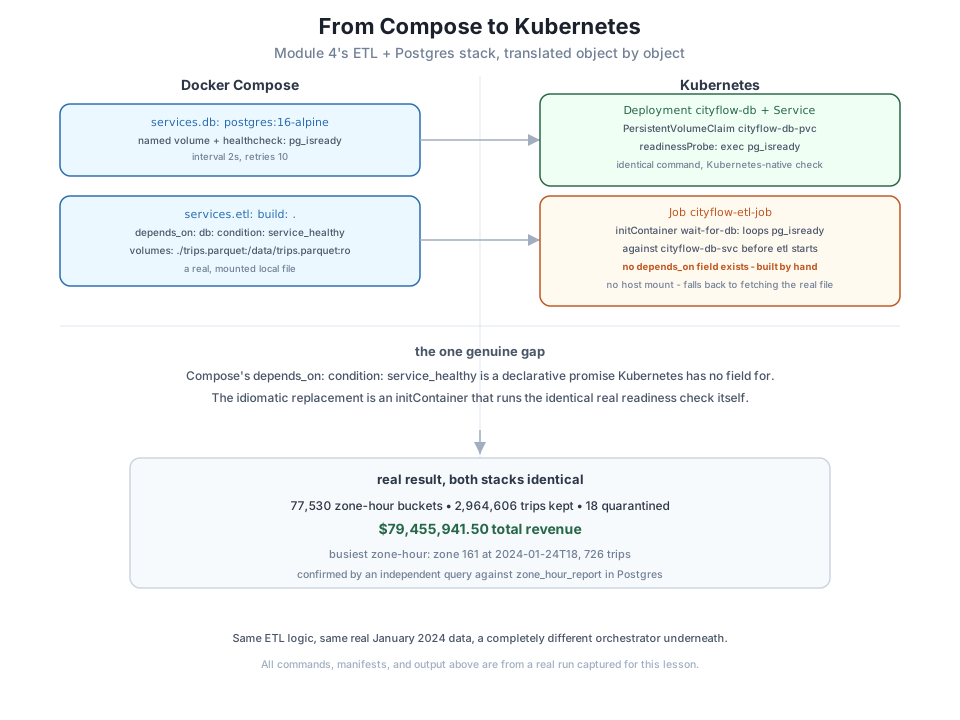
Module 4 ended with a real, two-service Compose stack: a Postgres database with a genuine HEALTHCHECK, and CityFlow’s ETL job gated behind depends_on: { db: { condition: service_healthy } } so it never started before Postgres could actually accept connections. Modules 5 and 6 then built up every Kubernetes object this course needs - Deployments, Services, ConfigMaps, PersistentVolumeClaims, Jobs - one at a time, each in isolation. This lesson does something neither of those did: it takes that exact Compose stack and translates it, object by object, into its Kubernetes equivalent, run for real on this course’s own Kind cluster.
By the end of this lesson, you will be able to:
depends_on: { condition: service_healthy } has no direct Kubernetes equivalent, and build the honest replacement yourself with an initContainer.initContainer logs separately from its main container’s logs.This is Module 4 Lesson 5’s guided project, unchanged - included here as the concrete reference point:
services:
  db:
    image: postgres:16-alpine
    environment:
      POSTGRES_PASSWORD: cityflow
      POSTGRES_DB: cityflow
    volumes:
      - cf-etl-stack-pgdata:/var/lib/postgresql/data
    healthcheck:
      test: ["CMD-SHELL", "pg_isready -U postgres -d cityflow"]
      interval: 2s
      timeout: 3s
      retries: 10

  etl:
    build: .
    depends_on:
      db:
        condition: service_healthy
    environment:
      DB_HOST: db
      DATA_PATH: /data/trips.parquet
    volumes:
      - ./yellow_tripdata_2024-01.parquet:/data/trips.parquet:ro

volumes:
  cf-etl-stack-pgdata:
Two services, each with a real job: db is a long-running database with durable storage and a real readiness check; etl is a batch job that must not start until db has proven it’s actually ready, and reads the real, mounted January 2024 trip data. Every mechanism in this file has a name in Kubernetes - the question this lesson answers is which one.
| Compose concept | Kubernetes object(s) |
|---|---|
services.db (a long-running container) | Deployment (cityflow-db) |
db’s exposure to etl by service name | Service (cityflow-db-svc, ClusterIP) |
volumes.cf-etl-stack-pgdata (a named volume) | PersistentVolumeClaim (cityflow-db-pvc) |
db.healthcheck | readinessProbe on the db Deployment’s pod spec |
services.etl (a batch service, build: .) | Job (cityflow-etl-job) |
etl.depends_on: { condition: service_healthy } | no direct equivalent - see below |
The first five rows are close to mechanical. Compose’s image: vs build: distinction disappears entirely in Kubernetes - every container in a pod spec just names an image, built beforehand exactly the way Module 3 already taught. A Compose named volume and a Kubernetes PersistentVolumeClaim solve the identical problem (data that survives a container restart) with almost the same shape, which is exactly why Module 6 Lesson 2 introduced PVCs by contrasting them directly with a Compose volume. And healthcheck: maps onto readinessProbe: almost line for line - both run a real command on a schedule and track whether it currently succeeds.
The Postgres side, translated:
apiVersion: apps/v1
kind: Deployment
metadata:
  name: cityflow-db
  namespace: cityflow
spec:
  replicas: 1
  selector:
    matchLabels:
      app: cityflow-db
  template:
    metadata:
      labels:
        app: cityflow-db
    spec:
      containers:
        - name: db
          image: postgres:16-alpine
          env:
            - name: POSTGRES_PASSWORD
              value: "cityflow"
            - name: POSTGRES_DB
              value: "cityflow"
          ports:
            - containerPort: 5432
          volumeMounts:
            - name: pgdata
              mountPath: /var/lib/postgresql/data
          readinessProbe:
            exec:
              command: ["pg_isready", "-U", "postgres", "-d", "cityflow"]
            initialDelaySeconds: 2
            periodSeconds: 2
      volumes:
        - name: pgdata
          persistentVolumeClaim:
claimName: cityflow-db-pvcapiVersion: v1
kind: PersistentVolumeClaim
metadata:
name: cityflow-db-pvc
namespace: cityflow
spec:
accessModes:
- ReadWriteOnce
resources:
requests:
storage: 200MiapiVersion: v1
kind: Service
metadata:
name: cityflow-db-svc
namespace: cityflow
spec:
selector:
app: cityflow-db
ports:
- port: 5432
targetPort: 5432Compare readinessProbe.exec.command to Compose’s healthcheck.test - the same pg_isready -U postgres -d cityflow command, run the same way, on a comparable schedule. Kubernetes’ name for “is this container currently able to do its job” is readiness, not health, but the mechanism - a real command Kubernetes runs on a schedule and tracks - is the direct descendant of what Compose already taught you.
depends_on: condition: service_healthyHere is the one row of that table with no clean translation, and it’s worth sitting with rather than glossing over. Compose’s depends_on: { db: { condition: service_healthy } } is a declarative promise: “don’t even start this container until that one reports healthy.” Kubernetes has nothing that reads like that at all. There is no dependsOn: field anywhere in a Job or Pod spec. A Job’s pod, once scheduled, starts every container in it - Kubernetes has no built-in concept of one pod waiting on another pod’s readiness before it begins.
That isn’t an oversight; it reflects a real difference in how the two tools think. Compose manages one stack’s declared service graph on one host. Kubernetes manages an open-ended set of independent pods that may not even know about each other, on any number of nodes - there is no natural place to put “wait for that other, unrelated object to be ready” as a first-class field. The idiomatic Kubernetes answer is to build the wait yourself, with an initContainer: a container that runs to completion before the pod’s main containers start at all, and that the kubelet won’t let anything else in the pod proceed past until it exits 0.
apiVersion: batch/v1
kind: Job
metadata:
  name: cityflow-etl-job
  namespace: cityflow
spec:
  backoffLimit: 2
  template:
    spec:
      restartPolicy: Never
      initContainers:
        - name: wait-for-db
          image: postgres:16-alpine
          command:
            - sh
            - -c
            - |
              until pg_isready -h cityflow-db-svc -U postgres -d cityflow; do
                echo "cityflow-db-svc not ready yet, retrying in 2s"
                sleep 2
              done
      containers:
        - name: etl
          image: cityflow-etl-k8s:1.0
          imagePullPolicy: IfNotPresent
          env:
            - name: DB_HOST
              value: "cityflow-db-svc"
wait-for-db reuses the exact postgres:16-alpine image just for its pg_isready binary - it never touches the etl container’s actual data. Its until loop is the identical logic Compose’s condition: service_healthy performs internally, just written out explicitly instead of handled for you. This is a fair trade for the loss of a single declarative field: an initContainer can run any real readiness check, not only the specific ones a healthcheck syntax anticipates, at the cost of writing it yourself.
This is also how Module 4’s loader solved it, independently
Module 4 Lesson 4’s loader service used a Python-side connection-retry loop instead of a Compose healthcheck, for the same underlying reason: something has to actively wait for a dependency, and Compose’s healthcheck was only one of two genuine solutions even there. An initContainer’s shell loop and a job’s own retry loop are the same idea at two different layers - here, Kubernetes’ total lack of a native depends_on makes the wait-in-a-separate-step version the cleaner one, since it keeps the retry logic completely out of cityflow_etl.py itself.
kubectl create namespace cityflow
kubectl apply -f pvc.yaml
kubectl apply -f deployment.yaml
kubectl apply -f service.yaml
kubectl wait --for=condition=Available deployment/cityflow-db -n cityflow --timeout=60s
kubectl get pods,svc,pvc -n cityflow
namespace/cityflow created
persistentvolumeclaim/cityflow-db-pvc created
deployment.apps/cityflow-db created
service/cityflow-db-svc created
deployment.apps/cityflow-db condition met
NAME READY STATUS RESTARTS AGE
pod/cityflow-db-5bc58cf488-7tcsf 1/1 Running 0 27s
NAME TYPE CLUSTER-IP EXTERNAL-IP PORT(S) AGE
service/cityflow-db-svc ClusterIP 10.96.136.40 <none> 5432/TCP 27s
NAME STATUS VOLUME CAPACITY ACCESS MODES STORAGECLASS AGE
persistentvolumeclaim/cityflow-db-pvc Bound pvc-36e4cd59-3800-436d-a4e7-09caca55dbdc 200Mi RWO standard 27sPostgres is Running, its readiness probe has already passed (that’s what let the Deployment reach Available), and its PVC is Bound. Now the Job:
kubectl apply -f job.yaml
kubectl wait --for=condition=Complete job/cityflow-etl-job -n cityflow --timeout=60s
kubectl get pods -n cityflow -l job-name=cityflow-etl-job
job.batch/cityflow-etl-job created
job.batch/cityflow-etl-job condition met
NAME READY STATUS RESTARTS AGE
cityflow-etl-job-7nms7 0/1 Completed 0 17sA Job’s pod runs an initContainer and its real containers with separate logs - reading each one requires naming which container you mean:
kubectl logs -n cityflow cityflow-etl-job-7nms7 -c wait-for-db
kubectl logs -n cityflow cityflow-etl-job-7nms7 -c etl
cityflow-db-svc:5432 - accepting connections[cityflow-etl] starting - DB_HOST=cityflow-db-svc
[cityflow-etl] no file at /data/trips.parquet - nothing mounted, fetching the real source
[cityflow-etl] fetched real data to /tmp/trips.parquet
[cityflow-etl] CityFlow zone-hour ETL - January 2024 (Kubernetes)
[cityflow-etl] ---------------------------------------------------
[cityflow-etl] source rows (on disk): 2,964,624
[cityflow-etl] zone-hour buckets: 77,530
[cityflow-etl] trips kept: 2,964,606
[cityflow-etl] quarantined (out-of-window): 18
[cityflow-etl] total revenue: $79,455,941.50
[cityflow-etl] busiest zone-hour: zone 161 at 2024-01-24T18, 726 trips
[cityflow-etl] report written to Postgres: zone_hour_report
[cityflow-etl] elapsed seconds: 11.49
[cityflow-etl] ETL completed successfullywait-for-db’s single line proves it only ran the readiness loop once and exited immediately - Postgres was already reporting Available by the time this Job started, so there was nothing to retry. etl’s log shows one genuine difference from Module 4’s version: there’s no mounted file here at all. This Kind cluster has no bind mount configured from this machine’s filesystem into a pod, the way Compose’s volumes: line trivially provided - so DATA_PATH never exists, and the job takes the exact fallback path Module 3 built for the no-mount case, fetching the real January 2024 file itself from the official NYC TLC source. That’s not a workaround invented for this lesson; it’s the same ensure_data() logic Module 3 Lesson 5 already proved genuine, now exercised as the normal path instead of a rare one - a real, honest consequence of Kubernetes not sharing Compose’s easy access to the host filesystem.
kubectl exec -n cityflow cityflow-db-5bc58cf488-7tcsf -- psql -U postgres -d cityflow -c \
  "SELECT COUNT(*) AS buckets, SUM(trips) AS total_trips, ROUND(SUM(revenue),2) AS total_revenue FROM zone_hour_report;"
buckets | total_trips | total_revenue
---------+-------------+---------------
77530 | 2964606 | 79455941.50
(1 row)77,530 buckets, 2,964,606 trips, $79,455,941.50 - identical to Module 4’s Compose result, identical to Module 3’s original bare docker run. Same ETL logic, same real data, a completely different orchestrator underneath it, and the exact same verified answer.
kubectl delete job cityflow-etl-job -n cityflow
kubectl delete deployment cityflow-db -n cityflow
kubectl delete service cityflow-db-svc -n cityflow
kubectl delete pvc cityflow-db-pvc -n cityflow
kubectl get all,configmaps,secrets,pvc,jobs -n cityflow
job.batch "cityflow-etl-job" deleted
deployment.apps "cityflow-db" deleted
service "cityflow-db-svc" deleted
persistentvolumeclaim "cityflow-db-pvc" deleted
NAME DATA AGE
configmap/kube-root-ca.crt 1 14mOnly the kube-root-ca.crt ConfigMap Kubernetes creates automatically in every namespace remains - everything this lesson created is gone.
Build cityflow-etl-k8s:1.0 yourself (Module 3’s ETL script, extended with Module 4’s Postgres write - both lessons already show the full code), load it into the Kind cluster with kind load docker-image, and apply all four manifests in this lesson. Confirm your own zone_hour_report query matches: 77,530 buckets, 2,964,606 trips, $79,455,941.50.
Hint
Apply the PVC, Deployment, and Service first and wait for Available before applying the Job - if the Job starts before cityflow-db-svc exists at all (not just before Postgres is ready), wait-for-db’s DNS lookup itself will fail rather than just retry the connection, which is a different, avoidable problem.
Temporarily delete the initContainers: block from job.yaml, delete the namespace’s Postgres Deployment (so cityflow-db-svc genuinely isn’t ready yet), then apply the PVC/Deployment/Service and the Job all at once, with no kubectl wait in between. Confirm the etl container itself fails on its first psycopg2.connect() attempt.
Hint
This reproduces, on Kubernetes, the exact race Module 4 Lessons 1, 3, and 4 all hit on Compose before a real healthcheck or retry loop existed - the fix is the same idea in both places: something has to actually wait, whether that’s Compose’s condition: service_healthy or Kubernetes’ initContainer.
Rewrite wait-for-db’s shell loop to give up and exit non-zero after 10 failed attempts, instead of looping forever. Confirm the Job’s pod now shows Init:Error (or similar) rather than Init:0/1 hanging indefinitely if Postgres is never going to become ready.
Hint
An initContainer that never exits leaves the whole pod stuck at Init:0/1 forever - a real production initContainer almost always needs its own bounded retry count, exactly like the backoffLimit Module 6 Lesson 3 gave the Job itself.
Module 4’s two-service Compose stack translated to Kubernetes almost entirely mechanically: db became a Deployment with a readinessProbe running the identical pg_isready command Compose’s healthcheck used, backed by a PersistentVolumeClaim in place of a named volume and exposed through a Service; etl became a Job. The one genuine gap was depends_on: { condition: service_healthy } - Kubernetes has no native field for “wait for that other object to be ready,” so this lesson built the honest replacement, an initContainer running the same pg_isready check in a loop before the main etl container ever starts. Run for real, the translated stack produced the identical result Module 3 and Module 4 both already verified: 77,530 zone-hour buckets, 2,964,606 trips, $79,455,941.50 total revenue - the same ETL logic, a different orchestrator, the same answer.
healthcheck → Kubernetes readinessProbe - a real command run on a schedule, tracked by the platform.depends_on: condition: service_healthy has no Kubernetes equivalent - the idiomatic replacement is an initContainer that runs the same real check itself before the main containers start.initContainer and main container have separate logs - kubectl logs -c <container-name> is required once a pod has more than one.Almost every real migration from Compose to Kubernetes looks exactly like this lesson: most of it is a fairly mechanical object-for-object translation, and the value of doing it carefully is in the small number of places - here, exactly one - where the two tools’ underlying models genuinely differ and a shortcut would silently break something. Believing Kubernetes has some hidden depends_on equivalent, or skipping the wait step entirely because “it worked in Compose,” is a real, common mistake; you’ve now seen precisely where that gap is and built the correct fix yourself.
The Job you just ran had no resource limits at all - it could, in principle, have used every byte of memory and every CPU cycle this node has. Lesson 2 gives the scheduler the information it actually needs to make that safe: CPU and memory requests and limits, and what genuinely happens when a container hits one.
Keep DATATWEETS free. Help fund practical data, AI, and engineering lessons for learners worldwide.
