Title here
Summary here
Every piece is now on the table. Lesson 1 translated Module 4’s Compose stack into real Kubernetes objects. Lesson 2 measured, rather than guessed, the real memory this job needs. Lesson 3 gave you the tools to diagnose it if any of this goes wrong. This lesson assembles all three into the final form CityFlow’s ETL job will run in for the rest of this course: a real image, its configuration externalized into a ConfigMap the way Module 6 Lesson 1 taught, resource requests and limits sized from Lesson 2’s actual measurement rather than a round number picked at random, and logging that says something useful about what the job is actually doing.
By the end of this lesson, you will be able to:
requests/limits choice with a specific, measured number rather than a guess.initContainer into one final Job manifest.Lesson 1’s Job worked, but it hardcoded everything: the data URL, the trip window, and had no resource limits at all. Three real gaps, each with a real fix already established elsewhere in this module:
DATA_URL, WINDOW_START, and WINDOW_END become environment variables sourced from a ConfigMap, exactly like Module 6 Lesson 1’s BOROUGH_FILTER - the same image now runs a different month, or points at a different mirror of the source file, with zero rebuild.128Mi and a limit of 256Mi: comfortably above the real measured need, not an arbitrary round number.print() → a consistent, prefixed log format. Every line CityFlow’s ETL job prints already carries a [cityflow-etl] prefix and a clear label per value, so kubectl logs output is unambiguous about which job produced it and what each number means - useful the moment more than one CityFlow job is running on this cluster at once, which by the guided project, there will be.apiVersion: v1
kind: ConfigMap
metadata:
name: cityflow-etl-config
namespace: cityflow
data:
DATA_URL: "https://d37ci6vzurychx.cloudfront.net/trip-data/yellow_tripdata_2024-01.parquet"
WINDOW_START: "2024-01-01"
WINDOW_END: "2024-02-01"Three genuinely independent settings: which file to fetch, and the two dates that define its aggregation window. Nothing about the ETL logic itself changes if any of these three values change - which is exactly the test a ConfigMap-driven design has to pass.
# gate: skip
"""CityFlow's zone-hour ETL job - Module 3's chunked, row-group-at-a-time
aggregation, combined with Module 4's Postgres write, packaged for
Kubernetes with its configuration externalized into a ConfigMap. Same real
logic every prior module verified against; DATA_URL and the trip window are
now genuinely configurable, with no image rebuild, the same way Module 6
Lesson 1's BOROUGH_FILTER was.

DATA_PATH may point at a mounted file; when nothing is mounted (the normal
case on this Kind cluster, which has no host bind-mount configured), it
falls back to fetching DATA_URL itself - the same fallback Lesson 1 already
exercised as the normal path.

Exit codes follow the same batch-job convention as Module 3/4:
  0  success            - report computed and written to Postgres
  2  no input available - nothing mounted AND the fallback fetch failed
  3  validation failed  - the file parsed but produced zero in-window trips
"""
import datetime as dt
import os
import sys
import time
import urllib.request

import numpy as np
import pandas as pd
import pyarrow.parquet as pq

DATA_PATH = os.environ.get("DATA_PATH", "/data/trips.parquet")
DATA_URL = os.environ["DATA_URL"]
DB_HOST = os.environ.get("DB_HOST", "")
WINDOW_START = os.environ.get("WINDOW_START", "2024-01-01")
WINDOW_END = os.environ.get("WINDOW_END", "2024-02-01")
KEEP = ["tpep_pickup_datetime", "PULocationID", "total_amount"]
WIN_LO = dt.datetime.strptime(WINDOW_START, "%Y-%m-%d")
WIN_HI = dt.datetime.strptime(WINDOW_END, "%Y-%m-%d")


def log(msg):
    print(f"[cityflow-etl] {msg}", flush=True)


def ensure_data():
    if os.path.exists(DATA_PATH):
        log(f"using mounted data at {DATA_PATH}")
        return DATA_PATH
    log(f"no file at {DATA_PATH} - nothing mounted, fetching {DATA_URL}")
    tmp = "/tmp/trips.parquet"
    try:
        urllib.request.urlretrieve(DATA_URL, tmp)
    except Exception as e:
        print(f"ERROR: no mounted data and fallback fetch failed: {e}", file=sys.stderr)
        sys.exit(2)
    log(f"fetched real data to {tmp}")
    return tmp


def aggregate_row_group(path, rg):
    tbl = pq.ParquetFile(path).read_row_group(rg, columns=KEEP)
    ts = tbl.column(0).to_numpy(zero_copy_only=False)
    keep = (ts >= np.datetime64(WIN_LO)) & (ts < np.datetime64(WIN_HI))
    hour = ts[keep].astype("datetime64[h]").astype("int64")
    zone = tbl.column(1).to_numpy()[keep]
    amt = tbl.column(2).to_numpy(zero_copy_only=False)[keep]
    part = (
        pd.DataFrame({"zone": zone, "hour": hour, "amt": amt})
        .groupby(["zone", "hour"], sort=False)
        .agg(trips=("amt", "size"), revenue=("amt", "sum"))
        .reset_index()
    )
    return part, int((~keep).sum())


def write_report(report):
    import psycopg2
    conn = psycopg2.connect(
        host=DB_HOST, port=5432, dbname="cityflow", user="postgres", password="cityflow",
    )
    cur = conn.cursor()
    cur.execute("""
        CREATE TABLE IF NOT EXISTS zone_hour_report (
            zone     INTEGER NOT NULL,
            hour     BIGINT  NOT NULL,
            trips    INTEGER NOT NULL,
            revenue  NUMERIC NOT NULL,
            PRIMARY KEY (zone, hour)
        );
    """)
    cur.execute("TRUNCATE zone_hour_report;")
    rows = list(report[["zone", "hour", "trips", "revenue"]].itertuples(index=False, name=None))
    cur.executemany(
        "INSERT INTO zone_hour_report (zone, hour, trips, revenue) VALUES (%s, %s, %s, %s);",
        rows,
    )
    conn.commit()
    cur.close()
    conn.close()


def main():
    start = time.time()
    log(f"starting - DATA_URL={DATA_URL} WINDOW={WINDOW_START}..{WINDOW_END} DB_HOST={DB_HOST or '(none)'}")
    path = ensure_data()
    pf = pq.ParquetFile(path)
    parts, quarantined = [], 0
    for rg in range(pf.metadata.num_row_groups):
        part, q = aggregate_row_group(path, rg)
        parts.append(part)
        quarantined += q

    agg = pd.concat(parts, ignore_index=True)
    report = (
        agg.groupby(["zone", "hour"], sort=False)
        .agg(trips=("trips", "sum"), revenue=("revenue", "sum"))
        .reset_index()
    )

    if len(report) == 0 or report["trips"].sum() == 0:
        print("ERROR: zero in-window trips after aggregation", file=sys.stderr)
        sys.exit(3)

    if DB_HOST:
        write_report(report)

    log("CityFlow zone-hour ETL - Kubernetes")
    log("-------------------------------------")
    log(f"source rows (on disk):       {pf.metadata.num_rows:,}")
    log(f"zone-hour buckets:           {len(report):,}")
    log(f"trips kept:                  {int(report['trips'].sum()):,}")
    log(f"quarantined (out-of-window): {quarantined}")
    log(f"total revenue:               ${report['revenue'].sum():,.2f}")

    top = report.loc[report["trips"].idxmax()]
    hour_str = str(np.array(int(top["hour"]), dtype="datetime64[h]"))
    log(f"busiest zone-hour:           zone {int(top['zone'])} at {hour_str}, {int(top['trips'])} trips")
    if DB_HOST:
        log("report written to Postgres: zone_hour_report")
    log(f"elapsed seconds:             {time.time() - start:.2f}")
    log("ETL completed successfully")
    sys.exit(0)


if __name__ == "__main__":
    main()
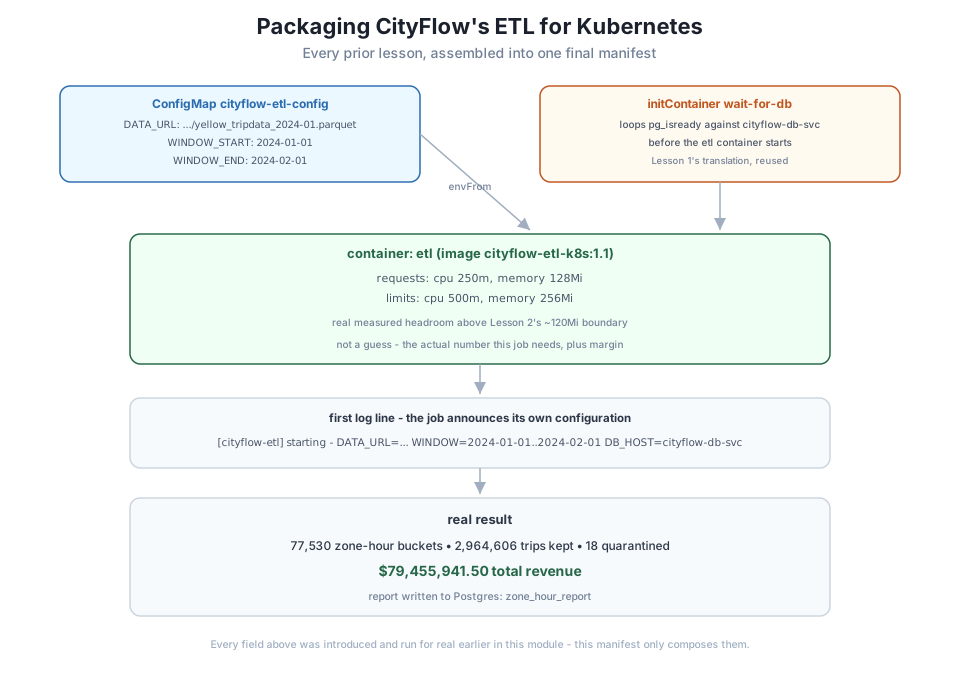
Every value the ConfigMap will provide - DATA_URL, WINDOW_START, WINDOW_END - is read as a real environment variable with os.environ, and the job’s very first log line prints all three back out: starting - DATA_URL=... WINDOW=2024-01-01..2024-02-01 DB_HOST=.... That single line means a reader of kubectl logs never has to go find the ConfigMap separately to know what this specific run was actually configured to do - the run announces its own configuration as its first act, which is a small habit worth keeping in any real batch job.
FROM python:3.13-slim

WORKDIR /app

COPY requirements.txt .
RUN pip install --no-cache-dir -r requirements.txt

COPY cityflow_etl.py .

CMD ["python", "cityflow_etl.py"]
pandas==2.2.3
pyarrow==19.0.0
psycopg2-binary==2.9.10docker build -t cityflow-etl-k8s:1.1 .
kind load docker-image cityflow-etl-k8s:1.1 --name datatweets-docker-k8swriting image sha256:3dfac79749a17e248f59de121ac9f81112c991514633ab9e2f36683d7932dcf7 done
naming to docker.io/library/cityflow-etl-k8s:1.1 done
Image: "cityflow-etl-k8s:1.1" with ID "sha256:3dfac79749a17e248f59de121ac9f81112c991514633ab9e2f36683d7932dcf7" not yet present on node "datatweets-docker-k8s-control-plane", loading...Same slim base, same cache-friendly dependency-before-code order Module 3 established - nothing about building this image is new, only what runs inside it once it’s there.
apiVersion: batch/v1
kind: Job
metadata:
  name: cityflow-etl-job
  namespace: cityflow
spec:
  backoffLimit: 2
  template:
    spec:
      restartPolicy: Never
      initContainers:
        - name: wait-for-db
          image: postgres:16-alpine
          command:
            - sh
            - -c
            - |
              until pg_isready -h cityflow-db-svc -U postgres -d cityflow; do
                echo "cityflow-db-svc not ready yet, retrying in 2s"
                sleep 2
              done
      containers:
        - name: etl
          image: cityflow-etl-k8s:1.1
          imagePullPolicy: IfNotPresent
          envFrom:
            - configMapRef:
                name: cityflow-etl-config
          env:
            - name: DB_HOST
              value: "cityflow-db-svc"
          resources:
            requests:
              cpu: "250m"
              memory: "128Mi"
            limits:
              cpu: "500m"
              memory: "256Mi"
Every mechanism this module has taught, in one manifest: the initContainer wait pattern from Lesson 1, in place of Compose’s depends_on: condition: service_healthy; the measured 128Mi/256Mi memory request and limit from Lesson 2, comfortably above the real ~120Mi boundary that section found; and envFrom.configMapRef supplying DATA_URL, WINDOW_START, and WINDOW_END with no value baked into the image at all. env.DB_HOST stays a plain value here rather than a ConfigMap entry, since it names this specific stack’s Postgres Service - a detail of this deployment, not a parameter of the ETL logic itself.
Applied against Lesson 1’s real cityflow-db Deployment and cityflow-db-svc Service (still the same objects, brought back up the same way):
kubectl apply -f configmap.yaml
kubectl apply -f job.yaml
kubectl wait --for=condition=Complete job/cityflow-etl-job -n cityflow --timeout=90s
kubectl logs -n cityflow -l job-name=cityflow-etl-job -c etl
configmap/cityflow-etl-config created
job.batch/cityflow-etl-job created
job.batch/cityflow-etl-job condition met
[cityflow-etl] starting - DATA_URL=https://d37ci6vzurychx.cloudfront.net/trip-data/yellow_tripdata_2024-01.parquet WINDOW=2024-01-01..2024-02-01 DB_HOST=cityflow-db-svc
[cityflow-etl] no file at /data/trips.parquet - nothing mounted, fetching https://d37ci6vzurychx.cloudfront.net/trip-data/yellow_tripdata_2024-01.parquet
[cityflow-etl] fetched real data to /tmp/trips.parquet
[cityflow-etl] CityFlow zone-hour ETL - Kubernetes
[cityflow-etl] -------------------------------------
[cityflow-etl] source rows (on disk): 2,964,624
[cityflow-etl] zone-hour buckets: 77,530
[cityflow-etl] trips kept: 2,964,606
[cityflow-etl] quarantined (out-of-window): 18
[cityflow-etl] total revenue: $79,455,941.50
[cityflow-etl] busiest zone-hour: zone 161 at 2024-01-24T18, 726 trips
[cityflow-etl] report written to Postgres: zone_hour_report
[cityflow-etl] elapsed seconds: 11.64
[cityflow-etl] ETL completed successfullyEvery ConfigMap value shows up correctly in the job’s own first log line, the initContainer found Postgres already ready with nothing to retry, and the report landed in zone_hour_report exactly as Lesson 1 first confirmed: 77,530 buckets, 2,964,606 trips, $79,455,941.50. Lesson 5’s guided project runs this identical manifest from a clean cluster state, start to finish, as its own independent confirmation.
kubectl delete job cityflow-etl-job -n cityflow
kubectl delete configmap cityflow-etl-config -n cityflow
docker rmi cityflow-etl-k8s:1.1
docker exec datatweets-docker-k8s-control-plane crictl rmi docker.io/library/cityflow-etl-k8s:1.1Change the ConfigMap’s DATA_URL, WINDOW_START, and WINDOW_END to February 2024’s file (yellow_tripdata_2024-02.parquet, 2024-02-01..2024-03-01), re-apply, and rerun the Job with no rebuild at all. Confirm the report shows a real, different set of numbers for February.
Hint
This is the exact test a ConfigMap-driven design has to pass: if you find yourself needing to rebuild the image to process a different month, the configuration wasn’t actually externalized.
Set limits.memory back down to 64Mi on this final manifest and confirm it reaches OOMKilled again, the same as Lesson 2’s demonstration - proving the 128Mi/256Mi choice in this lesson’s manifest isn’t decorative, it’s load-bearing.
Hint
If you don’t see OOMKilled at 64Mi, double-check you changed limits.memory and not requests.memory - only the limit is what the kubelet actually enforces as a kill boundary.
Add a KEEP_COLUMNS (or similar) setting to the ConfigMap that isn’t used by the script yet, and extend cityflow_etl.py to read and log it (it doesn’t need to change the aggregation logic - just prove the pattern scales to a fourth setting with no new code path beyond reading and logging it).
Hint
Every key under a ConfigMap’s data: becomes its own separate environment variable through envFrom - Module 6 Lesson 1’s Exercise 2 asked this exact question about a different service; the answer is identical here.
This lesson assembled CityFlow’s ETL job into its final Kubernetes form: a ConfigMap externalizing DATA_URL, WINDOW_START, and WINDOW_END so the same image processes any month with no rebuild; resource requests/limits of 128Mi/256Mi memory, chosen from Lesson 2’s real measured ~120Mi boundary rather than guessed; the initContainer wait-for-Postgres pattern from Lesson 1; and a first log line that announces the job’s own effective configuration, so kubectl logs alone tells a reader what a given run was actually configured to do. Run against the real data, it produced the identical verified numbers every prior module in this course has established: 77,530 zone-hour buckets, 2,964,606 trips, $79,455,941.50 total revenue.
envFrom, reusable for a different month or source with no rebuild.128Mi/256Mi chosen because Lesson 2 actually found the real boundary, not picked as a round number.A real production data job is rarely one clever new trick - it’s the accumulation of several individually simple decisions (externalize this, measure that, log the other) applied consistently to one real piece of work. This lesson is the proof that CityFlow’s ETL job, packaged this way, is genuinely production-shaped: configurable without a rebuild, sized from real measurement rather than guesswork, and observable from its logs alone. Lesson 5’s guided project runs this exact manifest end to end, against a real, live Postgres, with independent verification at every step.
Every piece is built and individually verified. Lesson 5 puts them all together for real: CityFlow’s packaged ETL job, running as a genuine one-off Kubernetes Job against a real Postgres Deployment on this course’s own Kind cluster, verified end to end against the same real numbers this module has checked from every angle.
Keep DATATWEETS free. Help fund practical data, AI, and engineering lessons for learners worldwide.
