Title here
Summary here
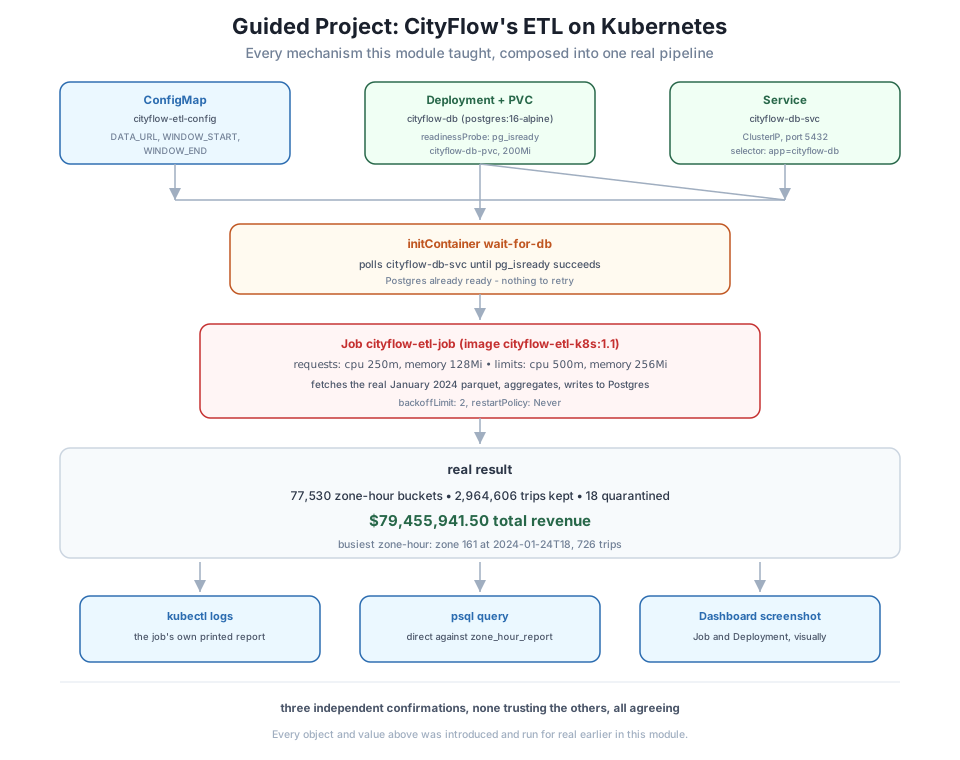
This project runs Module 7 end to end, from a completely clean namespace: CityFlow’s real ETL job, translated to Kubernetes objects (Lesson 1), given measured resource limits (Lesson 2), debuggable with the tools this module taught (Lesson 3), and packaged with a ConfigMap and proper logging (Lesson 4) - all four lessons, together, on the real January 2024 trip data, verified three independent ways.
By the end of this project, you will be able to:
Five files, each one this module already built and explained - assembled here as the complete, real pipeline:
apiVersion: v1
kind: PersistentVolumeClaim
metadata:
  name: cityflow-db-pvc
  namespace: cityflow
spec:
  accessModes:
    - ReadWriteOnce
  resources:
    requests:
storage: 200MiapiVersion: apps/v1
kind: Deployment
metadata:
name: cityflow-db
namespace: cityflow
spec:
replicas: 1
selector:
matchLabels:
app: cityflow-db
template:
metadata:
labels:
app: cityflow-db
spec:
containers:
- name: db
image: postgres:16-alpine
env:
- name: POSTGRES_PASSWORD
value: "cityflow"
- name: POSTGRES_DB
value: "cityflow"
ports:
- containerPort: 5432
resources:
requests:
cpu: "100m"
memory: "128Mi"
limits:
cpu: "500m"
memory: "256Mi"
volumeMounts:
- name: pgdata
mountPath: /var/lib/postgresql/data
readinessProbe:
exec:
command: ["pg_isready", "-U", "postgres", "-d", "cityflow"]
initialDelaySeconds: 2
periodSeconds: 2
volumes:
- name: pgdata
persistentVolumeClaim:
claimName: cityflow-db-pvcapiVersion: v1
kind: Service
metadata:
name: cityflow-db-svc
namespace: cityflow
spec:
selector:
app: cityflow-db
ports:
- port: 5432
targetPort: 5432apiVersion: v1
kind: ConfigMap
metadata:
name: cityflow-etl-config
namespace: cityflow
data:
DATA_URL: "https://d37ci6vzurychx.cloudfront.net/trip-data/yellow_tripdata_2024-01.parquet"
WINDOW_START: "2024-01-01"
WINDOW_END: "2024-02-01"apiVersion: batch/v1
kind: Job
metadata:
name: cityflow-etl-job
namespace: cityflow
spec:
backoffLimit: 2
template:
spec:
restartPolicy: Never
initContainers:
- name: wait-for-db
image: postgres:16-alpine
command:
- sh
- -c
- |
until pg_isready -h cityflow-db-svc -U postgres -d cityflow; do
echo "cityflow-db-svc not ready yet, retrying in 2s"
sleep 2
done
containers:
- name: etl
image: cityflow-etl-k8s:1.1
imagePullPolicy: IfNotPresent
envFrom:
- configMapRef:
name: cityflow-etl-config
env:
- name: DB_HOST
value: "cityflow-db-svc"
resources:
requests:
cpu: "250m"
memory: "128Mi"
limits:
cpu: "500m"
memory: "256Mi"Every field in every one of these five objects was introduced, explained, and run for real somewhere in Modules 5-7. Nothing here is new; this project is entirely about correctly composing what you already have.
kubectl create namespace cityflow
kubectl apply -f configmap.yaml
kubectl apply -f pvc.yaml
kubectl apply -f deployment.yaml
kubectl apply -f service.yaml
kubectl wait --for=condition=Available deployment/cityflow-db -n cityflow --timeout=60s
kubectl apply -f job.yaml
kubectl wait --for=condition=Complete job/cityflow-etl-job -n cityflow --timeout=90s
kubectl get jobs -n cityflow
kubectl get pods -n cityflow
namespace/cityflow created
configmap/cityflow-etl-config created
persistentvolumeclaim/cityflow-db-pvc created
deployment.apps/cityflow-db created
service/cityflow-db-svc created
deployment.apps/cityflow-db condition met
job.batch/cityflow-etl-job created
job.batch/cityflow-etl-job condition met
NAME STATUS COMPLETIONS DURATION AGE
cityflow-etl-job Complete 1/1 16s 16s
NAME READY STATUS RESTARTS AGE
cityflow-db-55548fd9f4-mrsmx 1/1 Running 0 22s
cityflow-etl-job-4wtvb 0/1 Completed 0 16sPostgres came up, passed its readiness probe, and only then did the ETL Job’s initContainer find it ready with nothing to wait for - one Complete Job, one Running database, from a completely empty namespace, in under 30 seconds.
kubectl logs -n cityflow -l job-name=cityflow-etl-job -c etl[cityflow-etl] starting - DATA_URL=https://d37ci6vzurychx.cloudfront.net/trip-data/yellow_tripdata_2024-01.parquet WINDOW=2024-01-01..2024-02-01 DB_HOST=cityflow-db-svc
[cityflow-etl] no file at /data/trips.parquet - nothing mounted, fetching https://d37ci6vzurychx.cloudfront.net/trip-data/yellow_tripdata_2024-01.parquet
[cityflow-etl] fetched real data to /tmp/trips.parquet
[cityflow-etl] CityFlow zone-hour ETL - Kubernetes
[cityflow-etl] -------------------------------------
[cityflow-etl] source rows (on disk): 2,964,624
[cityflow-etl] zone-hour buckets: 77,530
[cityflow-etl] trips kept: 2,964,606
[cityflow-etl] quarantined (out-of-window): 18
[cityflow-etl] total revenue: $79,455,941.50
[cityflow-etl] busiest zone-hour: zone 161 at 2024-01-24T18, 726 trips
[cityflow-etl] report written to Postgres: zone_hour_report
[cityflow-etl] elapsed seconds: 11.64
[cityflow-etl] ETL completed successfullyThe job’s first line confirms exactly what it was configured to do - the real ConfigMap values, echoed back - before a single row is processed. Then the real result: 77,530 zone-hour buckets, 2,964,606 trips kept, 18 quarantined, $79,455,941.50 total revenue, busiest zone-hour zone 161 at 2024-01-24T18 with 726 trips.
kubectl exec -n cityflow deploy/cityflow-db -- psql -U postgres -d cityflow -c \
  "SELECT COUNT(*) AS buckets, SUM(trips) AS total_trips, ROUND(SUM(revenue),2) AS total_revenue FROM zone_hour_report;"
buckets | total_trips | total_revenue
---------+-------------+---------------
77530 | 2964606 | 79455941.50
(1 row)Identical to the job’s own log, queried from a completely separate command against the database directly - not trusting the job’s own printed output alone, the same discipline Module 4 Lesson 4 and Module 6 Lesson 5 both applied to their own results.
This is the same real January 2024 number set every module in this course anchors to when its scope is one real month rather than the full quarter: Module 3’s original bare docker run, Module 4’s Compose stack, and this module’s Lesson 1 translation all produced this exact same 77,530 / 2,964,606 / $79,455,941.50 - five completely different ways of running the identical real logic against the identical real data, five identical answers.
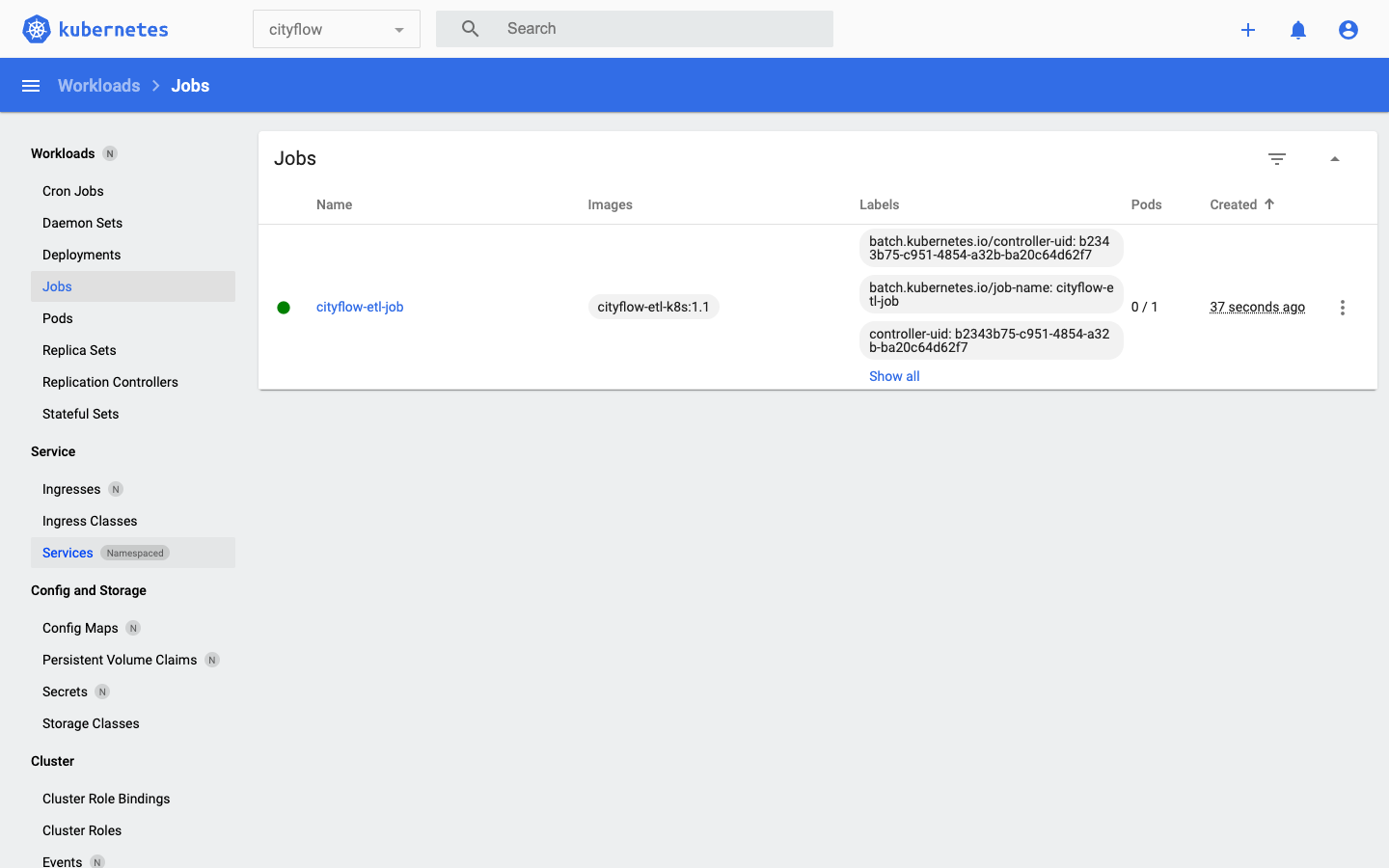
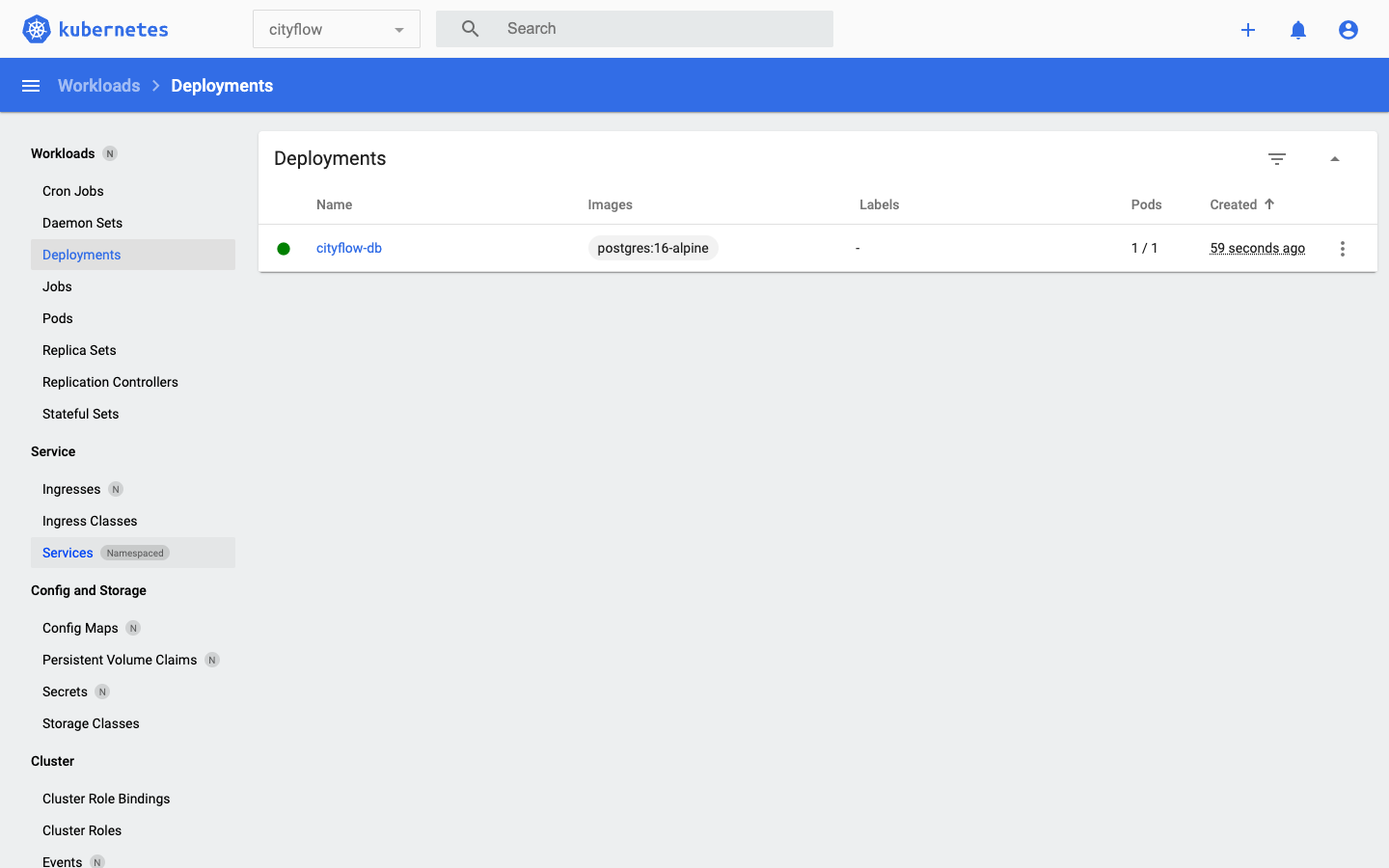
Three independent confirmations of the same real result: the job’s own log, a direct database query, and a visual Dashboard check - none of them trusting the others, all of them agreeing.
kubectl delete namespace cityflownamespace "cityflow" deletedkubectl get all -A
kubectl get configmaps,secrets,pvc,jobs,cronjobs -AOnly the same pre-existing cluster infrastructure every module in this course has left in place - the control plane, coredns, kindnet, local-path-provisioner, and the Dashboard itself. Deleting the namespace removed the ConfigMap, the PVC (and its backing PersistentVolume), the Deployment and its ReplicaSet and pod, the Service, and the Job and its pod, in one command.
Remove the built images too, from both the host and the Kind node’s own containerd:
docker rmi cityflow-etl-k8s:1.1
docker exec datatweets-docker-k8s-control-plane crictl rmi docker.io/library/cityflow-etl-k8s:1.1
Untagged: cityflow-etl-k8s:1.1
Deleted: sha256:3dfac79749a17e248f59de121ac9f81112c991514633ab9e2f36683d7932dcf7
Deleted: docker.io/library/cityflow-etl-k8s:1.1Build and load cityflow-etl-k8s:1.1 yourself, apply all five manifests in the order this project used, and confirm your own run shows the identical real numbers: 77,530 buckets, 2,964,606 trips, $79,455,941.50 - checked both in the job’s log and by an independent psql query.
Hint
If the Job’s pod stays at Init:0/1 far longer than a few seconds, check kubectl logs -c wait-for-db first - a namespace or Service name typo in the initContainer’s command is the most common cause, and it will loop forever rather than fail loudly, exactly as Lesson 1’s Exercise 3 pointed out.
Introduce a real, single deliberate fault - an unreasonable resource request on the etl container, or a wrong DATA_URL in the ConfigMap - and use kubectl logs, describe, and events to diagnose it, without looking back at this lesson’s answer first.
Hint
A wrong DATA_URL should produce a real fetch error inside kubectl logs (the container did run); an unreasonable resource request should produce nothing in logs at all and a FailedScheduling event instead - if you get the opposite of what you expected, that’s worth sitting with rather than skipping past.
Change the ConfigMap to point at the full multi-month scope Course 1’s capstone verified (240,917 buckets / 9,554,757 trips / $256,692,373.14) by running this Job three times, once per month, each writing into the same zone_hour_report table without truncating between runs (you’ll need to change write_report’s TRUNCATE to an UPSERT or remove it for a multi-run accumulation). Confirm your combined total matches Course 1’s capstone number.
Hint
This is a genuinely harder exercise than it looks - zone_hour_report’s primary key is (zone, hour), and a naive multi-run INSERT will collide on any zone-hour that appears in more than one month’s data unless you switch to ON CONFLICT DO UPDATE, which is exactly the kind of idempotency question Course 1 Module 8 and Course 2 Module 6 both explored in depth.
This project ran every mechanism Module 7 taught, together, from a completely clean namespace: a PersistentVolumeClaim and a Postgres Deployment and Service (Lesson 1’s translation), a ConfigMap-driven Job with measured resource limits (Lessons 2 and 4) gated by an initContainer readiness wait (Lesson 1), verified three independent ways - the job’s own logs, a direct psql query against the database it wrote to, and two real Kubernetes Dashboard screenshots. The real result, confirmed by all three: 77,530 zone-hour buckets, 2,964,606 trips kept, 18 quarantined, $79,455,941.50 total revenue, busiest zone-hour zone 161 at 2024-01-24T18 with 726 trips - the same real January 2024 answer Module 3’s original bare docker run, Module 4’s Compose stack, and this module’s own Lesson 1 have all already produced. kubectl delete namespace cityflow removed every trace of it in one command, confirmed against the pre-existing cluster and Dashboard infrastructure this course has run on since Module 5.
docker run (Module 3), a Compose stack (Module 4), a Kubernetes translation (Lesson 1), a packaged manifest (Lesson 4), and this guided project - one real answer, checked from every angle this course has built.This is the actual shape a real Kubernetes data job takes in production: not one clever manifest, but several ordinary, individually-simple objects - storage, a database, configuration, resource limits, a run-to-completion workload - composed correctly and verified independently rather than trusted on faith. You’ve now watched CityFlow’s real ETL logic cross every layer this course has taught: a plain script, a Docker image, a Compose service, and finally a genuine Kubernetes Job, with the identical real answer at every single step. Module 8’s capstone takes this exact shape one step further, scheduling it to run automatically and repeatedly as a CronJob - the last mechanism this course has left to teach.
That completes Module 7: Running a Data Job on Kubernetes. You translated a real Compose stack object by object, measured the real difference between a memory limit that kills and a CPU limit that only slows, diagnosed a real crash and a real scheduling failure with the same three tools, and packaged CityFlow’s actual ETL job with a ConfigMap, measured resource limits, and real logging - then ran the whole thing together, from nothing, verified three independent ways.
Next comes Module 8: Capstone, where this exact job gets its final piece: a CronJob, so it runs automatically and repeatedly rather than once, with real Dashboard screenshots of it firing on its own schedule and its output checked, one more time, against the same real numbers this entire course has verified from every angle.
Keep DATATWEETS free. Help fund practical data, AI, and engineering lessons for learners worldwide.
