Title here
Summary here
Your Task Manager has a glaring problem: anyone can do anything. There’s no sign-in, no notion of who is calling — so there’s no way to keep one person’s tasks separate from another’s, or to stop a stranger from deleting everything. The fix is authentication: a way for a client to prove who it is. FastAPI has first-class support for the OAuth2 password flow, the standard “log in with a username and password, then carry a token” pattern used by APIs everywhere. This lesson sets up the skeleton of that flow; the next lessons make it secure with hashing and real tokens.
By the end you’ll have a working login endpoint and a protected route — the foundation everything else in this module builds on.
By the end of this lesson, you will be able to:
/token login endpoint with OAuth2PasswordRequestFormOAuth2PasswordBearerYou’ll use the dependency-injection skills from Module 4. Let’s begin.
“OAuth2” sounds heavy, but the password flow is intuitive — it’s the login experience you’ve used a thousand times, formalized into three steps:
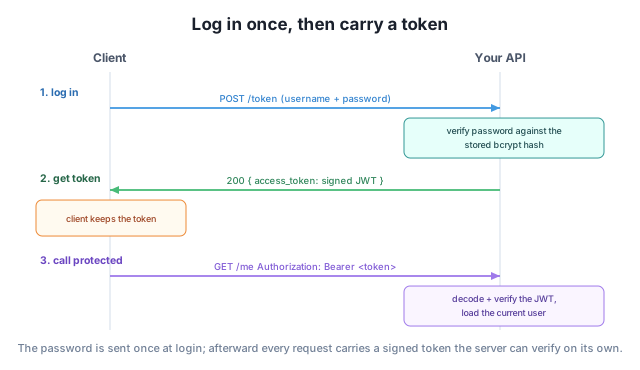
/token endpoint.Authorization: Bearer <token> header), and the API checks it instead of asking for the password again.The big idea: the password travels once. Everything after that uses the token, which the server can verify quickly and which can be made to expire. In this lesson we’ll wire up steps 1 and 3 with a placeholder token; Lessons 2 and 3 add real password hashing and signed, expiring tokens.
OAuth2PasswordBearerFastAPI gives you OAuth2PasswordBearer, a dependency that looks for the Authorization: Bearer <token> header and hands you the token string — rejecting the request with 401 if it’s missing. You create it once, pointing it at the URL of your future login endpoint:
from fastapi import FastAPI, Depends
from fastapi.security import OAuth2PasswordBearer

app = FastAPI()
oauth2_scheme = OAuth2PasswordBearer(tokenUrl="token")

@app.get("/me")
def read_me(token: str = Depends(oauth2_scheme)):
    return {"token_received": token}
Any endpoint that depends on oauth2_scheme now requires a token. Without one, FastAPI refuses before your code runs:
from fastapi.testclient import TestClient

client = TestClient(app)
print(client.get("/me").status_code, client.get("/me").json())
401 {'detail': 'Not authenticated'}That 401 is OAuth2PasswordBearer doing its job: no token, no entry. The tokenUrl="token" argument doesn’t create the login endpoint — it just tells the docs where clients should go to get a token, which powers the “Authorize” button you’ll see shortly.
OAuth2PasswordRequestFormNow step 1: the /token endpoint where clients exchange a username and password for a token. The OAuth2 spec says these arrive as form data (not JSON), and FastAPI provides OAuth2PasswordRequestForm to read them for you — it pulls username and password from the form automatically:
from fastapi.security import OAuth2PasswordRequestForm

@app.post("/token")
def login(form: OAuth2PasswordRequestForm = Depends()):
    # Real password checking comes in Lesson 2; for now, issue a placeholder token.
    return {"access_token": form.username + "-token", "token_type": "bearer"}
The response shape — access_token plus token_type: "bearer" — is the format OAuth2 clients (and the docs UI) expect. Let’s log in, then use the returned token on the protected endpoint:
login = client.post("/token", data={"username": "ada", "password": "x"})
print(login.json())

token = login.json()["access_token"]
print(client.get("/me", headers={"Authorization": f"Bearer {token}"}).json())
{'access_token': 'ada-token', 'token_type': 'bearer'}
GET /me with token -> {'token_received': 'ada-token'}The full loop works: the client logged in, received a token, sent it back as a Bearer token, and reached the protected endpoint. Right now the token is just the username with -token glued on and the password isn’t actually checked — those are exactly the holes Lessons 2 and 3 close with bcrypt hashing and signed JWTs.
Try it with the Authorize button
Because you used OAuth2PasswordBearer, the automatic docs at /docs grow an Authorize button. Click it, enter a username and password, and the docs will call /token, store the returned token, and attach it to every protected request you try — so you can exercise your whole auth flow from the browser without writing a line of client code.
In your own words, what gets sent in each of the three steps of the OAuth2 password flow, and which step sends the password?
Hint
Step 1 (log in) sends the username and password to /token. Step 2 returns an access token. Step 3 sends that token (as Authorization: Bearer <token>) on each protected request. The password is sent only in step 1; everything after uses the token.
The /me endpoint returned 401 Not authenticated when called without a token, even though the function body never ran. What produced that response?
Hint
The OAuth2PasswordBearer dependency did. It looks for the Authorization: Bearer header before your code runs, and raises 401 when it’s absent — so unauthenticated requests never reach your endpoint logic.
A teammate tries to log in by sending {"username": "ada", "password": "x"} as a JSON body and it fails. Why, and what should they send instead?
Hint
OAuth2PasswordRequestForm reads form data, not JSON, because that’s what the OAuth2 spec requires. They should send the fields as form data (e.g. data={...} in the test client, or a normal HTML form post), not a JSON body.
Authentication lets a client prove who it is, and FastAPI supports the standard OAuth2 password flow: log in once at a /token endpoint, receive an access token, and send that token on every later request. You protect an endpoint by depending on OAuth2PasswordBearer, which requires an Authorization: Bearer header and returns 401 without one, and you build the login endpoint with OAuth2PasswordRequestForm, which reads the username and password from form data. You wired the whole loop end to end — though with a placeholder token and no real password check yet, which the next two lessons fix.
OAuth2PasswordBearer — requires a Bearer token; returns 401 if missing.OAuth2PasswordRequestForm — reads username/password from form data at login.Almost every real API needs login, and the OAuth2 password flow is the conventional way to do it — the same pattern behind countless apps and the one interviewers expect you to know. FastAPI builds it in, including the docs “Authorize” button that makes testing painless. With the skeleton in place, you’re ready to make it actually secure: hashing passwords so they’re never stored in the clear, which is exactly where the next lesson goes.
Store passwords safely with bcrypt, verify them at login, and turn a token into the current user with a dependency.
Return to the Authentication and Security module overview
You’ve stood up the OAuth2 password flow — a login endpoint and a protected route — and seen the token loop work end to end. Next you’ll make it trustworthy: hashing passwords with bcrypt so they’re never stored in plain text, and writing the dependency that turns a token back into the user making the request.