Title here
Summary here
Every version of your Task Manager so far has had the same fatal flaw: its data lived in a Python list in memory, so the moment the server restarted, every task vanished. Real applications keep data in a database — storage that lives on disk and persists. In this module you’ll give your API one using SQLModel, a library written by FastAPI’s own creator that lets the same kind of model you’ve used all course double as a database table. This first lesson is about the plumbing: connecting to a database, creating the tables, and handing each request a session to talk to it.
Once this foundation is in place, the create/read/update/delete operations in the coming lessons are short and natural.
By the end of this lesson, you will be able to:
SQLModel.metadata.create_allyield dependencyYou’ll use the dependency-injection skills from Module 4. Let’s begin.
SQLModel sits on top of two well-known libraries: Pydantic (which you’ve used for validation) and SQLAlchemy (the standard Python SQL toolkit). The result is that a single class can be both a Pydantic model and a database table. You already know how to write class Task(SQLModel) with typed fields — SQLModel lets you mark such a class as a table, and now each instance is a row you can save and query. Because it’s the same mental model you’ve used since Module 2, there’s very little new syntax to learn.
We’ll use SQLite as the database. SQLite needs no server and no installation — the entire database is a single file on disk (e.g. tasks.db). That makes it perfect for learning and for plenty of real apps; and because SQLModel speaks SQLAlchemy underneath, moving to PostgreSQL later is mostly a one-line change to the connection string.
The engine is the object that manages the connection to your database. You create it once, for the whole app, with create_engine and a connection string that says where the database lives:
from sqlmodel import create_engine

engine = create_engine("sqlite:///tasks.db")
The string sqlite:///tasks.db means “a SQLite database in the file tasks.db in the current directory.” The engine doesn’t open a connection yet — it’s a factory that hands out connections when you need them. Everything that talks to the database goes through this one engine.
SQLite needs one extra option with FastAPI
FastAPI can handle requests on different threads, and SQLite is cautious about cross-thread use. When you wire this into a real app, create the engine with create_engine("sqlite:///tasks.db", connect_args={"check_same_thread": False}). That setting is specific to SQLite and safe here because each request gets its own session; other databases like PostgreSQL don’t need it.
An engine knows where the database is, but a fresh database has no tables yet. You define a table by writing a SQLModel class with table=True (you’ll go deeper on this in Lesson 2), then ask SQLModel to create every defined table:
from sqlmodel import SQLModel, Field, create_engine

class Task(SQLModel, table=True):
    id: int | None = Field(default=None, primary_key=True)
    title: str

engine = create_engine("sqlite:///tasks.db")
SQLModel.metadata.create_all(engine)
SQLModel.metadata keeps a registry of every table=True class you’ve defined; create_all(engine) issues the SQL to create any of those tables that don’t exist yet (it’s safe to call on every startup — existing tables are left alone). After this runs, the database file exists on disk with a task table ready for rows:
import os
print("DB file exists:", os.path.exists("tasks.db"))
DB file exists: TrueThat file is your data. Stop the program, start it again, and the file — and everything in it — is still there. That’s the persistence your in-memory list never had.
You don’t run queries on the engine directly. Instead you open a session — a short-lived workspace for a unit of work (reading rows, adding rows, committing changes). The clean way to give every endpoint a session is a dependency that opens one, hands it over with yield, and closes it afterward — exactly the yield pattern from Module 4:
from sqlmodel import Session

def get_session():
    with Session(engine) as session:
        yield session
The with Session(engine) block opens a session bound to the engine; yield session passes it into your endpoint; and when the request finishes, the with block closes the session automatically — even if the endpoint raised an error. Endpoints then just declare they need a session, and they’re connected to the database:
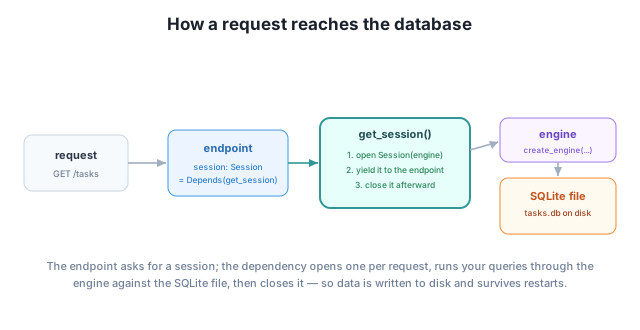
To prove the connection works, we can open a session and query the (empty) table. On a brand-new database it returns zero rows:
from sqlmodel import Session, select

with Session(engine) as session:
    tasks = session.exec(select(Task)).all()
    print("rows in fresh table:", len(tasks))
rows in fresh table: 0A successful, empty result is exactly what you want here: the table exists, the session connected to it, and the query ran. In the next lessons you’ll fill that table with real rows and read, update, and delete them.
What does sqlite:///tasks.db tell create_engine, and what would change if you later moved to PostgreSQL?
Hint
It says “use SQLite, stored in the file tasks.db.” Moving to PostgreSQL is mostly swapping the connection string for something like postgresql://user:pass@host/dbname — because SQLModel/SQLAlchemy speaks both, your models and queries barely change.
Why provide the session through a yield dependency instead of creating a Session(engine) inside every endpoint?
Hint
The dependency guarantees a session is opened and closed for every request (the teardown runs even on errors), and it removes repetitive setup from each endpoint. It’s the same reuse-and-cleanup benefit of yield dependencies from Module 4, applied to database sessions.
create_all do?If you call SQLModel.metadata.create_all(engine) every time the app starts, will it wipe or duplicate your existing tables?
Hint
No — create_all only creates tables that don’t already exist; it leaves existing tables and their data untouched. That’s why it’s safe to call on every startup. (Changing the shape of an existing table is a separate topic called migrations.)
A database gives your API storage that survives restarts, and SQLModel makes adding one feel familiar: it merges Pydantic models with SQLAlchemy tables, so a model class can also be a table. You connect with an engine (create_engine and a connection string like sqlite:///tasks.db), create your tables with SQLModel.metadata.create_all(engine), and give each request a session through a yield dependency that opens and closes it automatically. With those three pieces — engine, tables, session — your API is wired to real, persistent storage and ready for CRUD.
create_engine).create_all — creates any not-yet-existing tables; safe to call on startup.yield dependency that opens and closes a session per request.Persistence is the line between a demo and a real application. Almost every API you build will be backed by a database, and this engine-plus-session-dependency setup is the standard FastAPI pattern for it — the same shape whether you use SQLite for a side project or PostgreSQL in production. Get this foundation right and the actual data operations, which you’ll write next, are remarkably little code.
Define table models with SQLModel, set primary keys, and separate your table from your input and output schemas.
Return to the Databases with SQLModel module overview
Your API is now connected to a real database with sessions ready to go. Next you’ll design the data itself — defining table models, choosing a primary key, and keeping your database tables cleanly separate from the schemas clients send and receive.