Title here
Summary here
Every FastAPI project starts the same way: a single main.py with a handful of endpoints. That’s perfect for learning and for tiny services. But the Task Manager you’ve been building keeps growing — tasks, then users, then projects, then comments — and that one file balloons to hundreds of lines. Scrolling to find an endpoint becomes a chore, merge conflicts pile up when two people edit the same file, and the structure no longer tells you anything about how the app is organized. FastAPI’s answer is the APIRouter: a way to group related routes into their own module, then plug that module into your app. Think of a router as a mini FastAPI app that holds a slice of your endpoints.
In this lesson you’ll take routes out of main.py, give them a shared URL prefix and a docs tag, and reassemble everything with one line. The result behaves identically to the single-file version — the split is purely about organization.
By the end of this lesson, you will be able to:
main.py doesn’t scale and how routers fix itAPIRouter with a shared prefix and tagsinclude_routermain.py plus a routers/ packageYou’ll build directly on the Task Manager endpoints from earlier modules. Let’s begin.
When everything lives in main.py, the app starts out readable:
from fastapi import FastAPI

app = FastAPI()

@app.get("/tasks")
def all_tasks(): ...

@app.get("/tasks/{task_id}")
def one_task(task_id: int): ...

@app.get("/users")
def all_users(): ...

@app.get("/users/{user_id}")
def one_user(user_id: int): ...

# ...and projects, and comments, and labels...
With four endpoints it’s fine. But real apps have dozens. Soon main.py is 600 lines long, the task code and the user code are interleaved, and changing one feature means scrolling past everything else. Two teammates editing different features still collide in the same file. There’s nothing wrong with the code — the problem is that all of it lives in one place, and one place can only hold so much before it stops being navigable.
What you really want is a file per feature: all the task routes together in one module, all the user routes in another. That’s exactly what APIRouter gives you.
APIRouter: A Mini App for a Group of RoutesAn APIRouter works almost exactly like the app object you already know. You create one, attach routes to it with the same .get, .post, and friends, and then attach the router itself to your main app. The difference is that a router lives wherever you want — typically in its own module — so a group of related routes can be defined far away from main.py.
Two options make routers especially tidy:
prefix= — a URL path that is prepended to every route on the router. Set prefix="/tasks" and a route defined as "" becomes /tasks, while /{task_id} becomes /tasks/{task_id}. You write each path relative to the prefix, so the prefix never gets repeated.tags= — labels used to group endpoints in the interactive docs at /docs. Give every task route the tag "tasks" and they appear together under a “tasks” heading, which makes the docs far easier to read as the app grows.Here’s a complete, runnable example. The router defines its routes with paths relative to the "/tasks" prefix, and app.include_router(...) plugs it into the application:
from fastapi import FastAPI, APIRouter

tasks_router = APIRouter(prefix="/tasks", tags=["tasks"])

@tasks_router.get("")
def all_tasks():
    return ["write", "email"]

@tasks_router.get("/{task_id}")
def one_task(task_id: int):
    return {"id": task_id}

app = FastAPI()
app.include_router(tasks_router)
Notice the paths on the router: "" for the collection and "/{task_id}" for a single task. Neither one mentions /tasks — the prefix supplies it. Let’s confirm the routes resolve where we expect:
from fastapi.testclient import TestClient

client = TestClient(app)
print(client.get("/tasks").json())
print(client.get("/tasks/7").json())
print(list(app.openapi()["paths"].keys()))
['write', 'email']
{'id': 7}
['/tasks', '/tasks/{task_id}']The prefix did its job: a route registered as "" answers at /tasks, and "/{task_id}" answers at /tasks/{task_id}. The OpenAPI schema (what powers /docs) lists the full, prefixed paths. From the outside, this app is indistinguishable from one where you typed @app.get("/tasks") directly — but now those routes can live in their own file.
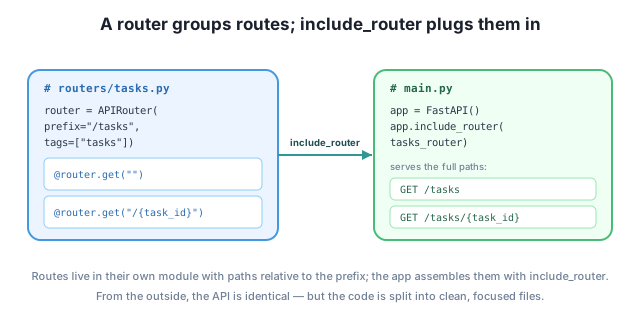
Router paths are relative to the prefix
Inside a router with prefix="/tasks", you write paths relative to that prefix — "" for the collection and "/{task_id}" for one item — and FastAPI prepends /tasks for you. Don’t repeat the prefix in the route (writing @router.get("/tasks") under prefix="/tasks" would give you /tasks/tasks). The tags=["tasks"] you set on the router groups all of its endpoints under one heading in /docs, so related routes stay together in the documentation.
The example above is one file only so it’s easy to run and verify. In a real project, you’d split it: each router goes in its own module inside a routers/ package, and main.py shrinks to a short assembly file that imports and includes them. The behavior is identical — the split is organizational.
A typical Task Manager layout looks like this:
taskmanager/
├── main.py
└── routers/
    ├── __init__.py
    ├── tasks.py
    └── users.py
The routers/ folder is a Python package — the empty __init__.py is what makes Python treat the folder as importable. Each module defines one router. By convention the variable is named router inside its module, because the module name (tasks) already tells you what it’s for:
# routers/tasks.py
from fastapi import APIRouter

router = APIRouter(prefix="/tasks", tags=["tasks"])

@router.get("")
def all_tasks():
    return ["write", "email"]

@router.get("/{task_id}")
def one_task(task_id: int):
    return {"id": task_id}
# routers/users.py
from fastapi import APIRouter
router = APIRouter(prefix="/users", tags=["users"])
@router.get("")
def all_users():
return ["ada", "linus"]
@router.get("/{user_id}")
def one_user(user_id: int):
return {"id": user_id}Now main.py does just one job — create the app and include each router. Because both modules name their router router, you alias them on import to keep things clear:
# main.py
from fastapi import FastAPI
from routers.tasks import router as tasks_router
from routers.users import router as users_router

app = FastAPI()
app.include_router(tasks_router)
app.include_router(users_router)
That’s the whole application. main.py stays a handful of lines no matter how many features you add — to introduce projects tomorrow, you create routers/projects.py and add two lines to main.py. Each feature owns its file, teammates stop colliding, and /docs neatly groups endpoints by tag.
This is the same APIRouter you already verified — the single-file version earlier in this lesson is exactly what the routers/tasks.py plus main.py pair compiles to at runtime. GET /tasks still returns ['write', 'email'], GET /tasks/7 still returns {'id': 7}, and the OpenAPI paths are still /tasks and /tasks/{task_id}. Splitting the code across files changes how you read the project, not how the app behaves.
A router is created with prefix="/projects" and a route is registered as @router.get("/{project_id}"). After app.include_router(...), what full URL answers that route?
Hint
The prefix is prepended to the route’s path, so the route answers at /projects/{project_id} (for example, /projects/42). You write the path relative to the prefix — "/{project_id}" — and FastAPI supplies the /projects part.
A teammate writes router = APIRouter(prefix="/tasks") and then @router.get("/tasks"). They expect the route at /tasks but it isn’t there. What went wrong, and what should the route path be?
Hint
The prefix and the route path are both applied, so the endpoint actually lives at /tasks/tasks. Router paths are relative to the prefix, so for the collection the path should be "" (giving /tasks), not "/tasks".
Following the recommended layout, you need to add comment endpoints. Which file do you create, what would you name its router variable, and how many lines do you add to main.py?
Hint
Create routers/comments.py defining router = APIRouter(prefix="/comments", tags=["comments"]) with its routes. In main.py you add two lines: an import (from routers.comments import router as comments_router) and app.include_router(comments_router). main.py stays short no matter how many features you add.
An APIRouter is a mini FastAPI app that holds a group of related routes in its own module, so your project doesn’t have to live in one ever-growing main.py. You attach routes to a router with the same decorators you’d use on app, give the router a prefix (prepended to every route’s path) and tags (which group its endpoints in /docs), and write each route’s path relative to the prefix — "" for the collection, "/{task_id}" for one item. You verified that a router with prefix="/tasks" serves /tasks and /tasks/{task_id}, with the OpenAPI schema showing the full prefixed paths. Finally, the recommended layout puts each router in a routers/ package and reduces main.py to importing and include_router-ing each one.
APIRouter — a mini app you attach routes to, then include in the main app.prefix= — a path prepended to every route on the router; write routes relative to it.tags= — labels that group a router’s endpoints together in the interactive docs.app.include_router(...) — wires a router’s routes into the application.routers/ package — the standard layout: one module per feature, a thin main.py.Every FastAPI app outgrows a single file, and routers are the universal way to deal with it. Splitting features into their own modules keeps each file small and focused, lets teammates work without colliding, and makes the project structure self-documenting. Because routers behave identically to inline routes — same paths, same docs — adopting them costs nothing in functionality and pays off the moment your app has more than a handful of endpoints. It’s the structure you’ll find in essentially every production FastAPI codebase.
Run code before and after every request with middleware, and let browsers call your API from other origins by enabling CORS.
Return to the Structure, Dependencies, and Middleware module overview
Your Task Manager is no longer trapped in one file — each feature lives in its own router, and main.py just assembles them. Next you’ll add behavior that spans every request: middleware that runs before and after your endpoints, and CORS configuration that lets browser-based front ends talk to your API.