Title here
Summary here
Every HTTP response carries a three-digit status code — a number that tells the client what happened before it reads a single byte of the body. You’ve already seen a few: 200 when things work, 422 when validation fails, 404 when something’s missing. So far FastAPI has chosen these for you. In this lesson you take control: you’ll learn what the codes mean and how to return the right one for each outcome, plus how to send responses that aren’t JSON. Getting status codes right is one of the simplest things that separates a sloppy API from a professional one.
This lesson sets the foundation for the rest of the module — clean errors, forms, and files all build on speaking HTTP clearly.
By the end of this lesson, you will be able to:
status_code on a path operation (e.g. 201 Created)status module instead of memorizing numbers204You’ll build on the endpoints from Modules 1 and 2. Let’s begin.
A status code is grouped by its first digit, and just knowing the families gets you most of the way:
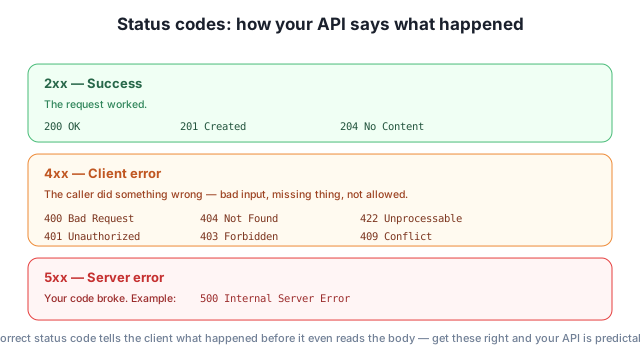
200 OK is the default; 201 Created means a new resource was made; 204 No Content means success with nothing to return.400 Bad Request, 404 Not Found, 422 for invalid data, 401/403 for auth, 409 Conflict for a clash.500 Internal Server Error.The dividing line that matters most: 4xx is the client’s fault, 5xx is yours. Returning the right family is how clients (and you, when debugging) instantly know where a problem lies.
By default FastAPI returns 200 for a successful response. But creating something should return 201 Created. You set that with the status_code argument on the path-operation decorator:
from fastapi import FastAPI

app = FastAPI()

@app.post("/tasks", status_code=201)
def create_task(title: str):
    return {"title": title}
Now a successful POST reports 201 instead of 200:
from fastapi.testclient import TestClient

client = TestClient(app)
response = client.post("/tasks?title=Plan")
print(response.status_code, response.json())
201 {'title': 'Plan'}The body is the same dictionary as always — only the status code changed, and now it accurately says “I created something.” This is the single most common status-code upgrade you’ll make: every “create” endpoint should return 201.
status Module Instead of Magic NumbersWriting 201 works, but status_code=201 doesn’t read as “Created” — and few people remember that 204 means “No Content” or 409 means “Conflict.” FastAPI ships a status module with named constants so your code documents itself:
from fastapi import FastAPI, status

app = FastAPI()

@app.post("/tasks", status_code=status.HTTP_201_CREATED)
def create_task(title: str):
    return {"title": title}

@app.delete("/tasks/{task_id}", status_code=status.HTTP_204_NO_CONTENT)
def delete_task(task_id: int):
    return None
status.HTTP_201_CREATED is exactly the integer 201 — just far more readable. The delete endpoint uses 204 No Content, the right code for “it worked, and there’s deliberately nothing to send back.” Here’s what 204 looks like — note the empty body:
client = TestClient(app)
r = client.delete("/tasks/3")
print(r.status_code, repr(r.text))
204 ''The response has status 204 and a genuinely empty body. A 204 is the conventional answer to a successful delete: the action succeeded, and there’s nothing meaningful to return.
204 means “nothing to return” — on purpose
A 204 No Content response must have an empty body — that’s part of its meaning. So you return None from the function and let the 204 say everything. Don’t try to return data with a 204; if you have data to send back, use 200 or 201 instead.
By default FastAPI converts whatever you return into JSON — the right choice for almost every API. But sometimes you want something else: plain text for a health check, HTML for a page, a file download. You choose with response_class. Here’s a plain-text endpoint:
from fastapi import FastAPI
from fastapi.responses import PlainTextResponse

app = FastAPI()

@app.get("/ping", response_class=PlainTextResponse)
def ping():
    return "pong"
client = TestClient(app)
r = client.get("/ping")
print(r.status_code, repr(r.text), "| content-type:", r.headers["content-type"])200 'pong' | content-type: text/plain; charset=utf-8Because we set PlainTextResponse, the response’s Content-Type is text/plain instead of application/json, and the body is the raw string pong — not "pong" wrapped as JSON. FastAPI offers several response classes (JSONResponse, PlainTextResponse, HTMLResponse, RedirectResponse, FileResponse); you’ll meet FileResponse in Lesson 4. For everyday data APIs, though, the JSON default is exactly what you want.
What status code should each return: (a) a successful POST /tasks that creates a task, (b) a successful DELETE /tasks/5 with nothing to send back, (c) a request for /tasks/999 when no such task exists?
Hint
(a) 201 Created — a new resource was made. (b) 204 No Content — success with an empty body. (c) 404 Not Found — a 4xx because the client asked for something that isn’t there (you’ll raise this with HTTPException in Lesson 2).
Two things go wrong: (a) a client sends {"title": 123} where a string is required; (b) your code calls int("oops") and crashes. Which status-code family does each fall into, and whose fault is each?
Hint
(a) is 4xx (specifically 422) — the client sent bad data. (b) is 5xx (500) — your code broke. The first digit tells everyone whose problem it is: 4xx = caller, 5xx = server.
Rewrite status_code=409 using the status module, and say in plain English what 409 means.
Hint
Use status_code=status.HTTP_409_CONFLICT (after from fastapi import status). 409 Conflict means the request clashes with the current state — for example, trying to create something that already exists.
Every response carries a status code whose first digit tells the client what happened: 2xx success, 4xx the caller’s error, 5xx your server’s error. FastAPI defaults to 200, but you should set the right code per endpoint with status_code= on the decorator — 201 Created for creates, 204 No Content for deletes — and use the readable status module constants instead of bare numbers. You can also pick a response type beyond JSON with response_class (plain text, HTML, files), though JSON remains the default and the right choice for most data APIs.
status_code= — sets the success code for a path operation.status module — readable constants like status.HTTP_201_CREATED.response_class — choose a response type such as PlainTextResponse.Status codes are the vocabulary of HTTP. Clients, browsers, caches, and monitoring tools all make decisions based on them — a frontend shows a “created!” toast on 201, retries on 503, and logs an alert on 500. An API that returns the right codes is predictable and easy to build against; one that returns 200 for everything (including errors) is a constant source of bugs. Mastering this now makes the error handling in the next lesson — and every API you build — far cleaner.
Raise clean, correct errors with HTTPException and write custom handlers for your own error cases.
Return to the HTTP Done Right module overview
You can now make your API say exactly what happened with the right status code and response type. Next you’ll handle the unhappy paths properly — raising clean 404s and other errors with HTTPException, and defining custom handlers for your own kinds of failures.