Title here
Summary here
In Module 1 your API only handed data out. Real applications also take data in: a client sends “here’s a new task,” and your API has to receive it, check it’s valid, and act on it. That incoming data is called a request body, and it almost always arrives as JSON. The question is how to read it safely — how do you know the client actually sent a title, that done is a true/false and not the word “maybe”? FastAPI’s answer is Pydantic: you describe the shape of the data once as a class, and FastAPI parses, validates, and hands it to you as a ready-to-use Python object.
This lesson is your first taste of accepting data. The rest of the module adds constraints, nesting, and output shaping.
By the end of this lesson, you will be able to:
You’ll build on the endpoints from Module 1. Let’s begin.
When a client reads data, the request needs almost nothing — just a URL. But when a client sends data — creating a task, signing up, posting a comment — it includes a request body: a chunk of data, almost always JSON, carried with the request. Reading happens with GET; sending data to create something happens with POST.
So to let someone create a task, you need a POST endpoint that reads the JSON body. The challenge is trust: the body is just text off the network. Before you store it or act on it, you need to know it has the right fields, with the right types. Writing that checking by hand is tedious and easy to get wrong — which is exactly the job Pydantic takes off your hands.
A Pydantic model is a class that describes the shape of some data. You write it by subclassing BaseModel and listing the fields as type-hinted attributes. Here’s a model for a task:
from pydantic import BaseModel

class Task(BaseModel):
    title: str
    done: bool = False
    priority: str = "medium"
Read it like a contract. title: str is required and must be a string — it has no default, so a request without it is invalid. done: bool = False and priority: str = "medium" have defaults, which makes them optional: if the client omits them, they fall back to those values. That single class now defines exactly what a valid task looks like.
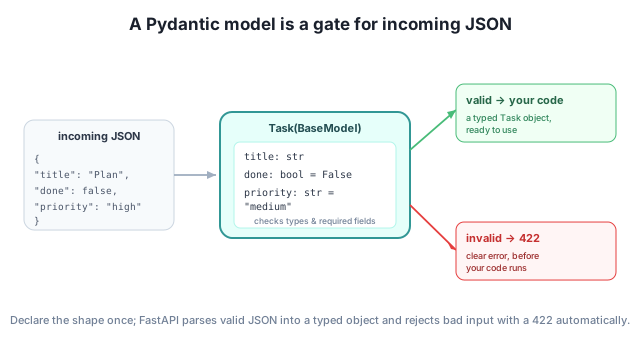
To receive a request body, you add a parameter to your endpoint function and annotate it with your model. FastAPI sees that the type is a Pydantic model and knows to read it from the request body (not the URL):
from fastapi import FastAPI
from pydantic import BaseModel

app = FastAPI()

class Task(BaseModel):
    title: str
    done: bool = False
    priority: str = "medium"

@app.post("/tasks")
def create_task(task: Task):
    return {"received": task.model_dump()}
Inside the function, task is a fully-formed Task object — you can read task.title, task.done, and so on. The task.model_dump() call turns the model back into a plain dictionary (handy for returning or storing). Let’s send it a body and see what comes back. When you send only a title, the defaults fill in the rest:
from fastapi.testclient import TestClient

client = TestClient(app)
print(client.post("/tasks", json={"title": "Write the report"}).json())
print(client.post("/tasks", json={"title": "X", "done": True, "priority": "high"}).json())
{'received': {'title': 'Write the report', 'done': False, 'priority': 'medium'}}
{'received': {'title': 'X', 'done': True, 'priority': 'high'}}The first request omitted done and priority, so Pydantic filled in False and "medium". The second supplied all three. Either way, your function received a clean, complete Task. (We’re using FastAPI’s TestClient to call the endpoint from code, exactly as in Module 1 — no running server needed.)
Here’s the payoff. Because you declared the types, FastAPI validates every request body against the model before your function runs — the same automatic checking you saw for path and query parameters, now for whole JSON objects. Send something invalid and you get a clear 422 instead of a crash:
# title is required but missing
print(client.post("/tasks", json={"done": True}).status_code)
print(client.post("/tasks", json={"done": True}).json()["detail"][0]["type"])

# done must be a bool, not arbitrary text
print(client.post("/tasks", json={"title": "X", "done": "yes please"}).status_code)
422
missing
422The first request left out the required title, so FastAPI rejected it with a 422 and an error whose type is "missing". The second sent "yes please" where a boolean belongs, and was rejected too. Your endpoint code never ran in either case — invalid data simply never reaches it. That’s the guarantee a Pydantic model gives you: inside your function, the data is already valid.
Pydantic is the engine under FastAPI
Pydantic isn’t a FastAPI invention — it’s a standalone, widely used Python library for data validation, and FastAPI is built on top of it. Everything you learn about Pydantic models here applies anywhere Pydantic is used. In FastAPI, the same model can validate input and describe your data in the automatic /docs page.
In the Task model, which fields are required and which are optional, and what decides that? What would you change to make priority required?
Hint
title is required (no default); done and priority are optional (they have defaults). A field is required exactly when it has no default value. To make priority required, remove its = "medium" default, leaving priority: str.
Using the create_task endpoint, what JSON comes back from POST /tasks with body {"title": "Email the team", "done": true}? Which field falls back to a default?
Hint
You get {"received": {"title": "Email the team", "done": true, "priority": "medium"}}. priority wasn’t sent, so it defaults to "medium"; title and done use the supplied values.
Which of these bodies are rejected with a 422, and why: (a) {"title": "X"}, (b) {"title": 123}, (c) {}?
Hint
(a) is valid — only title is required and it’s a string. (b) is rejected: title must be a string, not a number. (c) is rejected: title is missing. FastAPI checks all of this before your function runs.
A request body is the JSON data a client sends when it wants your API to accept something, typically with a POST. You describe its shape with a Pydantic model — a BaseModel subclass whose type-hinted fields define what’s required (no default) and what’s optional (has a default). Annotate an endpoint parameter with the model, and FastAPI reads the body, validates it against the model, and hands your function a clean typed object — or returns a 422 with a clear error before your code ever runs. You read the data with attributes like task.title and convert back with model_dump().
BaseModel subclass describing the shape of data.model_dump() — turns a model instance back into a plain dictionary.422 before your code runs.Accepting data is what turns a read-only API into a real application — creating accounts, posting content, submitting orders all depend on it. Pydantic models give you that for free and safely: you describe the data once, and you never again write manual “is this field present? is it the right type?” checks. This same model will power validation, documentation, and output shaping throughout the rest of the course.
Add rules to your fields — lengths, numeric ranges, and custom validators — so only sensible data gets through.
Return to the Request Bodies and Pydantic module overview
Your API can now accept data and trust its shape. Next you’ll tighten that trust with field constraints and custom validators — rules like “a title can’t be empty” and “an estimate can’t be negative” — so only sensible data ever makes it through.