Title here
Summary here
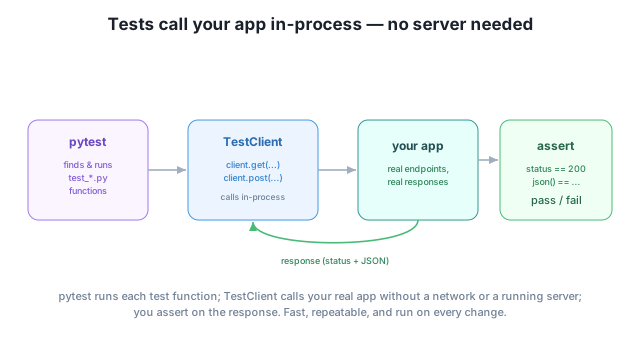
You’ve been verifying your endpoints by hand all course — calling them, eyeballing the output. That works while you’re building, but it doesn’t scale and it doesn’t last: the moment you change one thing, you’d have to re-check everything by hand to be sure you didn’t break something else. Automated tests solve this. You write small functions that call your endpoints and assert what they should return; then a single command runs them all in a fraction of a second, every time you change the code. FastAPI makes this delightful because its TestClient calls your app in-process — no running server, no network — so tests are fast and simple.
This first lesson of the final module gives your API the safety net that makes it shippable.
By the end of this lesson, you will be able to:
pytest and TestClientYou’ve used TestClient informally already; now you’ll use it for real. Let’s begin.
A test is just code that checks your code. Instead of manually hitting /tasks/1 and reading the output, you write a function that calls it and asserts the result is what you expect. The payoff compounds:
test_get_task_not_found is executable documentation of what your API promises.For a hobby script you might skip this. For anything you deploy, automated tests are the difference between “I think it works” and “I know it works.” They’re a hallmark of professional code.
Two tools do the work. pytest is the standard Python test runner: it discovers files named test_*.py, runs every function named test_*, and reports which passed. TestClient (which you’ve seen) wraps your FastAPI app and lets you call it like an HTTP client — but in-process, with no server.
Install pytest alongside FastAPI:
pip install pytestYou already have httpx (it backs TestClient) from installing fastapi[standard] earlier in the course.
Say this is your app, in main.py:
from fastapi import FastAPI, HTTPException

app = FastAPI()
TASKS = {1: "Write the report"}

@app.get("/tasks/{task_id}")
def get_task(task_id: int):
    if task_id not in TASKS:
        raise HTTPException(status_code=404, detail="Task not found")
    return {"id": task_id, "title": TASKS[task_id]}
Put your tests in test_main.py next to it. Each test creates a TestClient, calls an endpoint, and asserts the result — one test for the happy path, one for the error path:
from fastapi.testclient import TestClient
from main import app

client = TestClient(app)

def test_get_task_ok():
    response = client.get("/tasks/1")
    assert response.status_code == 200
    assert response.json() == {"id": 1, "title": "Write the report"}

def test_get_task_not_found():
    response = client.get("/tasks/999")
    assert response.status_code == 404
    assert response.json() == {"detail": "Task not found"}
Each function is a tiny, focused check: call, then assert. The assert statement is plain Python — if the expression is false, the test fails and pytest shows you exactly what differed.
From the folder containing both files, run pytest:
pytest -vtest_main.py::test_get_task_ok PASSED [ 50%]
test_main.py::test_get_task_not_found PASSED [100%]
========================= 2 passed in 0.13s =========================Both tests passed in a fraction of a second — no server started, no requests over a network. That speed is the whole point: a suite this fast is one you’ll actually run on every change. From here you scale up — more endpoints, more tests, the same pattern — and you can wire pytest into a pre-commit hook or CI so it runs automatically before code ever ships.
Test the error paths, not just the happy path
Beginners test only what should succeed. The bugs live in the edges: the 404 when something’s missing, the 401 without a token, the 422 on bad input. Asserting those error responses is often more valuable than asserting the success case — they’re exactly the behaviors that quietly break during a refactor.
TestClient calls your app without starting a server or using the network. Why does that matter for a test suite you run dozens of times a day?
Hint
In-process calls are fast and deterministic — no port to bind, no network latency or flakiness, nothing to start or stop. That makes the whole suite run in well under a second, so running it constantly (on every save, every commit) is painless.
The get_task endpoint expects an integer task_id. Write a test asserting that GET /tasks/abc returns a 422. Why that status?
Hint
def test_get_task_bad_id(): assert client.get("/tasks/abc").status_code == 422. It’s 422 because task_id: int can’t parse "abc" — FastAPI’s validation rejects it before your code runs (the same behavior you saw back in path parameters).
You add a function check_health() to test_main.py but pytest never runs it. Why, and what’s the fix?
Hint
pytest only collects functions whose names start with test_. check_health doesn’t match, so it’s ignored. Rename it test_health and pytest will discover and run it.
Automated tests are code that checks your code — your safety net for catching regressions, documenting behavior, and refactoring without fear. With pytest (the runner that discovers test_*.py files and test_* functions) and TestClient (which calls your app in-process, no server or network), testing FastAPI is fast and simple: create a client, call an endpoint, and assert on the status_code and json(). Test the error paths as much as the happy path, and run the suite on every change.
test_* functions and reports pass/fail.404/401/422, not just 200.Tests are what let you ship and keep shipping. A tested API can be changed, refactored, and extended with confidence, because the suite tells you instantly if something broke — which is why automated testing is expected on any professional team and a standard part of deploying through CI. This is also the foundation for the capstone: you’ll write a real test suite for the complete Task Manager before you deploy it.
Manage settings and secrets with pydantic-settings — load configuration from environment variables and keep keys out of your code.
Return to the Testing, Settings, Deployment, and Capstone module overview
You can now prove your API works with a fast, automated test suite — the safety net that makes everything else in this module possible. Next you’ll handle configuration the right way: loading settings and secrets from the environment with pydantic-settings, so your app is configurable and your keys never live in code.