Title here
Summary here
So far, you have been in charge of the steps. In Module 3 you ran a single tool round-trip; in Module 7 you decided the order — retrieve, then generate. An agent hands that control to the model. You give it a goal and some tools, and it decides what to do: which tool to call, what to do with the result, and whether it’s finished. It runs in a loop — think, act, observe — until the task is solved. That shift, from you scripting the steps to the model choosing them, is the whole idea behind agents.
This lesson is about what an agent actually is, shown on a real example. The next lessons build the loop properly and add memory, retrieval, and planning.
By the end of this lesson, you will be able to:
You’ll build on tool use from Module 3. Let’s begin.
The word “agent” gets used loosely, so here is a sharp definition. A workflow is a sequence of steps you write: do A, then B, then C. Your Module 7 RAG pipeline was a workflow — it always retrieved, then always generated, in that fixed order. That’s perfect when you know the steps in advance.
An agent is different: the model decides the steps at runtime. You don’t write “retrieve then generate.” You give the model a goal and a toolbox and let it work out the path — maybe it uses one tool, maybe five, maybe none, in whatever order the problem demands. The defining feature is model-driven control flow: the loop’s decisions come from the model, not from your code.
This makes agents the right choice when a task is open-ended or its steps can’t be fully specified ahead of time — and the wrong choice when a simple, predictable workflow would do. Agents cost more and are harder to predict; reach for one only when the flexibility is worth it.
Every agent, no matter how sophisticated, runs the same cycle:
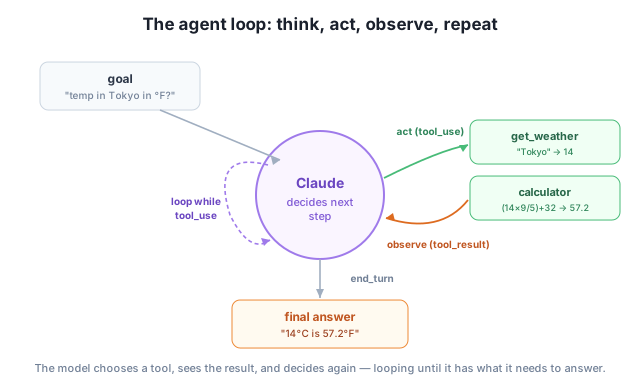
tool_use request, exactly like Module 3).tool_result.The loop repeats: each observation becomes new context for the next decision. It ends when the model stops asking for tools — stop_reason flips from tool_use to end_turn — and writes its answer. The driver of your program is literally while the model wants a tool: run it and loop.
Let’s watch this happen. We give the model two tools — a get_weather lookup and a calculator — and one goal that needs both: “What is the temperature in Tokyo right now, and what is that in Fahrenheit?” Neither tool alone answers it; the model has to plan a sequence. Here is the real trajectory it produced:
--- step 1: stop_reason=tool_use ---
  text: I'll get the current temperature in Tokyo and convert it to Fahrenheit for you.
  tool_use: get_weather({'city': 'Tokyo'})
  -> result: 14
--- step 2: stop_reason=tool_use ---
  text: Now let me convert 14°C to Fahrenheit using the formula: (C × 9/5) + 32
  tool_use: calculator({'expression': '(14 * 9/5) + 32'})
  -> result: 57.2
--- step 3: stop_reason=end_turn ---
  text: The current temperature in Tokyo is **14°C**, which is equivalent to **57.2°F**.
Look carefully at what the model did on its own. Nobody told it to call the weather tool first. Nobody told it to then call the calculator, or what expression to compute. It planned a two-step sequence: get the temperature, feed that number into a conversion, then answer. Step 1 and step 2 each stopped with tool_use (the model wanted to act); step 3 stopped with end_turn (it was done). That is the loop running for real — three turns, two tools, one goal — and it’s the same pattern whether an agent makes two calls or two hundred.
The result of one step becomes the input to the next
Notice the 14 from step 1 reappears inside the calculator expression in step 2. The agent carried an observation forward and used it to choose its next action. That ability — to let what it saw shape what it does next — is exactly what makes the behavior “agentic” rather than a fixed script.
Classify each as an agent or a fixed workflow: (a) a script that always summarizes a document then translates the summary; (b) a system you ask “find out why our error rate spiked and suggest a fix,” which decides on its own what logs to read and what to compute. Explain the difference.
Hint
(a) is a workflow — the steps (summarize → translate) are fixed by you. (b) is an agent — you give a goal and it decides which tools/steps to use. The line is whether you or the model chooses the control flow.
In the trajectory above, steps 1 and 2 ended with stop_reason == "tool_use" but step 3 ended with end_turn. What does each value tell your loop to do?
Hint
tool_use means the model wants you to run a tool and feed the result back — so the loop continues. end_turn means the model is finished — so the loop stops and you take its final text. That single check is what drives the whole agent.
The goal needed both get_weather and calculator. What would happen if you offered only the calculator? Would the model be able to complete the task, and what does that tell you about choosing an agent’s tools?
Hint
With only a calculator the agent couldn’t get the live temperature, so it couldn’t finish (it would have to guess or admit it can’t). An agent is only as capable as the tools you give it — designing the toolbox is part of designing the agent.
An agent is a language model running in a loop with tools, where the model decides the steps instead of you scripting them — model-driven control flow. Each turn it thinks (decides the next action), acts (calls a tool with a tool_use request), and observes (your code returns a tool_result), repeating until it stops asking for tools (end_turn) and answers. You saw a real agent plan a two-step sequence on its own — look up Tokyo’s temperature, then convert it with a calculator — carrying the result of one step into the next. That self-directed chaining is what separates an agent from a fixed workflow.
Agents are the architecture behind coding assistants, research tools, and autonomous workflows — anything that has to figure out its own steps. Understanding the think-act-observe loop, and when an agent is the right tool versus an over-engineered one, is the foundation for everything in this module and for the frameworks (like LangGraph) you’ll use to build production agents next.
Build the think-act-observe loop by hand: run tools, feed results back, and loop until the agent is done.
Return to the Building AI Agents module overview
You’ve seen what an agent is and watched one chain tools to solve a task on its own. Next you’ll build that loop yourself — the compact piece of code that turns a single model call into an agent that keeps working until the job is done.