Title here
Summary here
Type “How do I reset my password?” into a keyword search and a help center that only stores the sentence “I forgot my login credentials” will find nothing — the two sentences share no important words, yet they mean almost the same thing. Embeddings are how we fix that. An embedding turns a piece of text into a list of numbers — a vector — built so that texts with similar meaning produce similar vectors. Once meaning is a position in space, “find related text” becomes “find nearby points,” and search starts to understand what you meant, not just what you typed.
This lesson is about the idea. The next lessons get hands-on with generating embeddings, measuring similarity, and building a search engine.
By the end of this lesson, you will be able to:
You’ll just read and look at one real example here — no setup required. Let’s begin.
Computers don’t compare meaning; they compare numbers. So the entire trick is to convert text into numbers in a way that preserves meaning. An embedding does exactly that: it maps a piece of text to a fixed-length vector — say 384 numbers — where each number is one coordinate. The vector itself isn’t meant to be read by a human; what matters is where it lands relative to other vectors. Two sentences about resetting a password land near each other; a sentence about the weather lands far away.
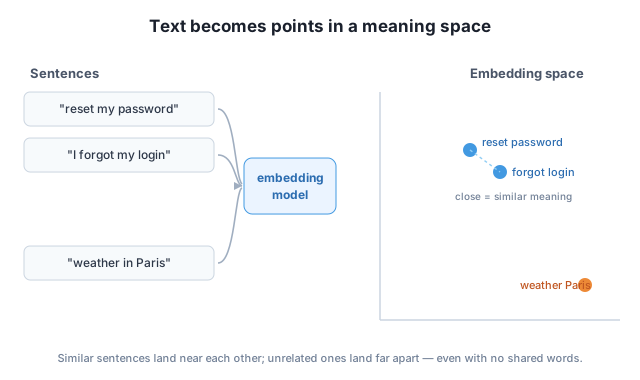
The key shift in thinking: an embedding doesn’t store words, it stores position. “I forgot my login” and “How do I reset my password?” have almost no words in common, but a good embedding model places them close together because it learned, from enormous amounts of text, that they’re used in the same situations. That’s why embeddings can match meaning that keyword search misses entirely.
Here’s an actual embedding, produced by a small open model called all-MiniLM-L6-v2 (you’ll install and run it yourself in Lesson 2). We embed one short sentence and look at the result:
from sentence_transformers import SentenceTransformer

model = SentenceTransformer("all-MiniLM-L6-v2")
vector = model.encode("The cat sat on the mat.")

print("dimensions:", vector.shape[0])
print("first 5 numbers:", vector[:5].round(4).tolist())
dimensions: 384
first 5 numbers: [0.1302, -0.0158, -0.0367, 0.058, -0.0598]So this model represents any piece of text — a word, a sentence, a paragraph — as 384 numbers. That length is fixed: a one-word query and a long sentence both come out as 384 numbers, which is what lets us compare them directly. The individual values (around 0.13, −0.016, …) aren’t meaningful on their own. Their pattern is what encodes meaning, and the pattern is what we’ll compare in the next lesson.
Different models, different dimensions
The number 384 is specific to this model. Other embedding models output 768, 1024, or 1536 numbers. More dimensions can capture finer distinctions but cost more to store and compare. What matters is that within one model, every text is the same length — so any two can be compared.
Once every sentence is a point in the same 384-dimensional space, “are these two texts related?” becomes a geometry question: how close are their points? We’ll make “close” precise in Lesson 3, but the behavior is easy to see. Embed three sentences and compare how similar each pair is (1.0 means identical direction, 0.0 means unrelated):
sentences = [
    "How do I reset my password?",          # 0
    "I forgot my login credentials.",        # 1
    "What's the weather like in Paris?",     # 2
]
# (similarity computed from the embeddings — you'll write this in Lesson 3)
password vs login : 0.68
password vs weather : 0.02
login vs weather : 0.06Look at what happened. The two account sentences score 0.68 — strongly similar — despite sharing none of the same key words. Either one paired with the weather sentence scores near zero. The model captured meaning, not vocabulary. A keyword search would have rated “password” and “login” as completely unrelated; the embedding rates them as close cousins.
This is the whole promise of embeddings, and you saw it on real numbers: meaning becomes distance, so finding related text becomes finding nearby points.
Embeddings are one of the most reusable tools in all of applied AI. The same “turn text into comparable vectors” move powers:
Every one of these rests on the idea in this lesson: meaning becomes a position, and similar meanings sit close together.
Given these three sentences — (a) “Where is my package?”, (b) “How do I track my order?”, (c) “Do you sell gift cards?” — which two would you expect to have the highest similarity, and why? What does that tell you about how embeddings group text?
Hint
(a) and (b) both ask about the location/status of an order, so they’d embed close together even though they share no key words. (c) is about a different topic and would sit far from both. Embeddings group by meaning, not shared vocabulary.
A user searches a help center for “can’t sign in” but every article uses the phrase “login problems.” Explain in one or two sentences why keyword search returns nothing useful, and how an embedding-based search would behave differently.
Hint
Keyword search looks for the literal words “sign in,” which don’t appear in the article, so it finds nothing. An embedding maps “can’t sign in” and “login problems” to nearby vectors because they mean the same thing, so semantic search surfaces the right article.
The lesson said a one-word query and a long sentence both become 384 numbers. Why is it important that every text — regardless of length — produces a vector of the same length?
Hint
To compare two vectors (measure their distance or similarity) they must have the same number of dimensions. A fixed length means any two pieces of text — short query vs. long document — can be compared directly in the same space.
An embedding turns text into a fixed-length vector of numbers built so that texts with similar meaning produce nearby vectors. The individual numbers aren’t meaningful on their own — what matters is position: related sentences land close together, unrelated ones land far apart, even when they share no words. You saw a real 384-dimensional embedding from all-MiniLM-L6-v2, and watched two account-help sentences score 0.68 similar while either scored near 0 against a weather sentence. Turning meaning into distance is what makes semantic search, RAG, recommendations, and clustering possible.
all-MiniLM-L6-v2); fixed within a model.Embeddings are the foundation for the next several modules. Vector databases store and search them at scale; retrieval-augmented generation uses them to feed a model the right context from your own data. Understanding that meaning becomes distance is the mental model everything else builds on.
Install sentence-transformers and generate real embeddings in Python — locally, for free, with no API key.
Return to the Embeddings & Semantic Search module overview
You now understand what an embedding is and why nearby points mean similar text. Next you’ll generate embeddings yourself — installing sentence-transformers, encoding text, and inspecting the real vectors that make all of this work.