Title here
Summary here
For the last several modules you built everything by hand — prompt wiring, a RAG pipeline, the agent loop, tool dispatch, memory. That was the right way to learn: you now know exactly what each of those systems does and why. But in a real project you rarely rebuild that plumbing every time. LangChain and LangGraph package those exact pieces as reusable building blocks. The question this lesson answers is: what do they give you, and when should you actually use one?
This lesson is about the why, with one small working example. The next lessons go hands-on with chains, RAG, and agents.
By the end of this lesson, you will be able to:
We’re on LangChain 1.x and LangGraph 1.x. Let’s begin.
The two libraries solve two different problems, and they’re designed to work together.
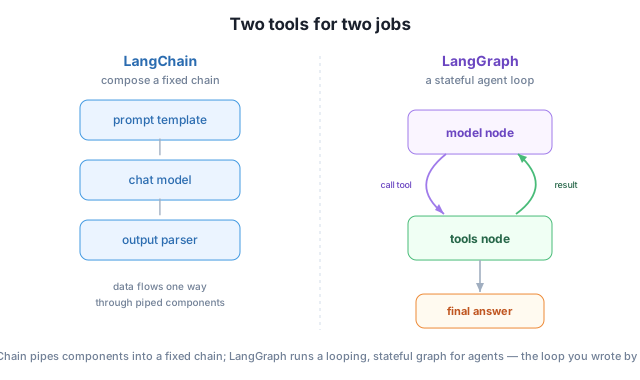
A useful way to hold it: LangChain is for chains, LangGraph is for agents. You met chains (RAG) in Module 7 and agents (the loop) in Module 8 — now you’ll build both with frameworks that you already understand from the inside.
LangChain’s signature is the LangChain Expression Language (LCEL): you connect components with the | (pipe) operator, and the output of each flows into the next. It reads left to right, just like a Unix pipe. Here is a complete chain — a prompt template, the Claude chat model, and a parser that pulls out the plain text:
from langchain_anthropic import ChatAnthropic
from langchain_core.prompts import ChatPromptTemplate
from langchain_core.output_parsers import StrOutputParser

model = ChatAnthropic(model="claude-haiku-4-5", max_tokens=100)
prompt = ChatPromptTemplate.from_messages([
    ("system", "You are a terse assistant. Answer in one sentence."),
    ("human", "Explain {topic} to a beginner."),
])

chain = prompt | model | StrOutputParser()
print(chain.invoke({"topic": "embeddings"}))
Embeddings are numerical representations of words or objects that capture their
meaning, so similar things have similar numbers and can be compared mathematically.Read the chain literally: the {topic} fills the prompt, the filled prompt goes to the model, and the model’s reply goes through StrOutputParser() to come out as a clean string. Swapping any piece — a different prompt, a different model, a JSON parser — is a one-line change, and every component speaks the same invoke() interface. That uniformity is the core of what LangChain buys you.
You already know what this does
This chain is the same “fill a prompt, call the model, read the text” flow you wrote directly with the Anthropic SDK in earlier modules. The framework didn’t add new capability — it gave you a compact, swappable way to express it. That’s the theme of this whole module: recognize the plumbing you built by hand, now provided for you.
Frameworks are not free. They add a dependency, a learning curve, and a layer of abstraction between you and the API. Use that trade deliberately.
Reach for LangChain/LangGraph when:
Prefer the raw SDK when:
The honest rule: a framework earns its place when it removes more complexity than it adds. Because you built these systems by hand first, you’re in the best possible position to judge that — you can always see what the framework is doing under the hood, and drop down to the SDK whenever it’s clearer.
For each, say whether LangChain (a fixed chain) or LangGraph (a stateful agent loop) fits better: (a) summarize a document, then translate the summary; (b) answer “investigate why signups dropped and propose a fix,” deciding its own steps. Why?
Hint
(a) is a fixed two-step pipeline → LangChain chain. (b) needs the model to choose its own steps and loop → LangGraph agent. The dividing line is the same as Module 8: fixed steps versus model-decided control flow.
In chain = prompt | model | StrOutputParser(), what does each | pass along, and what type comes out at the very end?
Hint
The first | passes the filled prompt (messages) to the model; the second passes the model’s reply (an AIMessage) to the parser. StrOutputParser() returns a plain Python string — the message’s text content.
You need a function that labels a support email as “urgent” or “normal” — one model call, no retrieval, no tools. Framework or raw SDK? Justify it.
Hint
Raw SDK. It’s a single call with no components to compose, so a framework would add dependencies and indirection for no benefit. Frameworks pay off when you’re wiring many pieces together, not for one isolated call.
LangChain gives you reusable components (models, prompts, parsers, loaders, splitters, retrievers) and the LCEL pipe (|) to compose them into a fixed chain; LangGraph gives you stateful, looping graphs for agents — the think-act-observe loop, plus memory, provided for you. The slogan to remember is LangChain for chains, LangGraph for agents. You saw a real three-component chain run on Claude in a few lines, and learned the deliberate trade-off: frameworks pay off when you’re composing many parts, while a single call is still best with the raw SDK. Having built these systems by hand, you can now use a framework with full understanding of what it’s doing.
| pipe syntax that composes components into a chain.invoke() — the uniform call interface every component shares.LangChain and LangGraph are the most common frameworks in production LLM engineering — knowing them is a practical job skill. More importantly, you’re learning them after building the same systems by hand, so you’ll use them with judgment instead of treating them as magic. That combination — understanding the internals and the framework — is exactly what separates someone who can ship reliable LLM applications from someone who can only glue tutorials together.
Work with chat models, prompt templates, and LCEL chains in depth — the building blocks of every LangChain app.
Return to the LangChain & LangGraph module overview
You now know what LangChain and LangGraph give you and when to use them. Next you’ll get hands-on with LangChain’s core building blocks — chat models, prompt templates, and chains — and compose them into something useful.