Title here
Summary here
In Module 3 you gave a model tools by writing schemas and running the tool-use loop yourself. It worked — but think about what happens at scale. Every team writes its own integration to the same GitHub, the same database, the same file system. A tool you build for your chatbot can’t be reused by your IDE or by Claude Desktop, because each app has its own private way of defining tools. That duplicated effort is exactly the problem the Model Context Protocol (MCP) was created to solve.
This lesson is about the idea and the architecture. The next lessons get hands-on.
By the end of this lesson, you will be able to:
There’s no setup yet — just one quick look at a server’s tools. Let’s begin.
Before MCP, connecting an AI application to an external capability meant writing a custom integration for that app. If you wanted three apps (a chatbot, an IDE assistant, an automation script) to all read your company wiki, you wrote three different integrations to the same wiki. Worse, every tool provider had to support every app’s format. The result was an N × M problem: N applications times M tools, each pairing built by hand.
MCP replaces that with a single open standard. A tool provider writes one MCP server; any MCP client can use it. It is often described as “USB-C for AI tools” — one connector, and everything that speaks the protocol just works together. Build a server for your wiki once, and Claude Desktop, your IDE, and your own Python program can all use it, unchanged.
MCP has three roles. Keep them straight and everything else follows.
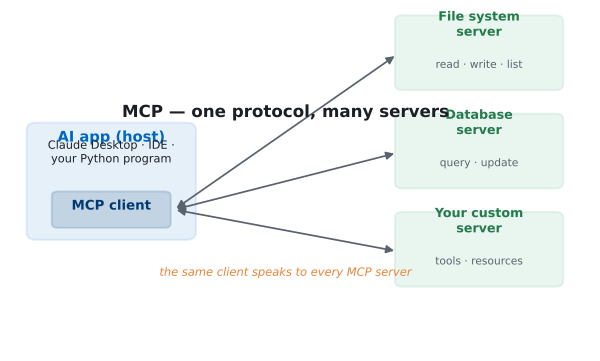
The model never connects to a server directly. The host’s client connects, discovers what the server offers, and makes those capabilities available to the model — the same control boundary you learned in Module 3, now standardized.
An MCP server can offer three kinds of things:
Tools are the part you’ll use most, and they behave just like the tools from Module 3 — a name, a description, and an input schema. Here is what it looks like when a client connects to a small server and asks what tools it provides:
=== MCP tools discovered ===
  add: Add two numbers and return the sum.
  word_count: Count the number of words in a piece of text.
That list came from a real server over MCP — the client didn’t know these tools in advance; it discovered them by asking. That discovery step is the heart of the protocol: a client can connect to a server it has never seen and immediately learn what it can do. You’ll write exactly this connection in Lesson 2.
MCP doesn’t replace tool use — it standardizes it
Everything you learned in Module 3 still applies. MCP doesn’t change how a model uses a tool (it still asks, you still execute). It standardizes where tools come from and how they’re discovered, so the same tool works across every MCP-compatible app instead of being locked to one codebase.
The payoff of a standard is leverage. When you build an MCP server for your data:
This is why MCP matters for engineering, not just convenience: it turns integrations from one-off glue code into reusable infrastructure.
For each of these, name whether it’s a host, a client, or a server: (a) Claude Desktop, (b) a program that wraps your company’s Postgres database for AI use, (c) the connection object inside an IDE that talks to that database program.
Hint
(a) is the host (the app the user interacts with), (b) is a server (it exposes a capability), (c) is a client (the connector inside a host that speaks to one server).
You’re designing an MCP server for a notes app. Which of these should be a tool and which a resource: “create a new note”, “read the text of note #42”? Why?
Hint
“Create a new note” does something (an action) → a tool. “Read the text of note #42” provides context the app can load → a resource. Tools act; resources are read.
Without MCP, connecting 4 AI apps to 5 tools by hand is how many integrations? With MCP, how many servers and clients do you build instead? What does that tell you about why the standard scales?
Hint
Without MCP it’s up to 4 × 5 = 20 custom integrations. With MCP you write 5 servers (one per tool) and each app has clients that speak the same protocol — the M×N problem collapses to M + N.
MCP is an open standard that lets any AI application connect to any tool or data source through one protocol — “USB-C for AI tools.” It replaces the N × M tangle of custom integrations with servers that expose capabilities and clients (inside hosts) that consume them. A server can offer tools (actions), resources (readable context), and prompts (templates), and a client discovers them at connection time. The win is reuse: build a server once, and every MCP-compatible app can use it.
As AI apps multiply, integrations become the bottleneck. MCP turns them into reusable infrastructure — which is why major AI tools have adopted it. Understanding the host/client/server model is the foundation for connecting Claude to the real systems your applications depend on.
Write a Python MCP client: spawn a server, discover its tools, and call them.
Return to the Model Context Protocol module overview
You now know what MCP is and the roles that make it work. Next you’ll connect to a real MCP server from Python — discovering and calling its tools exactly the way a host does under the hood.