Title here
Summary here
A language model is frozen at training time. It can’t see your company’s documents, today’s data, or anything private — so when you ask about them, it either refuses or, worse, makes something up. Retrieval-augmented generation (RAG) is the fix, and it’s the most important pattern in applied LLM engineering. The idea is simple: before the model answers, you retrieve the most relevant pieces of your own knowledge base — using the embeddings and vector database you built in the last two modules — and put them in the prompt. The model then answers from those facts instead of from memory.
This lesson is about the idea, shown end-to-end on real output. The next lessons build each piece properly.
By the end of this lesson, you will be able to:
You’ll bring together Chroma (Module 6) and the Claude API (earlier modules). Let’s begin.
You already know a model can’t access live or private information. Ask it about your return policy and it has two bad options: admit it doesn’t know, or guess. Plain semantic search (Module 5/6) has the opposite problem — it can find the right document, but it hands you a raw passage, not an answer. You wanted “you have 30 days”; search gives you the whole policy paragraph and leaves you to read it.
RAG combines the strengths of both. Search is good at finding relevant text; a language model is good at reading text and answering in natural language. Put them in sequence and you get a system that finds your facts and answers from them.
Every RAG system, from a weekend project to a production product, is the same three steps:
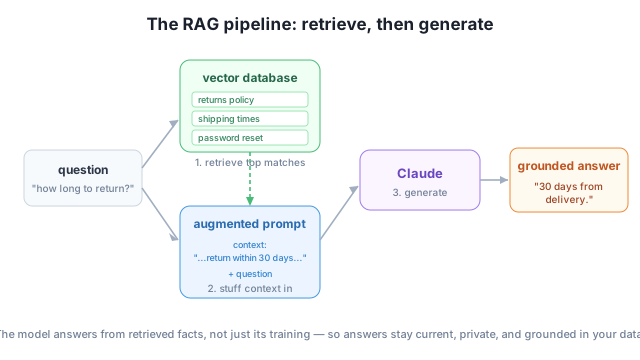
The model never had your data in training. You gave it the relevant slice, just in time, in the prompt.
Let’s run the whole thing once. We have a small knowledge base already stored in Chroma (you built one in Module 6). First, retrieve the documents most relevant to the question:
import chromadb

client = chromadb.Client()
collection = client.get_or_create_collection(name="knowledge_base")
collection.add(
    documents=[
        "You can return any unused item within 30 days of delivery for a full refund.",
        "Standard shipping takes 3-5 business days; express arrives in 1-2 days.",
        "We ship to over 60 countries worldwide.",
        "To reset your password, go to the sign-in page and click Forgot password.",
    ],
    ids=["d0", "d1", "d2", "d3"],
)

question = "How many days do I have to return something?"
results = collection.query(query_texts=[question], n_results=2)
retrieved = results["documents"][0]
for doc in retrieved:
    print("-", doc)
- You can return any unused item within 30 days of delivery for a full refund.
- Standard shipping takes 3-5 business days; express arrives in 1-2 days.Retrieval pulled the return-policy sentence to the top. Now augment a prompt with that context and generate an answer with Claude:
import anthropic

context = "\n".join(f"- {doc}" for doc in retrieved)
prompt = (
    "Answer the question using ONLY the context below. "
    "If the answer is not in the context, say you don't know.\n\n"
    f"Context:\n{context}\n\nQuestion: {question}"
)

client = anthropic.Anthropic()  # reads ANTHROPIC_API_KEY from your environment
response = client.messages.create(
    model="claude-haiku-4-5",
    max_tokens=150,
    messages=[{"role": "user", "content": prompt}],
)
print(response.content[0].text)
You have 30 days from delivery to return any unused item for a full refund.That’s RAG. The model gave a clean, correct, natural-language answer — drawn entirely from the document you retrieved, not from its training. Search found the fact; the model turned it into an answer.
Grounding is the whole point
The instruction “answer using ONLY the context” is what grounds the model in your data. It tells the model to rely on the supplied facts rather than its own memory — which is how RAG keeps answers accurate and lets the model admit when it doesn’t know. You’ll make grounding robust in Lesson 4.
The real test of RAG is what happens when the answer isn’t in your data. A bare model tends to invent something plausible. A grounded RAG system declines. Ask the same setup a question the knowledge base can’t answer:
question = "What is your CEO's name?"
# (retrieve, build the same grounded prompt, then generate)
I don't know. The information about the CEO's name is not included in the
provided context.This is exactly the behavior you want. Because the model was told to answer only from the retrieved context — and the context has nothing about a CEO — it refuses instead of hallucinating. That honesty is what makes RAG trustworthy enough to put in front of users, and it’s why “retrieve, then generate” has become the default architecture for question-answering over private data.
A colleague says “RAG is just search.” In your own words, name the three steps of a RAG pipeline and explain what the model adds after search has run.
Hint
The steps are retrieve (find relevant documents with the vector database), augment (put them in the prompt as context), and generate (the model answers from that context). Search alone returns raw passages; the model reads them and produces a direct, natural-language answer.
Given the four documents in the example, which one would be retrieved first for the question “How do I change my password?” — and would the final answer come from the model’s training or from the retrieved text?
Hint
The password-reset document (“go to the sign-in page and click Forgot password”) is the closest in meaning, so it’s retrieved first. The answer comes from that retrieved text, not training — that’s the point of grounding.
Rewrite the prompt instruction to remove “using ONLY the context” and “say you don’t know.” What behavior might you reintroduce, especially for questions your data can’t answer?
Hint
Without those instructions the model is free to fall back on its training and may hallucinate an answer for questions the context doesn’t cover (like the CEO’s name). The grounding instruction is what keeps it honest.
Retrieval-augmented generation gives a frozen model access to your own knowledge by retrieving relevant documents and putting them in the prompt, so the model answers from your data instead of from memory. Every RAG system follows the same three steps — retrieve (vector search), augment (build a context-rich prompt), generate (the model answers). You saw it run end-to-end: retrieval surfaced the return policy, and Claude answered “30 days from delivery” — and, crucially, said “I don’t know” when asked something the data couldn’t support. That grounding is what makes RAG trustworthy.
RAG is the backbone of nearly every “chat with your documents” product — support bots, internal knowledge assistants, research tools. It’s how you make a general model useful on your data without retraining it, and it’s the foundation for the tool-using agents you’ll build next. Master this pattern and you can build the majority of real-world LLM applications.
Turn the three steps into clean, reusable code: retrieve from Chroma, assemble the prompt, and generate with Claude.
Return to the Retrieval-Augmented Generation module overview
You’ve seen the whole pattern in miniature: retrieve the right facts, hand them to the model, get a grounded answer. Next you’ll build it as proper, reusable code — a real RAG pipeline you can point at any knowledge base.