Title here
Summary here
A language model is a brilliant text predictor, but it is sealed inside its own training data. It cannot see today’s weather, read your database, call an API, or take any action in the world. It also can’t reliably do exact arithmetic on big numbers — it predicts plausible digits, not computed ones. Tool use (also called function calling) is how you break that seal: you hand the model a set of functions it may call, and it decides when to use them.
In this lesson you’ll see the limitation first-hand, then watch the model ask to use a tool you provide — your first complete round-trip.
By the end of this lesson, you will be able to:
tool_use response and the tool_use stop reasonYou’ll reuse the SDK setup from earlier modules. Let’s begin.
Ask the model something that depends on live information and it will tell you, correctly, that it can’t:
import anthropic

client = anthropic.Anthropic()  # reads ANTHROPIC_API_KEY from your environment

resp = client.messages.create(
    model="claude-haiku-4-5",
    max_tokens=120,
    messages=[{"role": "user", "content": "What is the current temperature in Tokyo right now? Answer in one sentence."}],
)
print(resp.content[0].text)
I don't have access to real-time information, so I can't tell you the current
temperature in Tokyo right now.That honesty is the right behavior — but it’s not useful. The model has three structural limits that no prompt can fix:
Tools fix all three by letting the model delegate to real code — code you write and control.
Here is the single most important thing to understand, and the thing beginners most often get wrong: the model never runs your code. When you offer it tools, the model can respond not with an answer but with a request: “please call the function get_weather with city = "Tokyo".” Your program receives that request, runs the function however you like, and sends the result back. The model then uses that result to write its final answer.
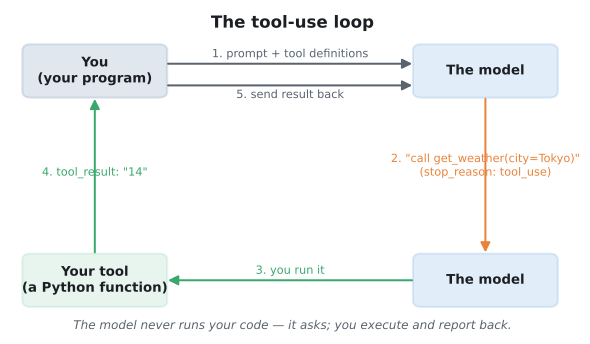
This design is what makes tool use safe and powerful at the same time. The model brings the judgment (when to call, with what arguments); your code brings the capability and the control (what the function actually does, and whether to allow it).
Let’s give the model a single tool and walk through the whole exchange. First, we describe the tool — a name, a plain-English description, and a JSON schema for its inputs — and send a question that needs it:
tools = [{
    "name": "get_weather",
    "description": "Get the current temperature for a city in Celsius.",
    "input_schema": {
        "type": "object",
        "properties": {"city": {"type": "string"}},
        "required": ["city"],
    },
}]

messages = [{"role": "user", "content": "What's the temperature in Tokyo right now?"}]

response = client.messages.create(
    model="claude-haiku-4-5", max_tokens=200, tools=tools, messages=messages,
)
print("stop_reason:", response.stop_reason)
for block in response.content:
    if block.type == "tool_use":
        print("wants to call:", block.name, "with", block.input)
stop_reason: tool_use
wants to call: get_weather with {'city': 'Tokyo'}Notice the model did not answer. Its stop_reason is "tool_use", and its content contains a tool_use block naming the function and the arguments it wants. The model correctly extracted city = "Tokyo" from the sentence. It is now paused, waiting for you.
Your job is to run the function and return the result. Here we’ll just hand back a fixed number, but in a real app this is where you’d call a weather API. You append the model’s turn, then a tool_result keyed to the request’s id, and call again:
tool_call = next(b for b in response.content if b.type == "tool_use")

# (in a real app: result = call_weather_api(tool_call.input["city"]))
result = "14"

messages.append({"role": "assistant", "content": response.content})
messages.append({"role": "user", "content": [
    {"type": "tool_result", "tool_use_id": tool_call.id, "content": result},
]})

final = client.messages.create(
    model="claude-haiku-4-5", max_tokens=120, tools=tools, messages=messages,
)
print("stop_reason:", final.stop_reason)
print(final.content[0].text)
stop_reason: end_turn
The current temperature in Tokyo is **14°C** (approximately 57°F).That’s the entire idea. The model recognized it needed live data, asked for the right tool with the right argument, and — once you supplied the result — wrote a correct, fluent answer. The stop_reason went from tool_use (it needs you) to end_turn (it’s done).
The two stop reasons that drive the loop
stop_reason == "tool_use" means the model is waiting for you to run a tool and send results back. stop_reason == "end_turn" means the model has finished. Your code loops while it sees tool_use and stops when it sees end_turn — you’ll formalize exactly that loop in Lesson 3.
Change the question to "How warm is it in São Paulo and should I bring a jacket?" and inspect the tool_use block. What city does it extract? Does it still ask for the tool even though the question has a second part?
Hint
Reuse the first code block, changing only the user message. Print block.input — you should see the city parsed out of a messier sentence. The model handles the “jacket” part after it gets the temperature back.
Define a tool called convert_currency with inputs amount (number) and to_currency (string), and ask "What is 50 US dollars in euros?". Confirm the model requests the tool with the right arguments instead of guessing an exchange rate.
Hint
Copy the get_weather tool definition and change the name, description, and properties. You don’t even need to return a real result to see the tool_use request — just inspect the first response.
Ask the same weather question but with no tools argument. Confirm the model goes straight back to “I can’t access real-time data.” This shows the model only reaches for tools you actually provide.
Hint
Remove tools=tools from the call. Without tools available, the model has no way to get live data, so it falls back to explaining its limitation — exactly the behavior from the start of the lesson.
A text-only model can’t access live or private data, can’t compute reliably, and can’t take actions. Tool use fixes all three by letting the model request a function call, which your code executes and reports back. The model supplies judgment (when and with what arguments); your program supplies capability and control. A request raises stop_reason == "tool_use" and pauses the model; once you return a tool_result, it continues to end_turn.
name, description, and input_schema describing one function.tool_use block — the model’s request, carrying the function name, input, and an id.tool_result — your reply, keyed to the request’s id, carrying the function’s output.Every useful LLM application beyond pure chat is built on tool use: weather bots, database assistants, coding agents, and the retrieval systems and autonomous agents you’ll build later in this course. Mastering this loop is the gateway to making models do things, not just describe them.
Write clear tool definitions and input schemas so the model calls your functions with valid, well-typed arguments.
Return to the Tool Use & Function Calling module overview
You’ve seen the whole idea in miniature: the model asks for a tool, you run it, it answers. Next you’ll learn to write tool definitions the model can use reliably — because a tool is only as good as the schema and description you give it.