Title here
Summary here
In Module 5 you built a working semantic search engine: embed every document, embed the query, compare the query to all of them, and return the closest. For fifteen FAQs that is instant and perfectly fine. But that approach hides a cost that grows with your data — every query re-scans every vector, and you have to keep all those vectors in memory and re-embed them whenever your program restarts. A vector database removes all three problems. It stores your embeddings on disk, builds an index so search doesn’t touch every vector, and lets you attach and filter on metadata.
This lesson is about why that matters. The next lessons get hands-on with Chroma.
By the end of this lesson, you will be able to:
You’ll just read and look at the architecture here — no setup required. Let’s begin.
Your Module 5 search did one comparison per stored document, per query. That is a linear scan: with documents, each query costs work proportional to . The table makes the trend concrete — these are rough orders of magnitude, but the direction is what matters:
| Documents | Comparisons per query | Feel |
|---|---|---|
| 15 | 15 | instant |
| 10,000 | 10,000 | still fine |
| 1,000,000 | 1,000,000 | sluggish |
| 50,000,000 | 50,000,000 | unworkable |
And speed is only part of it. To compare against every vector you must hold every vector in memory, and because your Module 5 script embedded the corpus at startup, it had to re-embed everything every time it ran. Embedding is the slow, expensive step — repeating it on each launch is pure waste. At real-world sizes, “compare to everything, every time” simply falls over.
A vector database is purpose-built for exactly this job. At its core it stores three things together for each item:
topic, author, or date.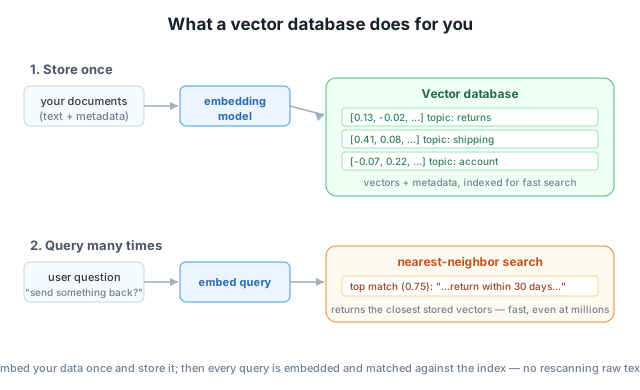
Storing the vector, the text, and the metadata together is what lets a single query return not just “the nearest vector” but the actual document it represents, optionally restricted to the metadata you care about. And because it all lives in the database, you embed each document once — not on every run.
The real magic is the index. Instead of comparing your query to every stored vector, a vector database organizes the vectors so it can jump almost straight to the closest ones. The most common technique is approximate nearest-neighbor (ANN) search: it trades a tiny, usually unnoticeable amount of accuracy for an enormous speed gain, finding the nearest neighbors without an exhaustive scan.
The payoff is a different scaling story. A linear scan grows with ; a good ANN index grows roughly with . Going from a thousand to a million documents barely changes query time. That is the difference between a demo and a product.
“Approximate” is the right trade-off
ANN search may occasionally miss the single absolute-closest vector in favor of one that’s nearly as close. In practice this is invisible — for search and retrieval, “one of the top few closest” is exactly what you want, and the speed-up is worth orders of magnitude. You can tune the accuracy/speed balance when you need to.
Putting it together gives you a pattern that is the backbone of every production retrieval system:
topic = shipping” — combining structured filters with semantic similarity.That last point is something your Module 5 loop couldn’t do cleanly. Real applications constantly need “find the most relevant document that also belongs to this user / this category / this date range.” A vector database makes that a single call, which you’ll write in Lesson 3.
Your Module 5 search compared the query to every document. If a query takes 1 millisecond against 1,000 documents using a linear scan, roughly how long would the same approach take against 1,000,000 documents? Why is this a problem for a live application?
Hint
A linear scan is proportional to , so 1,000,000 documents is 1,000× the work of 1,000 — about 1,000 ms, or a full second, per query. For a live app fielding many requests, a one-second scan per query is far too slow.
A vector database stores the embedding, the original document, and metadata together. Why isn’t the embedding alone enough — why keep the original text?
Hint
An embedding is a one-way summary: you can’t turn the vector back into readable text. To show the user the matching answer (or feed it to a model in RAG), you need the original document the vector came from, so it’s stored alongside.
ANN search is “approximate” — it might not always return the single closest vector. Give one reason this trade-off is acceptable for semantic search, and one situation where you might want exact search instead.
Hint
For semantic search, returning one of the top-few closest documents is just as useful to the user, so the huge speed gain is worth it. Exact search matters when correctness is absolute — e.g. deduplication or compliance lookups where you must find the true nearest match.
The brute-force search from Module 5 compares a query to every stored vector, which is fine for a handful of documents but scales linearly with — too slow, too memory-hungry, and it re-embeds everything on each run. A vector database fixes all three: it stores the embedding, the original text, and metadata together, persists them to disk, and builds an index (usually approximate nearest-neighbor) so search grows like instead of . The result is the store-once, query-many pattern, with metadata filtering layered on top.
Every production retrieval system — semantic search, recommendations, and the retrieval-augmented generation you’ll build next — runs on a vector database. Understanding what it stores and why the index matters is the difference between a toy that works on fifteen documents and a system that works on fifteen million.
Install Chroma, create a collection, add documents, and run your first vector-database query — locally and for free.
Return to the Vector Databases module overview
You now understand why a dedicated vector store exists and what its index buys you. Next you’ll use one for real — installing Chroma, creating a collection, and watching it store and search embeddings with just a few lines of Python.