Title here
Summary here
You are about to spend a whole course building things on top of large language models — tools, search systems, agents. All of it rests on understanding one surprisingly simple idea: a language model is a machine that predicts the next token. Get that idea right and everything else in this course will make sense. Get it wrong and the models will feel like unpredictable magic.
This first lesson has no API calls to write yet — just one short piece of code to count tokens. The goal is a correct mental model, so the code in every later lesson behaves the way you expect.
By the end of this lesson, you will be able to:
You only need a little Python. Let’s begin.
A large language model (LLM) does exactly one thing: given some text, it predicts what comes next. Show it "The cat sat on the" and it produces a score — a probability — for every token that could come next. "mat" scores high. "roof" scores lower. "banana" scores almost zero. The model then samples one token from that distribution, adds it to the text, and repeats. One token at a time, it writes a whole answer.
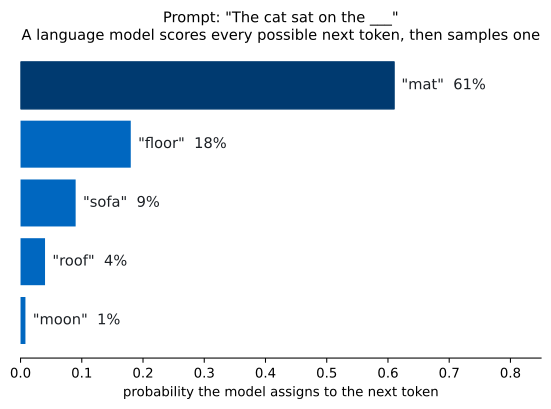
That is the entire trick. Everything an LLM appears to “know” — facts, grammar, code, reasoning — is a side effect of getting very, very good at predicting the next token across trillions of words of training text. There is no database of answers inside the model; there is a giant function that turns “the text so far” into “what is likely to come next.”
This explains both the magic and the limits. The model is fluent because predicting fluent text is exactly what it was trained to do. It sometimes states false things confidently — a hallucination — because a plausible-sounding token is not always a true one. Keep this in mind: the model optimizes for likely, not correct. Much of this course is about closing that gap with tools, retrieval, and careful prompting.
The model does not read text as words or characters. It reads tokens — chunks of text that are often a word, sometimes part of a word, sometimes just punctuation or a space. Common words are usually one token; rarer words split into several. As a rough rule of thumb for English, one token is about four characters, and 100 tokens is about 75 words.
Tokens matter for a practical reason: you are billed per token, and every model has a limit on how many tokens it can handle at once. So it pays to be able to count them. The Anthropic SDK can tell you the exact token count of a message before you ever send it for a real answer:
import anthropic

client = anthropic.Anthropic()

count = client.messages.count_tokens(
    model="claude-haiku-4-5",
    messages=[{"role": "user", "content": "The penguin waddled across the Antarctic ice."}],
)
print(count.input_tokens)18That eight-word sentence is 18 tokens — more than the word count, because the period, the spaces, and the capital letters all factor in, and “Antarctic” splits into pieces. You don’t need to predict token counts by hand; you just need to know that tokens, not words, are the unit the model and your bill are measured in. (Don’t worry about the Anthropic() client yet — you’ll set it up properly in Lesson 2.)
Why not just use word count?
Word count is a loose approximation. Code, numbers, emoji, and non-English text tokenize very differently from plain English prose — sometimes one character becomes several tokens. When budget or context limits matter, count tokens with count_tokens, not words.
When you send a request, the model sees your text, predicts the next token, sees your text plus that token, predicts again, and so on. Everything it can “see” at once — your prompt plus the answer it is generating — must fit inside a fixed budget called the context window, measured in tokens.
Different models have different windows. claude-haiku-4-5, the model you’ll use in this course, has a 200,000-token context window — roughly 150,000 words, or a few long books. The larger Claude models reach 1,000,000 tokens. That sounds enormous, but it fills up fast once you start stuffing in documents, conversation history, and tool results — which is exactly what later modules do. Two consequences follow:
Look again at the figure. The model produces a distribution over next tokens, and then it has to pick one. How it picks is called sampling. If it always took the single highest-probability token, its output would be deterministic but often dull and repetitive. Instead it usually samples with a little randomness, which is why the same prompt can yield slightly different answers on different runs.
The knob that controls this randomness is often called temperature. Low temperature makes the model nearly always pick the top token — focused, repeatable, good for extraction and classification. Higher temperature flattens the distribution so lower-probability tokens get a chance — more varied and creative, good for brainstorming. You’ll meet the exact controls in Lesson 6; for now, the takeaway is conceptual:
This is also why “the model gave a different answer when I ran it again” is not a bug. It is the system working as designed.
It is tempting to skip the theory and start calling the API. Resist that — the four ideas above are the ones that bite people later:
Hold onto these and the rest of the course is engineering, not magic.
Use count_tokens to measure three very different messages: a plain English sentence, a short snippet of Python code, and a line of numbers like "1 2 3 4 5 6 7 8 9 10". Which uses the most tokens relative to its character count?
Hint
Reuse the count_tokens call from above, changing only the content string. Compare count.input_tokens to len(content) for each. Code and digit-heavy strings often tokenize less efficiently than prose.
A model with a 200,000-token window needs room for both your input and its answer. If you reserve 4,000 tokens for the answer, roughly how many words of input can you supply? Use the rule of thumb that 100 tokens ≈ 75 words.
Hint
Subtract the reserved output tokens from the window, then convert tokens to words: (200000 - 4000) * 0.75. The point is the order of magnitude, not an exact figure.
Write down the prompt "The opposite of hot is" and list three tokens you think the model would score highly for the next position, in order. Then think about which you’d expect at low temperature versus high temperature.
Hint
"cold" should dominate. At low temperature the model almost always returns it; at high temperature words like "cool" or "freezing" become more likely to appear.
A large language model predicts the next token from a probability distribution and samples one, repeating until the answer is complete. It works in tokens, not words, so you measure and budget in tokens. It can only see what fits in its context window, so it has no memory beyond what you send. And because its output is sampled, the same prompt can give different answers — by design.
Every technique in this course — prompting, tools, retrieval, agents — is a way of working with next-token prediction rather than against it. The engineers who build reliable LLM applications are the ones who never forget what the model is actually doing under the hood.
Install the SDK, set your API key safely, and make your first real call to the Messages API.
Return to the Working with LLMs in Python module overview
You now have the one mental model that makes LLMs predictable instead of magical: they predict the next token, in tokens, within a context window, by sampling. Next you’ll put it to work — your first real call to Claude, and a tour of exactly what comes back.