Title here
Summary here
In Lesson 2 you made your first call and sent a single user message. That works, but it hides the structure that every real conversation with Claude is built on. A request is not one block of text — it is a small cast of roles, each playing a part: a top-level system instruction that sets the rules, user turns that ask, and assistant turns that answer.
Once you see those roles clearly, you gain the single most useful lever in the whole API: the system prompt. The same question, under two different system prompts, produces two genuinely different answers. By the end of this lesson you will be steering tone, format, and behavior on purpose instead of hoping the model guesses what you want.
By the end of this lesson, you will be able to:
system, user, assistant — and explain what each one doesmessages list of {"role", "content"} dicts that alternates correctlyYou only need your working setup from Lesson 2. Let’s begin.
Every Messages API request is shaped by three roles. Two of them live inside a list called messages; one of them sits outside it.
system — a top-level instruction, not a message. It tells Claude who it is and what rules to follow before it reads a single word from the user. Think of it as standing directions for the whole conversation.user — what the person (or your program) says to Claude. Questions, requests, data to process.assistant — what Claude says back. When you continue a conversation, you include the model’s previous replies here so it remembers what it already said.The key thing to internalize: the system prompt is a separate parameter, while user and assistant turns are entries in the messages list. They are not the same kind of thing, and mixing them up is a common beginner mistake.
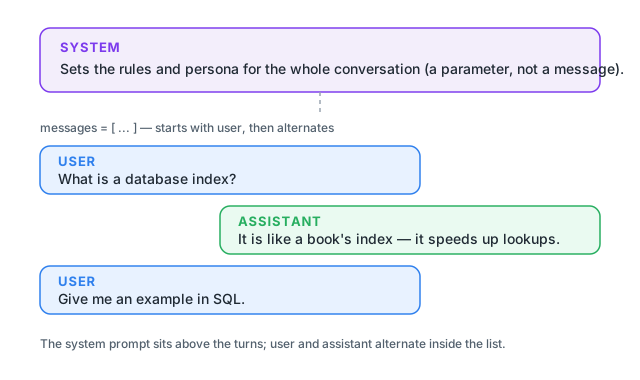
The messages parameter is a Python list, and every entry is a dictionary with exactly two keys: role and content. Here is the smallest possible list — one user turn:
messages = [
    {"role": "user", "content": "What is a database index?"},
]
When you want Claude to remember earlier parts of a conversation, you keep appending turns. A real back-and-forth looks like this:
import anthropic

client = anthropic.Anthropic()

response = client.messages.create(
    model="claude-haiku-4-5",
    max_tokens=150,
    messages=[
        {"role": "user", "content": "My favorite color is teal."},
        {"role": "assistant", "content": "Got it — teal it is. What would you like to do?"},
        {"role": "user", "content": "What did I say my favorite color was?"},
    ],
)
print(response.content[0].text)
You said your favorite color is teal.Claude answers correctly because the fact is right there in the messages list. Remember from Lesson 1 that the model has no memory beyond what you send — that earlier user turn is the memory. (client.Anthropic() reads your key from the ANTHROPIC_API_KEY environment variable, exactly as you set it up in Lesson 2.)
The Messages API enforces two structural rules, and breaking either returns a 400 error:
user. A conversation starts with someone asking, not with the assistant talking into the void.user, assistant, user, assistant, and so on. You cannot stack two user turns in a row in the middle of a conversation and expect a clean exchange.If you ever see an error like messages: roles must alternate between "user" and "assistant", this is what it means — check the order of your list.
The system prompt is not in the list
Notice there is no {"role": "system", ...} entry above. On Claude, the system prompt is its own top-level system= parameter on messages.create(), separate from the messages list. The next section shows it in action.
The system prompt is where you tell Claude how to behave: what persona to adopt, what tone to use, what format to return, and what rules to never break. It is the highest-leverage parameter you have, because it shapes every answer in the conversation without you repeating yourself.
The clearest way to feel its power is to ask the exact same question twice, changing only the system prompt. Here is the first version — a terse expert:
import anthropic

client = anthropic.Anthropic()

question = "What is a database index?"

terse = client.messages.create(
    model="claude-haiku-4-5",
    max_tokens=200,
    system="You are a terse expert. Answer in exactly one sentence, no preamble.",
    messages=[{"role": "user", "content": question}],
)
print(terse.content[0].text)
A database index is a data structure that enables fast lookup and retrieval of rows
from a table by creating a sorted reference to specific columns, similar to how a
book's index lets you quickly find topics instead of reading every page.Now the same question, same model, same max_tokens — only the system prompt changes:
tutor = client.messages.create(
    model="claude-haiku-4-5",
    max_tokens=200,
    system=(
        "You are a friendly tutor for absolute beginners. Explain the idea in "
        "two or three sentences using one simple everyday analogy. Do not use "
        "headings or lists."
    ),
    messages=[{"role": "user", "content": question}],
)
print(tutor.content[0].text)
A database index is like a table of contents in a book—instead of flipping through
every single page to find a topic, you can look it up in the table of contents and
jump straight to the right pages. Similarly, an index helps a database find data
quickly by creating a sorted reference guide, so it doesn't have to search through
every single row when you ask a question.Look at what changed. The question was identical. The model was identical. Yet the first answer is a single dense sentence aimed at someone who already knows the field, and the second is a warm, analogy-driven explanation for a newcomer. The system prompt is the only difference, and it controlled tone, audience, length, and format all at once.
This is the core idea of the lesson: when an answer comes back too formal, too long, too vague, or in the wrong shape, your first move is almost always to adjust the system prompt — not to argue with the model in the user turn.
It helps to have a mental checklist of the levers the system prompt gives you. In practice you are usually steering some mix of these four:
A vague system prompt produces vague behavior. Compare “be helpful” (the model already tries to be) with “Answer in exactly one sentence, no preamble” (concrete, checkable, repeatable). The more specific and testable your instruction, the more reliably Claude follows it. Notice the terse prompt above said “exactly one sentence, no preamble” — and that is exactly what came back.
Keep formatting rules in the system prompt
If your program needs to parse Claude’s output — say, you only want a single label or a JSON-shaped answer — put that requirement in the system prompt, not buried in the user turn. The system prompt applies to every turn, so the format stays consistent even as the conversation grows.
Sometimes the cleanest way to show Claude what you want is not to describe it but to demonstrate it. You can seed the messages list with a few example user/assistant pairs before the real question. The model picks up the pattern and continues it. This is called few-shot priming (a few examples; “zero-shot” means none).
Here we want one-word sentiment labels, so we show two complete examples first, then ask about a third review:
import anthropic

client = anthropic.Anthropic()

response = client.messages.create(
    model="claude-haiku-4-5",
    max_tokens=60,
    system="You label the sentiment of a movie review as POSITIVE, NEGATIVE, or NEUTRAL. Reply with one word only.",
    messages=[
        {"role": "user", "content": "A dazzling, unforgettable ride from start to finish."},
        {"role": "assistant", "content": "POSITIVE"},
        {"role": "user", "content": "Two hours of my life I will never get back."},
        {"role": "assistant", "content": "NEGATIVE"},
        {"role": "user", "content": "It was fine. Some good moments, some dull ones."},
    ],
)
print(response.content[0].text)NEUTRALThe two example turns are not a real conversation that happened — you are writing both sides yourself to establish the pattern. Claude sees that each review maps to one capitalized word and answers the new review the same way. Note the list still alternates user, assistant, user, assistant, user, and still starts with user, so the structural rules hold. Few-shot priming and a clear system prompt work well together: the system prompt states the rule, the examples remove any doubt about the exact shape.
You now have the full picture of a Claude request:
messages list carries the conversation as alternating user and assistant turns, starting with user.Most of the difference between a flaky LLM feature and a dependable one comes down to a precise system prompt. Spend your effort there first.
Pick one question (for example, “What is recursion?”) and send it three times with three different system prompts: a terse expert, a friendly tutor, and a pirate. Keep the model and max_tokens identical across all three. Read the outputs side by side and notice exactly what the system prompt changed.
Hint
Reuse the terse/tutor pattern from this lesson. Only the system= string should differ between the three calls; the messages list stays the same. Print a label before each so you can tell them apart.
Construct a messages list with at least two user turns and one assistant turn between them, where the final user turn refers back to something said earlier (like a name or a number). Confirm Claude answers using the earlier information.
Hint
Start with user, then assistant, then user — that is a valid alternation. If you accidentally place two user turns back-to-back in the middle and get a 400 error about roles alternating, that error is the rule from this lesson catching you.
Write a system prompt that forces a strict output format — for example, “Reply with only a single integer, no words.” Ask Claude a counting or arithmetic question and check that the reply is exactly that format. Then loosen the rule and watch the format drift.
Hint
Specific, checkable instructions (“only a single integer, no words”) hold up far better than soft ones (“keep it short”). The stricter and more testable your wording, the more reliably the format comes back the way you need it.
A Claude request is built from three roles. The top-level system prompt sets the persona and rules and is not part of the message list; the user and assistant roles are entries in the messages list, which must start with user and alternate. The system prompt is your main lever for behavior — the same question under two different system prompts produced one terse expert sentence and one beginner-friendly analogy, with nothing else changed. When you need a specific pattern, you can also prime the model with a few example user/assistant turns.
system= instruction (not a message) that sets persona, tone, format, and rules for the whole conversation.messages representing what the person or program says to Claude.messages representing Claude’s replies, included so the model remembers the conversation.{"role", "content"} dicts; must begin with user and alternate roles.Almost every reliable LLM application — a support bot, a data extractor, a code reviewer — is really a carefully written system prompt plus a well-structured messages list. Master these roles and you can make Claude behave consistently for any audience and any output shape, which is the foundation for the tools, agents, and pipelines you will build in later modules.
Keep context across many turns by managing the messages list, and learn why the model has no memory of its own.
Return to the Working with LLMs in Python module overview
You can now direct Claude on purpose: set the rules with a system prompt, carry the conversation in an alternating messages list, and demonstrate patterns with example turns. Next you will hold a real multi-turn conversation, managing that list yourself so Claude remembers everything that came before.