Title here
Summary here
In the last lesson you tracked what needs doing with issues. Now you’ll automate the most important safeguard in any project: making sure new code actually works before it spreads. Every time you push a commit, wouldn’t it be nice if a machine quietly ran your entire test suite and told you, with a single green check or red X, whether anything broke? That is exactly what GitHub Actions does. It is an automation engine built right into GitHub that runs workflows — series of steps — on cloud machines in response to events like a push or a pull request. In this lesson you’ll build a real continuous-integration (CI) workflow that runs your tests on every push, so breakage never sneaks past you.
By the end of this lesson, you will be able to:
.github/workflows/ci.yml file that checks out code, sets up Python, installs dependencies, and runs testsThis builds directly on the testing habits you already have and turns them into automation. Let’s begin.
GitHub Actions is an automation system built into GitHub. You describe a piece of automation in a file, commit that file to your repository, and from then on GitHub runs it automatically whenever a chosen event happens — most commonly when someone pushes a commit or opens a pull request. The automation runs on a fresh, throwaway virtual machine in GitHub’s cloud, so it needs nothing installed on your own computer.
That automation file is called a workflow, and a handful of terms describe its parts. They sound abstract at first, but they map onto a simple sentence: a workflow runs on an event; it contains a job that runs on a runner; the job runs ordered steps, some of which use prebuilt actions.
.github/workflows/. A repo can have many.on:) — what causes the workflow to run, such as push or pull_request.runs-on:) — the machine the job runs on, like ubuntu-latest. GitHub spins up a clean one for each run.run:) or uses a prebuilt action (uses:).uses:) — a reusable, prepackaged unit of work that someone has already written, such as actions/checkout@v4 for fetching your code.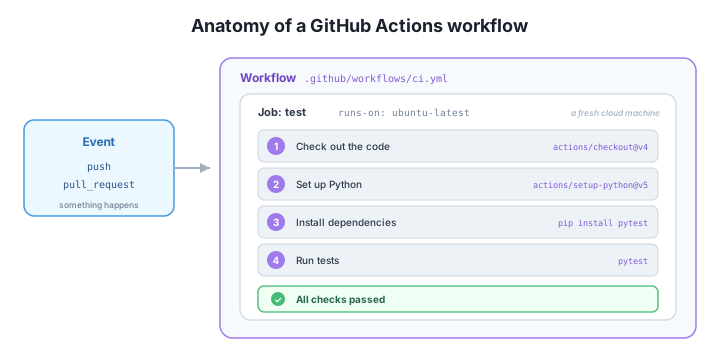
Keep that figure in mind as we build the file — every line you write fills in one of those boxes.
Before automating anything, it helps to have something worth testing. Our sample project is a tiny calculator module with a matching test suite. Here is the code being tested:
# calculator.py
def add(a, b):
    return a + b


def divide(a, b):
    if b == 0:
        raise ValueError("cannot divide by zero")
    return a / b
And here are the tests, written with pytest — one for addition, one for division, and one that confirms dividing by zero raises an error:
# test_calculator.py
import pytest
from calculator import add, divide


def test_add():
    assert add(2, 3) == 5


def test_divide():
    assert divide(10, 2) == 5


def test_divide_by_zero():
    with pytest.raises(ValueError):
        divide(1, 0)
A core principle of CI is that it runs the same checks you’d run by hand — it just runs them for you, every time, without fail. So let’s run the tests locally first to see what “passing” looks like:
$ pytest
...                                                                      [100%]
3 passed in 0.01s
Three dots, three passing tests. This is precisely the command our workflow will run in the cloud. The whole point of CI is to guarantee that this green result is re-checked on every push, even when you forget to run it yourself.
ci.yml Step by StepA workflow lives at .github/workflows/ci.yml — a YAML file you commit to your repo like any other. We’ll read it top to bottom, because each section maps onto a piece of vocabulary from earlier.
First, give the workflow a name and declare the events that trigger it. We want it to run on every push to main and on every pull request targeting main:
name: CI

on:
  push:
    branches: [main]
  pull_request:
    branches: [main]
Next, define the jobs. We need just one, named test, and it runs on the ubuntu-latest runner — a clean Linux machine GitHub provisions for us:
jobs:
  test:
    runs-on: ubuntu-latest
Now the steps, in order. The runner starts empty, so step one is to fetch our code with the prebuilt actions/checkout action; step two installs Python with actions/setup-python; step three installs pytest with a shell command; and step four runs the tests:
    steps:
      - name: Check out the code
        uses: actions/checkout@v4

      - name: Set up Python
        uses: actions/setup-python@v5
        with:
          python-version: "3.11"

      - name: Install dependencies
        run: pip install pytest

      - name: Run tests
        run: pytest
Notice the pattern: steps that pull in someone else’s prepackaged work use uses:, while steps that run a plain command use run:. Put together, the complete validated file is:
# .github/workflows/ci.yml
name: CI

on:
  push:
    branches: [main]
  pull_request:
    branches: [main]

jobs:
  test:
    runs-on: ubuntu-latest
    steps:
      - name: Check out the code
        uses: actions/checkout@v4

      - name: Set up Python
        uses: actions/setup-python@v5
        with:
          python-version: "3.11"

      - name: Install dependencies
        run: pip install pytest

      - name: Run tests
        run: pytest
Workflows are just YAML in your repo
A workflow is nothing magical — it’s a YAML file committed under .github/workflows/. GitHub watches that folder and runs any workflow it finds. The uses: keyword pulls in prebuilt actions (like actions/checkout) so you don’t reinvent common chores such as fetching your code or installing a language. Always pin a version with @v4 or @v5 so a future update to an action can’t silently change how your workflow behaves.
Continuous integration is the practice of automatically building and testing your code every time it changes, so problems are caught the moment they appear rather than days later. The workflow you just wrote is CI: the instant a commit lands on main — or a pull request targets it — GitHub spins up a fresh machine, checks out your code, installs Python and pytest, and runs the suite. You never have to remember to do it, and a teammate’s broken change can’t quietly pass review.
Once the file is committed and pushed, you can watch each run in the repository’s Actions tab, which lists every workflow run with its status and lets you click in to read the log of each step. More importantly, the outcome is surfaced right where you make decisions: a green check appears next to the commit and on the pull request when all steps succeed, and a red X appears if any step fails. On a pull request, that check sits in the merge box, giving everyone an at-a-glance verdict before code is merged.
The shift this creates is cultural as much as technical. Because every push is tested, “it works on my machine” stops being an excuse — the same clean cloud environment tests everyone’s code identically. A red X is a fast, blameless signal to fix something before it spreads, and a green check is real, automated confidence that the project still works. In the next lesson you’ll make that check do even more by requiring it to pass before anyone can merge.
A teammate says your workflow tests pushes but they’re not sure it runs when someone opens a pull request. Which part of the file makes it run on pull requests targeting main?
Hint
Look in the on: block. The pull_request: trigger with branches: [main] is what tells GitHub to run the workflow whenever a pull request targets the main branch. Without that section, only the push: trigger would fire.
runs-on setsIn the test job you see the line runs-on: ubuntu-latest. What does that line control, and what would change if you swapped it for windows-latest?
Hint
runs-on: chooses the runner — the type of cloud machine the job executes on. ubuntu-latest gives you a fresh Linux machine; windows-latest would run the very same steps on a Windows machine instead. GitHub provisions a clean runner for each run.
You want the workflow to also check code style by running a linter (for example, flake8) after the tests. How would you add that as a step, and what would the result be if the linter found problems?
Hint
Add another step using run:, the same way the test step works — for example a step named “Lint” with run: flake8 (and an install step for it, like pip install flake8). If the linter exits with an error, that step fails, the whole job fails, and the commit/PR gets a red X just as a failing test would.
GitHub Actions is GitHub’s built-in automation engine: you commit a workflow (a YAML file in .github/workflows/) and GitHub runs it on cloud runners in response to events. A workflow contains one or more jobs, each running on a runner (runs-on:), and each job runs ordered steps that either execute a command (run:) or use a prebuilt action (uses:). You built a real continuous-integration workflow — ci.yml — that triggers on every push and pull request to main, checks out the code, sets up Python, installs pytest, and runs the suite. The result shows up in the Actions tab and as a green check (pass) or red X (fail) next to the commit and on the pull request, so broken code is caught immediately.
on:), job, runner (runs-on:), step, and action (uses:).Tests only protect a project if they actually get run, and humans forget. Continuous integration removes that risk by running your checks automatically on every change, in a clean environment everyone shares — so “it works on my machine” stops mattering and broken code is caught at the moment it’s introduced rather than after it ships. That green check is automated confidence, and it’s also the foundation for the next safeguard: making that check required before anyone can merge, which is exactly what you’ll set up next.
Make your CI check mandatory so no one can merge code until the tests pass.
Return to the Automating with GitHub module overview
You can now automate your test suite so it runs on every push and pull request, with the result shown as a clear green check or red X. Next you’ll turn that check from a helpful signal into an enforced rule — using branch protection to require that CI passes before any code is allowed to merge.