Title here
Summary here
In the last lesson you built a continuous integration workflow that runs your tests on every push. But a green check is only useful if it can actually stop something. As things stand, nothing prevents a teammate from pushing straight to main, or from clicking Merge on a pull request while the tests are still red. The workflow runs, the X appears — and the broken code lands anyway. Branch protection closes that gap. It lets you tell GitHub, in the repository’s settings, that certain branches may only change in approved ways: through a reviewed pull request, with passing checks, and never by a careless direct push. This is how a team’s good intentions become rules the platform enforces for everyone.
By the end of this lesson, you will be able to:
mainThis builds directly on the CI workflow from Lesson 2 and the pull-request conventions from Modules 5 and 6. Let’s begin.
By default, a GitHub branch is wide open. Anyone with write access can git push directly to main, skipping pull requests entirely. And even when people do use pull requests, the Merge button works whether or not the CI check passed and whether or not anyone reviewed the change. Your conventions — “always open a PR,” “wait for tests,” “get one approval” — are just that: conventions. They hold right up until someone is in a hurry and ignores them.
Branch protection turns those conventions into guarantees. It’s a set of rules attached to a branch (or a pattern of branches) that GitHub enforces on every change. You configure it in the repository under Settings -> Branches, either as a classic branch protection rule or as a newer, more flexible ruleset (Settings -> Rules -> Rulesets). Both do the same core job: they gate the branch so that a change can only land if it satisfies the conditions you’ve defined.
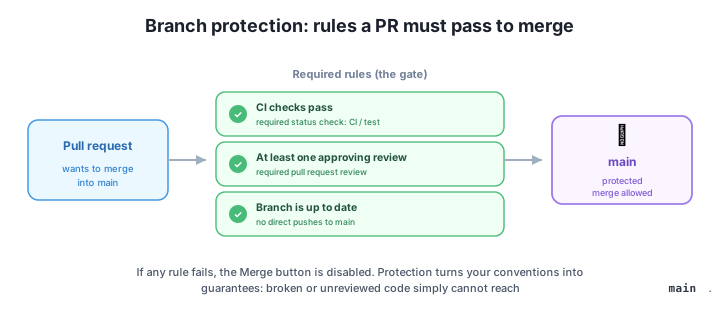
The mental model is a gate in front of the branch. A pull request approaches the gate carrying its commits; the gate checks every rule you turned on; and only when all of them are green does the gate open and allow the merge. Anything that tries to bypass the gate — like a direct push to main — is rejected outright.
When you add a branch protection rule (or ruleset) for main, you choose which conditions to enforce. These are the ones you’ll reach for most often:
main becomes opening a pull request and merging it. No more accidental git push origin main.CI / test check) and they become required: the Merge button stays disabled until they report success on the PR’s latest commit.main before it can merge. This catches the case where two changes pass individually but break when combined — the PR has to re-run its checks against current main first.You don’t need all of these at once. A very common, sensible starting point for a team branch is just three: require a pull request, require the CI status check, and require one approving review. That alone guarantees nothing reaches main without being reviewed and tested.
There’s one subtlety that trips up almost everyone the first time. When you go to add a required status check, your CI check might not appear in the dropdown. That’s not a bug — GitHub can only offer checks it has actually seen. A check name becomes selectable only after the workflow has run at least once, because that first run is what registers the check’s name with the repository.
So the order is: push the CI workflow from Lesson 2 (or open a PR) so the check runs once, then go to Settings -> Branches, edit the rule, search for the check by name (such as test, the job from your workflow), and select it. From that point on it’s required.
A check must run before you can require it
A status check only appears in the “require status checks” list after it has run at least once on the repository. If your CI check isn’t in the dropdown yet, you haven’t pushed the workflow — or opened a PR that triggers it — even one time. Push the workflow first so GitHub learns the check’s name, then come back and mark it required.
Once the rules are on, the effect is immediate and visible on every pull request:
main are blocked. If someone runs git push origin main, the push is rejected with a message that the branch is protected and changes must go through a pull request.If you prefer the command line, the same protection can be configured with the GitHub CLI’s API access — for example, to require the test check and one review:
gh api -X PUT repos/OWNER/REPO/branches/main/protection \
  -F required_status_checks.strict=true \
  -F 'required_status_checks.contexts[]=test' \
  -F required_pull_request_reviews.required_approving_review_count=1 \
  -F enforce_admins=true \
  -F restrictions=null
Here strict=true is the “require branch to be up to date” option, contexts[]=test names the required check, and enforce_admins=true makes the rules apply to administrators too, not just regular contributors.
A teammate keeps forgetting to open a pull request and pushes straight to main. Which single branch protection setting puts an end to that, and what happens when they try it next time?
Hint
Enable Require a pull request before merging on the main branch (Settings -> Branches). Once it’s on, a git push origin main is rejected as a protected-branch violation — the only way to change main becomes opening a PR and merging it.
You’re setting up a required status check, but your CI check from Lesson 2 doesn’t appear in the “require status checks” search box. Why not, and how do you fix it?
Hint
GitHub can only require a check it has already seen. The check’s name is registered the first time the workflow runs. Push the workflow (or open a PR that triggers it) so it runs once, then return to the protection rule and the check will be selectable.
A pull request has one approval, but its required CI check just failed. What state is the Merge button in, and what must happen before the PR can merge?
Hint
The Merge button stays disabled — every required condition must be green, and the failing CI check isn’t. The author has to fix the code and push new commits so the check re-runs and passes; only then (with the approval still valid) does the Merge button become clickable.
Branch protection is how you stop broken or unreviewed code from reaching an important branch. Without it, anyone can push straight to main or merge a pull request with failing tests; with it, GitHub enforces your rules on every change. You configure it in Settings -> Branches as a branch protection rule or a ruleset, choosing conditions like require a pull request, require status checks (your Lesson 2 CI workflow becomes a required check), require approving reviews, require the branch to be up to date, and optional hardening such as linear history, signed commits, or restricting who can push. A status check can only be marked required after it has run at least once, so GitHub knows its name. Once protection is on, the Merge button is disabled until every required condition passes, and direct pushes to main are blocked.
test) must pass before merge; a check is selectable only after it runs once.main, before merging.Conventions you have to remember are conventions you will eventually skip — usually at the worst moment, when you’re rushing a fix. Branch protection moves the enforcement off the team and onto the platform: the tests you wrote, the reviews you agreed to, and the “always use a PR” rule stop being habits and become guarantees that hold for everyone, every time. That’s what makes main trustworthy — you can deploy from it knowing nothing landed there without passing the gate. With that safety net in place, you’re ready to automate what happens after a merge: publishing a site and cutting releases.
Publish a site with GitHub Pages and automate releases when changes land on main.
Return to the Automating with GitHub module overview
You can now turn your team’s conventions into rules the platform enforces — protected branches where every merge has passed its tests and earned a review. Next you’ll put that trusted main branch to work, automating the steps that take a merged change all the way to a published site and a tagged release.