Title here
Summary here
In the last lesson you watched SkyLog’s history fork: main and feature/colored-output each gained commits the other didn’t have. Branching is only half the story, though — eventually you want that feature work back on main. That’s what merging does. git merge takes the commits from one branch and brings them into the branch you’re standing on. The part that trips people up is that Git has two ways of doing this depending on what the history looks like — a quiet fast-forward or a three-way merge that creates a brand-new merge commit. Once you can tell which one happened by reading the graph, merging stops feeling like magic.
We’ll keep working in the SkyLog repository.
By the end of this lesson, you will be able to:
git merge--no-ff to keep feature history visiblegit log --oneline --graphgit branch -dLet’s bring those branches back together.
A merge always has a direction: you merge another branch into the branch you’re currently on. So the first step is to switch to the receiving branch — usually main — and only then run git merge naming the branch whose work you want to pull in.
$ git switch main
$ git merge feature/colored-output -m "Merge feature/colored-output"
Read that as “I’m on main, bring feature/colored-output’s commits here.” The branch you name is left exactly as it was; only the branch you’re on changes. If you forget which side you’re on, git branch (with its * marker) and git status will remind you before you do anything irreversible.
You merge INTO the branch you’re on
A merge never happens “between” two branches in the abstract — it happens on your current branch. To get feature work onto main, switch to main first, then git merge feature/.... Get the direction backwards and you’ll move the wrong pointer. And as you’ll see below, --no-ff is worth remembering because it keeps a permanent record that a feature branch ever existed, even when Git could have merged silently.
Git picks one of two strategies automatically, and the choice depends entirely on whether the receiving branch has moved since the branch split off.
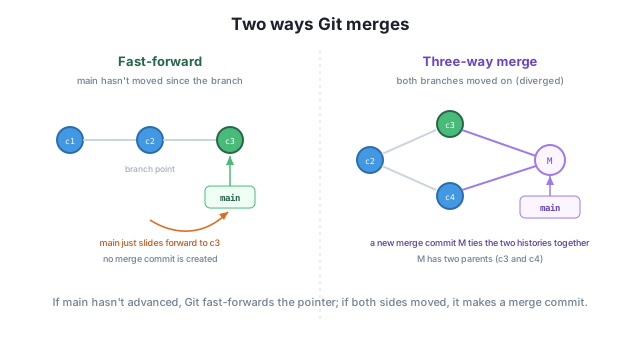
Three-way merge. This is the case from Lesson 1: main got Document basic usage while feature/colored-output got Add colored output, so both sides moved. Git can’t just slide a pointer forward, so it builds a new merge commit that has two parents — one from each branch — tying the two histories together:
$ git merge feature/colored-output -m "Merge feature/colored-output"
Merge made by the 'ort' strategy.
 skylog.py | 2 +-
 1 file changed, 1 insertion(+), 1 deletion(-)
The phrase “Merge made by the ‘ort’ strategy” tells you a merge commit was created. (ort is just the name of Git’s default merge engine.) Now look at the graph:
$ git log --oneline --graph
*   51fa417 Merge feature/colored-output
|\
| * 57738e5 Add colored output
* | f0a8c02 Document basic usage
|/
* 7203482 Add SkyLog script
* 09e95d6 Add project README
Read it bottom-up. The two branches share the first two commits, then fork: Document basic usage on main (the * | line) and Add colored output on the feature side (the | * line). At the top, the merge commit 51fa417 joins them — the |\ underneath it shows it has two parents. That fork-then-rejoin diamond is the visual signature of a three-way merge.
Fast-forward. Now contrast that with a branch where main didn’t move after the split. If the only new commits are on the feature branch, Git has nothing to reconcile — it simply slides the main pointer forward to the tip of the feature branch. No merge commit is created:
$ git merge feature/footer
Updating 51fa417..37abfe5
Fast-forward
 README.md | 3 +++
 1 file changed, 3 insertions(+)
The word Fast-forward (and Updating <old>..<new>) is your signal that no new commit was made — the history stays a single straight line. That’s tidy, but it also means the fact that a separate feature branch existed disappears from the history.
Sometimes a clean straight line isn’t what you want. On a team, a merge commit is a useful record: it says “this group of commits was a single feature, merged in together.” When a fast-forward is possible but you’d rather keep that record, pass --no-ff (“no fast-forward”) to force a merge commit anyway:
$ git merge --no-ff feature/license -m "Merge feature/license"
Merge made by the 'ort' strategy.
 LICENSE | 1 +
 1 file changed, 1 insertion(+)
 create mode 100644 LICENSE
Even though Git could have fast-forwarded here, “Merge made by the ‘ort’ strategy” confirms it created a merge commit instead. In the graph this shows up as the same diamond shape you saw with the three-way merge, so anyone reading the history later can see exactly where the feature/license work began and ended. Many teams set --no-ff as their default for merging feature branches for precisely this reason.
Once a branch’s commits are safely on main, the branch pointer has done its job — keeping it around just clutters git branch. Delete it with git branch -d (the -d is for “delete”):
$ git branch -d feature/colored-output
Deleted branch feature/colored-output (was 57738e5).
The output confirms the deletion and shows the commit the branch pointed at (57738e5) in case you need to find it again. The lowercase -d is deliberately safe: Git refuses to delete a branch whose commits haven’t been merged anywhere, protecting you from losing work. (There’s an uppercase -D that forces deletion regardless — reach for it only when you genuinely want to throw the commits away.) Deleting the branch doesn’t touch the commits themselves; they live on in main’s history. You’re only removing the label.
You’re on main. Since you branched feature/footer, main hasn’t received any new commits, but feature/footer has two. You run git merge feature/footer. Will Git fast-forward or create a merge commit, and how will you know from the output?
Hint
It will fast-forward, because the receiving branch (main) hasn’t moved since the split — Git just slides the pointer forward. The output will say Fast-forward and Updating <old>..<new>, with no “Merge made by the ‘ort’ strategy” line and no new merge commit.
In git log --oneline --graph, you see a top commit with |\ on the line below it and two branches that fork lower down and rejoin. What kind of commit is at the top?
Hint
It’s a merge commit. The |\ means it has two parents — one from each branch — and the fork-then-rejoin diamond shows two diverged lines of history being tied back together. That’s the signature of a three-way merge (or a --no-ff merge).
Your team wants every feature merge to leave a visible trace in the history, even when the feature could be merged with a simple fast-forward. Which option do you add to git merge, and what does it do?
Hint
Add --no-ff (no fast-forward). It tells Git to create a merge commit even when a fast-forward is possible, so the history shows exactly where the feature branch started and ended — a permanent record that the feature existed as its own line of work.
Merging brings one branch’s commits into the branch you’re currently on, so you always switch to the receiving branch (usually main) first, then run git merge <other>. Git chooses automatically between a fast-forward — when the receiving branch hasn’t moved, it just slides the pointer forward with no new commit — and a three-way merge, which creates a merge commit with two parents when both sides have diverged. You can recognize each in git log --oneline --graph: a straight line means fast-forward, while a fork-and-rejoin diamond (with |\ under the top commit) means a merge commit. Use --no-ff to force a merge commit even when a fast-forward is possible, and clean up finished branches with git branch -d <name>, which safely refuses to delete unmerged work.
git merge <other> — brings <other>’s commits into your current branch.--graph.--no-ff — forces a merge commit even when a fast-forward is possible, keeping feature history visible.git branch -d <name> — safely deletes a merged branch (refuses if its commits aren’t merged anywhere).Merging is how individual lines of work become shared progress — it’s the moment a feature branch turns into part of the real project. Knowing when Git fast-forwards versus when it makes a merge commit lets you read any project’s history at a glance and predict what your own merges will do. The --no-ff habit and clean branch deletion are exactly the conventions you’ll meet in team workflows and pull requests later in this course. But merges don’t always go smoothly: when both branches changed the same lines, Git can’t decide for you. That’s the next lesson — merge conflicts.
See what happens when two branches change the same lines, and learn to resolve a merge conflict by hand.
Return to the Branching and Merging module overview
You can now reunite branches: switch to the receiver, run git merge, and read whether Git fast-forwarded or built a merge commit straight from the graph. You also know how to force a merge commit with --no-ff and tidy up afterward with git branch -d. Next you’ll handle the one case Git can’t resolve on its own — when two branches edit the same lines — and learn to fix a merge conflict with confidence.