Title here
Summary here
In the last module you pushed to your own repository. But most collaboration involves repositories you don’t own — an open-source project, a teammate’s repo, a company codebase you can’t push to directly. So how do you contribute changes to a project you can’t write to? The answer is the fork-and-pull-request model, and it’s the workflow behind nearly all of open source and a great deal of professional teamwork. The idea: make your own copy (a fork), do your work there, and then politely propose your changes back to the original with a pull request the maintainers can review and merge.
This lesson is the map of that whole process. The next lessons walk each step in detail.
By the end of this lesson, you will be able to:
origin (your fork) and upstream (the original)You’ll build on remotes from Module 4. Let’s begin.
Permissions exist for good reasons. If anyone could push directly to a popular project, its history would be chaos and its security nonexistent. So by default, you have read access to other people’s repositories but not write access — you can clone and read them, but git push will be refused.
That’s exactly the situation the fork-and-pull-request model solves. Instead of needing write access to the original, you get your own writable copy and propose changes back through a channel the maintainers control. They stay in charge of what actually lands; you still get to contribute.
gh repo fork with the CLI.Crucially, a pull request is a conversation, not a file dump. Maintainers can comment, ask for changes, and approve — and you can push more commits to address feedback, which update the same PR automatically. (That review process is Lesson 3.)
Here’s how the whole thing fits together, from spotting something you want to change to seeing it merged:
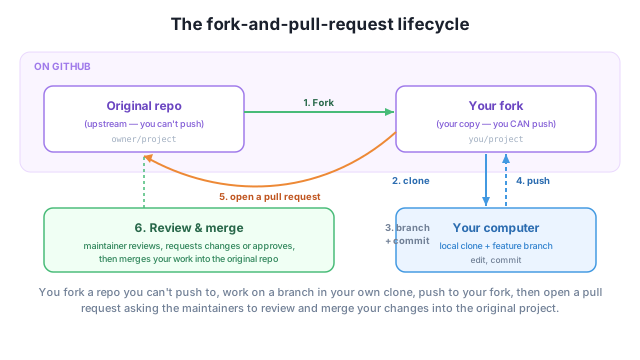
Read it as six steps:
you/project, a writable copy.main).Every contribution you make to an open-source project will follow this shape.
origin vs upstreamThis model involves two remotes, and keeping them straight is the one thing beginners trip on:
origin — your fork. It’s what you cloned from and what you push to. You have write access.upstream — the original repo you forked from. You add this remote yourself so you can pull in the project’s latest changes (Lesson 4). You typically only read from it.So you push to origin (your fork) and pull updates from upstream (the original). Getting these two names right makes the rest of the workflow click.
Forking vs branching
A branch is a separate line of work inside one repository. A fork is a whole separate copy of the repository under your account. On a team where everyone has write access to one shared repo, people often skip forking and just use branches + pull requests within that repo. Forking shines when you don’t have write access — the classic open-source case.
You want to fix a typo in a popular open-source project’s README, but git push is refused. Explain why, and what the fork-and-pull-request model lets you do instead.
Hint
You only have read access, not write access, so you can’t push to the original. Instead you fork it (your own writable copy), commit the fix on a branch in your fork, and open a pull request asking the maintainers to merge your fix into the original.
After forking and cloning, you have two remotes. Which one is origin, which is upstream, and which do you push to?
Hint
origin is your fork (you cloned it and push to it); upstream is the original repo you forked from (you add it to pull in updates). You push to origin; you fetch updates from upstream.
Put these in order: open a pull request, push to your fork, clone your fork, fork the repo, branch and commit.
Hint
You usually have only read access to other people’s repositories, so you can’t git push to them. The fork-and-pull-request model is the way around that: fork the repo (your own writable copy under your account), clone it, branch and commit your work, push to your fork, then open a pull request proposing your changes to the original — where maintainers review and merge them. Two remotes matter: origin is your fork (you push here) and upstream is the original (you pull updates from here). A pull request is a conversation, not just a code drop.
origin vs upstream — your fork (push to) vs the original (pull updates from).The fork-and-pull-request model is how open source works and how countless teams ship code: nothing reaches the main project without review. Mastering it means you can contribute to any public project on GitHub, build a visible track record of real contributions, and participate in the review culture that professional teams run on. It’s arguably the most valuable collaboration skill in this entire course — and the next lessons make each step concrete, starting with opening a pull request.
Fork, branch, push, and open your first pull request — in the GitHub interface and with the gh CLI.
Return to the Collaboration with Pull Requests module overview
You now have the map of the fork-and-pull-request model and the difference between origin and upstream. Next you’ll walk it for real — forking a project, pushing a branch, and opening your first pull request.