Title here
Summary here
In the last lesson you opened a pull request. Opening it is only the beginning — the real work of collaboration happens after, while the PR is open. This is code review: another person reads your proposed changes, asks questions, suggests improvements, and eventually gives a verdict. It’s a back-and-forth between a reviewer and an author, and it’s how teams catch bugs, share knowledge, and agree that code is ready before it lands in main.
Review can feel intimidating the first time someone leaves comments on your work, but the framing that helps most is this: a pull request is a conversation about the code, not a judgment of you. In this lesson you’ll see both sides of that conversation — how reviewers leave feedback and how authors respond to it.
By the end of this lesson, you will be able to:
gh CLIThis builds directly on the pull request you opened in Lesson 2. Let’s begin.
Every pull request has a Files changed tab. This is where review happens. It shows the diff — every line the PR adds (in green) or removes (in red), file by file — so a reviewer can see exactly what would change if the PR were merged, without ever pulling the branch down.
Reviewers leave two kinds of feedback:
A suggestion is a special, powerful kind of inline comment: instead of describing a change, the reviewer writes it. When leaving an inline comment, click the suggestion button (the small document icon) and the comment becomes an editable copy of that line. The reviewer edits it to what they think it should be, and the author can click Apply suggestion to commit that exact change with one click. Under the hood it’s just a fenced block:
```suggestion
total = sum(prices)  # use the built-in instead of a manual loop
```
Suggestions are perfect for small, concrete fixes — a typo, a clearer variable name, a one-line refactor — because they turn “you should change this” into “here, I changed it for you; approve it if you agree.”
From the terminal, you can read a PR and its diff without opening a browser:
gh pr view 42
gh pr diff 42
gh pr view shows the title, description, status, and conversation; gh pr diff prints the full diff. Leaving line-anchored inline comments and suggestions is best done in the web UI, but the CLI is excellent for quickly reading a PR before you dig in.
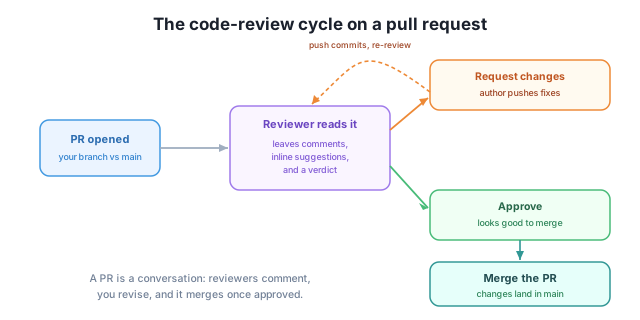
The figure shows the loop you’ll live in: a PR is opened, a reviewer reads it and responds, and depending on what they find, the PR either loops back for revisions or moves forward to merge.
When a reviewer finishes, they submit a review, which bundles all their pending comments together with one of three verdicts. Choosing the right one is how a reviewer signals what should happen next.
The same three verdicts are available from the CLI, where a message body is required for the blocking and commenting verdicts:
gh pr review 42 --approve
gh pr review 42 --request-changes -b "Please add a test for the empty-list case before this merges."
gh pr review 42 --comment -b "Looks solid overall — just a couple of small thoughts inline."
If you want to leave a single general comment on a PR without submitting a formal review, use:
gh pr comment 42 -b "Heads up: this overlaps with the work in #38."The difference is subtle but useful: gh pr review records a verdict (and shows up as Approved / Changes requested), while gh pr comment just adds a note to the conversation with no verdict attached.
Review the code, not the person
Good review feedback is about the change, not the author. “This loop runs in O(n squared) — can we use a set here?” is helpful; “why would you write it like this?” is not. As an author, read Request changes as “the code needs another pass,” never as a personal verdict. The whole point of review is that two people make the code better than one would alone.
Here’s the part that surprises newcomers: when a reviewer requests changes, you do not open a new pull request. You fix the code on the same branch and push again — and the open PR updates itself automatically.
The cycle looks like this:
git add .
git commit -m "Add test for empty-list case; rename total variable"
git push
Because the PR points at that branch, your new commits appear in the PR instantly — the diff, the commit list, and any Request changes verdict all refresh. There’s nothing extra to open or re-submit.
As you address each piece of feedback, click Resolve conversation on the thread to collapse it and mark it as handled. This keeps the review tidy: open threads are work still outstanding, resolved threads are done. When every thread is resolved and a reviewer re-reviews and approves, you’re ready to merge.
This is the dashed loop in the figure: push fixes, the reviewer re-reviews, and you go around again until it’s approved — usually just once or twice in practice.
When the PR is approved and any required checks pass, the Merge pull request button on the Conversation tab goes green. GitHub offers three merge strategies, and it’s worth knowing the difference:
main. Preserves the full history of how the work was built.main. Great for keeping main history clean when your branch had lots of small “fix typo” commits.main individually with no merge commit, for a perfectly linear history.Many teams standardize on squash so that each PR becomes one tidy commit on main. Pick whichever your project uses; the result is the same — your changes land in main.
You can merge from the CLI too, choosing the strategy with a flag:
gh pr merge 42 --squashOther flags include --merge (merge commit) and --rebase (rebase). Add --delete-branch to clean up the feature branch once it’s merged, since you won’t need it anymore. With that, the conversation is complete: your work is part of the project’s history.
A reviewer spots a single line that computes a sum with a manual loop and wants it replaced with sum(). They could leave an inline comment describing the change, or a suggestion. Which is better here, and why?
Hint
A suggestion is better for a small, concrete one-line fix: the reviewer writes the exact replacement in a suggestion block, and the author applies it with one click. An inline comment only describes the change, leaving the author to retype it. Suggestions turn “you should change this” into “here’s the change — apply it if you agree.”
You reviewed a PR and found a bug that would break production if merged. Which of the three verdicts do you submit, and what’s the CLI command (PR #17)?
Hint
Use Request changes, because the bug must be fixed before merging — this verdict blocks the merge on most repos. From the CLI: gh pr review 17 --request-changes -b "This breaks on empty input — needs a guard before it can merge." A message body is required for this verdict.
A reviewer requested changes on your open PR. You make the fixes locally. What do you do next — open a new pull request, or something else?
Hint
Do not open a new PR. Commit your fixes on the same branch and git push — the open PR updates automatically with the new commits. Then click Resolve conversation on the threads you’ve addressed and ask for a re-review.
Code review is the conversation that happens on an open pull request. Reviewers read the diff in the Files changed tab, leaving general comments in the conversation and inline comments pinned to specific lines — including suggestions, which propose an exact edit the author can apply in one click. Every review carries one of three verdicts: Comment (feedback, no verdict), Request changes (must be addressed before merge), or Approve (good to merge). The author responds not by opening a new PR but by pushing more commits to the same branch — the PR updates automatically — and resolving conversations as each thread is handled. Once approved, the PR is merged via a merge commit, squash, or rebase. All of it has gh equivalents: gh pr view, gh pr diff, gh pr review, gh pr comment, and gh pr merge.
Almost no professional code reaches main without review, so being able to both give and receive it is a daily skill on any team. Knowing how to leave precise, kind feedback marks you as a strong collaborator; knowing how to respond to it — pushing fixes calmly instead of taking it personally — marks you as a strong author. The review loop is also where most real learning happens on a team: you absorb a codebase’s conventions and patterns faster by reading and discussing changes than by any other means.
Add an upstream remote and pull in the latest changes so your fork never falls behind the original project.
Return to the Collaboration with Pull Requests module overview
You can now take part in a code review from both sides — leaving comments and suggestions, choosing a verdict, responding by pushing commits, and merging once approved. Next you’ll keep your fork from drifting out of date by syncing it with the original project’s latest changes.