Title here
Summary here
You already know how to merge one branch into another — you did it back in Module 3. This lesson introduces its counterpart, rebase, and tackles the question every developer eventually asks: when should I merge, and when should I rebase? Both commands answer the same need — “combine the work on this branch with that one” — but they produce very different-looking histories. Merge keeps a faithful record of what actually happened, branches and all. Rebase rewrites your commits so the history reads as a clean straight line. Neither is “better”; they’re tools for different goals, and knowing which to reach for is a mark of real Git fluency.
By the end of this lesson, you will be able to:
git rebase to replay a branch onto an updated basegit pull --rebase to keep a clean history when syncingThis builds directly on merging (Module 3). Let’s begin.
Imagine you branched feature off main, did some work, and meanwhile main moved on with a commit of its own. The two branches have diverged — each has commits the other doesn’t. Here’s that situation:
$ git log --oneline --graph --all
* 30b2d20 Update app on main
| * d8bba3a Extend feature x
| * 6ac7a3f Add feature x
|/
* d7a1be0 Add README
* 3cfe321 Add app
You want your feature work and the new main work together. Merge and rebase both get you there — they just leave behind very different histories.
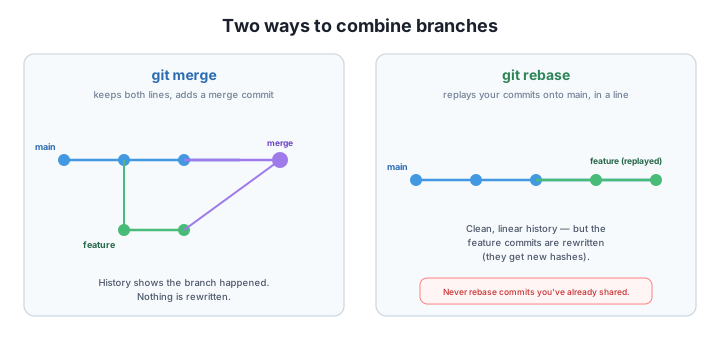
You already know this one. From main, git merge feature combines the branches by creating a merge commit — a special commit with two parents that ties the two lines together:
$ git merge feature
$ git log --oneline --graph --all
*   91a44a6 Merge branch 'feature'
|\
| * d8bba3a Extend feature x
| * 6ac7a3f Add feature x
* | 30b2d20 Update app on main
|/
* d7a1be0 Add README
* 3cfe321 Add app
Notice the diamond shape: history honestly records that two lines of work existed in parallel and came together. Nothing is rewritten — every original commit keeps its hash. The cost is that, across many features, the graph fills with merge commits and crisscrossing lines, which some teams find noisy.
Rebase takes a different approach. Instead of tying the branches together with a merge commit, it picks up your feature commits and replays them, one by one, on top of the latest main — as if you had started your work from there all along. From the feature branch:
$ git rebase main
Successfully rebased and updated refs/heads/feature.
Now the history is a single straight line:
$ git log --oneline --graph --all
* 6b01b40 Extend feature x
* 13cbec3 Add feature x
* 30b2d20 Update app on main
* d7a1be0 Add README
* 3cfe321 Add app
No diamond, no merge commit — just a clean sequence that’s easy to read. But look closely at the hashes: the feature commits went from 6ac7a3f / d8bba3a to 13cbec3 / 6b01b40. They are new commits. Rebase didn’t move your originals; it created fresh copies with the same changes on a new base. That’s what “rewriting history” means, and it’s the key to the one rule that follows.
Because rebase replaces commits with new ones, there is a single rule you must never break:
Never rebase commits you’ve already shared (pushed).
Here’s why. If you’ve pushed feature and a teammate has based work on those commits, rebasing replaces them with new hashes. Now your history and theirs disagree about commits that are supposed to be the same, and untangling that is genuinely painful. (It echoes Module 2’s warning about rewriting pushed history — same principle, bigger tool.)
The safe zone is your own local, un-pushed commits: tidying them up before you share is exactly what rebase is for. So the practical guidance is simple:
A cleaner pull: git pull –rebase
A plain git pull is “fetch + merge”, which can sprinkle little merge commits into your history every time you sync. git pull --rebase does “fetch + rebase” instead: it replays your un-pushed local commits on top of what you just fetched, keeping the history linear. Because it only rewrites your own un-pushed commits, it respects the golden rule. Many teams set it as the default with git config --global pull.rebase true.
After you rebase feature onto main, you notice the feature commits have different hashes than before. Is something wrong? What happened?
Hint
Nothing is wrong — that’s exactly what rebase does. It replays your commits onto the new base as brand-new commits with the same changes, so they get new hashes. The originals are replaced. This is why you must never rebase commits you’ve already shared.
You and a teammate have both pushed commits to a shared develop branch, and you need to bring in their latest work. Should you rebase develop or merge? Why?
Hint
Merge. develop is shared and already pushed, so rebasing it would rewrite commits other people have — breaking the golden rule. Rebase is for your own local, un-pushed work; merge is the safe choice for combining shared branches.
Looking at a graph, how can you tell at a glance whether a branch was merged or rebased into main?
Hint
A merge leaves a merge commit and a visible diamond/fork in the graph (two parents joining). A rebase leaves a single straight line with no merge commit — the commits appear as if they were made sequentially on top of the base.
Merge and rebase both combine branches, but shape history differently. Merge creates a merge commit with two parents, preserving the branching exactly as it happened — nothing is rewritten, but the graph can get busy. Rebase replays your commits onto a new base, producing a clean linear history — at the cost of rewriting those commits into new ones with new hashes. The golden rule: never rebase commits you’ve already shared, because replacing shared commits with new hashes breaks everyone who built on them. Rebase your own local branch to tidy it before sharing; merge shared branches. And git pull --rebase keeps your syncs linear by rebasing only your un-pushed local commits.
git pull --rebase — fetch + rebase your local commits, keeping history linear and safe.Merge vs rebase is one of the most common — and most misunderstood — decisions in everyday Git. Get it right and your project history stays both honest and readable, and your git pull stops littering merge commits everywhere. Get the golden rule wrong and you can scramble a shared branch for your whole team. Understanding why rebase rewrites commits is also the foundation for the next lesson, where you’ll use interactive rebase to deliberately reshape your local commits into a clean, professional series.
Squash, reword, reorder, and drop commits to craft a clean history before you share it.
Return to the Rewriting and Recovering History module overview
You can now choose between merge and rebase deliberately and explain the golden rule that keeps rebasing safe. Next you’ll take rebase further — using its interactive mode to squash, reword, and reorder your local commits into exactly the history you want reviewers to see.