Title here
Summary here
You already know how to make a branch. This lesson is about the bigger question a team has to answer: which branches should exist, and how does work flow into the line everyone ships from? That agreement is called a branching strategy, and choosing one is one of the first decisions a team makes — because without a shared convention, everyone invents their own, and the repository turns into a maze. The good news is that the industry has converged on a handful of well-understood strategies. Learn the three main ones and you’ll recognize almost any team’s setup on sight.
By the end of this lesson, you will be able to:
This builds on branches (Module 3) and pull requests (Module 5). Let’s begin.
A branching strategy is simply your team’s written agreement about three things: which branches are long-lived, where new work starts, and how it gets back into the line you release from. It’s a convention, not a Git feature — Git is happy to let you do anything, which is exactly why teams need rules.
A good strategy answers everyday questions before they cause arguments: Do we branch off main or off some develop branch? How long should a branch live before it’s merged? When and how do we cut a release? The three strategies below answer those questions differently, trading simplicity against control.
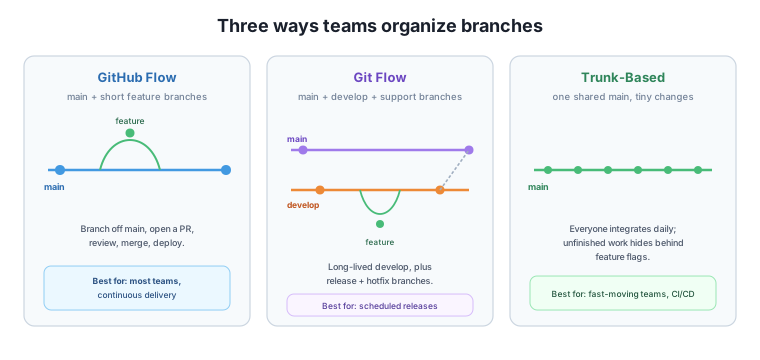
GitHub Flow is the lightest strategy, and the one this course has been quietly teaching all along. There is one long-lived branch — main — which is always deployable. To do any work, you:
main with a descriptive name.main and deploy.That’s the whole model. Branches are short-lived — hours or days, not weeks — and main is the single source of truth. Because there’s only one long-lived branch, there’s very little to keep straight, which is why GitHub Flow suits the majority of teams, especially those practicing continuous delivery (shipping frequently).
Its one limitation: it assumes you can release from main whenever you want. If your project ships on a fixed schedule and must maintain several released versions at once, you may want more structure.
Git Flow adds structure for teams with scheduled, versioned releases. It keeps two long-lived branches:
main — holds only released, production code. Every commit here is a shipped version.develop — the integration branch where finished features accumulate between releases.Around those, it defines several short-lived support branches: feature/* branches start from develop, release/* branches prepare a version for shipping (final testing, version bumps) before merging into main, and hotfix/* branches patch production urgently by branching from main directly.
This gives you fine control — you can stabilize a release while new features keep landing on develop — but it’s noticeably more complex. There are more branches to track, more merges, and more rules to remember. Git Flow shines for software with distinct versioned releases (think installed applications or libraries with support windows) and is often overkill for a continuously deployed web service.
Trunk-based development goes the opposite direction from Git Flow: minimize branching entirely. Everyone integrates their work into a single shared branch (the “trunk”, usually main) at least daily, in small increments. Branches, if used at all, live only a few hours before merging.
The obvious worry — “how do you merge unfinished work?” — is solved with feature flags: code paths that are merged but switched off until they’re ready, so incomplete features can sit safely in main without affecting users. The payoff is that everyone is always working against the latest code, so the painful “big merge” at the end of a long-lived branch never happens.
Trunk-based development demands discipline and strong automated testing (a solid CI pipeline catching breakage immediately), which is why it’s popular with fast-moving teams and at large scale.
Start simple, add structure only when it hurts
Most teams should start with GitHub Flow and reach for something heavier only when a real problem demands it. Adopting Git Flow’s five branch types for a small project that deploys continuously adds ceremony without benefit. The best strategy is the simplest one that solves the problems your team actually has.
A small startup deploys its web app several times a day and has no concept of “version 2.0” — they just ship continuously. Which branching strategy fits best, and why?
Hint
GitHub Flow (or trunk-based). They release continuously from main with no scheduled versioned releases, so Git Flow’s develop and release branches would add complexity with no payoff. Short-lived feature branches off main with pull requests are all they need.
In Git Flow, what is the purpose of having both a main branch and a develop branch?
Hint
main holds only released production code (each commit is a shipped version), while develop is where finished features accumulate between releases. Separating them lets the team keep main stable and shippable while integration continues on develop.
In trunk-based development, everyone merges into one branch daily — even unfinished work. How do teams avoid shipping half-built features to users?
Hint
Feature flags: the unfinished code is merged but kept switched off behind a flag, so it sits safely in main without affecting users until it’s complete and the flag is turned on.
A branching strategy is your team’s agreement about which branches exist and how work flows into the line you ship from — a convention, not a Git feature. GitHub Flow keeps one always-deployable main with short-lived feature branches and pull requests; it’s the simplest and fits most teams. Git Flow adds long-lived main and develop branches plus feature, release, and hotfix support branches, giving structured control for scheduled, versioned releases at the cost of complexity. Trunk-based development has everyone integrate into one shared line daily in small increments, hiding unfinished work behind feature flags; it needs strong automation but avoids painful big merges. Start simple and add structure only when a real problem demands it.
main + short-lived feature branches and PRs.main + develop + feature/release/hotfix branches for versioned releases.The branching strategy is the single most visible workflow decision a team makes — it shapes how you start work, how you review it, and how you ship. Recognizing these three patterns means you can join almost any team and immediately understand their setup, and contribute to choosing the right one rather than cargo-culting a heavier process than the project needs. With the structure of branches settled, the next lesson tackles the content that flows through them: writing commit messages a team can actually rely on.
Adopt Conventional Commits to make your project history readable, searchable, and automatable.
Return to the Team Workflows module overview
You can now recognize the three branching strategies teams use and reason about which fits a given project. Next you’ll make the work that flows through those branches legible to everyone — by writing commit messages with a shared, professional format.