Title here
Summary here
You make commits all the time, but how much thought goes into the message? It’s tempting to type fixed stuff and move on. The problem shows up months later, when you (or a teammate) open git log to understand why a line of code exists — and find a wall of vague, inconsistent messages that explain nothing. A commit message is the one chance you get to leave a note for the future. Done well, your history becomes living documentation; done badly, it becomes noise everyone learns to ignore. This lesson teaches you to write messages a team can rely on, anchored on a widely used format called Conventional Commits.
By the end of this lesson, you will be able to:
type(scope): description, with breaking-change markersThis builds on the commits you already know how to make (Module 2) and prepares your history for the teamwork in the rest of this module. Let’s begin.
Git already records what changed — the diff is right there in every commit. What it can’t record is why you changed it: the bug you were chasing, the decision you made, the constraint you were working around. That reasoning lives only in your head, and the commit message is where you write it down before it’s gone. Six months later, the diff tells the next reader what the code does; only your message tells them why it became that way. That is what people mean when they say history is documentation.
A reader skimming git log should be able to grasp each change from its subject line alone. A great message follows the same shape regardless of which tools or conventions a team layers on top:
That’s the universal skeleton. The next step is to standardize the subject line itself so the whole team writes it the same way — and so machines can read it too.
Conventional Commits is a lightweight convention that gives the subject line a small, predictable structure:
type(scope): descriptionThe pieces are:
feat (a new feature), fix (a bug fix), docs (documentation only), refactor (restructuring code without changing behavior), test (adding or fixing tests), and chore (maintenance, tooling, dependencies). Others you’ll meet include style, perf, build, and ci.cart). Use it when it helps a reader filter; omit it when the change is broad.So a feature touching the cart module reads feat(cart): include tax in total. A couple more realistic one-liners:
fix(cart): handle empty item list
docs: add usage examples to README
Breaking changes get special treatment, because they matter most to anyone depending on your code. Mark them with an exclamation mark right before the colon — feat(cart)!: ... — and/or add a BREAKING CHANGE: footer describing what broke and how to migrate. That marker is the signal automated tools watch for.
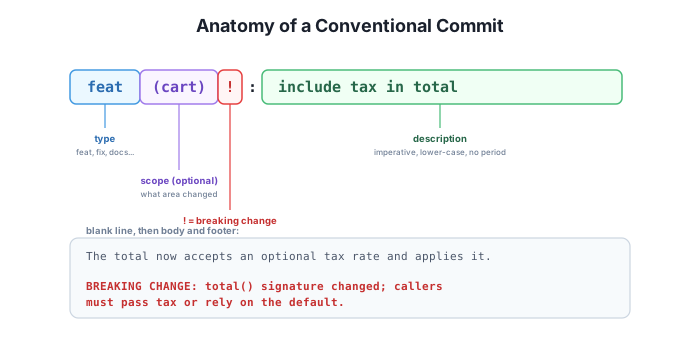
The subject answers WHAT, the body answers WHY
Git already records what changed line-by-line in the diff, so don’t waste your message restating it. Use the subject to name the change at a glance, and use the body to explain the why — the reason, the trade-off, the bug it fixes. A reader can always read the diff to see what happened; only you can tell them why it happened.
A shared format isn’t bureaucracy for its own sake — it buys you two concrete things.
First, history becomes filterable. Because every subject starts with a type, you can answer questions like “what features shipped this month?” by grepping your log for feat, or audit every breaking change at a glance. Consistent prefixes turn an unstructured pile of messages into something close to a queryable database.
Second, the format is machine-readable, which means tools can build on it. Here is a full Conventional Commit — with a body and a breaking-change footer — created in a multi-line -m, then read back with git log:
$ git commit -m "feat(cart): include tax in total

The total now accepts an optional tax rate and applies it.

BREAKING CHANGE: total() signature changed; callers must pass tax or rely on the default."
$ git log -1 --pretty=format:'%h%n%B'
9f6bb56
feat(cart): include tax in total
The total now accepts an optional tax rate and applies it.
BREAKING CHANGE: total() signature changed; callers must pass tax or rely on the default.Your hash (9f6bb56 here) will differ — it’s computed from your repository’s content and history. Notice how the subject, blank line, body, and footer survive the round trip exactly: the structure you typed is the structure a tool reads.
That readability is what makes changelogs and version bumps automatable. A release tool can scan the commits since your last release, group every feat and fix into a tidy changelog, and decide the next version number for you: a feat suggests a MINOR bump, a fix a PATCH, and anything marked breaking forces a MAJOR bump. Those bump rules come from semantic versioning, which we’ll cover properly in Lesson 4 — for now, the point is that the small discipline of a typed subject line pays off as automation you get for free.
A teammate committed a bug fix for the cart’s empty-list crash with the message fixed it. Rewrite it as a Conventional Commit subject line.
Hint
Something like fix(cart): handle empty item list. Start with the fix type, add the cart scope, and write an imperative, lower-case description with no trailing period that says what was fixed — not the unhelpful “fixed it”.
You add a brand-new apply_discount() function so the cart can take coupon codes. Which Conventional Commit type should the subject line use, and why?
Hint
feat, because you’re adding new functionality (a capability the cart didn’t have before). It would be fix only if you were correcting broken behavior, refactor if you were restructuring code without changing behavior, and test if you were only adding tests.
What’s wrong with this subject line: Fixed some cart stuff.?
Hint
Several things. It’s vague (“some cart stuff” tells the reader nothing about what changed), it’s not imperative (“Fixed” instead of “fix”/“handle”), and it ends with a trailing period a subject line shouldn’t have. It also lacks a Conventional Commit type. A better version: fix(cart): correct total when a coupon is applied.
A commit message is documentation: Git records what changed in the diff, so the message’s job is to explain why. A great message uses a concise imperative subject of about 50 characters with no trailing period, a blank line, an optional body wrapped near 72 columns explaining the reasoning, and optional footers. Conventional Commits standardizes the subject as type(scope): description — with types like feat, fix, docs, refactor, test, and chore, an optional scope, and a ! marker or BREAKING CHANGE: footer for breaking changes. That consistency makes history filterable and machine-readable, which in turn powers automatic changelogs and version bumps (a feat is a MINOR bump, a fix a PATCH, a breaking change a MAJOR — more in Lesson 4).
type(scope): description; types include feat, fix, docs, refactor, test, chore.! before the colon and/or a BREAKING CHANGE: footer.Commit messages are the part of your work that outlives the code itself — long after a function is rewritten, its history explains how it got there. Writing them in a shared, professional format means a new teammate can read your project’s story, find the change they’re hunting for, and trust that the history is reliable rather than noise. And because the format is machine-readable, the same discipline that helps humans also unlocks tooling that writes your changelog and picks your version number. With messages this legible, the next lesson tackles how multiple people can work in the same repository without stepping on each other.
Coordinate work across a team so multiple people can share one repository smoothly.
Return to the Team Workflows module overview
You can now write commit messages with a format a team relies on — an imperative subject, a body that explains the why, and the Conventional Commits structure that makes history both readable and automatable. Next you’ll put those messages to work in a shared repository, learning the habits that let several people commit, push, and pull without tripping over one another.