Title here
Summary here
Your team has merged a batch of work into main, run the tests, and decided it’s ready for the world. How do you mark this exact commit as the version you shipped, so you can point a teammate, a customer, or your future self straight back to it? Commit hashes like d638b86 are precise but meaningless to humans. What you want is a name — v1.0.0 — that says “this is the version we released.” That name is called a tag, and a tag dressed up with notes and downloads is a release. This lesson takes a finished version and turns it into a named, retrievable, shareable thing.
By the end of this lesson, you will be able to:
git tag, git show, and git describeWe’ll work with cart.py, the shopping-cart module from our sample project. Let’s begin.
Before you name a version, the team has to agree on what the name means. The near-universal convention is semantic versioning (often shortened to “semver”), which gives every release a three-part number — MAJOR.MINOR.PATCH — where each part signals a specific kind of change:
1.4.2 to 2.0.0)1.4.2 to 1.5.0)1.4.2 to 1.4.3)The rule that makes this useful is the reset: when you bump a number, every number to its right goes back to zero. A new feature on top of 1.4.2 becomes 1.5.0, not 1.5.2. A breaking change becomes 2.0.0. This lets anyone glance at two version numbers and know, without reading a single line of code, whether upgrading is safe (1.4.2 to 1.4.3), additive (1.4.2 to 1.5.0), or risky (1.4.2 to 2.0.0).
By convention, version tags carry a lowercase v prefix — v1.4.2, not 1.4.2. It’s a small thing, but it makes versions easy to spot in a list and is what tools like GitHub Releases expect.
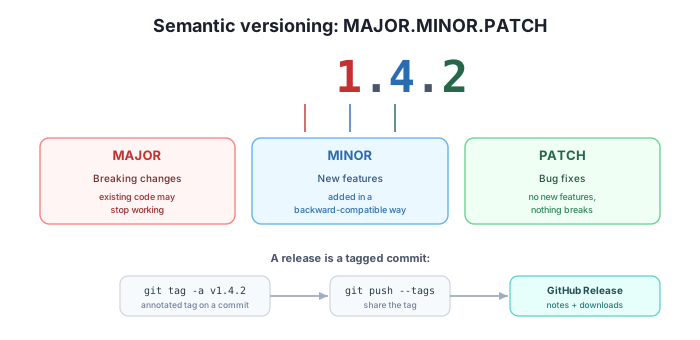
A tag is a permanent, human-friendly name pinned to one specific commit. Unlike a branch, a tag never moves — once v1.0.0 points at a commit, it points there forever, which is exactly what you want for “the thing we shipped.” Git offers two kinds.
A lightweight tag is nothing more than a name attached to a commit, like a sticky note:
$ git tag v0.9.0That’s it — no author, no date, no message. It’s fine for a quick private bookmark, but it records nothing about who tagged it, when, or why.
An annotated tag is a full object stored in the repository. It records the tagger, the date, and a message, and then points at the commit. Because a release is something you’ll come back to and want context for, annotated tags are the recommended choice for releases. You create one with git tag -a and a message:
$ git tag -a v1.0.0 -m "First stable release"
$ git tag -n
v1.0.0          First stable release
git tag on its own lists tag names; adding -n shows the first line of each tag’s message alongside it. To see everything an annotated tag stores, use git show:
$ git show v1.0.0
tag v1.0.0
Tagger: Maya Chen <[email protected]>
Date:   Tue Mar 4 11:00:00 2025 +0000

First stable release

commit d638b86f47e7ae1cb2c75784c78ff71d207fd0c7
Author: Maya Chen <[email protected]>
Date:   Tue Mar 4 10:00:00 2025 +0000
Notice the two blocks: the top is the tag itself (tagger, date, message), and below it is the commit the tag points at. That metadata is the whole reason annotated tags win for releases — six months from now, git show v1.0.0 tells you who cut the release and what it was for. (Your hashes, names, and dates will differ from the example above.)
Once you’ve kept working past a tag, git describe answers the question “where am I relative to the last release?” in a single readable string:
$ git describe --tags
v1.0.0-1-g9fffd0d
Read this right to left: you’re at commit 9fffd0d (the g stands for “git”), which is 1 commit after the tag v1.0.0. If you were sitting exactly on a tagged commit, git describe would just print the tag name. This is invaluable for build scripts and bug reports — it turns “some commit after the last release” into a precise, sortable label.
When the next version is ready, you tag again. Bumping our cart from its first release to one that adds a feature (discounts) means a MINOR bump:
$ git tag -a v1.1.0 -m "Add discount support"
$ git tag
v1.0.0
v1.1.0
Use annotated tags for releases — and remember they don’t push themselves
Reach for git tag -a (annotated) for anything you call a release: it records who tagged it, when, and why, so the version stays self-documenting long after you’ve forgotten the details. A bare git tag v0.9.0 (lightweight) is just a name with no metadata. And keep one thing front of mind for the next section: creating a tag is a local action. Your teammates won’t see it until you explicitly push it.
Here’s the surprise that trips up nearly everyone: git push does not push tags. A normal push sends your commits and branch updates, but it leaves your tags sitting on your machine. If you tag v1.1.0 and push your branch, your teammate’s git tag will still come up empty.
To share tags, you push them explicitly. You can name specific tags:
$ git push origin v1.0.0 v1.1.0
To github.com:datatweets/shopfront.git
 * [new tag]         v1.0.0 -> v1.0.0
 * [new tag]         v1.1.0 -> v1.1.0
The [new tag] lines confirm each tag was created on the remote. (The repository URL above is an example; yours will point at your own remote.) If you’d rather send everything at once, git push --tags pushes all of your local tags in one command. Pushing specific tags by name is the safer habit, though — it keeps half-finished or experimental tags from leaking to the team.
A pushed tag is already retrievable by anyone with the repo, but GitHub can dress it up into a proper Release: a page attached to the tag that carries release notes (what changed) and optional downloadable assets (a packaged binary, a zipped build, installers — whatever your users need). GitHub also auto-generates a source-code archive for the tagged commit.
There are two ways to create one. In the web UI, go to your repository’s Releases section (the right-hand sidebar of the repo’s main page, or …/releases), click Draft a new release, choose the existing tag v1.1.0 from the tag dropdown, give it a title and notes, attach any files, and publish.
From the terminal, the GitHub CLI does the same thing in one line:
$ gh release create v1.1.0 --title "v1.1.0" --notes "Add discount support to cart.py"After it runs, gh prints the URL of the newly created release page, which you can open or share directly. (You can also attach files by listing them after the flags, e.g. gh release create v1.1.0 ./dist/cart-1.1.0.zip --title "v1.1.0" --notes "...".) Either path produces the same result: a stable, named, documented point your team and users can return to at any time.
Your current release is v2.3.1. You ship a change that fixes a rounding bug in cart.py — no new features, and no existing behavior changes for anyone using the cart correctly. What’s the next version number, and why?
Hint
v2.3.2. A bug fix with no new features and no breaking changes is a PATCH bump, so only the last number increments. MAJOR and MINOR stay the same because nothing broke and nothing was added.
git describeYou run git describe --tags and get v1.1.0-4-g7c2a8b1. What does each part tell you about where you are in the history?
Hint
You are 4 commits after the tag v1.1.0, sitting at commit 7c2a8b1 (the g prefix just means “git”, it isn’t part of the hash). In other words, the most recent release before your current position is v1.1.0, and four commits have landed since then.
You created and pushed your branch, then told a teammate the new v1.2.0 tag was ready. They run git fetch and git tag, but v1.2.0 doesn’t appear. What went wrong, and how do you fix it?
Hint
A plain git push (and a plain fetch) does not include tags — creating a tag is a local action. You never pushed the tag itself. Fix it with git push origin v1.2.0 (or git push --tags), after which your teammate’s next fetch will pick it up.
A release is a finished version given a meaningful, retrievable name. Semantic versioning encodes the kind of change in a MAJOR.MINOR.PATCH number — MAJOR for breaking changes, MINOR for backward-compatible features, PATCH for bug fixes — with a v prefix by convention. A tag pins a permanent name to one commit: a lightweight tag is just a name, while an annotated tag (git tag -a) stores a tagger, date, and message, making it the right choice for releases. You list tags with git tag / git tag -n, inspect them with git show, and locate yourself relative to the last release with git describe --tags. Tags are not pushed by default — share them with git push origin <tag> or git push --tags. Finally, GitHub turns a pushed tag into a Release with notes and downloadable assets, via the web UI or gh release create.
v prefix.git tag -a, stores tagger/date/message; preferred for releases over lightweight tags.git tag -n to list with messages, git show for full detail, git describe --tags for “where am I since the last tag.”git push origin <tag> / --tags); publish a GitHub Release with notes and assets via the web or gh release create.Versions are how software communicates with the world. A clear semantic version tells users whether an upgrade is safe at a glance; an annotated tag preserves who shipped what and why; a GitHub Release gives everyone a single, documented place to download the exact version they need. Master this and you can take a pile of merged commits and turn it into something a team — and its users — can rely on, cite, and roll back to. With versioning and releases understood, you’re ready to put the whole module together.
Put branching, commits, pull requests, and releases together in one end-to-end workflow.
Return to the Team Workflows module overview
You can now mark a finished version with a semantic, annotated tag, share it with your team, and publish it as a GitHub Release with notes and downloads. In the next lesson you’ll run the full cycle end to end — branch, commit, open a pull request, merge, and cut a release — so every piece you’ve learned in this module clicks into a single, repeatable workflow.