Title here
Summary here
If you have ever ended up with files named report_final.docx, report_final_v2.docx, and report_final_REALLY_final.docx, you have already felt the problem that version control solves. Keeping track of how a project changes over time — by hand — is error-prone, and it gets far worse the moment a second person is involved. Version control is software that does this tracking for you: it records the history of your project so you can see what changed, when, and why; undo mistakes; and work alongside others without overwriting each other. Git is the version-control tool the world has largely settled on, and this lesson is about understanding what it is before you type a single command.
No setup yet — just the ideas. The next lesson installs Git.
By the end of this lesson, you will be able to:
Let’s begin.
Imagine you’re writing a program, a paper, or any project made of files. Without version control, every time you want to preserve a version, you copy the folder and rename it — project, project_backup, project_backup_2. This breaks down fast:
project_v7 tells you nothing about what changed or the reason for it.These aren’t rare edge cases — they’re the normal experience of working on anything that evolves over time. Version control exists to make all of them go away.
A version control system (VCS) records the state of your project over time as a series of snapshots. Each snapshot captures what every file looked like at one moment, along with a note describing the change. In Git, one snapshot is called a commit.
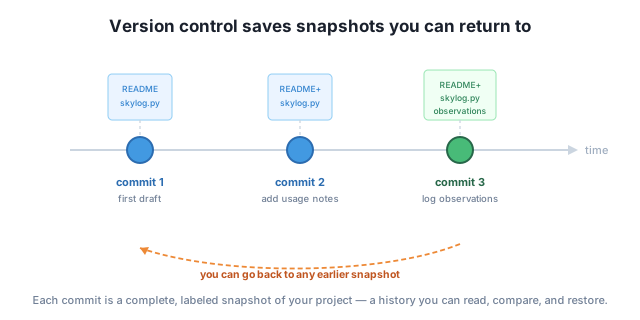
Because the whole history is stored, version control gives you superpowers over your own work:
That last point is why version control is non-negotiable on any team: it turns “who has the latest version?” into a non-question.
There have been many version-control systems, but Git is the one that won. A few things make it stand out, and one of them shapes everything about how it works: Git is distributed.
In a distributed VCS, every person has a full copy of the entire history on their own machine — not just the latest files, but every commit ever made. You can commit, view history, branch, and undo entirely offline, because nothing has to contact a central server. When you’re ready, you sync your history with others. This makes Git fast, resilient (there’s no single copy to lose), and flexible.
Git is also free and open source, extraordinarily reliable, and supported everywhere — which is why it underpins the vast majority of software projects in the world.
Git is not GitHub
People often say “Git” and “GitHub” interchangeably, but they’re different things. Git is the version-control tool that runs on your computer. GitHub is a website that hosts Git repositories online so you can back them up, share them, and collaborate. You can use Git with no GitHub at all; you’ll add GitHub later in this course once you’re comfortable with Git itself.
Learning Git pays off no matter what you do with code or data:
It has a reputation for being confusing, but most of that confusion comes from learning commands without the mental model. This course gives you the model first — starting with the snapshot idea you just met — so the commands feel logical instead of magical.
List two specific problems with the “copy the folder and rename it” approach to saving versions of a project, and say how a version-control system fixes each.
Hint
Examples: (1) You lose history — a VCS records every change with a message, so you can see what changed and when. (2) Collaboration overwrites work — a VCS merges multiple people’s changes instead of letting one copy clobber another. Undo and “why did this change?” are also valid.
In the diagram, what does “commit 2” capture, and what does the dashed arrow back to “commit 1” represent?
Hint
Commit 2 is a full snapshot of the project at that moment (the updated README and skylog.py), labeled with why it was made. The dashed arrow shows you can return the project to the state of any earlier commit — history isn’t just a record, it’s something you can travel back to.
A friend says “I’ll just use GitHub instead of Git.” Explain why that sentence doesn’t quite make sense.
Hint
Git is the tool that does version control on your computer; GitHub is a website that hosts Git repositories online. You use GitHub with Git, not instead of it — GitHub stores and shares the history that Git creates.
Version control records your project’s history as a series of snapshots so you can review changes, undo mistakes, experiment safely, and collaborate without overwriting each other — replacing the fragile “copy and rename the folder” habit. Git is the dominant version-control tool: it’s distributed, meaning every machine holds the full history and can work offline, then sync with others. It’s free, fast, reliable, and expected nearly everywhere. And it’s distinct from GitHub, the website that hosts Git repositories online. With the snapshot mental model in hand, the commands ahead will make sense.
Git is one of the highest-leverage skills you can learn: it’s a job-market baseline, it makes your own work safe to change, and it’s the foundation of how software and data teams build together. Understanding what it is and why it exists — before memorizing commands — is what turns Git from intimidating into intuitive. Everything else in this course builds on the snapshot idea you just learned.
Install Git on your machine, confirm it works, and set up your identity so your commits are labeled correctly.
Return to the Version Control Foundations module overview
You now know what version control is, how Git stores your work as snapshots, and why it’s worth learning. Next you’ll make it real — installing Git, checking it works, and telling it who you are so your first commits are properly attributed.