Title here
Summary here
In Lesson 1 you learned to ask XGBoost which features matter, and you also learned to distrust the easy answer. The built-in gain, weight, and cover importances each tell a slightly different story, and none of them tells you why a single prediction came out the way it did. When Northwind Analytics hands a stakeholder a predicted median house value of 0.46 for one California district and the stakeholder asks “why so low?”, a global importance bar chart is no help at all. It describes the model in the aggregate; it cannot decompose one row.
This lesson gives you a tool that can. SHAP (SHapley Additive exPlanations) attributes each individual prediction to its features, fairly and with a precise mathematical guarantee. It answers both questions at once: the global one (“which features drive the model overall?”) in a way that is more consistent than Lesson 1’s importances, and the local one (“why this exact prediction?”) that importances cannot touch. We will keep using the same California Housing model, the same random_state=42, and prove every claim by running the code. Because SHAP is theoretically grounded, it comes with a property we can check with np.allclose, and we will.
By the end of this lesson, you will be able to:
shap.TreeExplainerYou should be comfortable with the XGBoost training workflow, the California Housing features from earlier modules, and the feature-importance discussion from Lesson 1. Let’s begin.
Imagine the eight California Housing features as players cooperating to produce one prediction. The model starts from a baseline (what it would guess knowing nothing about a specific district, which turns out to be the average prediction across the data) and each feature nudges the prediction away from that baseline. SHAP asks a fairness question borrowed from cooperative game theory: how should the total movement, from baseline to final prediction, be divided among the features?
The answer SHAP uses is the Shapley value, the unique attribution that satisfies a short list of fairness axioms (a feature that never changes the prediction gets zero credit; two features that always act identically get equal credit; the credits always sum to the whole). Concretely, a feature’s Shapley value is its average marginal contribution across every possible order in which features could be added to the model’s knowledge:
You do not need to compute that sum by hand, and you never will. The bracket is simply “how much did adding feature change the prediction, given that the model already knew the features in set ?” Averaged fairly over all subsets , it becomes , feature ’s SHAP value for this specific row. What matters for us is that each SHAP value is signed: a positive value pushed this prediction up, a negative value pushed it down, and the size is how many MedHouseVal units of push.
For a general model, evaluating that sum is astronomically expensive. XGBoost is a tree ensemble, though, and the shap library ships a specialized algorithm, TreeExplainer, that computes exact SHAP values for trees efficiently by walking the tree structure directly. That is what makes SHAP practical on a real model.
import warnings
warnings.filterwarnings("ignore")
import numpy as np
import xgboost as xgb
import shap
from sklearn.datasets import fetch_california_housing
from sklearn.model_selection import train_test_split

data = fetch_california_housing()
feature_names = list(data.feature_names)
X_train, X_test, y_train, y_test = train_test_split(
    data.data, data.target, test_size=0.2, random_state=42
)

model = xgb.XGBRegressor(
    n_estimators=300, learning_rate=0.1, max_depth=4, random_state=42
)
model.fit(X_train, y_train)

explainer = shap.TreeExplainer(model)
shap_values = explainer.shap_values(X_test)

print("features        :", feature_names)
print("SHAP array shape:", shap_values.shape)
print("base value      :", float(round(explainer.expected_value, 4)))
features : ['MedInc', 'HouseAge', 'AveRooms', 'AveBedrms', 'Population', 'AveOccup', 'Latitude', 'Longitude']
SHAP array shape: (4128, 8)
base value : 2.0719Read the shapes. shap_values has one row per test district (4128) and one column per feature (8): every prediction gets its own full set of eight contributions, not a single global number. The explainer.expected_value of 2.0719 is the base value, the model’s average output over the data, which is where every explanation starts before any feature moves it.
TreeExplainer is exact, not sampled
For many models SHAP has to approximate the Shapley values by sampling feature subsets. For tree ensembles like XGBoost, TreeExplainer computes them exactly by exploiting the tree structure, and it does so fast enough to explain thousands of rows in a moment. That is why SHAP is a first-class citizen for gradient boosting specifically: the guarantees hold with no sampling noise. You can also call explainer(X_test) to get a richer Explanation object (with .values, .base_values, and .data); it carries the same numbers shap_values returns.
Here is the promise that separates SHAP from a heuristic importance score. For every single row, the base value plus that row’s eight SHAP values equals the model’s prediction for that row, exactly:
This is the additive in “SHapley Additive exPlanations.” It means an explanation is never a rough summary that mostly agrees with the model; it reconstructs the prediction on the nose. Let’s not take that on faith. We will add up the base value and the SHAP contributions for a few districts and compare against model.predict.
import warnings
warnings.filterwarnings("ignore")
import numpy as np
import xgboost as xgb
import shap
from sklearn.datasets import fetch_california_housing
from sklearn.model_selection import train_test_split

data = fetch_california_housing()
X_train, X_test, y_train, y_test = train_test_split(
    data.data, data.target, test_size=0.2, random_state=42
)
model = xgb.XGBRegressor(
    n_estimators=300, learning_rate=0.1, max_depth=4, random_state=42
).fit(X_train, y_train)

explainer = shap.TreeExplainer(model)
shap_values = explainer.shap_values(X_test)
base = float(explainer.expected_value)
preds = model.predict(X_test)

for i in [0, 1, 7]:
    reconstructed = base + shap_values[i].sum()
    print(f"row {i}: base={round(base, 4)}  "
          f"sum(SHAP)={round(float(shap_values[i].sum()), 4)}  "
          f"base+sum={round(float(reconstructed), 4)}  "
          f"prediction={round(float(preds[i]), 4)}")

all_match = np.allclose(base + shap_values.sum(axis=1), preds, atol=1e-4)
print("additivity holds for ALL 4128 rows:", bool(all_match))
row 0: base=2.0719 sum(SHAP)=-1.6122 base+sum=0.4597 prediction=0.4597
row 1: base=2.0719 sum(SHAP)=-1.0917 base+sum=0.9802 prediction=0.9802
row 7: base=2.0719 sum(SHAP)=-0.4954 base+sum=1.5765 prediction=1.5765additivity holds for ALL 4128 rows: TrueLook at row 0: start at the base value 2.0719, add up that district’s eight SHAP values (-1.6122 in total, so on balance the features pulled the prediction way down), and you land at 0.4597, which is exactly model.predict for that row. The same holds for rows 1 and 7, and the final line confirms it for all 4128 test districts at once with np.allclose. This is the numerical backbone of everything below: because the parts provably sum to the whole, we can trust that reading the SHAP values tells us how the prediction was really built, not an approximation of it.
Now we turn the per-row values into a single importance ranking. The recipe is simple and principled: for each feature, take the average of the absolute value of its SHAP values across all rows. A feature whose contributions are large in size (in either direction) is important; a feature whose contributions hover near zero is not. Because it is built from the additive, per-row values, this ranking is more consistent than the built-in importances you met in Lesson 1.
import warnings
warnings.filterwarnings("ignore")
import numpy as np
import xgboost as xgb
import shap
from sklearn.datasets import fetch_california_housing
from sklearn.model_selection import train_test_split

data = fetch_california_housing()
feature_names = list(data.feature_names)
X_train, X_test, y_train, y_test = train_test_split(
    data.data, data.target, test_size=0.2, random_state=42
)
model = xgb.XGBRegressor(
    n_estimators=300, learning_rate=0.1, max_depth=4, random_state=42
).fit(X_train, y_train)

explainer = shap.TreeExplainer(model)
shap_values = explainer.shap_values(X_test)

# Global importance = mean absolute SHAP value per feature
mean_abs_shap = np.abs(shap_values).mean(axis=0)
order = np.argsort(mean_abs_shap)[::-1]

print("Global importance (mean |SHAP|):")
for j in order:
    print(f"  {feature_names[j]:12s} {round(float(mean_abs_shap[j]), 4)}")
Global importance (mean |SHAP|):
Latitude 0.5626
Longitude 0.4764
MedInc 0.4061
AveOccup 0.1985
AveRooms 0.1037
HouseAge 0.0533
AveBedrms 0.0334
Population 0.0236Read that ranking on its own terms: on average, Latitude moves each prediction by about 0.56 units, Longitude by 0.48, and MedInc by 0.41 (in MedHouseVal units of $100,000), while Population barely registers at 0.02. Location dominates, income is a close third, and the rest trail off. Now put it next to Lesson 1’s gain importance for the identical model.
import warnings
warnings.filterwarnings("ignore")
import numpy as np
import xgboost as xgb
import shap
from sklearn.datasets import fetch_california_housing
from sklearn.model_selection import train_test_split

data = fetch_california_housing()
feature_names = list(data.feature_names)
X_train, X_test, y_train, y_test = train_test_split(
    data.data, data.target, test_size=0.2, random_state=42
)
model = xgb.XGBRegressor(
    n_estimators=300, learning_rate=0.1, max_depth=4, random_state=42
).fit(X_train, y_train)

explainer = shap.TreeExplainer(model)
shap_values = explainer.shap_values(X_test)
mean_abs_shap = np.abs(shap_values).mean(axis=0)

# gain importance from Lesson 1, normalized to fractions
gain = model.get_booster().get_score(importance_type="gain")
gain_named = {feature_names[int(k[1:])]: v for k, v in gain.items()}
total = sum(gain_named.values())

shap_rank = [feature_names[j] for j in np.argsort(mean_abs_shap)[::-1]]
gain_rank = sorted(gain_named, key=lambda n: gain_named[n], reverse=True)

print(f"{'rank':4s} {'by mean |SHAP|':14s} {'by gain (Lesson 1)':18s}")
for r in range(len(feature_names)):
    print(f"{r+1:<4d} {shap_rank[r]:14s} {gain_rank[r]:18s}")
rank by mean |SHAP| by gain (Lesson 1)
1 Latitude MedInc
2 Longitude AveOccup
3 MedInc Longitude
4 AveOccup Latitude
5 AveRooms HouseAge
6 HouseAge AveRooms
7 AveBedrms AveBedrms
8 Population Population The two rankings disagree at the very top, and that disagreement is the whole lesson of comparing them. gain crowns MedInc because income produces the biggest split-quality improvements when the tree chooses to split on it. Mean absolute SHAP instead puts Latitude and Longitude first, because location, taken across all rows, moves the actual predictions the most. Neither is “wrong”; they measure different things. gain scores how useful a feature is for building the tree; SHAP scores how much a feature moves the outputs the model actually produces, which is usually the question a stakeholder is really asking. When the two disagree, prefer SHAP for explaining predictions, and treat the gap itself as a signal worth investigating.
Why SHAP’s ranking is more trustworthy
Lesson 1 showed that gain, weight, and cover can rank the same features differently, with no principled way to pick between them. Mean absolute SHAP has no such ambiguity: it is derived from per-row contributions that provably sum to the prediction, so it is a single, consistent measure rather than one of several competing heuristics. It also costs more to compute, which is the trade-off we return to at the end.
Global rankings describe the model. The reason people reach for SHAP, though, is the thing importances simply cannot do: explain one specific prediction. Because the SHAP values for a row are signed and add up to the prediction, we can list, for a single district, exactly which features pushed its price up, which pushed it down, and by how much.
import warnings
warnings.filterwarnings("ignore")
import numpy as np
import xgboost as xgb
import shap
from sklearn.datasets import fetch_california_housing
from sklearn.model_selection import train_test_split

data = fetch_california_housing()
feature_names = list(data.feature_names)
X_train, X_test, y_train, y_test = train_test_split(
    data.data, data.target, test_size=0.2, random_state=42
)
model = xgb.XGBRegressor(
    n_estimators=300, learning_rate=0.1, max_depth=4, random_state=42
).fit(X_train, y_train)

explainer = shap.TreeExplainer(model)
shap_values = explainer.shap_values(X_test)
base = float(explainer.expected_value)
preds = model.predict(X_test)

for i in [0, 12]:
    print(f"\n=== District (test row {i}) ===")
    print(f"  base value : {round(base, 4)}")
    print(f"  prediction : {round(float(preds[i]), 4)}   (actual: {round(float(y_test[i]), 3)})")
    # largest-magnitude contributions first
    rows = sorted(
        zip(feature_names, shap_values[i], X_test[i]),
        key=lambda t: abs(t[1]), reverse=True,
    )
    for name, s, xval in rows:
        direction = "up  " if s > 0 else "down"
        print(f"    {name:11s} = {round(float(xval), 2):>9}   "
              f"SHAP {round(float(s), 4):>+8}  pushes {direction}")
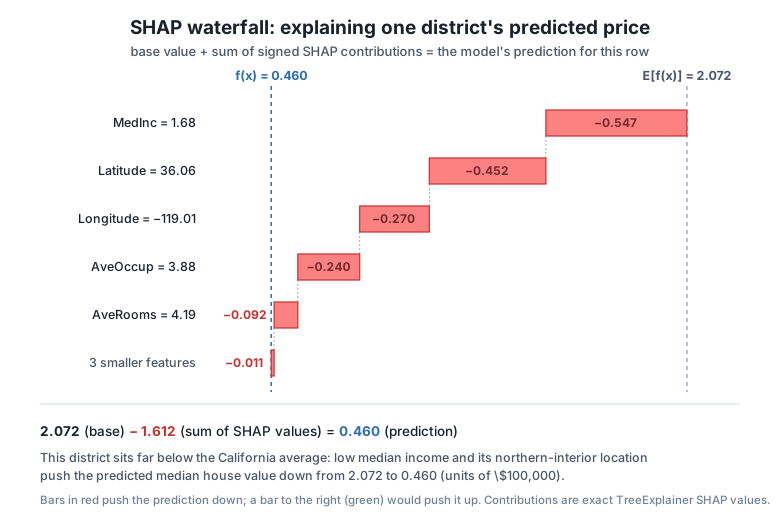
=== District (test row 0) ===
base value : 2.0719
prediction : 0.4597 (actual: 0.477)
MedInc = 1.68 SHAP -0.547 pushes down
Latitude = 36.06 SHAP -0.4521 pushes down
Longitude = -119.01 SHAP -0.2699 pushes down
AveOccup = 3.88 SHAP -0.24 pushes down
AveRooms = 4.19 SHAP -0.092 pushes down
Population = 1392.0 SHAP -0.0066 pushes down
AveBedrms = 1.02 SHAP -0.0065 pushes down
HouseAge = 25.0 SHAP +0.0019 pushes up
=== District (test row 12) ===
base value : 2.0719
prediction : 1.5899 (actual: 2.151)
Latitude = 33.76 SHAP +0.4497 pushes up
Longitude = -117.91 SHAP -0.3162 pushes down
AveOccup = 4.53 SHAP -0.2869 pushes down
MedInc = 2.86 SHAP -0.2769 pushes down
AveRooms = 4.15 SHAP -0.0828 pushes down
AveBedrms = 1.12 SHAP +0.0292 pushes up
Population = 4818.0 SHAP +0.0164 pushes up
HouseAge = 20.0 SHAP -0.0145 pushes downThese two districts tell genuinely different stories, and that is the point. Test row 0 is a low-value district (predicted 0.46, actual 0.48). Every feature but one pushes it below the 2.07 baseline, led by a low MedInc of 1.68 (SHAP -0.547) and its northern-interior location (Latitude 36.06 contributing -0.452, Longitude -0.270). The explanation in plain language: this district is predicted cheap mainly because incomes are low and it sits far from the pricey coast.
Test row 12 is more interesting because its features fight each other. Its Latitude of 33.76 (southern California) pushes the price up by +0.450, the single biggest force on the row, but Longitude, a crowded AveOccup of 4.53, and a below-average MedInc all pull it back down. The tug-of-war nets out to a prediction of 1.59. No global importance chart could have told you that location was helping this particular district while income was hurting it, in these exact amounts. That is the local resolution SHAP buys you, and it is why it belongs in any deployment where you may have to justify an individual prediction.
SHAP is strictly more informative than the built-in importances, so why not use it for everything? Because it costs more. Feature importance is essentially free: XGBoost accumulates it while training. SHAP has to do real extra work per row, walking the trees to compute contributions. TreeExplainer makes this fast enough to be routine for tree models, but it is still meaningfully slower than reading model.feature_importances_, and the gap grows with the number of rows and trees you explain.
The practical rule: reach for plain importance during model development, when you want a quick, cheap sense of what the model leans on and you are iterating fast. Reach for SHAP when you need trustworthy or per-prediction explanations, when a global ranking must be defensible, when someone asks “why this prediction?”, or when you are shipping a model whose individual outputs affect real decisions. Its three advantages, consistency (one principled ranking, not several heuristics), the union of global and local views, and signed contributions that say direction as well as size, are exactly what a deployed, accountable model needs. That deployment context is where the rest of this module is heading.
Try each one before opening its hint. They exercise the additivity check, the global ranking, and a local explanation.
Fit the same XGBRegressor, build a shap.TreeExplainer, and pick any three test rows you like. For each, print the base value, the sum of that row’s SHAP values, base + sum, and model.predict for the row. Confirm the last two agree to four decimals.
import warnings
warnings.filterwarnings("ignore")
import numpy as np
import xgboost as xgb
import shap
from sklearn.datasets import fetch_california_housing
from sklearn.model_selection import train_test_split

data = fetch_california_housing()
X_train, X_test, y_train, y_test = train_test_split(
    data.data, data.target, test_size=0.2, random_state=42
)

# Your code here
Hint
After fitting, do explainer = shap.TreeExplainer(model) and sv = explainer.shap_values(X_test). The base value is float(explainer.expected_value) (2.0719). For a row i, compute base + sv[i].sum() and compare it to model.predict(X_test)[i]. They will match to four decimals for every row, because additivity is exact, not approximate; a single np.allclose(base + sv.sum(axis=1), model.predict(X_test), atol=1e-4) returns True for the whole test set at once.
Compute the mean absolute SHAP value per feature and print the features in descending order. Then pull gain importance with model.get_booster().get_score(importance_type="gain") and compare the two number-one features. Note in one sentence which feature each method ranks first and why they differ.
import warnings
warnings.filterwarnings("ignore")
import numpy as np
import xgboost as xgb
import shap
from sklearn.datasets import fetch_california_housing
from sklearn.model_selection import train_test_split

data = fetch_california_housing()
feature_names = list(data.feature_names)
X_train, X_test, y_train, y_test = train_test_split(
    data.data, data.target, test_size=0.2, random_state=42
)

# Your code here
Hint
Mean absolute SHAP is np.abs(sv).mean(axis=0); sort it with np.argsort(...)[::-1] and index into feature_names. You should see Latitude (0.5626), Longitude (0.4764), MedInc (0.4061) at the top. gain instead ranks MedInc first. They differ because gain measures how much a feature improves tree splits, while mean absolute SHAP measures how much a feature moves the model’s actual predictions, and location moves predictions most here even though income builds the best splits.
Find the test district with the highest predicted MedHouseVal, print its per-feature SHAP contributions sorted by magnitude, and write one or two sentences naming the features that pushed its price up. Confirm the contributions still sum (with the base value) to its prediction.
import warnings
warnings.filterwarnings("ignore")
import numpy as np
import xgboost as xgb
import shap
from sklearn.datasets import fetch_california_housing
from sklearn.model_selection import train_test_split

data = fetch_california_housing()
feature_names = list(data.feature_names)
X_train, X_test, y_train, y_test = train_test_split(
    data.data, data.target, test_size=0.2, random_state=42
)

# Your code here
Hint
Get the index with i = int(np.argmax(model.predict(X_test))). Then sv = shap.TreeExplainer(model).shap_values(X_test) and sort zip(feature_names, sv[i], X_test[i]) by abs of the SHAP value, descending. For the top-predicted district you will see large positive contributions (features pushing the price up, typically a high MedInc and a favorable location), which makes sense for an expensive district. Verify with np.isclose(explainer.expected_value + sv[i].sum(), model.predict(X_test)[i], atol=1e-4), which is True.
You moved from ranking features to explaining predictions. SHAP gave you a single framework for both the global and the local question, backed by a property you verified with real numbers rather than trusted on faith.
What a SHAP value is
MedHouseVal unitsshap.TreeExplainer computes them exactly for XGBoost by walking the tree structure, fast enough for thousands of rowsAdditivity (verified)
explainer.expected_value = 2.0719) plus a row’s SHAP values equals the model’s prediction for that row, exactlynp.allclose(..., atol=1e-4) returning TrueGlobal explanation
Latitude 0.5626, Longitude 0.4764, MedInc 0.4061 on topgain (which ranks MedInc first) because gain scores split quality while SHAP scores movement of the actual predictions; prefer SHAP for explaining outputsLocal explanation
MedInc (-0.547) and inland location pulled the prediction down to 0.46; for test row 12, a favorable Latitude (+0.450) fought a low income and crowding to net out at 1.59Lesson 1 taught you to be skeptical of feature importance; this lesson gave you the tool that answers the deeper question importance cannot. When Northwind ships this model and a stakeholder, an auditor, or a homeowner asks “why did the model predict this for this district?”, you can now produce an exact, signed, feature-by-feature answer that provably adds up to the prediction. That is the difference between a model you can only describe in aggregate and one whose every output you can defend.
The additivity guarantee is what makes SHAP safe to build a workflow on. Because the parts sum to the whole, a SHAP explanation is not a plausible-sounding story layered on top of the model; it is the model’s arithmetic, reorganized so a human can read it. Carry that reliability forward: as you tune the model in the next lesson and deploy it later in the module, SHAP is the lens you will use to make sure a more accurate model is also a more understandable one.
You can explain what the model does, both overall and for any single district. Next you will make it better, moving from the sensible-but-untuned hyperparameters we have used all module to a principled search with Optuna, so the model you eventually deploy is both accurate and explainable.
Search the XGBoost hyperparameter space efficiently with Optuna and beat the hand-picked settings you have used so far.
Return to the Interpretation, Tuning & Deployment module overview
Before moving on, rerun the local explanation on a few districts of your own choosing, including the cheapest and most expensive predictions, and read each one out loud as a sentence: “this district is predicted high mostly because of X and Y, held back a little by Z.” Getting fluent at turning eight signed numbers into one honest sentence is the real skill here; the code is the easy part. When you can do that reliably, and when the additivity check backs you up every time, you are ready to tune a model you already know how to explain.
Keep DATATWEETS free. Help fund practical data, AI, and engineering lessons for learners worldwide.