Title here
Summary here
Over the last three lessons, Northwind Analytics turned a black-box booster into something they understand and trust: they read its feature importances, tuned its knobs, and validated it honestly. But everything they built still lives in one place, in-memory, inside a single Python process. The moment that process exits, the trained model is gone. A model that cannot outlive the session that trained it cannot answer a single real request.
This lesson closes that gap. You will persist the trained model to disk, load it back in a fresh process, and prove the reloaded copy predicts exactly what the original did, not “close enough,” but identical to the last decimal. Then you will wrap it in a tiny serving function that takes one district’s features and returns a price, the shape every real deployment eventually takes. Finally, because XGBoost is not the only game in town, you will train an equivalent LightGBM model on the same California Housing split and compare, and look honestly at where CatBoost fits, so you can choose a library on purpose instead of by habit. Every number below was produced by running the code for real.
By the end of this lesson, you will be able to:
save_model to .json or .ubj) and load it back into a fresh estimatorjoblib pickling, and explain why it is convenient but version-fragilepredict_price() serving function that scores a new input rowYou should be comfortable fitting an XGBRegressor, the train/test split used all course long, and reading a test RMSE. No deployment or web-framework experience is assumed. Let’s begin.
A trained XGBoost model is just a set of numbers: the structure of every tree and the value at every leaf. Saving writes those numbers to a file; loading reads them back into a model object you can call predict on. There are two families of ways to do this, and the difference between them matters more than it first appears.
save_model (JSON / UBJ)XGBoost’s own, recommended method is model.save_model(path). Give it a .json filename and it writes the model as human-readable JSON; give it .ubj and it writes UBJSON, a compact binary form of the same content. Both formats are forward-compatible: they store only the model itself in XGBoost’s documented schema, so a model saved by one version of XGBoost can be loaded by a later version. This is the format to reach for whenever a model has to survive an upgrade, move between machines, or be read by XGBoost’s C++, R, or Java bindings.
To load, construct a fresh estimator and call load_model. Here Northwind trains the tuned model, saves it to a temporary directory (never into the project itself), loads it back, and checks the reloaded predictions against the original.
import warnings
warnings.filterwarnings("ignore")
import os, tempfile
import numpy as np
import xgboost as xgb
from sklearn.datasets import fetch_california_housing
from sklearn.model_selection import train_test_split
from sklearn.metrics import mean_squared_error

data = fetch_california_housing()
X_train, X_test, y_train, y_test = train_test_split(
    data.data, data.target, test_size=0.2, random_state=42
)

model = xgb.XGBRegressor(
    n_estimators=300, learning_rate=0.1, max_depth=4, random_state=42
)
model.fit(X_train, y_train)
original_pred = model.predict(X_test)
print("original test RMSE:", float(round(np.sqrt(mean_squared_error(y_test, original_pred)), 4)))

# Save to a temp dir in the portable JSON format
tmpdir = tempfile.mkdtemp()
json_path = os.path.join(tmpdir, "northwind_xgb.json")
model.save_model(json_path)
print("file size (KB):", round(os.path.getsize(json_path) / 1024, 1))

# Load into a brand-new estimator
loaded = xgb.XGBRegressor()
loaded.load_model(json_path)
loaded_pred = loaded.predict(X_test)

print("predictions identical (array_equal):", bool(np.array_equal(original_pred, loaded_pred)))
original test RMSE: 0.4696
file size (KB): 584.1
predictions identical (array_equal): TrueRead the last line carefully: np.array_equal returned True, which is stronger than np.allclose. It means every one of the 4,128 test predictions from the reloaded model matches the original exactly, not within a tolerance. That is what you want from persistence: saving and loading must be a no-op on the model’s behavior. The freshly constructed xgb.XGBRegressor() had no idea what hyperparameters trained it, yet after load_model it reproduces the original perfectly, because the file carries the trained trees themselves.
JSON, UBJ, and the native Booster
Prefer .json when you want to be able to open the file and read it, and .ubj when you want the smallest, fastest binary artifact; they store the same model and are equally forward-compatible. You can also load into the lower-level native object with bst = xgb.Booster(); bst.load_model(path), which is handy when the serving side does not need the scikit-learn wrapper at all. Whichever you pick, save_model/load_model is the format XGBoost promises to keep readable across versions, so it is the safe default for anything long-lived.
joblib PicklingThe second family serializes the whole Python object with joblib (bundled with scikit-learn). One call saves it, one call brings it back, and you get the entire estimator, hyperparameters, fitted attributes, and all, exactly as it was.
import warnings
warnings.filterwarnings("ignore")
import os, tempfile
import numpy as np
import joblib
import xgboost as xgb
from sklearn.datasets import fetch_california_housing
from sklearn.model_selection import train_test_split

data = fetch_california_housing()
X_train, X_test, y_train, y_test = train_test_split(
    data.data, data.target, test_size=0.2, random_state=42
)

model = xgb.XGBRegressor(
    n_estimators=300, learning_rate=0.1, max_depth=4, random_state=42
)
model.fit(X_train, y_train)
original_pred = model.predict(X_test)

tmpdir = tempfile.mkdtemp()
pkl_path = os.path.join(tmpdir, "northwind_xgb.joblib")
joblib.dump(model, pkl_path)

reloaded = joblib.load(pkl_path)
reloaded_pred = reloaded.predict(X_test)
print("joblib round-trip identical:", bool(np.array_equal(original_pred, reloaded_pred)))
print("xgboost version:", xgb.__version__)
print("joblib  version:", joblib.__version__)
joblib round-trip identical: True
xgboost version: 3.3.0
joblib version: 1.5.3The round-trip is exact here too, so why not always use the easy button? Because joblib writes a Python pickle: it serializes the live object graph, which entangles the file with the exact versions of XGBoost, NumPy, and Python that created it. Load it under a mismatched XGBoost version and you may get a warning, a subtly different object, or an outright error. Pickles also execute code on load, so you must never unpickle a file you did not create yourself. That is the trade-off in one sentence: joblib is the most convenient inside a single, controlled environment; save_model is the most durable across time, machines, and versions. For a model you plan to serve for months, save the portable JSON (or UBJ); reach for joblib for quick, same-session checkpoints.
“Serving” a model means answering requests: given one new district’s features, return a predicted price. The core idea is simple, load the saved model once, then score each incoming row, and it looks the same whether it eventually sits behind a web API, a batch job, or a spreadsheet plugin. The two rules that keep it correct are (1) load the model a single time and reuse it, not once per request, and (2) present the features in the exact order the model was trained on. California Housing’s eight columns have a fixed order, and getting it wrong silently feeds the model garbage.
import warnings
warnings.filterwarnings("ignore")
import os, tempfile
import numpy as np
import xgboost as xgb
from sklearn.datasets import fetch_california_housing
from sklearn.model_selection import train_test_split

data = fetch_california_housing()
X_train, X_test, y_train, y_test = train_test_split(
    data.data, data.target, test_size=0.2, random_state=42
)

model = xgb.XGBRegressor(
    n_estimators=300, learning_rate=0.1, max_depth=4, random_state=42
)
model.fit(X_train, y_train)

tmpdir = tempfile.mkdtemp()
MODEL_PATH = os.path.join(tmpdir, "northwind_xgb.json")
model.save_model(MODEL_PATH)

# ---- serving code (in production this lives in its own module/service) ----
FEATURE_ORDER = [
    "MedInc", "HouseAge", "AveRooms", "AveBedrms",
    "Population", "AveOccup", "Latitude", "Longitude",
]
_served_model = None  # cache: load once, reuse for every call

def _get_model():
    global _served_model
    if _served_model is None:
        _served_model = xgb.XGBRegressor()
        _served_model.load_model(MODEL_PATH)
    return _served_model

def predict_price(features_dict):
    m = _get_model()
    row = np.array([[features_dict[name] for name in FEATURE_ORDER]], dtype=float)
    pred = m.predict(row)[0]
    return float(pred)

# Score one example district
example_district = {
    "MedInc": 5.0, "HouseAge": 25.0, "AveRooms": 6.0, "AveBedrms": 1.0,
    "Population": 1200.0, "AveOccup": 3.0, "Latitude": 34.2, "Longitude": -118.4,
}
pred = predict_price(example_district)
print("predicted MedHouseVal:", round(pred, 4))
print("approx dollars:", "$" + format(round(pred * 100000), ","))
predicted MedHouseVal: 2.5352
approx dollars: $253,518That is a complete, runnable serving path. A caller hands predict_price a dictionary keyed by feature name; the function pulls the values in FEATURE_ORDER, shapes them into the single-row 2-D array predict expects, and returns a plain Python float. The target MedHouseVal is in units of $100,000, so the model’s 2.5352 becomes roughly $253,518 for that district. The _get_model cache is the small but important detail: the first call loads the file from disk, and every call after reuses the already-loaded model, so you pay the load cost once rather than on every request.
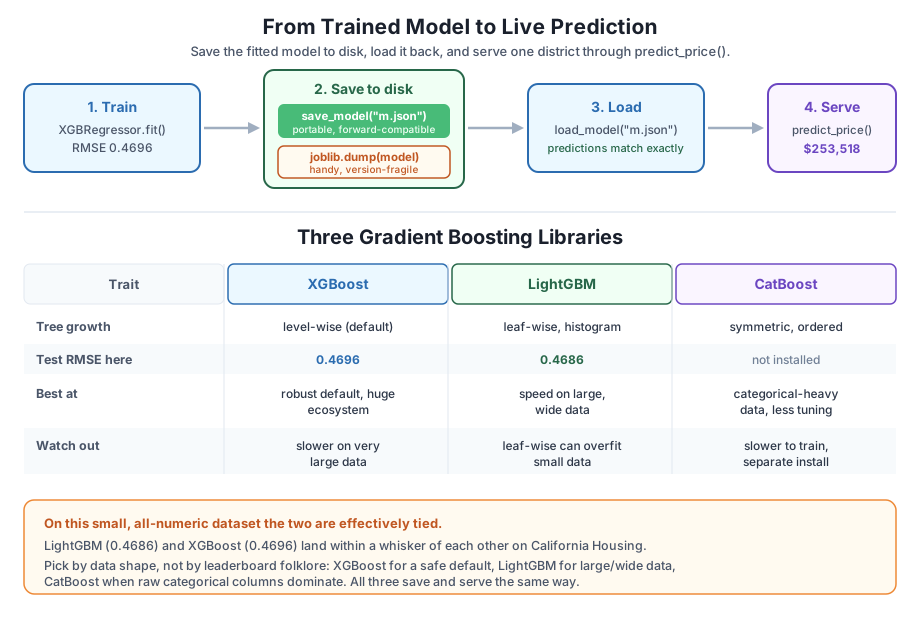
XGBoost is excellent, but it is one of three widely used gradient-boosting libraries, and a good engineer picks by fit, not by reputation. LightGBM (from Microsoft) is the other one that is installed here, so you can benchmark it directly. Two design differences matter:
Let’s put them head-to-head on the same split and seed, and time each fit.
import warnings
warnings.filterwarnings("ignore")
import time
import numpy as np
import xgboost as xgb
import lightgbm as lgb
from sklearn.datasets import fetch_california_housing
from sklearn.model_selection import train_test_split
from sklearn.metrics import mean_squared_error, r2_score

data = fetch_california_housing()
X_train, X_test, y_train, y_test = train_test_split(
    data.data, data.target, test_size=0.2, random_state=42
)

xgb_model = xgb.XGBRegressor(
    n_estimators=300, learning_rate=0.1, max_depth=4, random_state=42
)
lgb_model = lgb.LGBMRegressor(
    n_estimators=300, learning_rate=0.1, max_depth=4, random_state=42, verbose=-1
)

for name, model in [("XGBoost", xgb_model), ("LightGBM", lgb_model)]:
    t0 = time.perf_counter()
    model.fit(X_train, y_train)
    fit_s = time.perf_counter() - t0
    p = model.predict(X_test)
    rmse = float(np.sqrt(mean_squared_error(y_test, p)))
    r2 = float(r2_score(y_test, p))
    print(f"{name:9s} RMSE={round(rmse,4):<8} R2={round(r2,4):<8} fit_time={round(fit_s,3)}s")
XGBoost RMSE=0.4696 R2=0.8317 fit_time=0.735s
LightGBM RMSE=0.4686 R2=0.8324 fit_time=1.287sNote the lgb.LGBMRegressor API: it is a scikit-learn estimator with the same fit/predict methods as XGBRegressor, and it accepts the same n_estimators, learning_rate, and max_depth names, so switching libraries is almost a find-and-replace. (The verbose=-1 just silences LightGBM’s training chatter.)
On the numbers: the two are effectively tied. LightGBM’s test RMSE of 0.4686 edges out XGBoost’s 0.4696 by 0.001, a difference far smaller than the noise you would see from a different random split. Both explain about 83 percent of the variance. The timing here even favors XGBoost, but do not over-read that: California Housing is a small, all-numeric dataset with only eight features, which is precisely the regime where LightGBM’s histogram-and-leaf-wise speed advantage has little room to show. On datasets with hundreds of thousands of rows and many columns, LightGBM’s training-time edge is often dramatic. The honest reading of this bake-off is that on this data, accuracy is a wash and you should choose on other grounds.
The third major library, CatBoost (from Yandex), is not installed here, so we will not import it, but you should know its niche. CatBoost’s headline feature is native, principled handling of categorical features: instead of making you one-hot or label-encode text columns, you hand it the raw categories and tell it which columns they are. It uses ordered boosting, a technique designed to reduce a subtle target-leakage bias that categorical encoding can introduce, and it builds symmetric (oblivious) trees that use the same split across a whole level, which makes prediction very fast. In exchange, it can be slower to train and is a separate install. Its sweet spot is data that is heavy with high-cardinality categorical columns, retail, ad-tech, and customer data, where it often wins with less preprocessing and less tuning.
So which do you pick? Honest guidance:
All three save and serve with the same lifecycle you just practiced, so the deployment skills transfer no matter which one wins your bake-off.
Benchmark on your own data, not on folklore
The “which library is best” debates online are mostly about datasets that look nothing like yours. The only benchmark that decides your project is the one you run on your split, with your metric, timed on your hardware, exactly the head-to-head above. Because all three share the scikit-learn fit/predict interface, swapping one for another is cheap, so measure rather than argue. A 0.001 RMSE difference like the one here is not a reason to switch; a two-times training-speed difference on large data might be.
Try each one before opening its hint. They rehearse the save/load contract, the serving function, and the library comparison.
Fit the tuned XGBRegressor on the California Housing split, save it to a temporary .ubj file with save_model, load it into a fresh xgb.XGBRegressor(), and confirm the reloaded predictions equal the original with np.array_equal. Use tempfile.mkdtemp() so nothing is written into your project.
import warnings
warnings.filterwarnings("ignore")
import os, tempfile
import numpy as np
import xgboost as xgb
from sklearn.datasets import fetch_california_housing
from sklearn.model_selection import train_test_split

data = fetch_california_housing()
X_train, X_test, y_train, y_test = train_test_split(
    data.data, data.target, test_size=0.2, random_state=42
)

# Your code here
Hint
Fit the model, capture original_pred = model.predict(X_test), then path = os.path.join(tempfile.mkdtemp(), "m.ubj") and model.save_model(path). Load with loaded = xgb.XGBRegressor(); loaded.load_model(path) and compare with np.array_equal(original_pred, loaded.predict(X_test)), which returns True. UBJ behaves exactly like the JSON round-trip in the lesson, just as a compact binary file instead of readable text.
Starting from the lesson’s predict_price, write a predict_batch(list_of_dicts) that accepts several districts at once and returns a list of predicted prices. Score at least two districts and print the results. Reuse the single cached model rather than reloading it per row.
import warnings
warnings.filterwarnings("ignore")
import os, tempfile
import numpy as np
import xgboost as xgb
from sklearn.datasets import fetch_california_housing
from sklearn.model_selection import train_test_split

data = fetch_california_housing()
X_train, X_test, y_train, y_test = train_test_split(
    data.data, data.target, test_size=0.2, random_state=42
)

# Your code here
Hint
Keep FEATURE_ORDER and the cached _get_model() from the lesson. For the batch, build a 2-D array with one row per dict, rows = np.array([[d[name] for name in FEATURE_ORDER] for d in list_of_dicts], dtype=float), call m.predict(rows) once, and return [float(p) for p in preds]. Casting each prediction to float avoids NumPy printing np.float64(...) inside the list. Batching in a single predict call is exactly how you would score many requests efficiently.
Fit an XGBRegressor and an LGBMRegressor with matching n_estimators=300, learning_rate=0.1, max_depth=4, random_state=42 on the same split. Print each model’s test RMSE and , then state in one sentence which won and by how much.
import warnings
warnings.filterwarnings("ignore")
import numpy as np
import xgboost as xgb
import lightgbm as lgb
from sklearn.datasets import fetch_california_housing
from sklearn.model_selection import train_test_split
from sklearn.metrics import mean_squared_error, r2_score

data = fetch_california_housing()
X_train, X_test, y_train, y_test = train_test_split(
    data.data, data.target, test_size=0.2, random_state=42
)

# Your code here
Hint
Build lgb.LGBMRegressor(n_estimators=300, learning_rate=0.1, max_depth=4, random_state=42, verbose=-1) and fit both models. You should see XGBoost at RMSE 0.4696 / 0.8317 and LightGBM at 0.4686 / 0.8324. LightGBM wins by about 0.001 RMSE, a gap small enough that on this dataset the two are a tie; the choice between them here comes down to speed and ecosystem, not accuracy.
You took a trained model and gave it a life outside the session that made it: saved to disk, loaded back with identical behavior, wrapped for serving, and benchmarked against a peer. Let’s review.
Two ways to save, one non-negotiable check
model.save_model("m.json") (or .ubj) writes the model in XGBoost’s portable, forward-compatible format; load it into a fresh estimator with load_model (or into a native xgb.Booster)joblib.dump / joblib.load pickles the whole Python object: convenient in one controlled environment but fragile across library versions, and unsafe to load from untrusted sourcesnp.array_equal(original_pred, loaded_pred) returned True, meaning every reloaded prediction matched the original exactlyServing is load-once, then score
predict_price(features_dict) function loads the saved model a single time (cached), assembles features in the trained FEATURE_ORDER, and returns a plain float2.5352, roughly $253,518 in MedHouseVal’s $100,000 unitsChoosing a library on purpose
A model’s value is realized only when something can call it, tomorrow, on another machine, after a library upgrade. The save_model/load_model contract, verified with an exact-equality check, is what makes that possible without silent drift. Skip the verification and you can ship a model that loads without error but predicts subtly differently; do it every time and persistence becomes the invisible, reliable step it should be.
Knowing the library landscape matters just as much. XGBoost is a superb default, but a leaf-wise LightGBM or a categorical-native CatBoost can be the better tool for a specific dataset, and because all three share the scikit-learn interface and the same save-and-serve lifecycle, trying an alternative costs you almost nothing. That freedom to measure and switch, rather than commit on faith, is what separates deliberate engineering from cargo-culting the tool everyone else happens to use.
You can now train, tune, save, load, serve, and comparison-shop a gradient-boosting model. In the guided project you will put the whole chain together end to end, turning a fitted model into a clean, verifiable deployable artifact you could hand to a teammate or a service.
Assemble training, verification, saving, and a serving function into one reproducible deployable artifact.
Return to the Interpretation, Tuning & Deployment module overview
Before moving on, run the save/load round-trip yourself and try to break it on purpose: save with save_model, then load into a fresh estimator and confirm np.array_equal is True; swap .json for .ubj and watch the same guarantee hold in binary. Then rerun the XGBoost-versus-LightGBM bake-off and change one thing at a time, more trees, a deeper max_depth, and notice how close the two libraries stay on this data and how the timing shifts. Getting a feel now for how persistence behaves and how little separates the top libraries on a fair split is exactly the instinct the guided project will ask you to lean on when you package a model for real.
Keep DATATWEETS free. Help fund practical data, AI, and engineering lessons for learners worldwide.