Title here
Summary here
Across Module 4 you learned to look inside a trained model and to prepare it for the world outside your notebook. You measured feature importance and saw where the built-in scores mislead (Lesson 1), you traded them for SHAP values that explain any single prediction (Lesson 2), you tuned hyperparameters systematically with Optuna instead of by hand (Lesson 3), and you saved, reloaded, and served a model, comparing XGBoost against its sibling libraries (Lesson 4). Each of those was a skill in isolation. This project stitches them into the single workflow a data team actually runs when a model is ready to leave the lab: tune it, explain it, package it, and document it, so that what you hand off is not a notebook cell but a deployable artifact.
The running example for this course is Northwind Analytics, a fictional consultancy whose data team has adopted XGBoost as its default for tabular problems. A stakeholder has approved a housing-value model for production and asked for “the whole package, not just the numbers”: a tuned model, an explanation of what drives it, a saved file anyone on the team can load, a function that scores a new record, and a one-page card that states honestly what the model is and is not. Your job in this project is to produce exactly that. You will work on the real California Housing dataset, predicting the median house value of a neighborhood, and every number you report will be real and reproducible. By the end you will hold a model that scores a test RMSE of 0.4404 ( 0.8520), whose single most important feature by SHAP is Latitude, and whose reloaded copy predicts identically to the original.
By the end of this project, you will be able to:
predict(features) serving function that loads the artifact and scores a new recordThis is the capstone for Module 4, so you should already be comfortable with Optuna studies, SHAP explanations, and the save_model / load_model round trip from the earlier lessons. Let’s build the artifact.
A deployable artifact starts with a model worth deploying, so the first stage tunes one. You met Optuna in Lesson 3: instead of hand-building a grid, you define an objective that samples hyperparameters, trains a candidate, and returns a validation score, and the sampler learns which regions of the space are promising. Here you keep the study small and deterministic on purpose. A TPESampler(seed=42) makes the search reproducible, n_trials=25 keeps it to a couple of minutes, and setting the logging verbosity to WARNING silences Optuna’s per-trial chatter so the output stays clean.
The California Housing dataset ships inside scikit-learn, drawn from the 1990 California census. Each row is a block group (a small neighborhood), and the target, MedHouseVal, is the median house value there in units of $100,000. As in the Module 2 project, you split into a sealed test set and, inside the training data, a sub-train and a validation set. The study scores candidates on validation; the test set stays untouched until the final model is fit.
import warnings
warnings.filterwarnings("ignore")
import numpy as np
import xgboost as xgb
import optuna
from optuna.samplers import TPESampler
from sklearn.datasets import fetch_california_housing
from sklearn.model_selection import train_test_split
from sklearn.metrics import mean_squared_error, r2_score

optuna.logging.set_verbosity(optuna.logging.WARNING)   # quiet, clean output

data = fetch_california_housing()   # cached after the first download
X, y = data.data, data.target
features = list(data.feature_names)

X_train, X_test, y_train, y_test = train_test_split(
    X, y, test_size=0.2, random_state=42)
X_tr, X_val, y_tr, y_val = train_test_split(
    X_train, y_train, test_size=0.2, random_state=42)

print("Features:", features)
print("Rows -> sub-train:", X_tr.shape[0], " validation:", X_val.shape[0],
      " test:", X_test.shape[0])
# Output:
# Features: ['MedInc', 'HouseAge', 'AveRooms', 'AveBedrms', 'Population', 'AveOccup', 'Latitude', 'Longitude']
# Rows -> sub-train: 13209  validation: 3303  test: 4128
With the data split, define the objective and run the study. Each trial suggests seven hyperparameters, trains an XGBRegressor on the sub-train, and returns its validation RMSE, which Optuna minimizes.
def rmse(y_true, y_pred):
    return float(np.sqrt(mean_squared_error(y_true, y_pred)))

def objective(trial):
    params = dict(
        n_estimators=trial.suggest_int("n_estimators", 300, 800, step=100),
        learning_rate=trial.suggest_float("learning_rate", 0.02, 0.2, log=True),
        max_depth=trial.suggest_int("max_depth", 3, 8),
        min_child_weight=trial.suggest_int("min_child_weight", 1, 8),
        subsample=trial.suggest_float("subsample", 0.6, 1.0),
        colsample_bytree=trial.suggest_float("colsample_bytree", 0.6, 1.0),
        reg_lambda=trial.suggest_float("reg_lambda", 1.0, 20.0, log=True),
    )
    model = xgb.XGBRegressor(random_state=42, **params)
    model.fit(X_tr, y_tr)
    return rmse(y_val, model.predict(X_val))

study = optuna.create_study(direction="minimize", sampler=TPESampler(seed=42))
study.optimize(objective, n_trials=25)

best_params = study.best_params
clean = {k: (round(v, 4) if isinstance(v, float) else v)
         for k, v in best_params.items()}
print(f"Best validation RMSE: {study.best_value:.4f}")
print("Best params:", clean)
# Output:
# Best validation RMSE: 0.4628
# Best params: {'n_estimators': 800, 'learning_rate': 0.0798, 'max_depth': 7, 'min_child_weight': 1, 'subsample': 0.988, 'colsample_bytree': 0.9330, 'reg_lambda': 1.8891}
Twenty-five trials land on a deep-ish tree (max_depth=7) built from many trees (n_estimators=800) at a cautious learning_rate=0.0798, with light regularization and near-full row and column sampling. Now retrain that configuration on the full training set (sub-train plus validation) and score it, once, on the sealed test set. RMSE is in the same $100,000 units as the target.
final_model = xgb.XGBRegressor(random_state=42, **best_params)
final_model.fit(X_train, y_train)   # retrain on the FULL training set

test_pred = final_model.predict(X_test)
test_rmse = rmse(y_test, test_pred)
test_r2 = float(r2_score(y_test, test_pred))

print(f"Final test RMSE: {test_rmse:.4f}")
print(f"Final test R2:   {test_r2:.4f}")
# Output:
# Final test RMSE: 0.4404
# Final test R2:   0.8520
That is the model you will carry through the rest of the project: a test RMSE of 0.4404 and an of 0.8520, explaining about 85 percent of the variation in neighborhood house values. It is a good model. The remaining three stages are about turning “a good model” into “a good model anyone on the team can load, trust, and run.”
Why keep the study small and seeded
A 25-trial study is not a limitation here, it is a choice. Seeding TPESampler makes every run identical, which is exactly what you want when the numbers end up in a model card and a report. In real work you would spend more trials, but the discipline is the same: fix the seed, hold out a validation set for the search, and never let the sealed test set influence a single hyperparameter. A reproducible small study beats an unreproducible large one for anything you intend to ship.
A number on a test set tells a stakeholder how well the model does, not why it decides what it decides. Lesson 2 gave you the tool for the “why”: SHAP values, which attribute each prediction to its features in additive, signed contributions. You will use SHAP two ways here, the two ways every model card should include. First a global view, ranking features by their mean absolute SHAP value across the test set, which answers “what drives this model overall.” Then a local view for one district, which answers “why this particular prediction,” and which you will verify reconstructs the prediction exactly.
import shap

explainer = shap.TreeExplainer(final_model)
shap_values = explainer(X_test)

mean_abs = np.abs(shap_values.values).mean(axis=0)
order = np.argsort(mean_abs)[::-1]

print("Global feature ranking (mean |SHAP|):")
for i in order:
    print(f"  {features[i]:<11} {float(mean_abs[i]):.4f}")
# Output:
# Global feature ranking (mean |SHAP|):
#   Latitude    0.4788
#   Longitude   0.4011
#   MedInc      0.3860
#   AveOccup    0.1923
#   AveRooms    0.1236
#   HouseAge    0.0553
#   Population  0.0287
#   AveBedrms   0.0261
The global picture is striking: the two geographic features, Latitude and Longitude, top the list, with median income (MedInc) close behind. In 1990 California, where a neighborhood sits mattered as much as what its residents earned, and the model has learned that. The single most important feature by mean absolute SHAP is Latitude at 0.4788. Now zoom into one district and show the local explanation. SHAP’s key property is additivity: the base value (the model’s average output) plus the signed contributions equals the prediction exactly. You will confirm that rather than assume it.
i = 0                                  # explain the first test district
base_value = float(shap_values.base_values[i])
contribs = shap_values.values[i]
model_pred = float(final_model.predict(X_test[i:i + 1])[0])

# Rank this district's contributions by magnitude.
local_order = np.argsort(np.abs(contribs))[::-1]
print(f"Base value (average prediction): {base_value:.4f}")
print("Largest contributions for this district:")
for j in local_order[:4]:
    print(f"  {features[j]:<11} value={float(X_test[i, j]):>8.3f}"
          f"  contribution={float(contribs[j]):+.4f}")

reconstructed = base_value + float(contribs.sum())
print(f"\nBase + sum(contributions): {reconstructed:.4f}")
print(f"Model prediction:          {model_pred:.4f}")
print(f"Additivity holds: {abs(reconstructed - model_pred) < 1e-4}")
# Output:
# Base value (average prediction): 2.0720
# Largest contributions for this district:
#   MedInc      value=   1.681  contribution=-0.5018
#   Latitude    value=  36.060  contribution=-0.4998
#   AveOccup    value=   3.877  contribution=-0.2097
#   Longitude   value=  -119.010  contribution=-0.1937
#
# Base + sum(contributions): 0.5221
# Model prediction:          0.5221
# Additivity holds: True
This is a complete, defensible explanation of one prediction. The model starts from its average output of 2.0720 (about $207,000) and, for this district, walks down to 0.5221 (about $52,000). The reasons are concrete and signed: a below-average median income of 1.681 pulls the prediction down by 0.5018, and the neighborhood’s location (a Latitude of 36.06, well inland from the pricier coast) pulls it down another 0.4998. Add the base value to every feature’s contribution and you land on 0.5221, matching the model’s own prediction to four decimals. That exact reconstruction is what makes SHAP trustworthy enough to put in a model card: it is not a plausible story, it is the arithmetic the model actually did.
You have a tuned model and an explanation of it. Now make it portable. A model that lives only in a notebook’s memory is not deployable; the moment the kernel restarts, it is gone. Lesson 4 showed the round trip, and here you turn it into a real artifact: save the model to disk, save a metadata card alongside it, reload both in a fresh object, and prove the reload is faithful by checking that its predictions match the original exactly, not approximately.
One rule for this stage: nothing goes in the repository. Saved files land in a temporary directory from Python’s tempfile, which is where a real serving build would stage artifacts before shipping them to a model registry or object store, not in your source tree.
import tempfile, os, json

tmpdir = tempfile.mkdtemp(prefix="northwind_model_")
model_path = os.path.join(tmpdir, "housing_xgb.ubj")
card_path = os.path.join(tmpdir, "housing_xgb_card.json")

# 1. Save the model in XGBoost's portable binary format.
final_model.save_model(model_path)

# 2. Save a small metadata / model-card dict as JSON.
model_card = {
    "model_name": "northwind_california_housing_xgb",
    "target": "MedHouseVal",
    "features": features,
    "training_date": "2026-07-05",   # placeholder; set at build time
    "metrics": {"test_rmse": round(test_rmse, 4), "test_r2": round(test_r2, 4)},
    "hyperparameters": {k: (round(v, 4) if isinstance(v, float) else v)
                        for k, v in best_params.items()},
}
with open(card_path, "w") as f:
    json.dump(model_card, f, indent=2)

print("Artifact directory:", os.path.basename(tmpdir))
print("Saved:", os.path.basename(model_path), "and", os.path.basename(card_path))
# Output:
# Artifact directory: northwind_model_XXXXXXXX   (random temp suffix)
# Saved: housing_xgb.ubj and housing_xgb_card.json
Now the verification that makes this an artifact and not just a file. Load the model into a brand-new XGBRegressor and compare its predictions on the full test set against the original model’s. For a faithful save this must be an exact match, so np.array_equal (bit-for-bit equality) is the right test, not a tolerance.
reloaded = xgb.XGBRegressor()
reloaded.load_model(model_path)

reloaded_pred = reloaded.predict(X_test)
exact_match = bool(np.array_equal(reloaded_pred, test_pred))
print("Reloaded predictions match original exactly:", exact_match)
# Output:
# Reloaded predictions match original exactly: True
Exact. The reloaded model is not “close enough,” it is the same model. With that guarantee, write the serving function the stakeholder asked for. A clean predict(features) loads the artifact, shapes a single incoming record into the row form XGBoost expects, and returns one number. In production you would load the model once at startup rather than per call, but loading inside the function here keeps it self-contained and proves the artifact is all you need to score.
def predict(feature_row, model_file=model_path):
    """Score one district from the saved artifact. feature_row is a list of the
    8 features in the order given by `features`."""
    model = xgb.XGBRegressor()
    model.load_model(model_file)
    row = np.asarray(feature_row, dtype=float).reshape(1, -1)
    return float(model.predict(row)[0])

# Score the first test district straight from disk.
new_district = X_test[0].tolist()
prediction = predict(new_district)
print(f"Serving prediction: {prediction:.4f}  (in $100,000s)")
print(f"Actual value:       {float(y_test[0]):.4f}")
# Output:
# Serving prediction: 0.5221  (in $100,000s)
# Actual value:       0.4770
The serving function returns 0.5221 for that district, the same value the in-memory model and the SHAP reconstruction produced, against an actual of 0.4770. That consistency, the saved model, the reloaded model, the SHAP walk, and the serving function all agreeing on 0.5221, is the whole point of packaging: one model, one number, no matter how you invoke it.
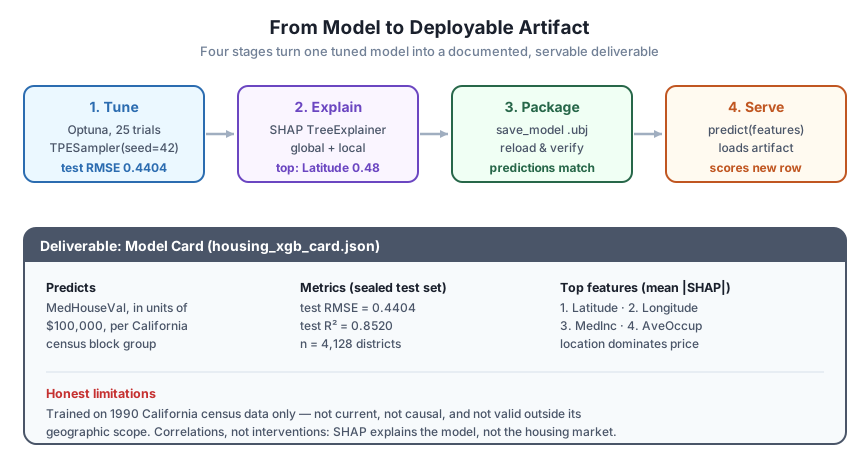
The artifact is built and verified. The final stage is the deliverable that makes it responsible to deploy: the model card. A model card is a short, structured document, half prose and half table, that answers the questions a stakeholder, an auditor, or a future teammate will ask before they trust a prediction. What does it predict, on what data? How well does it do, measured how? What drives it? What are its hyperparameters, so it can be rebuilt? And, most important and most often skipped, what are its honest limitations? You already saved the machine-readable half as housing_xgb_card.json; here you render the human-readable half and, critically, the limitations that no metric captures.
top3 = [features[i] for i in order[:3]]

print("=" * 58)
print("MODEL CARD:", model_card["model_name"])
print("=" * 58)
print(f"Predicts        : {model_card['target']} "
      f"(median house value, in $100,000s)")
print(f"Data            : California Housing (1990 census), "
      f"{X.shape[0]:,} block groups, {len(features)} features")
print(f"Test metrics    : RMSE {model_card['metrics']['test_rmse']}, "
      f"R2 {model_card['metrics']['test_r2']} (on {X_test.shape[0]:,} sealed districts)")
print(f"Top features    : {', '.join(top3)} (by mean |SHAP|)")
print(f"Key params      : max_depth={best_params['max_depth']}, "
      f"n_estimators={best_params['n_estimators']}, "
      f"learning_rate={best_params['learning_rate']:.4f}")
print("Limitations     : trained on 1990 California data only; predictions")
print("                  are not current, not causal, and not valid outside")
print("                  California; SHAP explains the MODEL, not the market.")
print("=" * 58)
# Output:
# ==========================================================
# MODEL CARD: northwind_california_housing_xgb
# ==========================================================
# Predicts        : MedHouseVal (median house value, in $100,000s)
# Data            : California Housing (1990 census), 20,640 block groups, 8 features
# Test metrics    : RMSE 0.4404, R2 0.852 (on 4,128 sealed districts)
# Top features    : Latitude, Longitude, MedInc (by mean |SHAP|)
# Key params      : max_depth=7, n_estimators=800, learning_rate=0.0798
# Limitations     : trained on 1990 California data only; predictions
#                   are not current, not causal, and not valid outside
#                   California; SHAP explains the MODEL, not the market.
# ==========================================================
That card is the deliverable. In a dozen lines it tells a reader everything they need to decide whether to trust this model for their problem, and just as importantly, when not to. The limitations section is not boilerplate. This model was trained on 1990 census data, so its dollar figures are decades stale; it is correlational, so a high SHAP value for MedInc does not mean raising incomes would raise prices; and it has never seen a neighborhood outside California, so scoring a Texas suburb with it would be meaningless no matter how confident the number looks. A model card that omits those caveats is worse than no card, because it lends false authority to a prediction. Stating them plainly is what separates a shipped model from a shipped artifact.
The model card is part of the model
It is tempting to treat the card as documentation you write afterward if there is time. Reframe it: the card is a component of the artifact, versioned and saved alongside the weights, exactly like housing_xgb_card.json sits next to housing_xgb.ubj. When the model is retrained, the card’s metrics and training date change with it. A deployable artifact is the pair, model plus card, and shipping the model without the card is shipping half of it.
Now it is your turn. Treat these as real extensions, run each one, and read the numbers before you check the hint.
The study used n_trials=25 for speed. Rerun it with n_trials=60 (same seeded TPESampler), retrain the final model on the full training set, and score it on the test set. Does the extra search meaningfully lower the test RMSE below 0.4404, or has the small study already found most of the gain?
# Reuse the same objective; only change n_trials.
study2 = optuna.create_study(direction="minimize", sampler=TPESampler(seed=42))
study2.optimize(objective, n_trials=60)
# Retrain xgb.XGBRegressor(random_state=42, **study2.best_params) on X_train,
# score on X_test, and compare to 0.4404.
Hint
Because the sampler is seeded, the first 25 trials of the 60-trial study are identical to your original study; the new trials only extend the search. Expect a small improvement at most: on a strong, well-defaulted model like XGBoost, most of the achievable gain shows up early, and doubling or tripling the trial budget usually shaves only a little more off the test RMSE. That is a useful thing to confirm firsthand, because it tells you when to stop spending compute on tuning.
Stage 2 explained district i = 0, whose prediction sat below the base value. Find a district the model predicts above the base value of 2.0720 (for example, i = int(np.argmax(final_model.predict(X_test)))), print its top signed SHAP contributions, and verify additivity again. Which features push an expensive neighborhood’s prediction up, and how do they contrast with the cheap district?
i = int(np.argmax(final_model.predict(X_test)))
contribs = shap_values.values[i]
# Print the base value, the top-4 contributions by magnitude, and check that
# base_value + contribs.sum() equals final_model.predict(X_test[i:i+1])[0].
Hint
Additivity holds for every prediction, so base_value + contribs.sum() will match the model’s output here too, to four decimals. What changes is the direction of the big contributions: for a high-value district expect a strong positive push from a high MedInc and a favorable Latitude / Longitude (coastal locations), the mirror image of the inland, lower-income district in Stage 2. That contrast, same base value, opposite contributions, is exactly what makes SHAP a per-prediction explanation rather than a global one.
Stage 3 verified the reloaded model matches the original. Do the same for the card: read housing_xgb_card.json back with json.load, and assert that its metrics["test_rmse"] equals round(test_rmse, 4) and its features list equals features. Then extend the card with a new field, "units": "USD_100k", re-save it, reload it, and confirm the field survives the round trip.
with open(card_path) as f:
    loaded_card = json.load(f)
# assert loaded_card["metrics"]["test_rmse"] == round(test_rmse, 4)
# assert loaded_card["features"] == features
# Add "units", re-dump to card_path, reload, and check it is present.
Hint
JSON preserves lists and numbers faithfully, so both assertions should pass without a tolerance. The point of the exercise is the habit: treat the card as a versioned artifact you can read, amend, and re-save just like the model file. When you add "units", dump with json.dump(loaded_card, f, indent=2) again and reload to confirm; this is the same round-trip discipline you applied to the weights, now applied to the metadata.
Congratulations! You carried a single model from a raw training call all the way to a documented, reloadable, servable artifact, exercising every skill Module 4 taught in the order a real deployment uses them. Let’s review what you did.
Tune to a Final, Sealed Number
n_trials=25, TPESampler(seed=42)) tuned seven hyperparameters against a held-out validation set, then the winner was retrained on the full training set and scored once on the sealed test setExplain Globally and Locally
Longitude and MedInc: in 1990 California, location drove value as much as incomePackage Into a Verified Artifact
tempfile directory (never the repo), then reloaded, and the reloaded model’s test predictions matched the original exactly via np.array_equalpredict(features) serving function loaded the artifact and scored a new district to the same 0.5221 the in-memory model producedDocument Honestly With a Model Card
The gap between “I trained a model that scores well” and “I shipped a model my team can trust” is exactly the four stages you just walked. A test RMSE is necessary but nowhere near sufficient: a model you cannot reload is not deployable, a model you cannot explain is not auditable, and a model without a card that names its limitations is a liability waiting to be misused. By carrying one model through tuning, explanation, packaging, and documentation, you produced the thing a data team actually hands off, a self-contained artifact plus the honest paperwork that says when to trust it and when not to.
The habit worth keeping is the discipline of verification at every seam. You did not assume the reloaded model matched, you checked it bit-for-bit. You did not assume SHAP was additive, you reconstructed the prediction and confirmed it. You did not bury the limitations, you printed them next to the metrics. That instinct, to prove each handoff rather than trust it, is what makes a model safe to deploy, and it is exactly what the Northwind Analytics team, and any team you join, needs from someone who ships models for a living.
You can now take an XGBoost model from a tuned fit to a documented, reloadable, servable artifact, with an explanation and an honest model card to back it up. That is the complete Module 4 workflow. The course now turns to its capstone, where you bring every module together, from the boosting fundamentals through tuning, interpretation, and deployment, in one final end-to-end build.
Bring every module together in one final end-to-end build on a real dataset.
Review the full Gradient Boosting & XGBoost course.
You just closed Module 4 the way real practitioners deploy: not by tossing a well-scoring notebook over the wall, but by tuning to a sealed number, explaining the model globally and locally, packaging it into an artifact you verified byte-for-byte, and documenting it with a card that states its limits as plainly as its metrics. Every piece you assembled here, the Optuna study, the SHAP explanation, the save-and-reload round trip, you first met one lesson at a time across this module, and now you have felt how they fit into a single, trustworthy handoff. That combination, a model that scores well and one you can reload, explain, serve, and honestly describe, is what turns a promising result into a deployable one. Carry that discipline into the capstone, because from here on, every model you build is one you could actually ship.
Keep DATATWEETS free. Help fund practical data, AI, and engineering lessons for learners worldwide.