Title here
Summary here
Welcome to Module 2. In Module 1 you did something most people who use boosting never do: you built a gradient booster from scratch, fitting shallow trees to residuals one after another and watching the test error fall as the corrections accumulated. That work was not busywork. It means that when you meet XGBoost in this lesson, it will not be a magic box. You already know the engine inside it: sequential trees, each fixing the mistakes of the ones before.
Our running team, Northwind Analytics, has been predicting median house values across California districts with scikit-learn’s GradientBoostingRegressor. It works, but they keep hearing the same name from every competition writeup and every colleague on tabular data: XGBoost. In this lesson you will find out what XGBoost actually is, why it is built differently from the plain gradient boosting you already know, and how to fit your very first XGBoost model. You will fit it two different ways, using both of XGBoost’s APIs, and put its accuracy head-to-head with Module 1’s model on the exact same California Housing data. Every number below was produced by running the code for real.
By the end of this lesson, you will be able to:
xgb.XGBRegressor) using the familiar fit/predict patternxgb.DMatrix plus xgb.train) and explain what a DMatrix isGradientBoostingRegressor on the same train/test splitYou should be comfortable with the scikit-learn fit/predict workflow, a train/test split, and the boosting intuition from Module 1. No prior XGBoost experience is assumed. Let’s begin.
XGBoost (short for eXtreme Gradient Boosting) is an open-source library that implements gradient-boosted decision trees. At its core it does exactly what you built by hand in Module 1: it trains an ensemble of trees sequentially, each new tree correcting the residual errors left by the ensemble so far. If that were the whole story, XGBoost would just be a faster version of GradientBoostingRegressor. It is much more than that.
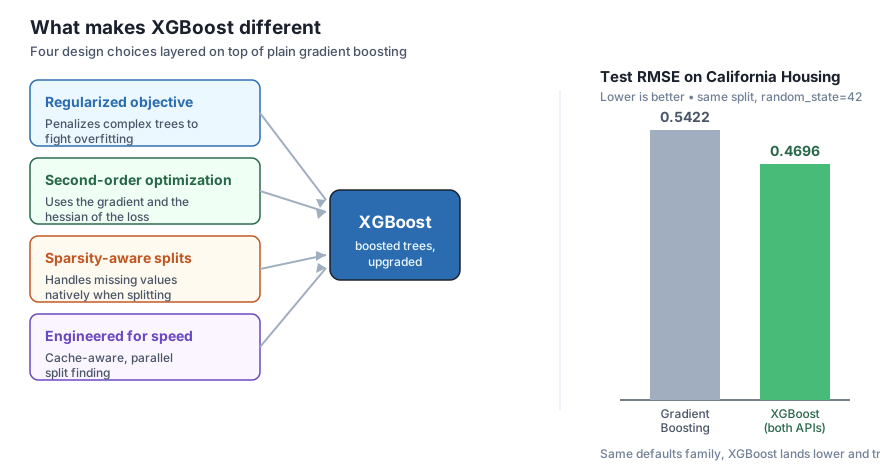
XGBoost takes the plain boosting loop and hardens it with four deliberate design choices. You do not need to master the math today (Lesson 2 opens up the objective in full), but you should know the names and what each one buys you:
Keep these four in mind as labels for now. The rest of this module fills each one in. What you will do today is get a model running and prove to yourself that the accuracy claim is real.
You already understand the hard part
Everything genuinely new in XGBoost is a refinement of the boosting loop you built in Module 1. The sequential, residual-correcting core is unchanged. The four upgrades above make that core more accurate (regularized objective, second-order steps), more robust (sparsity-aware splits), and much faster (speed engineering). Because you built the core yourself, you can treat this lesson as learning an interface, not a new algorithm.
One thing that confuses newcomers is that XGBoost exposes two different interfaces, and tutorials mix them freely. It is worth being clear about both from the start:
xgb.XGBRegressor, xgb.XGBClassifier) with the exact fit/predict methods you already use. It plugs straight into scikit-learn tools like Pipeline, GridSearchCV, and cross_val_score.DMatrix, hand XGBoost a dictionary of params, and call xgb.train. It exposes a few advanced features first and is what you will see in a lot of competition code.They are two doors into the same house. Given the same settings, they train the identical model. You will confirm that below by fitting both and getting the same test RMSE to four decimals. We will start with the scikit-learn API because it will feel like home.
Northwind loads the real California Housing data, splits it with the same random_state=42 used throughout the course, and fits an XGBRegressor. Note the hyperparameters: n_estimators (how many trees), learning_rate (how big a step each tree takes), and max_depth (how deep each tree grows). These are the same three knobs from Module 1, and we will study them closely in Lessons 3 and 4. For now we use sensible values.
import warnings
warnings.filterwarnings("ignore")
import numpy as np
import xgboost as xgb
from sklearn.datasets import fetch_california_housing
from sklearn.model_selection import train_test_split
from sklearn.metrics import mean_squared_error, r2_score

data = fetch_california_housing()
X_train, X_test, y_train, y_test = train_test_split(
    data.data, data.target, test_size=0.2, random_state=42
)

model = xgb.XGBRegressor(
    n_estimators=300,
    learning_rate=0.1,
    max_depth=4,
    random_state=42,
)
model.fit(X_train, y_train)

pred = model.predict(X_test)
test_rmse = np.sqrt(mean_squared_error(y_test, pred))
test_r2 = r2_score(y_test, pred)

print("XGBRegressor test RMSE:", float(round(test_rmse, 4)))
print("XGBRegressor test R2  :", float(round(test_r2, 4)))
XGBRegressor test RMSE: 0.4696
XGBRegressor test R2 : 0.8317That is it. The interface is byte-for-byte the scikit-learn workflow you already know: construct, fit, predict, score. Your first XGBoost model reaches a test RMSE of 0.4696 and explains about 83 percent of the variance in unseen districts (). Hold on to that 0.4696; we will compare it in two places.
Now the second door. The native API asks you to wrap your arrays in a DMatrix first. A DMatrix is XGBoost’s own optimized internal data structure: it stores your features and labels together in a compressed, cache-friendly layout that the training algorithm can sweep through quickly. Building it once up front is part of how XGBoost stays fast. Instead of passing hyperparameters to a constructor, you collect them in a params dictionary, where the key "objective" names the loss to minimize ("reg:squarederror" is plain squared-error regression), and you pass the tree count to xgb.train as num_boost_round.
import warnings
warnings.filterwarnings("ignore")
import numpy as np
import xgboost as xgb
from sklearn.datasets import fetch_california_housing
from sklearn.model_selection import train_test_split
from sklearn.metrics import mean_squared_error

data = fetch_california_housing()
X_train, X_test, y_train, y_test = train_test_split(
    data.data, data.target, test_size=0.2, random_state=42
)

# Pack the arrays into XGBoost's optimized DMatrix structure
dtrain = xgb.DMatrix(X_train, label=y_train)
dtest = xgb.DMatrix(X_test, label=y_test)

params = {
    "objective": "reg:squarederror",
    "learning_rate": 0.1,
    "max_depth": 4,
    "seed": 42,
}

bst = xgb.train(params, dtrain, num_boost_round=300)

pred = bst.predict(dtest)
test_rmse = np.sqrt(mean_squared_error(y_test, pred))

print("native API test RMSE:", float(round(test_rmse, 4)))
native API test RMSE: 0.4696Look at the number: 0.4696, identical to the scikit-learn API to four decimals. This is the point. n_estimators in the wrapper is the same as num_boost_round in the native call; learning_rate and max_depth mean the same thing in both. With matching settings, both APIs run the same training algorithm and produce the same model. The predictions agree not just on aggregate RMSE but row by row, which the exercises let you verify.
Which API should you use?
For most work, reach for the scikit-learn API (XGBRegressor / XGBClassifier). It gives you fit/predict and drops straight into pipelines, grid search, and cross-validation, so you keep all the tooling you already know. Use the native API (DMatrix + xgb.train) when you want a feature that surfaces there first or when you are reading competition code written in that style. They are interchangeable in accuracy; the choice is about ergonomics, not results.
You have seen XGBoost score 0.4696 twice. The question Northwind actually cares about is: does switching from scikit-learn’s GradientBoostingRegressor (Module 1’s tool) to XGBoost actually buy anything? Let’s settle it directly, both models on the same split, same random_state=42.
import warnings
warnings.filterwarnings("ignore")
import numpy as np
import xgboost as xgb
from sklearn.datasets import fetch_california_housing
from sklearn.model_selection import train_test_split
from sklearn.ensemble import GradientBoostingRegressor
from sklearn.metrics import mean_squared_error, r2_score

data = fetch_california_housing()
X_train, X_test, y_train, y_test = train_test_split(
    data.data, data.target, test_size=0.2, random_state=42
)

xgb_model = xgb.XGBRegressor(
    n_estimators=300, learning_rate=0.1, max_depth=4, random_state=42
)
gbr_model = GradientBoostingRegressor(random_state=42)

for name, model in [("XGBoost", xgb_model), ("GradientBoosting", gbr_model)]:
    model.fit(X_train, y_train)
    p = model.predict(X_test)
    rmse = np.sqrt(mean_squared_error(y_test, p))
    r2 = r2_score(y_test, p)
    print(f"{name:16s} RMSE={float(round(rmse, 4)):<8} R2={float(round(r2, 4))}")
XGBoost RMSE=0.4696 R2=0.8317
GradientBoosting RMSE=0.5422 R2=0.7756The verdict is clear. On identical data, XGBoost’s test RMSE of 0.4696 beats plain gradient boosting’s 0.5422, and its climbs from 0.7756 to 0.8317, explaining roughly five more percentage points of the variance. In MedHouseVal units (100,000 dollars each), that RMSE gap of about 0.073 is roughly 7,300 dollars less error on a typical district, with no tuning effort beyond picking a reasonable tree count and depth. And this is XGBoost cold, straight out of the box; the regularization, second-order steps, and tuning knobs you will study next only widen the gap.
This is not a fluke of these particular numbers. On structured, tabular data like Northwind’s, XGBoost is routinely competitive-with or better-than scikit-learn’s gradient boosting, and it typically gets there faster. That combination, more accuracy and more speed, is exactly why it became the default tool for this kind of problem.
A fair comparison, honestly reported
Both models here use library defaults for most settings and share the same split and seed, so the comparison is apples to apples. We are not claiming XGBoost is magic; we are showing that its four design upgrades translate into a real, measurable accuracy gain on real data. Later lessons will tune both far past these starting points, but the starting points already tell the story.
Try each one before opening its hint. They reinforce the two APIs and the comparison you just saw.
Fit an xgb.XGBRegressor(n_estimators=300, learning_rate=0.1, max_depth=4, random_state=42) and, separately, an xgb.train model with the matching params and num_boost_round=300 on a DMatrix. Print both test RMSEs and confirm they agree to four decimals.
import warnings
warnings.filterwarnings("ignore")
import numpy as np
import xgboost as xgb
from sklearn.datasets import fetch_california_housing
from sklearn.model_selection import train_test_split
from sklearn.metrics import mean_squared_error

data = fetch_california_housing()
X_train, X_test, y_train, y_test = train_test_split(
    data.data, data.target, test_size=0.2, random_state=42
)

# Your code here
Hint
Build the scikit-learn model with the constructor arguments above and the native model with params = {"objective": "reg:squarederror", "learning_rate": 0.1, "max_depth": 4, "seed": 42} plus num_boost_round=300. Remember to wrap the test features in xgb.DMatrix(X_test) before calling bst.predict. Both should print 0.4696. If you want to be strict, compare the two prediction arrays with np.allclose(pred_sklearn, pred_native, atol=1e-4), which returns True: the two APIs produce the same model row by row, not just on average.
Fit an XGBRegressor (same settings as above) and a default GradientBoostingRegressor(random_state=42) on the same split. Print each model’s test RMSE and , then state in one sentence how much accuracy the switch to XGBoost buys.
import warnings
warnings.filterwarnings("ignore")
import numpy as np
import xgboost as xgb
from sklearn.datasets import fetch_california_housing
from sklearn.model_selection import train_test_split
from sklearn.ensemble import GradientBoostingRegressor
from sklearn.metrics import mean_squared_error, r2_score

data = fetch_california_housing()
X_train, X_test, y_train, y_test = train_test_split(
    data.data, data.target, test_size=0.2, random_state=42
)

# Your code here
Hint
Fit both models, predict on X_test, and compute RMSE with np.sqrt(mean_squared_error(...)) and with r2_score(...). You should see XGBoost at RMSE 0.4696 / 0.8317 versus gradient boosting at 0.5422 / 0.7756. The switch cuts test RMSE by about 0.073 (roughly 7,300 dollars per district) and lifts explained variance by about five percentage points, all before any tuning.
Keeping n_estimators=300, max_depth=4, and random_state=42 fixed, fit three XGBRegressor models with learning_rate set to 0.05, 0.1, and 0.3. Print each one’s test RMSE and note which learning rate did best here.
import warnings
warnings.filterwarnings("ignore")
import numpy as np
import xgboost as xgb
from sklearn.datasets import fetch_california_housing
from sklearn.model_selection import train_test_split
from sklearn.metrics import mean_squared_error

data = fetch_california_housing()
X_train, X_test, y_train, y_test = train_test_split(
    data.data, data.target, test_size=0.2, random_state=42
)

# Your code here
Hint
Loop over [0.05, 0.1, 0.3], building a fresh XGBRegressor(n_estimators=300, learning_rate=lr, max_depth=4, random_state=42) each time. You should see roughly 0.4923, 0.4696, and 0.4573. On this dataset the larger learning rate happens to score best at 300 trees, but do not over-read one split: learning rate and tree count trade off against each other, and Lessons 3 and 4 will show how to tune them together rather than in isolation.
You fit your first XGBoost models and proved, with real numbers, that the library earns its reputation. Let’s review.
What XGBoost adds to plain boosting
Two APIs, one model
xgb.XGBRegressor) gives you fit/predict and plugs into pipelines and grid searchxgb.DMatrix + xgb.train with a params dict and num_boost_round) is XGBoost’s own lower-level interfaceDMatrix is XGBoost’s optimized internal data structure for fast trainingXGBoost vs. Module 1’s gradient boosting
GradientBoostingRegressor at 0.5422 / 0.7756XGBoost is the workhorse of applied machine learning on tabular data, and you have now driven it yourself instead of reading about it. Just as important, you saw that it is not a mysterious black box: it is the boosting loop you already built by hand, upgraded in four specific, nameable ways. That framing is what lets you tune it deliberately later, because when a knob like learning_rate or max_depth changes the result, you will know which part of the machine you are adjusting.
Knowing both APIs matters more than it looks. The scikit-learn API keeps you inside the ecosystem of pipelines and cross-validation you already trust, while the native API unlocks XGBoost’s own features and lets you read the competition code where they first appear. From here on you can pick whichever door fits the task, confident they lead to the same model.
You have a working XGBoost model and proof it beats plain gradient boosting. Next you will open up the objective function you have only named so far, seeing exactly how the regularization penalty and the second-order (gradient-and-hessian) step change what each tree is trained to do.
See the regularized objective and the second-order optimization that make XGBoost more than a faster gradient booster.
Return to the XGBoost in Depth module overview
You crossed the line from understanding boosting to using the tool the whole industry reaches for. Before moving on, rerun the head-to-head yourself and try one small change at a time: swap max_depth up or down, raise or lower n_estimators, and watch how XGBoost responds versus how plain gradient boosting did in Module 1. Getting a feel for these knobs now, while the model is still simple and the numbers are honest, will make Lesson 2’s tour of the objective, and the serious tuning in Lessons 3 and 4, land as a natural next step rather than a leap.
Keep DATATWEETS free. Help fund practical data, AI, and engineering lessons for learners worldwide.