Title here
Summary here
Meet Docent, the assistant you’ll evaluate and monitor for the rest of this course. Docent answers developer questions about Meridian, a serverless database, by retrieving pages from Meridian’s documentation and asking Claude to answer from them. It’s a small, honest RAG bot — the kind of thing a team ships in an afternoon and then trusts for months.
This lesson is about the moment right after you ship it. You run a few questions, the answers look great, and you tell everyone it works. That instinct — read a handful of outputs, decide it’s fine — is the single most common way LLM apps go to production with failures nobody has seen yet. In this lesson we’re going to fall into that trap on purpose: we’ll watch Docent look perfect on a few questions, then catch it failing on one we almost didn’t check, and then use a little arithmetic to show why “it looked fine” was never evidence of anything.
In this lesson, you will:
Here is Docent in full. It’s deliberately minimal — a keyword retriever that returns the two most relevant docs, and a single Claude call instructed to answer only from those docs (and to refuse otherwise). You’ll reuse this exact code throughout the course, so read it once now.
import anthropic
client = anthropic.Anthropic()  # reads ANTHROPIC_API_KEY from the environment

DOCS = [
    {"id": "auth", "title": "Authentication",
     "text": "Meridian authenticates every request with an API key sent in the Authorization header as a bearer token. "
             "Create keys in the dashboard under Settings > API Keys. Keys are either test or live mode; test keys only "
             "touch sandbox data. A key is shown once at creation and cannot be recovered, only rotated."},
    {"id": "ratelimits", "title": "Rate Limits",
     "text": "The Free plan allows 60 requests per minute. The Pro plan allows 600 requests per minute. Exceeding the "
             "limit returns HTTP 429 with a Retry-After header giving the seconds to wait. Rate limits are applied per "
             "API key, not per account."},
    {"id": "plans", "title": "Plans and Pricing",
     "text": "Meridian has three plans. Free costs 0 dollars per month and includes 1 GB of storage. Pro costs 25 dollars "
             "per month and includes 50 GB of storage. Scale costs 199 dollars per month and includes 500 GB of storage. "
             "All plans include unlimited read replicas."},
    {"id": "regions", "title": "Regions",
     "text": "Databases can be created in three regions: us-east, eu-west, and ap-south. The region is fixed at creation "
             "time and cannot be changed later; to move data to another region you must export and re-import into a new "
             "database. Cross-region read replicas are available on the Scale plan only."},
    {"id": "errors", "title": "Error Codes",
     "text": "Meridian uses standard HTTP status codes. 400 means a malformed request, 401 means a missing or invalid API "
             "key, 403 means the key is valid but lacks permission, 404 means the resource does not exist, and 429 means "
             "the rate limit was exceeded. 5xx codes indicate a server-side error and should be retried with backoff."},
    {"id": "backups", "title": "Backups",
     "text": "Automatic daily backups are retained for 7 days on the Free plan, 30 days on Pro, and 90 days on Scale. "
             "Backups run at 03:00 UTC. Point-in-time recovery to any second in the retention window is available on the "
             "Scale plan. Restoring a backup creates a new database and never overwrites the original."},
    {"id": "sdks", "title": "SDKs",
     "text": "Official SDKs are available for Python, JavaScript, and Go. Install the Python SDK with 'pip install meridian'. "
             "The SDK reads the MERIDIAN_API_KEY environment variable by default. All SDKs retry idempotent requests up to "
             "3 times on 5xx errors with exponential backoff."},
    {"id": "deletion", "title": "Deleting Data",
     "text": "Deleting a database is immediate and irreversible once the 24-hour grace period ends. During the grace period "
             "the database is soft-deleted and can be restored from the dashboard. After 24 hours the data and its backups "
             "are permanently purged. Deletion requires a live-mode key with admin permission."},
]

def retrieve(question, docs, k=2):
    # simple keyword-overlap retrieval; good enough for the course, and easy to evaluate
    q = set(question.lower().split())
    scored = sorted(docs, key=lambda d: len(q & set((d["title"] + " " + d["text"]).lower().split())), reverse=True)
    return scored[:k]

def docent_answer(question, docs, model="claude-haiku-4-5"):
    ctx = "\n\n".join(f"[{d['id']}] {d['title']}\n{d['text']}" for d in retrieve(question, docs))
    prompt = (f"Answer the question using ONLY the context. If the context does not contain the answer, say "
              f"\"I don't have that in the docs.\" Be concise.\n\nContext:\n{ctx}\n\nQuestion: {question}")
    msg = client.messages.create(model=model, max_tokens=200,
                                 messages=[{"role": "user", "content": prompt}])
    return msg.content[0].text
That’s the whole product. Eight doc pages, a two-line retriever, one Claude call. Now let’s do what everyone does next: try it.
We’ll spot-check three questions — the same three a developer would type first: an error code, a price, a rate limit. If these come back right, the natural conclusion is “great, it works.”
spot_check = [
    "What HTTP status code does Meridian return when you exceed the rate limit?",
    "How much does the Pro plan cost per month?",
    "How many requests per minute does the Pro plan allow?",
]
for q in spot_check:
    print("Q:", q)
    print("A:", docent_answer(q, DOCS))
    print()
Q: What HTTP status code does Meridian return when you exceed the rate limit?
A: Meridian returns HTTP 429 when you exceed the rate limit.
Q: How much does the Pro plan cost per month?
A: The Pro plan costs $25 per month.
Q: How many requests per minute does the Pro plan allow?
A: The Pro plan allows 600 requests per minute.Three for three. HTTP 429, twenty-five dollars a month, six hundred requests per minute — all correct, all concise, all grounded in the docs. If you stopped here you would ship Docent with total confidence and you would not be crazy to do so. This is exactly what “looks fine” feels like: fluent, plausible, and right on everything you happened to try.
These answers vary run to run
The outputs above are from one real run against claude-haiku-4-5. Because the model samples its response, re-running this code gives answers that are close but not byte-identical — one run says “Meridian returns HTTP 429,” another just says “HTTP 429.” That non-determinism is not a bug; it’s the whole reason evaluation is hard. The retrieval step, by contrast, is plain Python and returns the same docs every time — we’ll lean on that in a moment.
Now let’s do the thing the spot-check skipped: keep going. We’ll run five more questions from the same product’s documentation. To see why an answer comes out the way it does, we’ll also print which two doc pages the retriever handed to Claude.
more = [
    "What does a 401 error mean?",
    "Which environment variable does the Python SDK read for the API key?",
    "What does Meridian charge for the Free plan?",
    "How long is the grace period before a deleted database is permanently purged?",
    "Does Meridian support MongoDB-style aggregation pipelines?",
]
for q in more:
    retrieved = [d["id"] for d in retrieve(q, DOCS)]
    print("Q:", q)
    print("retrieved:", retrieved)
    print("A:", docent_answer(q, DOCS))
    print("-" * 60)
Q: What does a 401 error mean?
retrieved: ['errors', 'auth']
A: A 401 error means a missing or invalid API key.
------------------------------------------------------------
Q: Which environment variable does the Python SDK read for the API key?
retrieved: ['sdks', 'errors']
A: The Python SDK reads the `MERIDIAN_API_KEY` environment variable for the API key by default.
------------------------------------------------------------
Q: What does Meridian charge for the Free plan?
retrieved: ['errors', 'backups']
A: I don't have that in the docs.
------------------------------------------------------------
Q: How long is the grace period before a deleted database is permanently purged?
retrieved: ['deletion', 'backups']
A: The grace period is 24 hours. After 24 hours, the data and its backups are permanently purged.
------------------------------------------------------------
Q: Does Meridian support MongoDB-style aggregation pipelines?
retrieved: ['errors', 'auth']
A: I don't have that in the docs.
------------------------------------------------------------Look at the third question. “What does Meridian charge for the Free plan?” — Docent answered “I don’t have that in the docs.” But it does. The plans page says in plain text that Free costs 0 dollars per month and includes 1 GB of storage. Docent refused to answer a question its own documentation answers directly. That’s a real failure.
And here’s the part that should make you uneasy: it doesn’t look like a failure. Compare it to the last question, the MongoDB one — that’s genuinely out of scope, and “I don’t have that in the docs” is the correct answer there. The two outputs are word-for-word identical, but one is right and one is wrong. Without knowing the reference answer, you cannot tell a good refusal from a bad one by reading it. A refusal always looks responsible.
The retrieved: line tells us the mechanism. For the Free-plan question the keyword retriever handed Claude ['errors', 'backups'] — the wrong two pages — and never included plans. Claude did exactly what it was told: it answered only from the context it was given, and since the price wasn’t in that context, it refused. The model behaved perfectly; the retriever failed silently. And because retrieval here is deterministic, this isn’t bad luck you can shrug off:
q = "What does Meridian charge for the Free plan?"
for run in (1, 2):
    print(f"run {run}: retrieved =", [d["id"] for d in retrieve(q, DOCS)], "| needed = plans")
run 1: retrieved = ['errors', 'backups'] | needed = plans
run 2: retrieved = ['errors', 'backups'] | needed = plansSame wrong answer every single time. This bug was live from the moment we shipped. Our three-question spot-check never touched it — not because we were careless, but because we only looked where we happened to look.
It’s tempting to conclude “I just need to spot-check more carefully.” That misses the real problem, which is structural. Two properties of LLM apps make eyeballing untrustworthy no matter how sharp your eye:
Put those together and a few hand-checked answers tell you almost nothing about the answers you didn’t check. We can make that precise. Suppose your assistant is correct on a fraction of questions, and each spot-check is an independent draw. The chance that all of your checks happen to pass — that you see nothing wrong — is:
Let’s compute it for a few values. This is ordinary arithmetic, so it’s fully reproducible — the numbers below are exact.
for accuracy in [0.9, 0.8, 0.7]:
    for n in [3, 5, 10]:
        all_pass = accuracy ** n
        print(f"accuracy={accuracy:.0%}  checks={n:>2}  P(all pass)={all_pass:.3f}  "
              f"P(you spot a failure)={1 - all_pass:.3f}")
    print()
accuracy=90% checks= 3 P(all pass)=0.729 P(you spot a failure)=0.271
accuracy=90% checks= 5 P(all pass)=0.590 P(you spot a failure)=0.410
accuracy=90% checks=10 P(all pass)=0.349 P(you spot a failure)=0.651
accuracy=80% checks= 3 P(all pass)=0.512 P(you spot a failure)=0.488
accuracy=80% checks= 5 P(all pass)=0.328 P(you spot a failure)=0.672
accuracy=80% checks=10 P(all pass)=0.107 P(you spot a failure)=0.893
accuracy=70% checks= 3 P(all pass)=0.343 P(you spot a failure)=0.657
accuracy=70% checks= 5 P(all pass)=0.168 P(you spot a failure)=0.832
accuracy=70% checks=10 P(all pass)=0.028 P(you spot a failure)=0.972Read the top-left number first. A genuinely good assistant that’s correct 90% of the time passes a three-question spot-check of the time — so about 27% of the time you’d catch a problem, and the other 73% of the time your spot-check comes back clean and you learn nothing new. Now read the bottom of the first column, the part that should worry you: an assistant that’s only correct 70% of the time — one that’s wrong on nearly a third of questions — still sails through a three-question check of the time. A broken assistant looks flawless in three checks about a third of the time. Three green checkmarks are perfectly consistent with a system that fails constantly.
The chart below plots this. Each cluster is a number of spot-checks; each bar is how often you’d “see nothing wrong” at a given true accuracy. The bars you actually care about are the tall ones on the left — small numbers of checks let even mediocre systems look perfect.
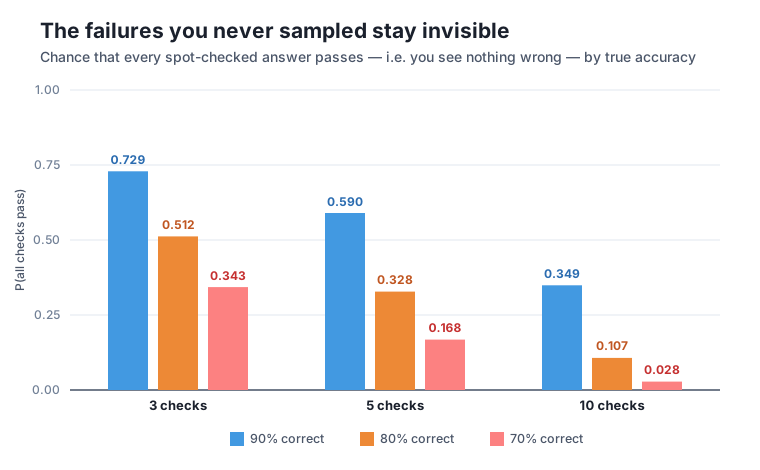
There’s a flip side hiding in this table, and it’s the good news that motivates the whole course. The reason spot-checks fail is that three is a tiny sample. But the same formula says the failure probability collapses as grows: at 10 checks, a 70%-correct assistant gets caught of the time. The problem was never that measurement doesn’t work — it’s that eyeballing three answers isn’t measurement. Systematically running many labeled questions and counting the passes is.
Refusals are the sneakiest failures of all
Our slip was a false refusal: Docent said “I don’t know” to a question it could answer. These are especially dangerous because refusing feels safe and honest, so it rarely gets flagged in a casual review — a wrong number screams, but a polite “I don’t have that” slides right by. Later modules give you metrics that separate a correct refusal (the MongoDB question) from an incorrect one (the Free-plan question) automatically, so you never have to notice it by eye.
Run Docent on five questions from the Meridian docs that we did not test in Step 2 — for example, questions about regions, backup retention on the Scale plan, or which plans support point-in-time recovery. For each, print the retrieved doc ids alongside the answer, then judge each answer yourself against the docs. Did every question retrieve the page that actually contains the answer? Note any that slipped.
Hint
Reuse the loop from Step 2 verbatim, just swapping in your own question list. The retrieved: line is your debugging window: when an answer is wrong, check whether the needed page even made it into the top two. A slip is usually a retrieval miss (right model, wrong context), not the model inventing things.
Suppose your true accuracy is 85%. Using , compute the probability that a spot-check of 4 questions sees no failure, and the probability that a check of 20 questions sees no failure. Print both. How many checks would you need before the chance of missing every failure drops below 5%?
Hint
0.85 ** 4 and 0.85 ** 20 are one line each. For the last part, loop n upward and stop at the first n where 0.85 ** n < 0.05 — or solve it directly with math.log(0.05) / math.log(0.85) and round up. The answer being much larger than three is exactly the point.
The Free-plan question retrieved ['errors', 'backups'] instead of plans. Explain, in a sentence or two, why a keyword-overlap retriever might rank the wrong pages first for that question. Then propose one concrete change to Docent that would likely fix this specific case without hand-editing the question.
Hint
The retriever scores pages by how many words the question shares with each page’s title plus text. Words like “for”, “the”, and “plan” match many pages, while the page that actually holds the price (plans, containing “Free costs 0 dollars”) may share fewer of the question’s exact words. Think about raising k, removing common stopwords before scoring, or a better retriever entirely — but notice you’d only know your fix worked by re-measuring, which is the course’s whole thesis.
You shipped Docent in your head, spot-checked three questions, and it looked perfect — HTTP 429, twenty-five dollars, six hundred requests per minute, all correct. Then you kept going and caught it refusing to answer “What does Meridian charge for the Free plan?” even though the price is right there in the docs, because its retriever silently handed Claude the wrong two pages. That failure was deterministic and permanent, and your spot-check never touched it. The probability math showed why this is structural, not sloppy: with only three checks, even an assistant that’s wrong 30% of the time looks flawless about a third of the time. You cannot see the failures you didn’t sample, and reading a few fluent answers isn’t measurement.
Every team that ships an LLM feature faces this exact moment: the demo works, everyone nods, and the failures that ride to production are the ones nobody happened to type. The instinct to trust a few good outputs is universal and it is wrong for a reason you can now write down as an equation. The rest of this course is the disciplined alternative — a labeled dataset of questions with known-correct answers, metrics that score outputs automatically, and monitoring that watches real traffic — so that “does it work?” becomes a number you can compute and re-compute, not a vibe you happen to have on a good day. You just saw the problem; now you’ll build the fix.
You’ve felt the trap from the inside: Docent looked flawless on three questions and was quietly broken on the fourth, and the math told you why three checks were never going to catch it. The cure isn’t checking harder — it’s checking systematically, on a dataset, with metrics. But not every question is best answered the same way, and not every problem shows up before you ship. Next you’ll draw the line between offline evaluation — grading Docent on a fixed set of labeled questions before it ever sees a user — and online evaluation — watching what real users actually send it. Understanding when to use each is the foundation everything else in this course is built on.
Keep DATATWEETS free. Help fund practical data, AI, and engineering lessons for learners worldwide.
