Title here
Summary here
In Lesson 3 you adopted the evaluation mindset: replace “it looks fine” with a repeatable number. But the moment you try to write that number down, a harder question appears. A number of what? When Docent, our documentation assistant for the Meridian serverless database, answers a developer’s question, “was that good?” is not one measurement. It bundles together several different things that can each succeed or fail independently.
Consider one Docent reply. It could be correct (it said 429) but so slow it times out. It could be fast and cheap but wrong. It could be grounded in the docs yet irrelevant to what was actually asked. It could give a beautiful answer to a question it should have refused. Each of these is a distinct quality dimension, and — this is the key idea of the whole course — each one needs a different measurement method. That is why the course has different modules for different dimensions.
This lesson names the six dimensions worth measuring for an app like Docent, maps each to a concrete Meridian example, and points to the module where you will learn to measure it properly. Then you will run a small, real call that measures the operational dimension live.
In this lesson, you will:
The trap in Lesson 1 was believing a few good-looking answers meant the app worked. There is a subtler version of the same trap: believing that one score — even a carefully computed one — captures quality. It does not, because the things users care about pull in different directions.
Here is the concrete shape of the problem. Suppose you score every Docent answer from 0 to 1 and average them into a single “quality” number of 0.82. That number cannot tell you whether Docent is fast but occasionally wrong, or accurate but too slow to use, or correct on easy questions and confidently wrong on the ones that matter. A blended average is a summary of a summary; it throws away exactly the structure you need to fix the app.
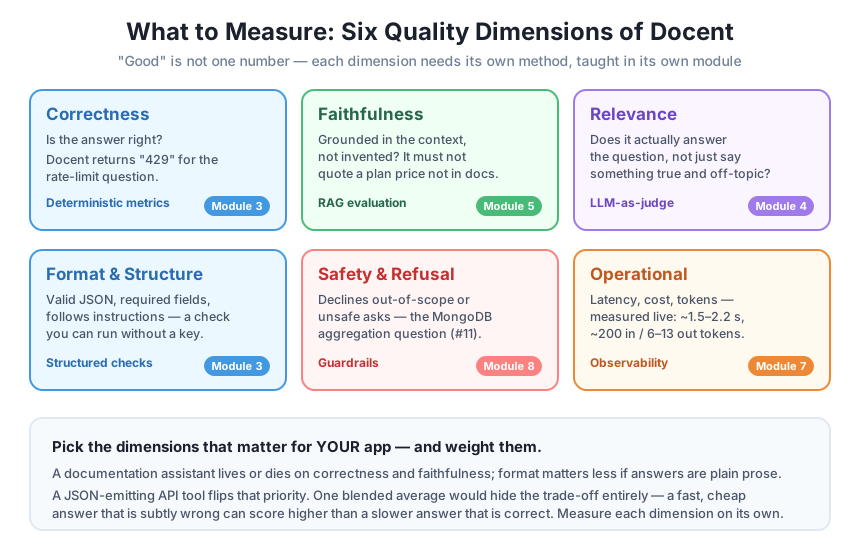
So instead of one score, we measure several quality dimensions and keep them separate. For a documentation Q&A assistant like Docent, six dimensions cover almost everything that matters:
The next sections take each one in turn, tie it to a Meridian example, and name the module where you will learn to measure it. The figure below is the map for the whole course; keep it in mind as you read.
Dimensions, not a hierarchy
These six are not ranked from most to least important. Which ones matter, and how much, depends entirely on your app. A docs assistant lives on correctness and faithfulness; a JSON-emitting API tool lives on format; a customer-facing bot lives on safety. You choose and weight the dimensions — the list just makes sure you do not forget one.
The most obvious dimension: does Docent state the true fact? When a developer asks “What HTTP status code does Meridian return when you exceed the rate limit?”, the one correct answer is 429. Anything else — 420, 503, “it depends” — is wrong, full stop. Because the reference answer is short and unambiguous, you can check correctness with deterministic metrics: exact match, keyword containment, or a fuzzy string score, no model in the loop. You will build these in Module 3.
Correctness asks whether the answer matches the truth. Faithfulness asks a narrower, RAG-specific question: is the answer supported by the context Docent was actually given? Docent retrieves Meridian doc pages and is told to answer only from them. If a developer asks about pricing and Docent replies “the Pro plan is 40 dollars per month,” that is unfaithful — the retrieved plans page says 25 dollars, and Docent invented the number. A hallucinated plan price that never appeared in the docs is a faithfulness failure even if it sounds plausible. Measuring this means comparing the answer against the retrieved context, which is its own discipline: RAG evaluation, in Module 5.
An answer can be correct and faithful and still useless, because it answers a question the user did not ask. If a developer asks “how do I move a database to another region?” and Docent responds with a true, doc-grounded paragraph about creating a database in a region, every fact is right but the reply misses the point — the docs say regions are fixed at creation and you must export and re-import. Relevance is a judgment call with no short reference string, so the natural tool is another model scoring the answer: LLM-as-judge, in Module 4.
Often Docent is not just chatting; it is feeding a downstream system that expects a specific shape — valid JSON, a required set of fields, a maximum length, a particular label. This dimension ignores whether the answer is true and asks only whether it is well-formed: did it return an object with an answer and a doc_id field, or did it wander off into prose? Format is the most mechanically checkable dimension of all — a plain parser, no model and no API key needed. You will fold these structured checks into Module 3 alongside correctness.
Meridian’s docs cover authentication, rate limits, plans, regions, errors, backups, SDKs, and deletion. They say nothing about MongoDB-style aggregation pipelines. So when a developer asks question #11 — “Does Meridian support MongoDB-style aggregation pipelines?” — the correct behavior is to refuse: Docent should say it does not have that in the docs, not invent a feature. An answer that confidently describes an aggregation syntax Meridian never had is a safety failure, even though it might read as helpful. Refusal behavior and other guardrails get their own treatment in Module 8.
Finally, the dimension that has nothing to do with the words in the answer: what did that answer cost you? Every Docent call takes some wall-clock time (latency) and consumes some tokens (which you pay for). An app can be perfect on all five quality dimensions above and still be unusable because it takes eight seconds per answer or burns through your token budget. These operational signals — latency, cost, tokens — are the heart of observability, in Module 7. They are also the cheapest dimension to start measuring, which is exactly what the demo below does.
Five of the six dimensions need machinery you will build later. But one — the operational dimension — you can measure right now with nothing more than the standard library and one live call. Latency is a time.time() around the request; token counts come straight back from the API response on msg.usage. No judge model, no labeled dataset, no extra cost beyond the answer itself.
Here is Docent’s answer function, instrumented to return the operational metrics alongside the text. It is the same minimal Docent you have seen, with a stopwatch and the usage fields added:
import time, warnings
warnings.filterwarnings("ignore")
import anthropic

client = anthropic.Anthropic()  # reads ANTHROPIC_API_KEY from the environment

DOCS = [
    {"id": "ratelimits", "title": "Rate Limits",
     "text": "The Free plan allows 60 requests per minute. The Pro plan allows 600 requests per minute. Exceeding the "
             "limit returns HTTP 429 with a Retry-After header giving the seconds to wait. Rate limits are applied per "
             "API key, not per account."},
    {"id": "plans", "title": "Plans and Pricing",
     "text": "Meridian has three plans. Free costs 0 dollars per month and includes 1 GB of storage. Pro costs 25 dollars "
             "per month and includes 50 GB of storage. Scale costs 199 dollars per month and includes 500 GB of storage. "
             "All plans include unlimited read replicas."},
]

def retrieve(question, docs, k=2):
    q = set(question.lower().split())
    scored = sorted(docs, key=lambda d: len(q & set((d["title"] + " " + d["text"]).lower().split())), reverse=True)
    return scored[:k]

def docent_answer_measured(question, docs, model="claude-haiku-4-5"):
    ctx = "\n\n".join(f"[{d['id']}] {d['title']}\n{d['text']}" for d in retrieve(question, docs))
    prompt = (f"Answer the question using ONLY the context. If the context does not contain the answer, say "
              f"\"I don't have that in the docs.\" Be concise.\n\nContext:\n{ctx}\n\nQuestion: {question}")
    start = time.time()
    msg = client.messages.create(model=model, max_tokens=200,
                                 messages=[{"role": "user", "content": prompt}])
    latency_s = time.time() - start
    return {
        "answer": msg.content[0].text,
        "latency_s": round(latency_s, 2),
        "input_tokens": msg.usage.input_tokens,
        "output_tokens": msg.usage.output_tokens,
    }

questions = [
    "What HTTP status code does Meridian return when you exceed the rate limit?",
    "How much does the Pro plan cost per month?",
]

for q in questions:
    r = docent_answer_measured(q, DOCS)
    print(f"Q: {q}")
    print(f"   answer:  {r['answer']}")
    print(f"   latency: {r['latency_s']} s")
    print(f"   tokens:  in={r['input_tokens']}  out={r['output_tokens']}")
    print()
Running this against the live model produced the following. Because model latency and wording vary run to run, these are a real recorded run — the numbers will be close but not byte-identical when you run it yourself:
Q: What HTTP status code does Meridian return when you exceed the rate limit?
   answer:  HTTP 429
   latency: 2.17 s
   tokens:  in=205  out=6

Q: How much does the Pro plan cost per month?
   answer:  The Pro plan costs $25 per month.
   latency: 1.52 s
   tokens:  in=199  out=13
Look at what you already have. Two live answers, and for each one a latency in seconds and an input/output token split — the raw material of the operational dimension. The rate-limit question answered in 6 output tokens; the pricing question needed 13. Both took under three seconds. If you logged these fields on every real Docent call, you would have a running picture of cost and speed without ever writing a judge or labeling a dataset. That is the whole idea of Module 7’s observability, in miniature.
Tokens are your cost, made countable
msg.usage.input_tokens and msg.usage.output_tokens are returned on every response at no extra charge — they are the model telling you exactly what you were billed for. Output tokens usually cost several times more than input tokens, so a chatty Docent that answers “The Pro plan costs 25 dollars per month” in 13 tokens is measurably pricier at scale than a terse “429” in 6. Logging both fields is the cheapest observability you will ever add.
The operational demo needs a live call, but not every dimension does. The format dimension is pure structure, so you can check it deterministically — no model, no API key, and identical output every run. Here is a format check that asks whether a candidate answer is valid JSON with the required fields:
import json

def check_format(text, required_fields):
    """Deterministic format check: valid JSON object with all required fields."""
    try:
        obj = json.loads(text)
    except json.JSONDecodeError:
        return {"valid_json": False, "has_fields": False, "passed": False}
    if not isinstance(obj, dict):
        return {"valid_json": True, "has_fields": False, "passed": False}
    has_fields = all(f in obj for f in required_fields)
    return {"valid_json": True, "has_fields": has_fields, "passed": has_fields}

required = ["answer", "doc_id"]

good = '{"answer": "429", "doc_id": "ratelimits"}'
missing = '{"answer": "429"}'
broken = 'Sure! Here is the answer: 429'

for label, text in [("well-formed", good), ("missing field", missing), ("not JSON", broken)]:
    print(f"{label:15} -> {check_format(text, required)}")
Running it — twice, to prove it is deterministic — gives the identical result both times:
well-formed     -> {'valid_json': True, 'has_fields': True, 'passed': True}
missing field   -> {'valid_json': True, 'has_fields': False, 'passed': False}
not JSON        -> {'valid_json': False, 'has_fields': False, 'passed': False}
Notice that this check says nothing about whether “429” is the right answer — that is correctness, a different dimension. It only asks whether the shape is valid. A well-formed reply with the wrong number passes the format check and fails the correctness check, and keeping those two verdicts separate is exactly the point of measuring by dimension.
Now put the dimensions side by side and the danger of a single number becomes concrete. Imagine two candidate versions of Docent:
Blend everything into one “quality score” and the two might tie — A’s speed cancels B’s accuracy. But no real team is indifferent between them. For a documentation assistant, a wrong status code sends a developer down the wrong debugging path; the extra 1.5 seconds does not. You would ship B and work on its latency separately. You can only make that call if correctness and latency are reported as two numbers, not smashed into one.
This is why serious evaluation keeps a scorecard, not a score: a small table with a column per dimension. You then decide the weights for your app — maybe correctness and faithfulness are gates that must pass, while latency and cost are budgets you optimize under. The dimensions give you the vocabulary; the weighting is your product judgment. The rest of this course builds one measurement method per dimension so that every column of that scorecard is something you can actually fill in.
Start with two, not six
You do not need all six dimensions on day one. For most docs assistants, correctness and faithfulness catch the failures that hurt users most, and the operational dimension is nearly free to log. Begin there, add format if you emit structured output, and add safety and relevance as the app meets real traffic. A two-column scorecard you actually maintain beats a six-column one you never fill in.
For each of these Docent replies, name which single dimension it fails. (a) Asked for the rate-limit status code, Docent answers a correct, doc-grounded paragraph about what a 401 means instead. (b) Asked the Pro plan price, Docent returns “the Pro plan is 40 dollars per month” — a number that appears nowhere in the retrieved plans page. (c) Asked whether Meridian supports MongoDB-style aggregation pipelines, Docent invents a confident answer describing a pipeline syntax.
Hint
(a) is a relevance failure — every fact is true and grounded, but it answers the wrong question, which is why Module 4’s LLM-as-judge is the right tool. (b) is a faithfulness failure — the answer is not supported by the retrieved context, the domain of Module 5’s RAG evaluation. (c) is a safety / refusal failure — the correct behavior for out-of-scope question #11 was to decline, covered by Module 8’s guardrails.
Extend the docent_answer_measured function so that, in addition to the fields it already returns, it adds a boolean within_budget that is True only when output_tokens is at most 50. Using the recorded run in the lesson (6 and 13 output tokens), state what within_budget would be for each of the two questions.
Hint
Add one line before the return: within_budget = msg.usage.output_tokens <= 50, and include "within_budget": within_budget in the returned dict. Both recorded answers (6 and 13 output tokens) are well under 50, so both would report within_budget = True. This is exactly how an operational check turns a raw token count from Module 7’s observability into a pass/fail signal on your scorecard.
You are running Docent inside a support tool where every answer is shown directly to a paying customer with no human in between. Rank the six dimensions from most to least critical for this specific setting, and name one dimension you would treat as a hard gate (must pass) rather than a number to optimize.
Hint
There is no single right ranking, but a defensible one puts safety / refusal and correctness at the top — a wrong or unsafe answer reaches a customer unfiltered — followed by faithfulness and relevance, then format and operational. Safety and correctness are natural hard gates: an answer that hallucinates a feature or states a wrong status code should be blocked regardless of how fast or cheap it was. Latency and cost are better treated as budgets you optimize under, once the gates pass.
Quality is not one number. An LLM app like Docent succeeds or fails along six separate dimensions, and this lesson mapped each to a concrete Meridian example and the method that measures it. Correctness (does it return 429?) uses deterministic metrics in Module 3. Faithfulness (did it invent a plan price?) uses RAG evaluation in Module 5. Relevance (did it answer the question actually asked?) uses LLM-as-judge in Module 4. Format (valid JSON with the right fields?) uses structured checks, also in Module 3, and you saw a real key-free version run identically twice. Safety (does it refuse the out-of-scope MongoDB question?) uses guardrails in Module 8. And the operational dimension — latency and tokens — you measured for real on a live Docent call: two answers in under three seconds, at 6 and 13 output tokens. The closing argument is the through-line of the course: a single blended average hides the trade-offs, so keep a scorecard with one column per dimension and weight the columns for your app.
msg.usage and a time.time() stopwatch, tracked with observability (Module 7).Every team that ships an LLM app eventually argues about whether it is “good enough,” and the argument goes in circles until someone names the dimensions. Once you can say “correctness is 0.96, faithfulness is 0.90, p95 latency is 2.4 seconds, and it refuses out-of-scope questions 8 times in 10,” the conversation becomes concrete: which numbers are gates, which are budgets, and which need work. Collapsing all of that into a single 0.82 does the opposite — it lets a fast, cheap, subtly-wrong version look as good as a correct one, and that is exactly the version that erodes user trust. The rest of this course exists to fill in each column of that scorecard with a method you can run. Next, you will stop mapping dimensions and start building: a first end-to-end evaluation harness for Docent that puts several of these measurements into one working script.
You can now break “is Docent good?” into six named dimensions, point to a concrete Meridian example of each, and say which method and module measures it. You also measured the operational dimension for real — latency and tokens on a live call — and ran a deterministic format check that gives the same verdict every time. Before moving on, try instrumenting the demo further: add the within_budget flag from Exercise 2, run the two questions a few times, and watch the latency wobble while the token counts stay stable. Getting a feel for which dimensions are noisy and which are exact will make the guided project in Lesson 5, where you assemble these measurements into one harness, land as a natural next step rather than a leap.
Keep DATATWEETS free. Help fund practical data, AI, and engineering lessons for learners worldwide.
