Title here
Summary here
This is the capstone for Why Evaluation Matters, and it turns everything the module argued for into something you can run. In Lesson 1 you fell into the “looks fine” trap — reading a few of Docent’s answers and calling it good. In this project you build the thing that replaces that gut feel: a small but genuinely working evaluation harness for Docent, our documentation Q&A assistant for the fictional Meridian database.
The harness has four stages, and they are the same four stages every serious eval has, no matter how fancy it gets later: assemble a golden dataset of questions with known-correct answers, run the system over it, score each answer against its reference, and aggregate the scores into a single number plus a per-item report. You’ll build each stage as a small runnable piece and then watch them snap together into one reproducible run. The scorer we write here is deliberately crude — plain keyword matching — and we’ll be honest about where it breaks. That’s fine: the point of Module 1 is a harness that works and reruns, not a perfect metric. Module 3 makes the scoring smart.
By the end of this project, you will be able to:
Each stage below is runnable, and the answer-generating stages call claude-haiku-4-5 for real. Because the model’s wording changes slightly from run to run, your answers won’t be byte-identical to the ones shown here — but the harness reads through that variation and reports a stable pass rate. Let’s build it.
An evaluation is only as trustworthy as the examples you test against. A golden dataset is a fixed, versioned list of inputs paired with known-correct reference answers — the “gold standard” a human vouches for. Testing against the same set every run is what makes results comparable over time: if the pass rate drops next week, you know the system changed, not the questions.
We’ll define a small set inline as a list of dicts. Seven items are factual questions with short reference answers drawn straight from Meridian’s docs, and each carries the keywords a correct answer must contain. The eighth is special: an out-of-scope probe — a question the docs simply cannot answer — where the correct behavior is not a fact but a refusal. Mixing that case in from day one keeps us honest, because a system that confidently answers questions it has no basis for is worse than one that says “I don’t know.”
GOLDEN = [
    {"q": "What HTTP status code does Meridian return when you exceed the rate limit?",
     "expected": "429", "keywords": ["429"], "kind": "factual"},
    {"q": "How many requests per minute does the Pro plan allow?",
     "expected": "600 per minute", "keywords": ["600"], "kind": "factual"},
    {"q": "How much does the Pro plan cost per month?",
     "expected": "25 dollars", "keywords": ["25"], "kind": "factual"},
    {"q": "How long are backups retained on the Scale plan?",
     "expected": "90 days", "keywords": ["90 days"], "kind": "factual"},
    {"q": "Which environment variable does the Python SDK read for the API key?",
     "expected": "MERIDIAN_API_KEY", "keywords": ["MERIDIAN_API_KEY"], "kind": "factual"},
    {"q": "What does a 401 error mean?",
     "expected": "missing/invalid API key", "keywords": ["invalid"], "kind": "factual"},
    {"q": "How long is the grace period before a deleted database is purged?",
     "expected": "24 hours", "keywords": ["24"], "kind": "factual"},
    {"q": "Does Meridian support MongoDB-style aggregation pipelines?",
     "expected": "refuse (not in docs)", "keywords": [], "kind": "refusal"},
]

factual = sum(1 for item in GOLDEN if item["kind"] == "factual")
refusal = sum(1 for item in GOLDEN if item["kind"] == "refusal")
print("dataset size:", len(GOLDEN))
print("factual items:", factual, "| refusal items:", refusal)
dataset size: 8
factual items: 7 | refusal items: 1Eight items — seven facts and one refusal probe. Every field earns its place: q is what we ask, expected is a human-readable label for the report, keywords is what the scorer will look for, and kind tells the scorer how to grade this item (match a fact, or check for a refusal). This structure is small enough to read at a glance and rich enough to drive the whole harness.
Now we bring in Docent itself. This is the minimal implementation the course reuses everywhere: a keyword-overlap retrieve that picks the two most relevant Meridian docs, and docent_answer, which stuffs those docs into a grounded prompt and asks claude-haiku-4-5 to answer using only that context — or to say it doesn’t have the answer. The anthropic.Anthropic() client reads your key from the ANTHROPIC_API_KEY environment variable; never hard-code a key in your source.
import warnings
warnings.filterwarnings("ignore")
import anthropic

client = anthropic.Anthropic()  # reads ANTHROPIC_API_KEY from the environment

DOCS = [
    {"id": "auth", "title": "Authentication",
     "text": "Meridian authenticates every request with an API key sent in the Authorization header as a bearer token. "
             "Create keys in the dashboard under Settings > API Keys. Keys are either test or live mode; test keys only "
             "touch sandbox data. A key is shown once at creation and cannot be recovered, only rotated."},
    {"id": "ratelimits", "title": "Rate Limits",
     "text": "The Free plan allows 60 requests per minute. The Pro plan allows 600 requests per minute. Exceeding the "
             "limit returns HTTP 429 with a Retry-After header giving the seconds to wait. Rate limits are applied per "
             "API key, not per account."},
    {"id": "plans", "title": "Plans and Pricing",
     "text": "Meridian has three plans. Free costs 0 dollars per month and includes 1 GB of storage. Pro costs 25 dollars "
             "per month and includes 50 GB of storage. Scale costs 199 dollars per month and includes 500 GB of storage. "
             "All plans include unlimited read replicas."},
    {"id": "regions", "title": "Regions",
     "text": "Databases can be created in three regions: us-east, eu-west, and ap-south. The region is fixed at creation "
             "time and cannot be changed later; to move data to another region you must export and re-import into a new "
             "database. Cross-region read replicas are available on the Scale plan only."},
    {"id": "errors", "title": "Error Codes",
     "text": "Meridian uses standard HTTP status codes. 400 means a malformed request, 401 means a missing or invalid API "
             "key, 403 means the key is valid but lacks permission, 404 means the resource does not exist, and 429 means "
             "the rate limit was exceeded. 5xx codes indicate a server-side error and should be retried with backoff."},
    {"id": "backups", "title": "Backups",
     "text": "Automatic daily backups are retained for 7 days on the Free plan, 30 days on Pro, and 90 days on Scale. "
             "Backups run at 03:00 UTC. Point-in-time recovery to any second in the retention window is available on the "
             "Scale plan. Restoring a backup creates a new database and never overwrites the original."},
    {"id": "sdks", "title": "SDKs",
     "text": "Official SDKs are available for Python, JavaScript, and Go. Install the Python SDK with 'pip install meridian'. "
             "The SDK reads the MERIDIAN_API_KEY environment variable by default. All SDKs retry idempotent requests up to "
             "3 times on 5xx errors with exponential backoff."},
    {"id": "deletion", "title": "Deleting Data",
     "text": "Deleting a database is immediate and irreversible once the 24-hour grace period ends. During the grace period "
             "the database is soft-deleted and can be restored from the dashboard. After 24 hours the data and its backups "
             "are permanently purged. Deletion requires a live-mode key with admin permission."},
]

def retrieve(question, docs, k=2):
    q = set(question.lower().split())
    scored = sorted(docs, key=lambda d: len(q & set((d["title"] + " " + d["text"]).lower().split())), reverse=True)
    return scored[:k]

def docent_answer(question, docs, model="claude-haiku-4-5"):
    ctx = "\n\n".join(f"[{d['id']}] {d['title']}\n{d['text']}" for d in retrieve(question, docs))
    prompt = (f"Answer the question using ONLY the context. If the context does not contain the answer, say "
              f"\"I don't have that in the docs.\" Be concise.\n\nContext:\n{ctx}\n\nQuestion: {question}")
    msg = client.messages.create(model=model, max_tokens=200,
                                 messages=[{"role": "user", "content": prompt}])
    return msg.content[0].text
The run loop itself is tiny: walk the golden set, call Docent on each question, and stash the answer next to the item it came from. We keep every original field (using {**item, ...}) so the scorer in Stage 3 has the keywords and kind it needs right alongside the answer.
records = []
for item in GOLDEN:
    answer = docent_answer(item["q"], DOCS)
    records.append({**item, "answer": answer})

# peek at one factual answer and the out-of-scope one
print("Q:", records[0]["q"])
print("A:", records[0]["answer"])
print()
print("Q:", records[7]["q"])
print("A:", records[7]["answer"])
Q: What HTTP status code does Meridian return when you exceed the rate limit?
A: Meridian returns HTTP 429 when you exceed the rate limit.
Q: Does Meridian support MongoDB-style aggregation pipelines?
A: I don't have that in the docs.Two real answers from claude-haiku-4-5. The factual question got a grounded answer containing “429”, and — crucially — the out-of-scope question got a refusal instead of an invented feature. That refusal is not luck; it’s the grounded prompt doing its job. On your run the exact wording will differ (Docent might say “HTTP 429.” or “The status code is 429.”), which is precisely why the next stage scores by content, not string equality.
Why the answer text changes but the score shouldn’t
Language models are non-deterministic: the same prompt can produce “HTTP 429.” on one run and “Meridian returns 429 when the rate limit is exceeded.” on the next. A good scorer looks through that surface variation to the thing that matters — here, whether “429” is present. If your metric flipped between pass and fail just because the model reworded a correct answer, the metric would be measuring style, not correctness. Design scorers to be as stable as the property you actually care about.
Now we grade. The two kinds of items need two kinds of checks. For factual items, scores_correct lowercases the answer and asks whether every required keyword is present — a substring/containment test. For the refusal item, refused looks for any of a few phrases that signal “I don’t know.” A tiny grade function routes each record to the right check based on its kind.
Let’s be blunt about the limitation: keyword matching is crude. It would mark “the code is definitely not 429” as correct because the string “429” appears, and it would mark a perfectly good answer that says “four hundred twenty-nine” as wrong. We accept that here because the metric is deterministic and reproducible — the same answer always scores the same way — and because a working-but-imperfect scorer you can rerun beats a vague feeling every single time. Module 3 replaces this with semantic and model-graded scoring; today we just need an honest floor.
def scores_correct(answer, keywords):
    """Crude but deterministic: every required keyword must appear in the answer."""
    a = answer.lower()
    return all(kw.lower() in a for kw in keywords)

REFUSAL_MARKERS = ["don't have that in the docs", "do not have that in the docs",
                   "don't know", "not in the docs", "no information",
                   "doesn't cover", "does not cover", "not covered"]

def refused(answer):
    """True if the answer signals it can't answer from the docs."""
    a = answer.lower()
    return any(m in a for m in REFUSAL_MARKERS)

def grade(record):
    if record["kind"] == "refusal":
        return refused(record["answer"])
    return scores_correct(record["answer"], record["keywords"])

# sanity-check the scorer on fixed strings — no model call, fully reproducible
print("keyword present: ", scores_correct("Meridian returns HTTP 429.", ["429"]))
print("keyword absent:  ", scores_correct("The limit is 600 per minute.", ["429"]))
print("refusal detected:", refused("I don't have that in the docs."))
print("real answer:     ", refused("The Pro plan costs 25 dollars per month."))
keyword present: True
keyword absent: False
refusal detected: True
real answer: FalseBecause this stage touches no model — just fixed strings and pure Python — it is fully deterministic. Run it a second time and you get the identical four lines. That reproducibility is the whole reason we can trust a number the harness reports: the only thing that varies between runs is Docent’s wording, and we’ve designed the scorer to be robust to that.
The final stage turns eight pass/fail judgments into something a human can act on: a small per-item table and one headline number, the pass rate (fraction of items that passed). The table is what you read when the number moves and you want to know which item broke; the pass rate is what you track over time.
print(f"{'#':<3}{'RESULT':<8}{'EXPECTED':<24}QUESTION")
print("-" * 78)

passes = 0
for i, r in enumerate(records, 1):
    ok = grade(r)
    passes += ok
    mark = "PASS" if ok else "FAIL"
    print(f"{i:<3}{mark:<8}{r['expected']:<24}{r['q'][:40]}")

rate = passes / len(records)
print("-" * 78)
print(f"Overall: {passes}/{len(records)} passed  |  pass rate = {rate:.2f}")
# RESULT EXPECTED QUESTION
------------------------------------------------------------------------------
1 PASS 429 What HTTP status code does Meridian retu
2 PASS 600 per minute How many requests per minute does the Pr
3 PASS 25 dollars How much does the Pro plan cost per mont
4 PASS 90 days How long are backups retained on the Sca
5 PASS MERIDIAN_API_KEY Which environment variable does the Pyth
6 PASS missing/invalid API key What does a 401 error mean?
7 PASS 24 hours How long is the grace period before a de
8 PASS refuse (not in docs) Does Meridian support MongoDB-style aggr
------------------------------------------------------------------------------
Overall: 8/8 passed | pass rate = 1.00That’s the whole harness, end to end: a golden dataset, a run over Docent, a scorer, and a report — and on this run Docent scored a clean 8/8, pass rate 1.00, including the all-important refusal on the MongoDB question. Your pass count may land at 7 or 8 depending on how the model phrases a borderline answer; item 6 (“401”) is the shakiest, because it passes only if the word “invalid” survives the model’s rewording. That fragility isn’t a bug in Docent — it’s the crude scorer showing its seams, which is exactly the honest signal that motivates the better metrics coming in Module 3.
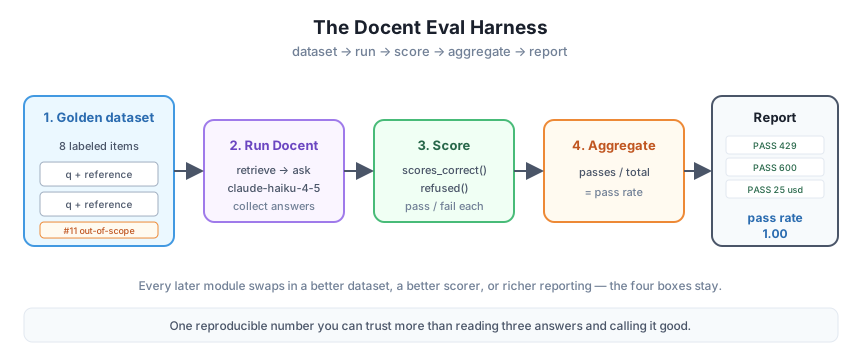
You have now built the scaffold the entire course stands on. Every later module changes one box and leaves the others intact: Module 2 grows the dataset, Module 3 replaces the scorer with something semantic, and the observability modules pipe the report into dashboards and traces. Same four stages, every time.
Right now every factual reference in the golden set is genuinely in the docs, so a well-behaved Docent should pass them all. Add a ninth item whose keyword is a value the docs contradict — for example, ask the Pro-plan cost question but set keywords to ["50 dollars"] (the docs say 25). Rerun the harness and confirm the scorer marks it FAIL. This proves your metric can actually catch a wrong answer, not just rubber-stamp everything.
Hint
You don’t need a new question — reuse an existing q with a deliberately wrong keywords list, kind still "factual". Because Docent answers “25 dollars” from the docs, scores_correct will look for “50 dollars”, not find it, and return False. A metric that never fails is a metric you can’t trust; this exercise is how you earn that trust.
The single pass rate hides structure. Extend Stage 4 to also print the pass rate split by kind — one number for factual items and one for the refusal item — so you can see at a glance whether failures cluster in facts or in refusals.
Hint
Group the graded records with a small dict keyed by kind, accumulating passes and totals: by_kind[r["kind"]] as a [passes, total] pair. After the loop, print passes/total for each key. In a real eval, a system that aces facts but stops refusing out-of-scope questions is a specific, dangerous regression — a breakdown surfaces it while the overall number might barely move.
Model wording drifts run to run, which makes two reports hard to compare. Save each run’s results to a JSON file (question, answer, pass/fail, and the pass rate) with a timestamp in the filename, so you can diff today’s run against last week’s and see exactly which items changed.
Hint
After Stage 4, build a list of {"q": ..., "answer": ..., "pass": grade(r)} dicts plus the aggregate, and write it with json.dump(...) to something like run_2026-07-07.json (use datetime.now().strftime("%Y-%m-%d")). Don’t store any secret — only questions, answers, and scores. This is the seed of experiment tracking, which the observability modules build out fully.
You built a complete, runnable evaluation harness for Docent — the capstone that ties Module 1 together. You assembled an eight-item golden dataset of question/reference pairs, including an out-of-scope probe that tests refusal; you ran Docent (claude-haiku-4-5) over the whole set and collected every answer; you wrote an honest, deterministic scorer that combines keyword matching for facts with a refusal check for the out-of-scope case; and you aggregated the results into a per-item table and a single pass rate. On the run shown here Docent scored 8/8 (pass rate 1.00), and we were candid that a crude keyword scorer can wobble by an item — which is the exact motivation for the better metrics ahead. This four-stage shape — dataset, run, score, aggregate — is the scaffold every remaining module extends.
scores_correct (keyword containment) plus refused (refusal-phrase check), routed by item kind; crude but reproducible.This is the shape of every real LLM evaluation, from a weekend script to a production quality gate: build a trustworthy dataset, run the system over it, score with a metric you understand, and report a number you can watch. Nothing you do later throws this away — you swap the crude keyword scorer for a semantic or model-graded one, grow the golden set, and pipe the report into dashboards and traces, but the four stages never change. Having built the harness by hand, you now understand exactly what those fancier tools are doing underneath, and you’ll never again ship on the strength of reading three answers and calling it good.
You’ve shipped a real evaluation harness — a golden dataset, a run over Docent, an honest scorer, and an aggregate report you can rerun any time. Right now that dataset is eight hand-picked items, which is enough to prove the machinery but not enough to trust in production. Next you’ll learn to build datasets deliberately: choosing coverage, capturing the edge cases that actually break, labeling references you can defend, and versioning the whole thing so your pass rate means something a month from now.
Keep DATATWEETS free. Help fund practical data, AI, and engineering lessons for learners worldwide.
