Title here
Summary here
This is the safety and cost module, and its blunt version is this: a loop that can’t stop isn’t a tool, it’s a bill. Back in Module 1 you learned that every loop needs a place to stop; now you’ll design that stop deliberately. This first lesson is about the exits — the specific conditions that make a loop end. Most people set at most one (they hope it finishes), and that’s exactly how loops run past the point of usefulness, wasting money and doing things you didn’t want. A well-engineered loop has several exits, and always includes a safety one.
By the end of this lesson, you will be able to:
Let’s look at the exits.
Think of a running loop as needing a set of doors it can leave through. There are four, and they answer four different questions about why the loop is ending.
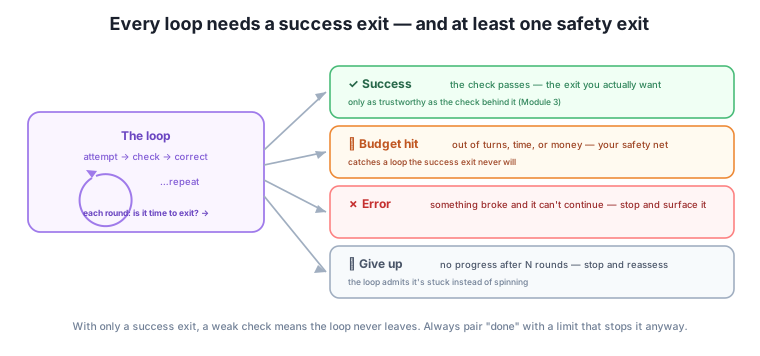
The most common — and most expensive — mistake is building a loop with only a success exit: “run until the check passes.” It sounds complete, but it has a fatal gap. If the check is weak, vague, or the task is harder than expected, the check may never pass. And a loop with only a success exit and a check that never fires doesn’t stop. It just keeps going — attempt, check, “not yet,” correct, attempt, “not yet” — forever, or until your patience or your credit card runs out.
This is why the rule from Modules 2 and 4 was to always set two stop conditions. The success stop is the finish you want. The safety stop — a budget or a give-up rule — is your insurance for when success never arrives. You met this idea in passing before; here it gets its full weight. A loop without a safety exit is trusting its check to be perfect, and Module 3 taught you that checks are exactly the thing that fails quietly. Never let a loop run on the success exit alone.
An automated loop with no safety exit is a runaway bill
When you run a loop by hand, your own patience is an accidental safety exit — you get tired and stop. When an automated agent runs the loop (Module 5), that accidental brake is gone. An agent told “keep going until it’s perfect,” with a check that can’t recognize perfect, will run hundreds of rounds, each one a paid request, chasing an exit it can never reach. The safety exit isn’t optional for automated loops — it’s the thing standing between you and a surprise bill.
Setting up a loop’s exits is a quick, deliberate step you do before you run it. For any loop, decide:
Those two are the non-negotiable pair. For automated or higher-stakes loops, add the others: an error exit (“if a file won’t open, stop and tell me”) and a give-up exit (“if two rounds pass with no improvement, stop”). Writing these down turns “I hope it finishes” into “here are the four ways this ends, and I’m fine with all of them.” That’s the difference between a loop you launch nervously and one you launch with confidence.
The owner sets up an automated loop to clean a messy customer-feedback export into a themed summary. Version one has only a success exit: “keep refining until the summary is good.” The check for “good” is soft, so on a tricky run the loop never quite satisfies it — and because an agent is running it, it grinds through round after round, each a paid call, producing slightly different summaries and never stopping. That’s the runaway.
Version two designs all four exits up front. Success: the summary covers the top five themes, each with three real supporting quotes (a concrete, checkable done). Budget: stop after six rounds regardless. Error: if the export file won’t parse, stop and report. Give up: if two consecutive rounds don’t improve the theme coverage, stop. Now the same tricky run ends cleanly at the budget exit after six rounds, with the best summary so far and a note that it didn’t fully converge — useful, bounded, and cheap. Same task, same agent; the difference is entirely in having designed the exits.
For each, name which exit the loop is taking: (a) the check confirms all criteria are met; (b) the loop has run its maximum 8 rounds; (c) the input file is corrupt and can’t be read; (d) three rounds in a row produced no improvement.
Hint
(a) success, (b) budget hit, (c) error, (d) give up. Each is a legitimate way for a loop to end — and a well-designed loop is prepared for all four, not just (a).
A loop is set to “keep improving the draft until it’s excellent.” What exit is missing, and what could go wrong?
Hint
There’s no safety exit — only a success condition (“excellent”) that a soft check may never confirm. If run by an agent, it could loop indefinitely, wasting time and money. Add a budget ("…or after five rounds") and ideally a give-up rule.
Write the two non-negotiable exits (success + safety) for a loop that drafts a product description.
Hint
Success: “40–70 words, states genre and audience, no invented quotes — all met.” Safety: “…or after four rounds, whichever comes first.” The first is your definition of done; the second guarantees the loop ends even if the check never passes.
A loop needs exits, designed deliberately, or it can run forever. There are four: success (the check passes — the exit you want, only as reliable as the check behind it), budget hit (out of turns, time, or money — your primary safety exit), error (something broke; stop and surface it), and give up (no progress for several rounds; stop and reassess). The most expensive mistake is a loop with only a success exit: if the check is weak or the task is hard, that exit may never fire, and the loop — especially an automated one, which lacks the accidental brake of your own patience — just keeps going and spending. So always design at least the non-negotiable pair: a success exit (your definition of done and check) and a safety exit (a budget or give-up limit) for when success never comes. Decide all the exits before you run, and you turn “I hope it finishes” into “here are the ways this ends, and I’m fine with all of them.”
Designing exits is the difference between a loop that’s a controllable tool and one that’s an open-ended liability — the runaway bill, the agent that “improved” something into the ground, the session that never ended. It’s also the safety backstop for everything you’ve built: even a great goal and a strong check can meet a task that just won’t converge, and the safety exit is what saves you then. Knowing the four exits is the foundation; next, you’ll set the most important safety exit precisely — the budget — deciding your limits in turns, time, and money before you ever hit run.
You now know the four ways a loop can end — success, budget, error, give-up — and the one rule that prevents runaways: never rely on the success exit alone; always pair it with a safety exit. Design the exits before you launch, every time. Next, you’ll make the most important safety exit concrete, setting real budgets in turns, time, and money so a loop can’t quietly cost you more than the task is worth.
Keep DATATWEETS free. Help fund practical data, AI, and engineering lessons for learners worldwide.
