Title here
Summary here
The last lesson said every loop needs a safety exit. This lesson makes the most important one concrete: the budget. A budget is a limit you set before the loop runs, so it physically can’t cost more than you decided the task was worth. There are three kinds — turns, time, and money — and knowing which to set, and to what, is what keeps a loop bounded. This matters most once an agent runs the loop for you: by hand, your own patience is an accidental budget, but an automated loop will happily spend until something explicit stops it.
By the end of this lesson, you will be able to:
Let’s look at the three budgets.
A budget answers “what’s the most this loop is allowed to consume before it stops, done or not?” You set it in one or more of three units.
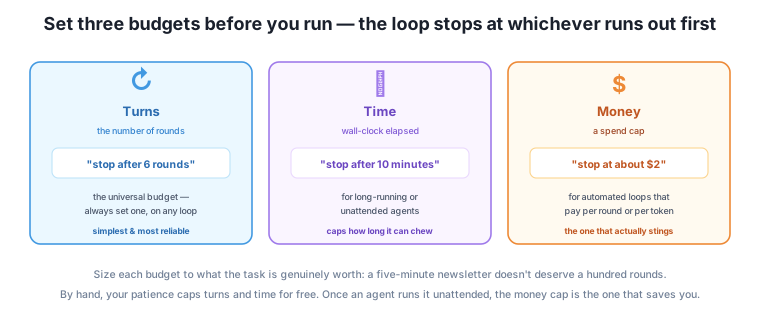
The loop stops at whichever budget runs out first. You don’t have to pick one; you set the ones that apply and the earliest limit wins.
A budget should be proportional to what the task is genuinely worth. A five-minute newsletter doesn’t deserve a hundred rounds or a $10 spend — if it hasn’t converged in five or six rounds, more rounds usually mean drift, not improvement (remember the over-looping and drifting-corrections lessons). A big, genuinely hard research task might reasonably warrant more. The question to ask when setting a budget is simple: “If this loop hit this limit without finishing, would I be annoyed at the waste, or relieved it stopped?” Set the limit at the point where you’d be relieved.
A good default for most everyday loops is a small number of turns — five or six is plenty for a writing or cleanup loop — plus, for anything automated, a money cap you’d be comfortable spending on the task even if it produced nothing. Start tight. You can always raise a budget for the rare task that needs it; you can’t un-spend money a runaway already burned.
Here’s the pattern worth internalizing. When you run a loop by hand, you have three budgets for free without thinking about it: you run out of patience (turns), you run out of afternoon (time), and money barely enters into it because you’re just typing. Your own limits keep the loop bounded automatically.
The moment an agent runs the loop unattended, all three of those accidental brakes disappear. It doesn’t get bored, it doesn’t notice the afternoon passing, and every round it takes costs real money. A loop that was self-limiting by hand becomes genuinely unbounded when automated — which is exactly why Module 5’s agents make this lesson non-optional. The money cap is the brake you have to add back deliberately, because it’s the one your own habits used to provide for free and no longer do.
Set the money cap before the first automated run, not after
The expensive lesson people learn once is launching an automated loop with a soft check and no spend cap, walking away, and coming back to a loop that ran for hours. The cap costs nothing to set and saves you from the one failure mode that hits your wallet. For any loop an agent runs on its own, decide the money (or turn) budget before you hit go — treat it as part of setting the loop up, like permissions in Module 5.
The owner automates the feedback-cleanup loop from last lesson. Sizing the budget, they reason: this summary is worth maybe fifteen minutes of a person’s time, so it’s not worth much agent spend. They set turns to 6 (a good summary shouldn’t need more), time to 10 minutes (so it can’t chew unattended), and money to about $1 (comfortable to spend on this even if it flopped). On a smooth run it finishes in three rounds, well under every budget — the limits never bind. On a tricky run where the check keeps not-quite-passing, it stops at the 6-round turn budget with the best summary so far, having spent well under a dollar. Either way, the owner knew the worst case before starting: six rounds, ten minutes, a dollar. That predictability — not the exact numbers — is the point of budgeting.
Which budget most directly protects you in each case: (a) an agent that pays per API call, running unattended overnight; (b) a hand-run writing loop you don’t want to over-polish; (c) an agent that could get stuck chewing on a huge folder for an hour?
Hint
(a) money — unattended and paid per call is the runaway-bill case. (b) turns — cap the rounds to avoid over-looping. (c) time — a wall-clock limit stops a long, unattended chew. In practice you’d often set more than one; these are just the most direct fit.
A task is worth about ten minutes of your time and is run by a paid agent. Suggest reasonable turn and money budgets, and justify them.
Hint
Something like 5 turns and a cap of a dollar or two — small, because the task isn’t worth much. The test: if it hit those limits without finishing, you’d be relieved it stopped, not annoyed at the waste. Start tight; raise only if this task genuinely proves to need more.
Why does a loop that was safely self-limiting when you ran it by hand become a runaway risk once an agent runs it?
Hint
By hand, your patience (turns), your afternoon (time), and the fact you’re just typing (money) capped the loop for free. An agent doesn’t get bored, doesn’t notice time, and pays per round — so all three accidental brakes vanish, and you have to add explicit budgets, especially the money cap, to replace them.
A budget is the safety exit made concrete: a limit set before a loop runs so it can’t cost more than the task is worth. There are three units. Turns (a maximum number of rounds) is the universal budget — simple, easy to reason about, and worth setting on every loop; if you set only one, set this. Time (a wall-clock limit) caps long-running or unattended loops. Money (a spend cap) is for automated loops that pay per round, and it’s the one that stings and the one most often forgotten. The loop stops at whichever runs out first. Size each budget to what the task is genuinely worth — start tight, since you can raise a limit but can’t un-spend a runaway — using the test “would I be relieved or annoyed if it stopped here?” And know the key pattern: running a loop by hand, your own patience and attention are accidental budgets; the moment an agent runs it unattended, those brakes vanish and the money cap is the one you must add back deliberately.
Budgets are what let you launch a loop — especially an automated one — without anxiety, because you’ve decided the worst case in advance. They’re the cheapest insurance in loop engineering: a number you set once that stands between you and the runaway bill, the hour-long chew, the two hundred pointless rounds. And they encode a mature instinct — that a loop’s cost should be proportional to its value, not open-ended. You now have exits and budgets, the “stop on purpose” half of this module. But some loops don’t run away loudly; they get quietly stuck, busy but going nowhere. Next, you’ll learn to recognize a stuck loop — one that’s oscillating, undoing its own work, or drifting — before its budget even runs out.
You can now bound any loop with budgets in turns, time, and money, sized to what the task is worth — and you know the money cap is the brake automation takes away and you must add back. Set a turn budget on every loop and a money cap on every automated one, before you run. Next, you’ll spot the quieter failure: a loop that isn’t running away so much as spinning in place — stuck, thrashing, or drifting — and learn to catch it early.
Keep DATATWEETS free. Help fund practical data, AI, and engineering lessons for learners worldwide.
