Title here
Summary here
Not every failing loop runs away loudly. Some get quietly stuck — busy, active, producing new output every round, but never actually getting closer to done. This is more insidious than a runaway, because it looks like progress: the loop is clearly working. This lesson teaches you to recognize the three shapes a stuck loop takes, how to detect one early, and — most usefully — the root cause hiding behind almost all of them.
By the end of this lesson, you will be able to:
Let’s name the patterns.
A healthy loop converges: each round, the result gets measurably closer to done. A stuck loop is busy but not converging — the output keeps changing without improving. It happens in three recognizable shapes.
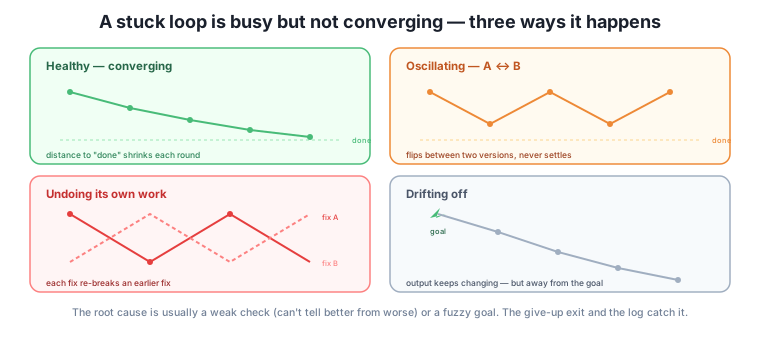
The trap that hides a stuck loop is mistaking activity for progress. The loop is clearly doing things — new drafts, new changes, confident messages — so it feels like it’s working. But activity isn’t the measure; convergence is. The single question that catches every stuck pattern is: “Is each round actually getting closer to done, or just different?”
Concretely, watch for these signals across rounds. The check keeps returning “not yet” with no reduction in the number of failing criteria. The output changes substantially each round but the same problems keep reappearing. The loop revisits a state it was in two rounds ago. Any of these means the loop is busy but not converging — and it’s time to stop it, because more rounds of a stuck loop don’t help; they just cost. This is exactly what the give-up exit from Lesson 1 is for: “if two rounds pass with no improvement, stop.” A give-up rule is your automated stuck-loop detector.
Here’s the reassuring part: stuck loops nearly all trace back to one of two root causes you already know how to fix.
A weak check causes oscillation and undoing. If the check can’t reliably tell a better attempt from a worse one, the loop has no stable direction to move in — so it wobbles, flipping between versions or trading one fix for another. The fix isn’t to keep looping; it’s to strengthen the check (Module 3). A check anchored to concrete criteria gives the loop a consistent target to converge on, and the oscillation stops because now there’s a real “better” to move toward.
A fuzzy goal causes drift. If the goal isn’t pinned down, “closer to done” isn’t well-defined, so the loop wanders — each round’s plausible little change nudges it somewhere, but there’s no fixed finish line to nudge toward. The fix is a sharper goal and definition of done (Module 2). Pin the finish line and the drift has nothing to drift away from.
So when you catch a stuck loop, the move is: stop it, then fix upstream. Don’t keep running a loop that’s spinning — strengthen the check or sharpen the goal, then run again. This is why the earlier modules were ordered as they were: a stuck loop is almost always a symptom of a skipped step in Module 2 or 3, showing up at runtime.
More rounds won’t rescue a stuck loop
The instinct when a loop isn’t converging is to let it run a few more rounds — surely it’ll get there. It won’t. A loop stuck because of a weak check or fuzzy goal will stay stuck no matter how many rounds you give it, because the thing preventing convergence is upstream of the looping. Stop early, fix the check or the goal, and restart. Rounds spent on a stuck loop are pure cost.
The owner runs a loop to tighten the shop’s About page and notices it won’t settle. Round 2 it’s 180 words, round 3 it’s 220, round 4 it’s back to 175, round 5 it’s 210 — oscillating. The output changes every round but never converges. Watching for progress rather than activity, they catch it quickly: the length keeps bouncing, and the same “too wordy / now too terse” note keeps reappearing.
The root cause is a weak check: “keep it a good length” gives no stable target, so each round over-corrects the last. They stop the loop — no point running it further — and fix upstream: they replace “a good length” with a concrete criterion, “between 150 and 200 words.” Now the check has a real target; the loop converges in two rounds and settles at 185. The stuck loop wasn’t a mysterious failure — it was a fuzzy criterion showing up at runtime, and the fix was the Module 3 skill of making the check concrete.
Which stuck pattern is each: (a) the summary gets longer, then shorter, then longer, never settling; (b) fixing the tone reintroduces a factual error you’d corrected, and fixing the fact re-flattens the tone; (c) after ten rounds the draft is further from the brief than round three was?
Hint
(a) oscillating, (b) undoing its own work, (c) drifting. Each looks busy but isn’t converging — the tell in every case is that the output changes without getting closer to done.
A loop keeps oscillating between two versions of a headline. Where’s the problem most likely to be, and how do you fix it?
Hint
The check — it can’t reliably tell which headline is better, so the loop flips between them with no stable direction. Fix it by strengthening the check with concrete criteria (length, must include the offer, no clickbait), so there’s a real “better” to converge toward. Then restart.
An agent is producing a new, different draft every round and reporting busily. What one question tells you whether it’s actually working?
Hint
“Is each round getting closer to done, or just different?” Activity (new drafts, confident messages) isn’t progress; convergence is. If the same problems keep reappearing and the failing-criteria count isn’t dropping, it’s stuck — stop it, don’t admire the busyness.
A stuck loop is busy but not converging — it produces new output every round without getting closer to done, which makes it more insidious than a runaway because it looks like progress. It takes three shapes: oscillating (flipping between two versions because the check can’t decide), undoing its own work (each fix re-breaks an earlier one), and drifting (slowly wandering away from a fuzzy goal). You catch it by watching progress, not activity — asking “is each round closer to done, or just different?” — and the give-up exit from Lesson 1 is your automated detector. Crucially, stuck loops almost always trace to two root causes you already know how to fix: a weak check (causing oscillation and undoing) and a fuzzy goal (causing drift). So the move is always the same: stop the loop, then fix upstream — strengthen the check or sharpen the goal — rather than burning rounds on a loop that can’t converge.
Recognizing a stuck loop early saves you the rounds — and, when automated, the money — that would otherwise pour into a loop that was never going to converge. And the diagnosis is empowering rather than mysterious: a stuck loop isn’t a sign the AI “can’t do it,” it’s a runtime symptom of a check or goal that needs sharpening, which you know how to do. This is loop engineering paying off across modules — a problem that shows up in Module 6 gets fixed with a Module 2 or 3 skill. Sometimes, though, the right response to a struggling loop isn’t for you to intervene — it’s for the loop to recognize its own limits and ask. Next, you’ll teach a loop to escalate: to stop and ask you a question instead of confidently guessing.
You can now tell a stuck loop from a working one — oscillating, undoing its own work, or drifting — by watching for convergence instead of activity, and you know the fix is upstream: strengthen the check or sharpen the goal, don’t burn more rounds. Let a give-up rule catch stuck loops for you automatically. Next, you’ll give a loop a different kind of exit — the ability to stop and ask you a question when it hits something it shouldn’t decide alone.
Keep DATATWEETS free. Help fund practical data, AI, and engineering lessons for learners worldwide.
