Title here
Summary here
When a loop misbehaves — runs away, gets stuck, ends wrong — the difference between fixing it and flailing is whether you can see what it actually did. A loop log is exactly that: a plain, round-by-round record of the loop’s attempts, checks, and decisions. With one, diagnosing a problem is reading evidence; without one, it’s guessing. This final lesson of the module teaches you to keep a log and read it back — and then, in the project, to diagnose a deliberately broken loop from its log alone.
By the end of this lesson, you will be able to:
Let’s start with what a log is.
A loop log is not a technical, developer-only thing — it’s just notes on what happened, one line per round. For each round, you record three things: what the loop tried (the action or the new draft), what the check said (pass, fail, and why), and what it decided to do next. That’s it. For a hand-run loop you might jot these in a notes file; for an automated loop, you ask the agent to keep a running log, or you read the transcript it already produces. The format doesn’t matter. What matters is that after the loop runs, there’s a record you can read.
The reason to keep one is simple: memory is not a record. After a fifteen-round loop, your sense of “what happened” is a vague impression — you remember it struggled, not the specific pattern. A log preserves the specifics, and the specifics are where the diagnosis lives. A loop that “just didn’t work” is a mystery; a loop whose log shows the length bouncing 185 → 150 → 210 → 160 is a solved case.
The whole point of a log is what you can see in it afterward. Reading one, you look for three things.
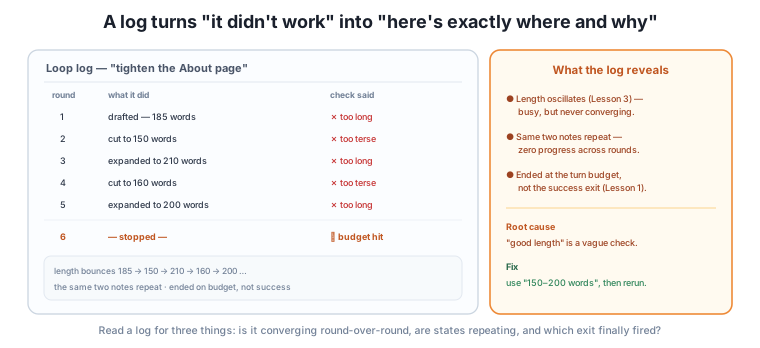
Put together, these three readings usually point straight at the root cause. In the figure’s log, the oscillating length plus the repeating “too long / too terse” notes plus the budget-exit ending all say the same thing: the check (“good length”) was too vague to converge on. The fix — a concrete “150–200 words” — is exactly the Module 3 skill, and the log is what led you to it instead of guessing.
The log connects the whole course
Notice how much of the course shows up in a single log. The exits (Lesson 1) tell you how it ended. The budget (Lesson 2) is why it stopped. The stuck patterns (Lesson 3) are visible in the round-over-round record. And the root cause is nearly always a check (Module 3) or goal (Module 2) that needs sharpening. A log is where all of loop engineering becomes legible at once — which is why reading one is such a high-leverage skill.
Here’s the project, in two parts. First, keep a log. On your next real loop — a writing loop, a folder cleanup, anything — keep a simple round-by-round record: what it tried, what the check said, what happened next. Just practicing this changes how you see a loop; you start noticing patterns while they’re happening.
Second, diagnose from a trace. Read this log of a broken loop and work out what went wrong, using only the record:
Loop: "summarize the feedback export into the top themes"
Round 1: produced 5 themes.        Check: "themes 2 and 4 have no real quotes" — FAIL
Round 2: produced 6 themes.        Check: "new themes 5,6 unsupported; 2 still empty" — FAIL
Round 3: produced 4 themes.        Check: "theme 2 now supported; theme 3 lost its quotes" — FAIL
Round 4: produced 6 themes.        Check: "themes 5,6 unsupported again" — FAIL
Round 5: produced 5 themes.        Check: "two themes unsupported" — FAIL
Round 6: — stopped —               Exit: budget (6 rounds), not success
Work through the three readings. Converging? No — every round still has unsupported themes; the failing count isn’t dropping. Repeating states? Yes — the theme count bounces 5 → 6 → 4 → 6 → 5, and “unsupported themes” recurs every round. Which exit? Budget, not success — it was stopped, not finished. The pattern is oscillation (Lesson 3), and the root cause is a check the loop can’t converge on: it keeps adding themes to be thorough, which reintroduces unsupported ones, then cutting them, which drops good ones. The fix is a sharper goal and check — “exactly five themes, each with three real quotes from the file; add none without support” — which removes the add/cut oscillation by fixing the number and the evidence bar. You diagnosed it from the log, not from guesswork. That’s the skill.
A loop’s log ends with “Exit: give-up (no improvement for 2 rounds).” What does that one line tell you about how to respond?
Hint
It ended on the give-up exit — it detected it was stuck and stopped itself (Lesson 3’s detector working). So don’t just rerun it as-is; the loop is telling you it couldn’t converge. Fix upstream — strengthen the check or sharpen the goal — before running again.
A log shows word counts 200, 140, 205, 145, 200 across five rounds, all failing the check. What pattern is this, and what’s the likely root cause?
Hint
Oscillation — the count bounces between ~200 and ~145 and never settles. The likely root cause is a vague length check (“about right”) with no concrete target, so each round over-corrects the last. Fix: a concrete range like “160–180 words.”
You’re about to run an automated cleanup loop. What three things should the log capture per round to make later diagnosis possible?
Hint
What it did (the action taken), what the check said (pass/fail and the reason), and what it decided next. Plus, at the end, which exit fired. Those are enough to read convergence, spot repeating states, and see how it ended — the three diagnostic readings.
A loop log is a plain, round-by-round record of what a loop did — for each round: what it tried, what the check said, and what it decided next — plus which exit it finally took. It’s not a developer-only thing; it’s notes, and the reason to keep it is that memory is an impression, but a log is evidence, and the specifics are where the diagnosis lives. You read a log for three things: is it converging (or just producing different output — the stuck-loop tell), are states repeating (the signature of oscillation), and which exit fired (success versus budget versus give-up tells you whether it finished, ran out of room, or broke). Together these usually point straight at the root cause, which — as all module — is almost always a check or goal that needs sharpening. A log is where the whole course becomes legible in one place: the exits, the budget, the stuck patterns, and the upstream fix all visible at once. The project — keep a log, then diagnose a broken loop from its trace — is that skill made real.
A log is what turns “the AI just didn’t work” into “here’s exactly where and why” — the difference between fixing a loop and abandoning it. It’s also the capstone skill of this module: it makes every other lesson observable, so a runaway, a stuck loop, or a wrong ending becomes a case you can read rather than a mystery you endure. And it scales — the more you hand loops to agents, the more you rely on their logs to know what happened while you weren’t watching. You’ve now designed loops that stop cleanly, stay bounded, escape being stuck, ask when they should, and leave a readable trail. The final module turns to putting all of this to work responsibly in real life — trust, cost, privacy, and giving loops to a team.
You can now keep a loop log and read it back — checking for convergence, repeating states, and which exit fired — to diagnose a stuck or runaway loop from evidence instead of guesswork. Keep a simple log on your next real loop; the habit sharpens how you see every loop. You’ve completed the “designing loops that stop” toolkit: exits, budgets, stuck-loop detection, escalation, and logs. Next, in the final module, you’ll put loop engineering to work in real life — the trust, cost, privacy, and team practices that turn a working loop into something you can rely on and share.
Keep DATATWEETS free. Help fund practical data, AI, and engineering lessons for learners worldwide.
