Title here
Summary here
An agent that can change the real files on your computer is powerful, and power you don’t control is a hazard. So before you run anything on its own, this lesson covers the single most important idea in the module — one that surprises almost everyone: what you tell an agent to do and what it’s allowed to do are two different things, controlled in two different places. Get this distinction right and you can hand work to an agent with genuine confidence. Get it wrong and you’re trusting a polite request to protect your files.
By the end of this lesson, you will be able to:
Let’s start with the distinction that everything else rests on.
Here is the idea to carry out of this entire module. When you write instructions for an agent — in your prompt, or in a CLAUDE.md file — you are giving it guidance: you shape what it tries to do. But whether an action actually happens is decided by a separate permission layer, enforced by the tool itself, not by the model. Writing “never delete anything” in a CLAUDE.md file is a request. It is not a lock. A capable, well-meaning agent will usually follow it — but “usually follow a request” is not the guarantee you want standing between an agent and your irreplaceable files.
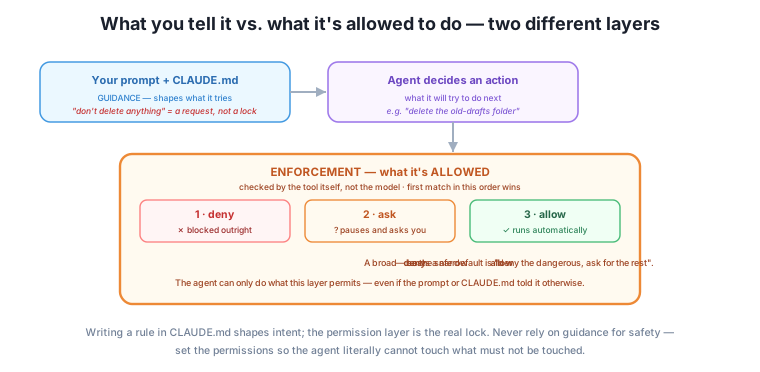
This distinction is genuinely good news, not a limitation. It means you don’t have to trust the agent’s good behavior for safety — you can enforce boundaries that hold regardless of what the agent decides to try. The prompt and CLAUDE.md make the agent helpful; the permission layer makes it safe. You use both, for different jobs.
The permission layer works by rules that resolve in a fixed order. In Claude Code (as of mid-2026), that order is deny first, then ask, then allow: for any action the agent wants to take, the tool checks the rules in that order and the first match wins. Other tools and later versions may organize the specifics differently — the durable idea is that there is an enforced ordering you can rely on, which the note at the end of this section revisits.
Because deny is checked first, a broad deny beats a narrow allow. If you deny “delete anything” and also allow “delete files in the temp folder,” the deny wins — the agent can’t delete, even in temp. That ordering is deliberate and it’s your friend: it means a safety rule can’t be accidentally overridden by a more specific permission. The safe posture it enables is simple — deny the genuinely dangerous, ask for anything you’re unsure about, allow only the clearly safe — and you can trust that the denies will hold.
Safety goes in the permissions, never the prompt
The one mistake to never make: relying on an instruction for a hard safety boundary. “I told it in CLAUDE.md not to touch the accounts folder” is guidance, and guidance can be missed, misread, or overridden by the agent’s own reasoning. If the accounts folder must not be touched, put that in the permission layer as a deny — so the agent literally cannot touch it, no matter what it decides. Instructions express your intent; permissions enforce it.
Agentic tools ship with named permission modes that bundle these rules into presets — from ones that ask before nearly everything to ones that run almost unattended. It’s tempting to picture them as a single slider from “safe” to “autonomous,” but that’s misleading. They really vary along two independent dials:
These come apart. A read-only “planning” mode, for instance, is highly restricted (it can look but not change anything) yet needs no one watching — safe and unattended. A “do it all automatically” mode is the opposite: fully permissive and only sensible when you’re right there and the folder is safe. Thinking in two dials keeps you from the classic error of turning on a hands-off mode because it “seemed efficient,” without noticing you’d also removed every approval prompt.
For your first runs, favor the restrictive end: a mode that asks before making changes, or a read-only mode that lets the agent explore and propose a plan without touching anything. You loosen the rules only once you trust what a particular agent does with a particular folder.
Tool-specific note (durable idea underneath)
The exact mode names, how many there are, how you switch between them, and even the precise deny/ask/allow resolution differ between Claude Code and Codex and change quickly — the specifics here reflect Claude Code as of mid-2026, so check each tool’s current permissions documentation rather than trusting any course, including this one. The durable ideas won’t change, and they’re what to actually rely on: guidance is separate from enforcement, safety belongs in the enforced permission layer (not your instructions), and autonomy has two dials (how much is pre-approved, and whether a human is present). Trust the principles; re-verify the exact mechanics before you depend on them.
Beyond permissions, a few setup habits keep your first autonomous runs low-risk:
None of this is about fear — it’s the same “spot-check the important stuff” prudence from Module 3, applied to a tool that acts on your files. A few minutes of safe setup buys you the confidence to let the agent do real work.
The owner wants the agent to tidy the shared “stuff” folder, but that folder also contains the shop’s only copy of some scanned invoices. Under the guidance-only approach, they’d write “don’t delete or modify the invoices” in a CLAUDE.md and hope. Under this lesson’s approach, they do two concrete things instead. First, they work on a copy of the folder, so the originals are safe no matter what. Second, they set a permission deny on the invoices subfolder, so the agent literally cannot change or delete anything in it — the boundary is enforced, not requested. Then they run in an ask-before-changes mode for the first pass, approving the agent’s moves as they watch. The tidy-up gets done, the invoices are provably untouched, and the owner learned to trust this agent on this task — after which they can safely loosen the approvals next time.
Which of these is a real safety boundary, and which is only a request: (a) a CLAUDE.md line “please don’t touch the payroll folder,” (b) a permission deny rule on the payroll folder?
Hint
(b) is enforcement — a real boundary the agent cannot cross. (a) is guidance — a request the agent will usually but not certainly follow. For anything that must not be touched, use (b); never rely on (a) for safety.
You have a deny on “delete any file” and an allow on “delete files in /temp.” The agent tries to delete a file in /temp. What happens, and why?
Hint
It’s blocked. Deny is checked before allow, and the first match wins — so the broad deny beats the narrower allow. This is the feature that keeps a safety rule from being accidentally overridden by a more specific permission.
You want an agent to reorganize a folder of important documents you can’t afford to lose. Describe a safe first-run setup.
Hint
Work on a copy (originals safe), confirm the folder is backed up, run in an ask-before-changes or read-only mode so you approve or preview each action, and deny access to anything that must not change. Loosen only after you’ve watched it behave.
The most important idea in this module is that guidance and enforcement are separate. Your prompt and CLAUDE.md are guidance — they shape what the agent tries to do — while a permission layer, enforced by the tool itself and not the model, decides what it’s actually allowed to do. Writing “don’t delete anything” in a file is a request, not a lock; real safety lives in the permission layer. Those permissions resolve deny, then ask, then allow, first match wins, so a broad deny beats a narrow allow — enabling the safe posture of “deny the dangerous, ask for the unsure, allow the clearly safe.” Permission modes vary along two dials — how much is pre-approved, and whether a human is present — not a single autonomy slider, so start restrictive (ask-before-changes or read-only) and loosen slowly. And set up safely: a dedicated folder, a copy of anything irreplaceable, a backup, and restrictive first runs. Enforce your boundaries; never merely request them.
This is the lesson that makes it safe to hand real work to an agent — the difference between confident delegation and hoping a polite instruction protects your files. The guidance-versus-enforcement distinction is also one of the most misunderstood things about these tools: people write careful instructions and believe they’ve built a fence, when they’ve only made a request. Knowing to put safety in the permission layer is what lets you loosen the reins over time without anxiety. With safe boundaries in place, you’re ready for the exciting part. Next, you’ll run your first autonomous loop and watch the agent iterate toward a goal on its own.
You now hold the key safety idea: instructions are guidance, permissions are enforcement, and real boundaries go in the permission layer — deny beats ask beats allow. Set up on a copy, in a dedicated folder, starting restrictive. That foundation is what makes everything next safe to try. Now for the payoff: in the next lesson you’ll actually run your first autonomous loop, give the agent a goal, and watch it gather, act, and check its way to done.
Keep DATATWEETS free. Help fund practical data, AI, and engineering lessons for learners worldwide.
