Title here
Summary here
You’ve got a goal, safe permissions, a first run, and a self-check. The last piece is making all of it stick, so you don’t re-explain the brief and the checks every single session. That’s what project memory does: a plain-text file — CLAUDE.md for Claude Code, AGENTS.md for Codex — that lives in your folder and that the agent reads automatically at the start of every session. It’s your brief and your check, written once, traveling with the folder. This lesson covers how to write one, the few caveats that matter, and then the module project that ties everything together.
By the end of this lesson, you will be able to:
Let’s start with what these files are.
A project memory file is exactly what it sounds like: standing instructions the agent loads at the start of each session, so it begins already knowing the goal, the checks, and the conventions for this folder. It’s written in plain Markdown — the same simple headings-and-bullets format these lessons use — so a non-developer can write one in a text editor. No code, no special syntax.
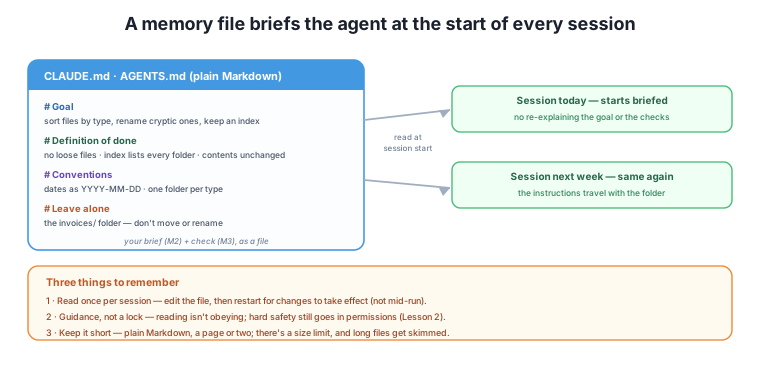
What goes in it is nothing new — it’s the artifacts you’ve been building all course. The goal (Module 2). The definition of done the agent should verify against (Module 3). The conventions you want followed (date formats, folder structure). And what to leave alone. Write your brief once into CLAUDE.md, and every session in that folder starts with the agent already knowing what “done” means and how you like things done — the persistent-setup idea from Module 4, now for a file agent.
Project memory is powerful, but three things about how it works will bite you if you don’t know them.
It’s read once per session, not per action. The agent loads the file when the session starts and works from that copy. If you edit CLAUDE.md in the middle of a run, the change usually won’t take effect until you start a fresh session. So when you update your standing instructions, restart the agent to be sure they apply — don’t assume a mid-run edit is being followed.
Reading is not obeying. This is the guidance-versus-enforcement point from Lesson 2, and it’s worth repeating because the file feels authoritative. A memory file is guidance: it strongly shapes what the agent tries to do, but it does not lock anything. “Leave the invoices folder alone” in CLAUDE.md is a request the agent will usually honor — but if that folder must never be touched, the real protection is a permission deny, not the memory file. Use project memory to make the agent helpful and consistent; use permissions to make it safe.
Keep it short. These files have a size limit, and beyond it they get truncated — and even below it, a long, rambling memory file gets skimmed rather than followed, the same way a long prompt does. Aim for a page or two of clear, specific instructions. A tight CLAUDE.md that the agent actually reads and follows beats an exhaustive one it skims. Say what matters, plainly, and stop.
Tool-specific note (durable idea underneath)
The exact filename (CLAUDE.md vs AGENTS.md), where it can live, the precise size limit, and how the two tools differ all change over time — check each tool’s current documentation. The durable ideas won’t change: a plain-Markdown file carries your standing brief and checks, it’s read at the start of a session, it’s guidance rather than a hard lock, and shorter is better.
Time to put the whole module together on the task that proves the point. You’ll point an agent at a messy folder and have it sort, rename, and index everything — then judge the result against a checklist you write yourself, exactly the Module 3 skill applied to an agent’s output.
Here’s the full loop, using every lesson:
CLAUDE.md/AGENTS.md: the goal (sort by type, rename cryptic files, write an index), the definition of done, conventions (naming, folder structure), and what to leave alone.When it passes your checklist, you’ve done it: an autonomous loop, run safely over real files, verified by both the agent and you. That’s the capability this module set out to give you — and you can now point it at any messy folder you own.
Actually run the project
Do this on a real (copied) folder of your own — a cluttered Downloads folder, a shared drive, a photo dump. Write the short memory file, run it safely, and check the result against your own checklist. One real run teaches you more than the whole module, and you’ll come away with both a tidy folder and a reusable CLAUDE.md for next time.
You put “never delete files in /archive” in CLAUDE.md. Is /archive protected? What would actually protect it?
Hint
Not really — the memory file is guidance the agent will usually but not certainly follow. Real protection is a permission deny on /archive, which the agent literally cannot cross. Use CLAUDE.md to guide behavior; use permissions to enforce hard boundaries.
You edited CLAUDE.md mid-run to change a naming rule, but the agent kept using the old one. Why, and what’s the fix?
Hint
The file is read once at session start, so the agent is still working from the version it loaded. Fix: restart the session (or start a fresh one) so it reloads the updated file. Don’t assume a mid-run edit takes effect.
Sketch a short CLAUDE.md for a loop that keeps a “receipts” folder organized by month.
Hint
Something like — # Goal: file each receipt into a YYYY-MM subfolder by its date. # Definition of done: no receipts loose in the top folder; each is in the right month; an index.md lists totals per month. # Conventions: name files YYYY-MM-DD-vendor.pdf. # Leave alone: the tax-final/ folder. Short, specific, and it carries your brief and check.
Project memory — a plain-Markdown CLAUDE.md (Claude Code) or AGENTS.md (Codex) file in your folder — carries your standing instructions so the agent reads them at the start of every session and always begins briefed. What goes in it is everything you’ve already built: the goal (Module 2), the definition of done to verify against (Module 3), your conventions, and what to leave alone. Three caveats matter: it’s read once per session (edit, then restart — a mid-run change won’t apply), it’s guidance not enforcement (a request the agent usually follows, never a lock — hard safety still lives in permissions), and it should be short (there’s a size limit, and long files get skimmed). The module project ties the whole module together: work safely on a copy, write a short memory file, run the agent in ask mode, let its self-check catch its mistakes, and judge the result against your own checklist — an autonomous loop, run safely over real files, verified by both the agent and you.
CLAUDE.md / AGENTS.md) of standing instructions the agent reads each session.Project memory is what turns a one-off agent run into a standing capability: write your brief and checks into a file once, and every future session on that folder starts fully briefed — the same reuse payoff as a Project in Module 4, now for a tool that acts on your files. It’s also the direct continuation of your brief from Module 2 and your check from Module 3, proving that the artifacts you built by hand are exactly what automated loops run on. You’ve now handed a loop to an agent, safely, end to end. Next, the course turns to keeping those loops from running away — designing the stop conditions, budgets, and escape hatches that a hands-off loop needs, which matters even more once an agent is spending on its own.
You can now write project memory that carries your brief and checks with a folder, mind its three caveats, and run the full module project — an autonomous loop, safe, self-checking, and verified against your own checklist. You’ve handed a loop over completely, and kept control where it counts. Next, the course tackles what a hands-off loop most needs: knowing when to stop. In “Designing Loops That Stop,” you’ll set the budgets and escape hatches that keep an autonomous loop from running — and spending — forever.
Keep DATATWEETS free. Help fund practical data, AI, and engineering lessons for learners worldwide.
