Title here
Summary here
Loops running in real work touch two things you have to be deliberate about: money and information. A loop that’s cheap once can get expensive when it runs constantly; and a loop is only as private as what you feed it. This lesson covers both guardrails — keeping cost proportional, and knowing what should never go into a loop in the first place. Neither is complicated, but both are the kind of thing people learn the hard way if they don’t think about them up front.
By the end of this lesson, you will be able to:
Let’s start with cost.
You met budgets in Module 6 — turns, time, and money caps on a single run. This lesson adds the dimension that bites in real work: frequency. A loop that costs a few cents per run is trivial once, but multiply it by “every day, automatically, forever” and it becomes a real line item. The cost of a loop in practice is per-run cost × how often it runs, and it’s the frequency that people forget when they set up a recurring loop and walk away.
So two habits. First, keep cost proportional to value — the same instinct as sizing a budget: an expensive loop should be earning its cost, and a cheap-by-hand task usually shouldn’t be wrapped in a paid automated loop at all. Second, for anything that runs repeatedly or automatically, do the multiplication before you set it running: a loop that’s fine at a dollar a run may not be fine at a dollar a run, ten times a day. Set the budget with the frequency in mind, and check the actual spend after it’s been running a while rather than assuming. Automation makes cost invisible until the bill arrives, so make it visible on purpose.
The privacy rule is simpler and more absolute: some information should never be pasted into a loop, and the reason is that once it’s in, you can’t take it back. Treat anything you send to an AI tool as potentially leaving your control — and act accordingly.
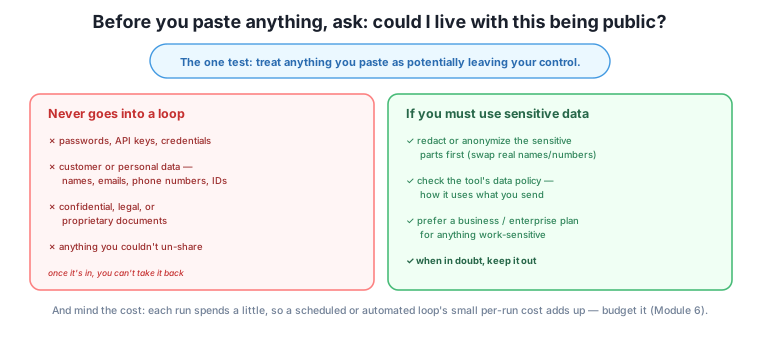
The list of things that should never go in:
The single test that catches almost everything: “Would I be OK if this ended up public?” If the honest answer is no, don’t paste it. It’s a fast, reliable gut check that doesn’t require you to memorize categories.
Sometimes the task genuinely involves sensitive material — you want to summarize real customer feedback, or work with a document that has names in it. You have safer options than pasting it raw.
Redact or anonymize first. Swap real names for “Customer A,” real numbers for placeholders, before the data goes into the loop. The loop can theme the feedback or restructure the document without ever seeing the private details. This is often all you need, and it’s a good habit even when you think the data is fine.
Know the tool’s data policy. Different tools — and different plans of the same tool — handle your data differently. A personal free chat may treat what you send differently from a business or enterprise plan built for confidential work. You don’t need to become a lawyer, but for anything work-sensitive, check how the tool says it uses your data, and prefer a plan intended for business use. When the data policy is unclear and the data is sensitive, that itself is a reason to keep it out.
This applies extra to automated loops
When you paste something, you at least see it and can catch yourself. When an agent loops over your files (Module 5), it may send the contents of those files to the AI as it works — including whatever sensitive data they contain — without you re-reading each one. So before you point an agent at a folder, know what’s in that folder. Don’t run an automated loop over a directory that holds credentials, customer records, or confidential documents unless you’ve confirmed the tool handles that data appropriately. The privacy rule is easiest to break by accident when a loop is reading files for you.
The owner wants to theme three months of customer feedback — which includes names, emails, and a few order numbers. The raw export must never go straight into a loop: it’s personal data. So they redact first — a quick find-and-replace turns names into “Customer 1, 2, 3…” and strips the emails and order numbers — and then run the theming loop on the anonymized version. The loop finds the same themes; it just never saw a real customer’s details.
For the newsletter loop, which touches no sensitive data, there’s nothing to redact — but they still mind the cost: it runs weekly, so before automating it they check that a week’s run is a few cents, confirm fifty-two of those a year is trivial, and move on. And they make a mental note never to point their file-organizing agent at the “accounts” folder, which holds the shop’s banking details — that folder gets a permission deny (Module 5) so no loop can read it. Cost sized to value, sensitive data kept out or redacted, and the riskiest folder walled off: the two guardrails, applied.
Which can go into a loop as-is, and which needs care: (a) a public blog draft, (b) a spreadsheet of customer emails, (c) your website’s admin password, (d) a list of book titles?
Hint
(a) and (d) are fine — public/non-sensitive. (b) needs redaction — customer emails are personal data; anonymize first. (c) never goes in — a password is a credential, the highest-risk category. The “would I be OK if this were public?” test flags (b) and (c) instantly.
You need to summarize real customer complaints that include names and order numbers. How do you do it safely?
Hint
Redact first: replace names with “Customer A/B/C” and remove order numbers and any contact details, then run the summarizing loop on the anonymized text. The loop can find the themes without ever seeing the personal data. Optionally, use a business-plan tool and check its data policy for extra assurance.
A loop costs about 5 cents per run and you set it to run every hour, automatically. Why should you pause before walking away?
Hint
Cost is per-run × frequency: 5 cents an hour is over a dollar a day, ~$400 a year, for a loop you’re not watching. Do the multiplication before automating, size the budget to the real total, and check the actual spend after it’s been running — automation makes cost invisible until the bill.
Two guardrails keep loops safe in real work. Cost: a loop’s real cost is per-run cost × frequency, and it’s frequency people forget — so keep cost proportional to value, don’t wrap a cheap-by-hand task in a paid automated loop, and for anything recurring, do the multiplication and check the actual spend, because automation makes cost invisible until the bill. Privacy: some information should never go into a loop — secrets and credentials, personal data, confidential/legal/proprietary material, and anything you couldn’t un-share — because once it’s in, you can’t take it back; the fast test is “would I be OK if this ended up public?” If a task genuinely needs sensitive data, redact or anonymize first, check the tool’s data policy and prefer a business plan, and when in doubt, keep it out. And take special care with automated loops, which may send the contents of files to the AI as they work — so know what’s in a folder before you point an agent at it, and wall off the sensitive ones with permissions.
These guardrails are where loop engineering meets professional and legal reality: a leaked credential, mishandled customer data, or a runaway automated bill are the kinds of mistakes that cause real damage, and all three are entirely preventable with the habits in this lesson. They’re also what makes it safe to use loops for genuine work rather than just toy tasks — you can hand real material to a loop precisely because you know what to redact and what to keep out. With trust and these guardrails in place, you’re ready to make your loops durable. Next, you’ll turn a working loop into a reusable recipe, so a loop you got right once becomes a standing asset you can run again and share.
You now have the two real-world guardrails: size cost to value (remembering frequency multiplies it), and never paste secrets, personal data, or anything you couldn’t un-share — redact first, check the data policy, and mind what an agent’s files contain. Run the “would I be OK if this were public?” test before every paste. Next, you’ll make your loops last: turning a working loop into a reusable recipe so you never have to rebuild a good one from scratch.
Keep DATATWEETS free. Help fund practical data, AI, and engineering lessons for learners worldwide.
