Title here
Summary here
A recipe you run every week is begging to be automated — and many tools now let you put a loop on a schedule, so it runs by itself on a cadence you set. That’s genuine leverage: the tedious recurring work happens without you. But a loop running unwatched is also where the failures you’ve studied all course can ship silently, so this lesson is really about the guardrails a scheduled loop needs — and the single most important pattern for keeping automation safe: automate the work, but keep a human on the release.
By the end of this lesson, you will be able to:
Let’s start with the trade-off.
Scheduling a loop trades your attention for convenience: the loop runs whether or not you’re watching, which is the whole benefit and the whole risk. Every safety mechanism you’ve relied on that depended on you being there — noticing drift, catching a weird output, stopping a runaway — is gone when the loop runs at 6 a.m. while you sleep. So the counterintuitive rule of scheduled loops is this: an unwatched loop needs more guardrails than a watched one, not fewer. The autonomy that makes it convenient is exactly what removes your live oversight, and the guardrails have to make up the difference.
This connects everything from the automation modules. A scheduled loop needs a strong self-check (Module 3, Lesson 4 of Module 5) because you’re not there to check it. It needs stop conditions and budgets (Module 6) because you’re not there to pull the plug — and the cost × frequency math from Lesson 2 matters most here, since a scheduled loop’s spend compounds silently. And it needs escalation (Module 6) so it can pause and wait for you rather than guessing on something risky. Scheduling isn’t a new skill; it’s a demand that you have already applied the safety skills, because now they’re all that stands between the loop and a silent mistake.
The most important pattern for scheduled loops resolves the trade-off cleanly: automate the work, but keep a human on the release. The loop runs automatically and does all the tedious effort — but instead of publishing its output straight to the world, it produces a draft and waits for a human to approve it. You keep the convenience (the work is done) and the safety (nothing high-stakes ships without a person’s yes).
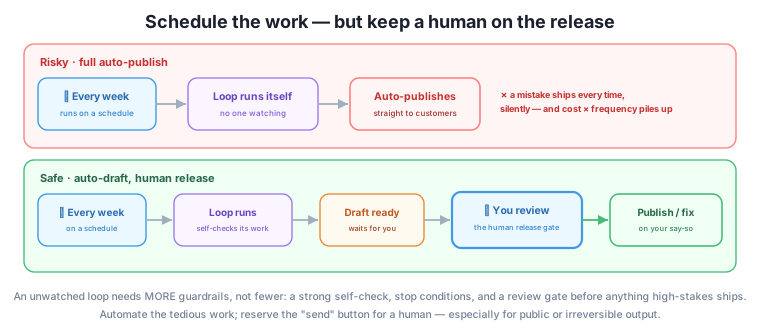
The distinction that decides how much you can automate is the stakes from Lesson 1. For genuinely low-stakes, reversible output — an internal digest, a draft nobody sees but you — full automation is fine; a rare glitch costs nothing. But for anything public or irreversible — a customer newsletter, a published post, a sent email — you keep the human release gate, because there the silent mistake is exactly the kind of confident error that damages things. The scheduled loop does the writing; you keep the “send” button. That’s not a failure to fully automate — it’s the correct amount of automation for output that matters.
Full auto-publish is only for output you’d be fine getting wrong
The test for whether a scheduled loop can publish without a human is the same as Lesson 1’s stakes test: would a wrong result, shipped automatically, be genuinely fine? If yes (a private note, a reversible internal draft), automate fully. If a wrong result would embarrass you, mislead a customer, or can’t be undone, keep the release gate — no matter how reliable the loop has been. Reliability reduces how often you’ll need to intervene; it never makes the rare silent public error acceptable.
Before you put a recipe on a schedule, add the pieces that replace your live oversight:
None of these is new; they’re the safety skills from the automation modules, now assembled as the entry fee for running a loop unwatched.
The owner automates the weekly newsletter using its recipe. They don’t set it to auto-send — it’s public and irreversible, exactly the case for a release gate. Instead, they schedule it to run every Friday morning: the loop drafts the newsletter against the recipe’s brief, runs its own check (facts sourced, length, tone), and leaves a finished draft in their inbox with a note on anything it flagged. Saturday, the owner spends two minutes on the release gate — reads the facts and the event date (the always-checks from Lesson 1), approves, and it sends. The tedious drafting is automated; the one human judgment that matters — “is this right to send to two thousand people?” — stays human.
They do fully automate the internal Monday to-do digest: it’s low-stakes and only they see it, so it just lands in their notes with no gate. And they set a budget with the frequency in mind (fifty-two runs a year) and check the spend once a month. Two scheduled loops, two levels of automation — each matched to the stakes, with the guardrails that replace the oversight a schedule takes away.
Which should have a human release gate and which can fully auto-publish: (a) a weekly public blog post, (b) a private daily summary only you read, (c) automated replies sent directly to customers?
Hint
(a) and (c) need a release gate — public and irreversible (a post, a sent customer reply), where a silent mistake ships. (b) can fully auto-publish — low-stakes, private, reversible. The rule is Lesson 1’s stakes test applied to automation.
You’re scheduling a loop that used to run with you watching. Name two guardrails that now have to do the job your attention did.
Hint
A strong rule-based self-check (your absent eyes) and stop conditions plus a frequency-sized budget (your absent hand on the plug). Escalation and a release gate are the other two. Together they replace the live oversight that scheduling removes.
Why is the cost × frequency math from Lesson 2 especially important for a scheduled loop?
Hint
A scheduled loop runs automatically and often, so its per-run cost compounds without you watching — a small cost times many unattended runs becomes a real, invisible bill. Size the budget for the frequency and spot-check the actual spend, because automation hides cost until it’s large.
Scheduling a loop trades your attention for convenience, so the counterintuitive rule is that an unwatched loop needs more guardrails, not fewer — every safety mechanism that depended on you being there is gone, and the guardrails (a strong self-check, stop conditions, a frequency-sized budget, and escalation) must make up the difference. The key pattern that keeps automation safe is automate the work, but keep a human on the release: the loop runs on schedule and does the tedious effort, but for anything public or irreversible it produces a draft and waits for a human’s approval, so nothing high-stakes ships silently. Whether you can fully auto-publish comes down to stakes (Lesson 1): low-stakes, reversible output can automate fully; anything that would embarrass, mislead, or can’t be undone keeps the release gate, no matter how reliable the loop has been. Set up a recurring loop with those guardrails in place, and spot-check the schedule itself periodically, because “set and forget” is how a drifting or quietly-expensive loop goes unnoticed.
Scheduled loops are where loop engineering delivers the most leverage — recurring work done for you — and also where it can do the most quiet damage, because a mistake ships automatically and unseen. The “automate the work, gate the release” pattern is what lets you capture the leverage without the risk, and it scales from a personal weekly newsletter to serious business automation. It’s also a mature stance that a lot of AI automation lacks: not “automate everything,” but “automate the effort and keep the judgment human where it counts.” One capability remains to make loops fully durable — sharing them safely with other people. Next, you’ll hand a loop to a team, and then assemble everything into the capstone.
You can now put a loop on a schedule safely — replacing your live oversight with a strong self-check, stop conditions, a frequency-sized budget, and escalation, and keeping a human release gate on anything public or irreversible. Automate the work; reserve “send” for a person where it matters. Next, you’ll hand a loop to other people with the documentation and guardrails that keep it safe in their hands — and then build the capstone that brings the whole course together.
Keep DATATWEETS free. Help fund practical data, AI, and engineering lessons for learners worldwide.
