Title here
Summary here
This is the last lesson of the course, and it does two things. First, it covers the final way loops become durable: handing them to a team — sharing a loop so other people can run it safely and consistently, not just you. Second, it brings everything together in the capstone: you’ll design, run, and document one complete loop, end to end, for a real task from your own work. That capstone is the proof — of the course, and to yourself — that you can engineer a loop, not just run one.
By the end of this lesson, you will be able to:
Let’s start with sharing.
A loop that only you can run helps only you. To let a colleague — or a whole team — run it well, you have to hand over more than “here’s a prompt.” You already have most of what’s needed: it’s the recipe from Lesson 3, plus a few things that matter specifically when someone else is at the controls.
The two things a team handoff buys you are consistency (everyone runs the same brief and check, so the output holds a standard regardless of who’s at the keyboard) and safety (the guardrails travel with the loop, so a less-experienced runner can’t accidentally cross a boundary you’d enforced). A well-handed-off loop is how “I can do this well” becomes “our team reliably does this well.”
Handing off is the whole course, made portable
Notice that everything a team handoff needs is a module you’ve already done — the brief (M2), the check (M3), the tool setup (M4–5), the stop conditions (M6), the pattern (M7), and the trust/privacy rules (M8). Handing a loop to a team is just packaging all of it so it works in someone else’s hands. If you can hand a loop off cleanly, you’ve demonstrated you understand every part of it — which is exactly what the capstone asks you to prove for yourself.
Here it is — the project that brings the whole course together. Design, run, and document one complete loop, end to end, for a real task from your own work. Not a toy example: something you’d genuinely find useful, so the capstone leaves you with a working tool as well as proof of skill.
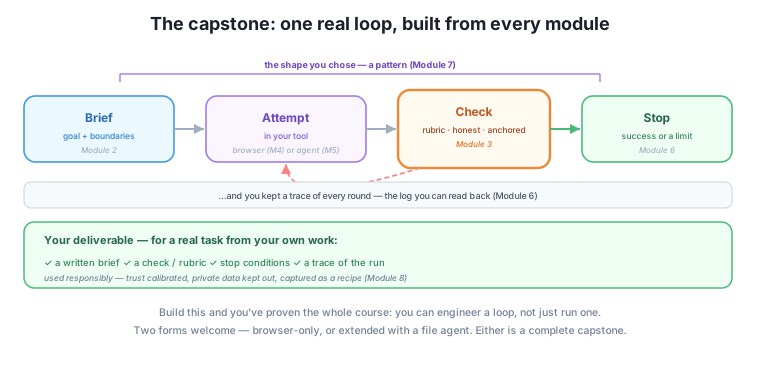
Your deliverable is a small set of written artifacts plus a run:
Items 4–6 are what turn a good final artifact into proof you understand the loop: anyone can produce a nice output once, but the trace, the honest risks, and the reflection show you engineered it deliberately and know where its limits are. And you actually run it — by hand in a browser (Module 4) or handed to a file agent (Module 5) — using whichever pattern fits the task (Module 7), with the real-world care from this module: trust calibrated to stakes, private data kept out, and the whole thing captured as a recipe at the end (Lesson 3).
Pick a real, repeating task
Choose something you actually do — a weekly report, a recurring email, a cleanup you dread, a research task. Two reasons: a real task exercises the whole toolkit honestly (a toy task lets you skip the hard parts), and you end the course with a genuine, reusable loop recipe in hand — a working tool, not just a certificate. The best capstone is one you’ll keep using next week.
The capstone comes in two forms, and either is complete — pick the one that matches how far you’ve gone.
CLAUDE.md/AGENTS.md as the standing brief, safe permissions, the agent’s own self-check, and a trace of its run. Same four artifacts, now driving a file agent.If you finished the browser track and stopped there, the browser capstone completes the course honestly — you set out to run loops in the tools you already had, and you can. If you went further into the file agents, the CLI capstone shows it. Both prove the same thing: you can take a real task and engineer a loop that finishes it, well and safely.
The owner’s capstone is the newsletter loop, documented as a complete artifact. The brief: a ready-to-send weekly newsletter, ≤250 words, leading with the week’s event, only in-stock books, warm tone, don’t touch the sign-off. The check: a fresh-chat rubric grading each criterion with evidence, plus a personal check of the facts and event date. The stop conditions: all criteria met, or five rounds. The pattern: draft-critique-revise with two-hat review. They run it in the Harborlight Claude Project, keep a short trace (round 1: 312 words, invented book; round 2: fixed both; done), and capture the whole thing as a recipe. Trust is calibrated (they personally verify before sending), and no private data is involved.
That single artifact touches every module of the course, and it’s not a homework exercise — it’s the actual tool that produces Harborlight’s newsletter every week. That’s the whole point of the capstone: the proof of your skill is a useful thing you’ll keep.
Beyond the recipe, name two things a teammate needs to run your loop safely.
Hint
Enforced guardrails (the permissions, budget, and privacy rules made concrete, not just described) and an owner (who maintains the recipe, watches the spend, and fixes drift). Escalation rules — which decisions aren’t theirs to make alone — are the other key piece. These are what let someone less familiar run it without crossing a boundary.
List the four written artifacts your capstone must include, and which module each comes from.
Hint
A brief (Module 2), a check/rubric (Module 3), stop conditions (Module 6), and a trace of the run (Module 6, Lesson 5). Plus you run it in a tool (Module 4 or 5) using a pattern (Module 7), with the responsible-use care from Module 8.
What real, repeating task from your own work would make a good capstone, and why?
Hint
Anything you do regularly that has a checkable finish line — a recurring report, email, summary, or cleanup. A real, repeating task exercises the whole toolkit honestly and leaves you with a reusable recipe you’ll actually use, which is the best outcome the capstone can have.
The final way loops become durable is handing them to a team: you share the recipe (Lesson 3) plus the things that matter when someone else runs it — enforced guardrails (permissions, budgets, privacy rules made concrete, not just described), an owner who maintains it, and escalation rules for the decisions that aren’t theirs to make. A good handoff buys consistency and safety, turning “I can do this well” into “our team reliably does this well” — and it’s really just the whole course packaged to work in someone else’s hands. Then comes the capstone: design, run, and document one complete loop for a real task from your own work, producing four artifacts — a written brief (M2), a check/rubric (M3), stop conditions (M6), and a trace (M6) — run in your tool (M4–5) with a fitting pattern (M7) and responsible use (M8), captured as a recipe. It comes in a browser-only or CLI-extended form, and either completes the course. That single artifact touches every module — and if you build it for something you actually do, you finish the course holding a real, reusable tool.
Handing a loop to a team is where loop engineering stops being a personal skill and becomes an organizational capability — reliable, repeatable work that doesn’t depend on one person’s attention. And the capstone is where it all becomes real for you: assembling every module into one working loop is the difference between having learned about loop engineering and being able to do it. You started this course fumbling with AI — asking, getting something almost right, giving up. You’re finishing it able to take a real task, write a goal a loop can finish, build a check that catches a false “done,” run the loop by hand or hand it to an agent, stop it safely, pick the right pattern, and use it all responsibly. That’s not a small shift. That’s the difference between using AI and engineering it — and it’s yours now.
You’ve reached the end. You can hand a loop to a team with the recipe and guardrails they need, and you have the capstone to build: one complete loop, for a real task, documented end to end — the proof that you can engineer a loop, not just run one. Go build it on something you actually do, keep the recipe, and start turning your everyday AI work into a set of dependable, well-engineered loops. You began by asking AI for answers; you’re leaving able to design how it works until the job is done. That’s loop engineering — and you’re a loop engineer now.
Keep DATATWEETS free. Help fund practical data, AI, and engineering lessons for learners worldwide.
