Title here
Summary here
In Lesson 1 you kept a loop from drifting by re-anchoring the brief. This lesson removes the retyping entirely: instead of pasting your brief and check into every new chat, you store them once, so every conversation starts already anchored. Both ChatGPT and Claude offer a feature for this — a Project — plus custom instructions that apply everywhere. For a loop you run regularly, like Harborlight’s weekly newsletter, this turns a cold start into a warm one, every time.
By the end of this lesson, you will be able to:
Let’s start with the idea of persistent setup.
Everything you’ve learned so far — the brief, the definition of done — has been something you write and then paste into a chat. That’s fine for a one-off, but for a loop you run again and again, retyping (or re-pasting) the same setup is wasted effort and an opening for mistakes. Persistent setup solves this: you store the loop’s standing pieces once, in a place the AI reads automatically, so they’re loaded into every relevant conversation without you lifting a finger.
There are two levels of this. A Project is a container for one body of work — it holds standing instructions, and usually reference files, that apply to every chat you start inside it. Custom instructions are broader: preferences that apply to all your chats, like “always write in British English” or “keep answers concise.” Projects are for a specific recurring loop; custom instructions are for how you like the AI to behave in general.
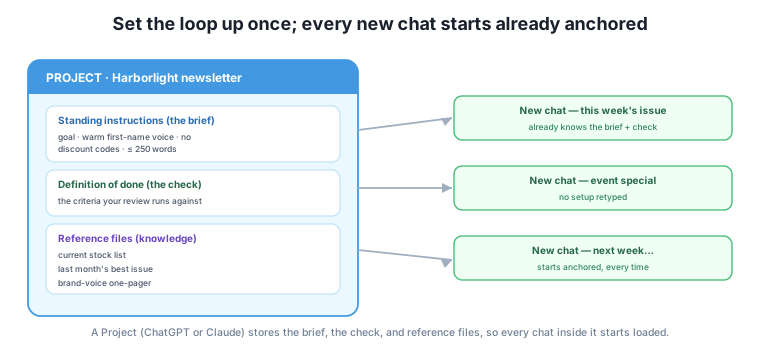
The payoff is exactly the anti-drift setup from Lesson 1, made automatic: every chat begins with the goal on top and the check loaded. You’ve moved re-anchoring from something you remember to do into something the tool does for you.
A good Project for a recurring loop holds three kinds of thing, mapping neatly onto what you’ve already built.
The brief, as standing instructions. Paste your six-part brief (Module 2) into the Project’s instructions: context, goal, the definition of done, scope, constraints, non-goals. Now every chat in the Project already knows what “done” means and what not to touch, without you saying so.
The check, alongside the brief. Because your definition of done lives in the instructions, you can also add the self-review pattern from Module 3: “When I ask you to check, grade each criterion separately with MET / NOT MET / UNSURE and quote the evidence.” The Project now carries not just the goal but the way you want it checked.
Reference files, as knowledge. Both tools let you attach files to a Project that the AI can draw on. For Harborlight, that might be the current stock list, last month’s best-performing newsletter (a reference example, from Module 3), and a one-page brand-voice guide. Now “only mention books we stock” and “match our voice” have real source material behind them, not just an instruction.
Your brief becomes your setup
Notice you’re not learning anything new to fill a Project — you’re reusing the brief and check you already built. That’s the reward for doing Modules 2 and 3 properly: the same artifacts drop straight into persistent setup here, and, later, into the CLAUDE.md and AGENTS.md files you’ll write for file agents in Module 5. Write a good brief once; reuse it everywhere.
Persistent setup is for the parts that don’t change between runs. The brief, the check, the brand voice, the stock list — these are stable, so they belong in the Project. The specific input for this run — this week’s events, the particular draft you’re working on — belongs in the individual chat, not the setup. A common mistake is stuffing one week’s content into the standing instructions, which then contaminates every future chat with stale details.
A simple test: if you’d want it loaded for every run of this loop, it’s setup; if it’s specific to one run, it’s chat. “Warm, first-name tone” is setup. “This week, feature the poetry night” is chat. Keeping that line clean means your Project stays a reusable engine, and each chat just feeds it the fresh input for one turn of the loop.
Persistent setup does need occasional maintenance, though — it’s not quite “set and forget.” Because the instructions and files are loaded silently every time, a stale entry does its damage quietly: an old stock list keeps recommending books you’ve sold out of, a superseded brand rule keeps steering the tone the wrong way, and you may not notice for weeks. So give a Project a quick review now and then — when the underlying facts change (a new season’s stock, a revised policy), refresh the attached files, and re-read the standing instructions to check nothing has gone out of date. A minute of upkeep keeps the warm start from quietly anchoring every run to yesterday’s facts.
Tool-specific note (durable idea underneath)
Where these features live, what they’re called, and which plan includes them differ between ChatGPT and Claude and change frequently — so check each tool’s own help pages for the current steps rather than trusting a screenshot from any course, including this one. The durable idea is what matters and won’t change: store the stable parts of a loop (brief, check, references) somewhere the AI loads automatically, and pass only the per-run input in the chat.
The owner sets up one Project, “Harborlight Newsletter,” once. Into its instructions goes the newsletter brief and the self-review pattern. Attached as files: the live stock list, last month’s best issue, and the brand-voice page. That’s a fifteen-minute, one-time setup.
Now each week is a warm start. They open a new chat inside the Project and type only the fresh input: “This week: Saturday poetry night, and a new local-authors table.” The AI already knows the voice, the length limit, the no-invented-books rule, and how to check — so the very first draft is close, and the loop is short. When they ask “check this against our criteria,” the Project supplies the criteria automatically. Fifteen minutes of setup, paid back every single week for a year — the same reuse argument as the brief itself, now automated.
For a recurring “weekly sales summary” loop, sort these into persistent setup vs. this-run chat: (a) the summary format you always use, (b) this week’s raw numbers, (c) “round money to whole dollars,” (d) the specific anomaly you noticed today.
Hint
Setup: (a) the standing format and (c) the rounding rule — they apply every week. Chat: (b) this week’s numbers and (d) today’s specific anomaly — they’re this-run input. Putting (b) or (d) in setup would pollute every future run with stale data.
List what you’d put in the standing instructions of a Project for “replying to customer reviews.” Draw on your brief and check.
Hint
Standing instructions: the goal (a warm, helpful reply), the definition of done (acknowledges the specific point, under 80 words, never promises a refund we haven’t approved, signs off as the team), and the check pattern (grade each criterion with evidence). Reference file: your refund/returns policy. The specific review goes in the chat.
Someone’s newsletter Project keeps mentioning last month’s book festival, which is over. What went wrong, and how do you fix it?
Hint
They put a specific, time-bound detail (the festival) into the standing instructions, so it leaks into every new chat. Fix: remove it from the Project’s instructions and pass each run’s actual events in the individual chat instead. Setup holds only what’s stable across runs.
Persistent setup stores a loop’s standing pieces once, so every relevant chat starts already anchored instead of cold. A Project is a container for one recurring loop — it holds your brief (as standing instructions), your check (the definition of done plus the self-review pattern), and reference files (a stock list, a best-example issue, a brand-voice guide) the AI can draw on. Custom instructions are broader preferences that apply to all your chats. The key discipline is separating setup (the parts stable across every run — brief, check, voice, references) from chat (the specific input for one run — this week’s events, this draft); mixing a run’s details into setup pollutes every future chat. You’re not learning new material to do this — you’re dropping the brief and check from Modules 2 and 3 straight into a reusable home, turning re-anchoring from a habit you remember into something the tool does automatically.
Persistent setup is what turns loop engineering from a per-chat effort into a standing capability. Once a recurring task’s brief and check live in a Project, every run starts strong, the check never gets forgotten, and anyone you share the Project with inherits the same standards — the beginnings of a team practice. It’s also the direct bridge to automation: the exact same standing-instructions-plus-reference-files pattern reappears as the CLAUDE.md and AGENTS.md files that brief file agents in Module 5. Next, you’ll extend loops to work over real documents — long inputs and uploads too big to handle in one pass.
You can now make a loop’s setup permanent, so every run starts anchored with the brief and check already loaded — no cold starts, no forgotten criteria. Build a Project for any task you do more than a couple of times; the setup pays for itself fast. Next, you’ll handle loops over real documents: long reports and uploads that are too big to work with in a single pass, broken into passes you can check.
Keep DATATWEETS free. Help fund practical data, AI, and engineering lessons for learners worldwide.
