Title here
Summary here
Until now your loops have worked with what you gave them — a brief, a draft, a document. But ChatGPT and Claude come with built-in tools that let a loop reach beyond that: web search lets it go fetch information it doesn’t have, and Artifacts (Claude) or Canvas (ChatGPT) give it a living document to revise in place. These turn a chat from a closed conversation into a loop that can gather and shape real material — which is exactly what the module project, a competitor brief, needs.
By the end of this lesson, you will be able to:
Let’s start with the most useful tool: web search.
When a loop needs current or external facts — what competitors charge, what events are on next month — web search lets the AI go get them. But a good research loop is not “search once and believe the results.” It’s a loop in its own right: search, check the results, search again to fill gaps, then synthesize.
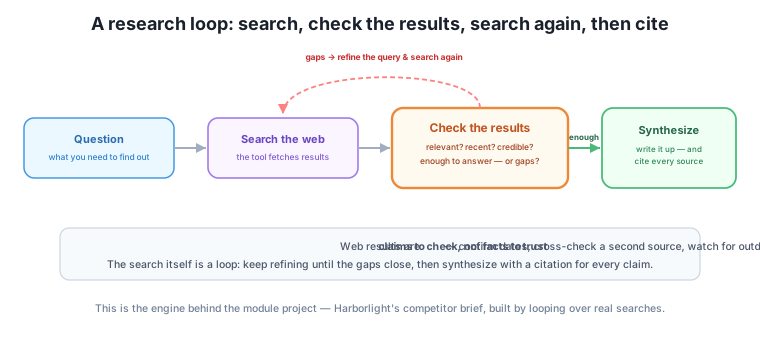
The check in a research loop is doing the same job it always does, applied to search results. Are they relevant to the question, or did the search wander? Are they recent enough to matter — a price from three years ago is worse than no price? Are they credible, or a random forum guess? And is there enough to actually answer, or are there gaps you need another search to fill? Only when the results pass that check do you synthesize; if they don’t, you refine the query and go again. That loop — search, check, refine, search — is what separates real research from grabbing the first result.
The single most important habit for research loops connects straight to Module 3: treat web results as claims to check, not facts to trust. An AI with web search can still get things wrong — it can misread a page, quote an outdated figure, or confidently summarize a source that itself was unreliable. Search reduces hallucination; it doesn’t eliminate the need to verify.
So build verification into the loop. Require the AI to cite its sources — a link or a name for each claim — so you can trace anything important back. Confirm that dates are current, especially for prices, hours, and events. And for anything that really matters, cross-check with a second source rather than trusting a single page. This is the “anchor to ground truth” and “demand evidence” discipline from Module 3, now aimed at the open web — where it matters even more, because the sources are of wildly varying quality.
Recency and sourcing are the usual failure points
The two ways a research loop most often produces a false “done” are stale information (a competitor’s old price, an event that already happened) and uncritical sourcing (repeating a single unreliable page as fact). Both are caught by the same habit: make every claim cite a source, and check the date and credibility of that source before you rely on it.
The second kind of tool is a living document. Claude’s Artifacts and ChatGPT’s Canvas open a document in a side panel that gets revised in place, rather than the AI reprinting the whole thing in the chat each turn. For a loop, this is a natural fit: your attempt lives in the panel, your checks and corrections happen in the chat, and the document evolves through versions you can see and step back through.
Why this helps a loop specifically: it keeps the work (the document) separate from the conversation about the work (your corrections), which fights the drift from Lesson 1 — the draft doesn’t get buried under the back-and-forth, because it lives in its own panel. Many of these tools also keep version history, so if a correction makes things worse you can return to the previous version — a safety net for the “the more I edited, the worse it got” spiral. You still run the same loop — attempt in the panel, check against your criteria, correct — but the living document makes each round cleaner to see and easier to undo.
Tool-specific note (durable idea underneath)
Which tools have web search or a living-document panel, what they’re named (Artifacts, Canvas), how you turn them on, and which plans include them all change often — check each tool’s current help rather than any course screenshot. The durable ideas are tool-independent: a research loop is search-check-refine with cited sources, and a living document keeps the work separate from the conversation so the loop stays clean.
The owner wants to know how three nearby bookshops price their events and what they’re running this season, to inform Harborlight’s own. This is a research loop. They ask the AI to search for each shop’s events page and pricing. The first results are thin — one page is from last year. So they check and refine: “That Riverside page is dated last autumn; find their current season, and confirm the ticket price from their own site, not a directory.” A second, tighter search fills the gap. As claims come in, they require a source link for each, and the AI drops one “fact” it can’t actually source.
Then the synthesis moves into an Artifact: a living “competitor snapshot” document that the loop refines in place — adding each shop, checking the entries against the sourced results, correcting a mislabeled price. The chat holds the corrections; the Artifact holds the growing document; the version history means an over-eager edit is one click to undo. What comes out is a sourced, current snapshot — and it’s exactly the raw material for the full competitor brief you’ll build as this module’s project in the next lesson.
Someone asks the AI “search for our competitor’s prices” and pastes the first answer into a report. What steps of a research loop did they skip?
Hint
They skipped the check and the refine. They didn’t ask whether the results were current, credible, or complete, didn’t require sources, and didn’t search again to fill gaps. A one-shot lookup isn’t a research loop — the checking and re-searching are the whole point.
Write a check you’d apply to web search results before trusting them in a competitor brief.
Hint
For each fact: is it from the company’s own site (credible), is it dated within the last few months (recent), and is there a source link I can follow (traceable)? Flag anything that fails, and cross-check any price or date with a second source before including it.
Explain how working in an Artifact or Canvas reduces drift compared with the AI reprinting the whole document in chat each turn.
Hint
The document lives in its own panel, separate from the stream of corrections, so it doesn’t get buried under the conversation the way a repeatedly-pasted draft does. The work stays in one visible place, and version history lets you undo a bad edit — both keep the loop clean and on target.
Built-in tools extend a loop’s reach. Web search lets a loop fetch external and current facts, but only as a proper research loop: search, check the results (relevant, recent, credible, enough?), refine the query to fill gaps, and synthesize — treating web results as claims to verify, not facts to trust, with a cited source for every claim and special care about recency and source quality. Artifacts (Claude) and Canvas (ChatGPT) give a loop a living document in a side panel, keeping the work separate from the conversation — which fights drift — and usually offering version history to undo a bad correction. Both tools run the same loop you already know; they just give it more to work with. The exact features and names change often, so lean on the durable ideas: verify what you fetch, cite your sources, and keep the work in its own place.
Web search and living documents are what let browser loops take on real research and real deliverables — the difference between an AI that only rearranges what you gave it and one that goes and finds what you’re missing. But that reach comes with the web’s variable reliability, so the verify-and-cite discipline you’ve carried since Module 3 is what keeps a research loop honest. You now have every browser skill: tight loops, persistent setup, document loops, and tool-using loops. Next, you’ll put them all together in the module project — a full research-and-report loop that builds Harborlight’s competitor brief end to end.
You can now run loops that reach beyond the chat: research loops that search, check, and cite, and living documents that keep the work clean and undoable. Carry the one rule that keeps them honest — web results are claims to verify, not facts to trust. Next, you’ll combine every skill from this module into the named multi-turn patterns and the full competitor-brief project that ties Module 4 together.
Keep DATATWEETS free. Help fund practical data, AI, and engineering lessons for learners worldwide.
