Title here
Summary here
In Lesson 1 you saw that real work is a loop, not a single answer. Now let’s take that loop apart and name its pieces, because once you can name them you can engineer them — improve one, notice when one is missing, and diagnose why a loop is misbehaving. The good news is that every loop, no matter how simple or how automated, is built from the same five parts. Learn them once here and you’ll recognize them in a chat window, in a command-line agent, and in your own head.
By the end of this lesson, you will be able to:
Let’s walk the loop one part at a time.
Here’s the whole shape. Keep this picture in mind for the rest of the course — every technique you learn is really about strengthening one of these five parts.
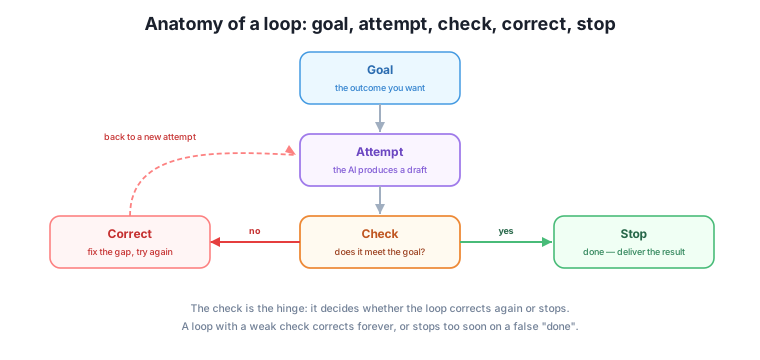
Read it as five parts that connect in a cycle:
Look at the diagram again and notice where all the arrows meet: the check. Every trip around the loop passes through it, and the check alone decides which way the loop turns — back to another correction, or forward to a stop. That makes it the single most important part, and it’s the idea this whole course is built on: a loop is only as good as its check.
Here’s why that’s true and not just a slogan. If your check is too weak, two bad things happen. Either it never says “good enough” — because it has no clear standard — and the loop polishes forever, burning your time and money. Or, worse, it says “good enough” when the work isn’t — a false done — and you ship something broken with full confidence. Both failures are check failures, not prompt failures. You can have a brilliant attempt and still fail, if the check can’t tell good from bad.
Note
This is the reverse of most people’s instinct. Beginners spend almost all their energy on the attempt — crafting the perfect prompt — and almost none on the check. This course deliberately flips that. Module 3, the core of the course, is entirely about building checks that work.
A quick but important distinction. When the check finds a gap, the fix isn’t to say “no, do better” and hope. That’s just rolling the dice on a fresh attempt. Real correction is specific: it names what was wrong so the next attempt targets it. “The newsletter is 400 words; our limit is 250, so cut the middle section” is a correction. “Make it better” is not.
Vague correction is one of the most common reasons a hand-run loop drifts. Each round you give a fuzzy nudge, the AI changes something semi-random, and you slowly wander away from the goal instead of toward it. Good correction closes the exact gap the check found — nothing more, nothing less. You’ll get lots of practice at this once you’re building checks in Module 3.
Most people can name goal, attempt, check, and correct — those feel like the “doing” parts. The one that gets left out is stop, and leaving it out is exactly why loops go wrong in the two opposite directions you’ll keep meeting: quitting too early, or grinding forever.
The fix is to realize a loop actually needs two stop conditions, not one.
Decide both before you start: what “done” looks like (success stop) and the limit at which you’ll walk away even if it isn’t done (safety stop). A newsletter loop might be “stop when all four goal items are met, or after four rounds, whichever comes first.” That single sentence prevents both failure modes at once. You’ll design stop conditions properly in Module 6 — for now, just never let a loop run without both.
Let’s trace all five parts through something concrete: writing this week’s Harborlight newsletter.
Two rounds, and notice that the check is what turned a rough first draft into a sendable newsletter. The prompt barely changed. The quality came from checking against a clear goal and correcting the specific gaps.
Someone asks Claude to summarize a report, reads the summary, notices it missed the budget section, says “you left out the budget — add a line on it,” gets a better version, and saves it. Label each of the five loop parts in that story.
Hint
Goal: a summary that includes the budget. Attempt: the first summary. Check: “it missed the budget.” Correct: “add a line on the budget.” Stop: saving the better version once it’s complete.
A loop’s only check is “does this read well?” for a factual company report. Which loop failure is this check most likely to cause, and why?
Hint
A false done. “Reads well” measures fluency, not accuracy — so a smooth, confident, factually wrong report passes the check. The loop stops satisfied while the real goal (correct information) is unmet.
Rewrite this vague nudge as a specific correction: “make the event flyer better.”
Hint
Anything that names the gap works, e.g. “The date is missing and the tone is too formal — add ‘Saturday, March 14, 6pm’ and make it sound warm and casual.” A correction points at a specific gap; “better” points at nothing.
Every loop is built from five parts: a goal (the outcome you want), an attempt (the AI’s draft), a check (comparing the attempt to the goal), a correction (a specific fix for the gap the check found), and a stop (ending when it’s good enough or a limit is hit). The check is the hinge: every trip around the loop passes through it, and it alone decides whether to correct again or stop — which is why a loop is only as good as its check. A weak check either loops forever or stops on a false “done”. And correction must be specific, naming the exact gap, not a vague “do better” that lets the loop drift.
Naming the five parts gives you a diagnosis kit. When a loop misbehaves, you don’t flail — you ask which part is broken: fuzzy goal, weak attempt, bad check, vague correction, or no stop rule. Nine times out of ten at work, the culprit is the check or the goal, not the prompt. Next, you’ll turn the lens on yourself and see that you’ve been running this exact loop by hand all along — and exactly where the manual version breaks down.
You can now take any loop apart into goal, attempt, check, correct, and stop — and you know the check is where quality lives. That vocabulary is your diagnosis kit for the rest of the course. Next, let’s catch you in the act of running this loop by hand.
Keep DATATWEETS free. Help fund practical data, AI, and engineering lessons for learners worldwide.
